- Analysis of professional testing tools such as Appium and Espresso for application development.
- Exploring applications for automating everyday tasks using flows and macros.
- Technical guide on setting up development environments and drivers for Android devices.
If you've ever felt like you're wasting too much time doing the same thing over and over on your phone, you're probably already thinking about how optimize your daily routinesAutomation in Android is a fascinating world that ranges from simple "if this happens, do that" rules to complex software testing systems that ensure apps don't crash when launched.
The best part is that you don't need to be a computer whiz to get started, although if you're curious about the technical side, there are some very powerful tools. Basically, we can divide this universe into two parts: automation for the end user, which seeks to make our lives easier, and the test automation, focused on developers and quality analysts.
Test Automation for Experts: Appium and Espresso
When we talk about Continuous Testing Or, with continuous testing, we enter more professional territory. The goal here is to verify that a mobile application functions perfectly on different devices and operating system versions.
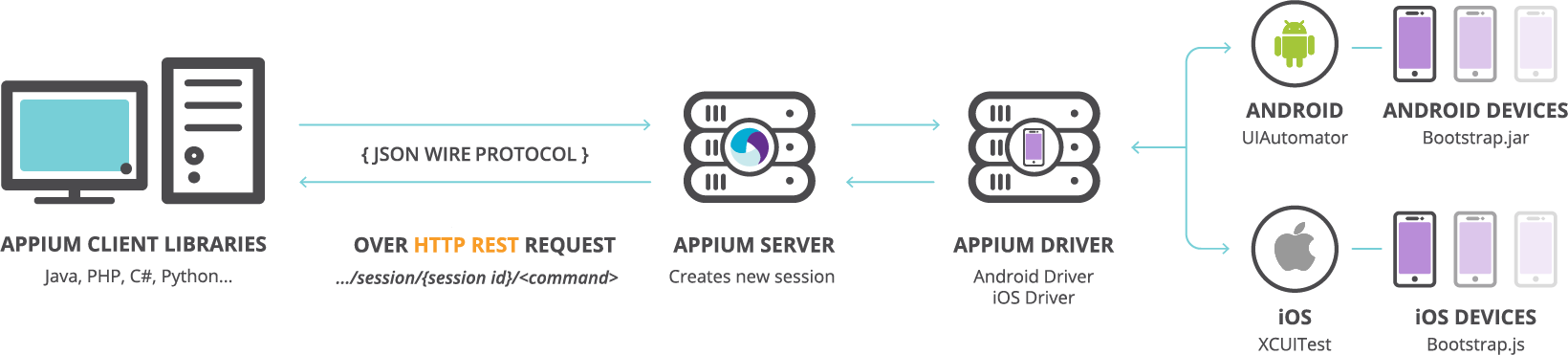
In this stage, Appium has been crowned as the most in-demand tool. Its main advantage is that it's open source and cross-platform, meaning you can use the same programming language to test both Android and iOS. It works as a NodeJS-based HTTP server that translates your commands into a language the device understands through the controller. UIAutomator2.
On the other hand, we have EspressoUnlike Appium, Espresso stands out for its speed and performance. It's the ideal choice if you're only interested in the Android ecosystem and if developers want to integrate testing. directly in the source code to expedite the deployment.

To get Appium up and running, it is essential to have Android Studiowhich is the standard development environment. Once the SDK is installed and the server is configured (either using NPM or the Desktop version), the Appium Inspector to locate screen elements using XPath paths, thus allowing the machine to know exactly where to click.
Apps to Automate Your Daily Life
If you're not a programmer but want your phone to be practically smart, there are apps that let you create custom workflows without writing a single line of code.
macrodroid It's one of the most balanced options. It uses the concept of macros, where you define a trigger and an action. For example, you can configure the Wi-Fi turns off automatically when closing a specific application or have the mobile phone notify you when the battery reaches a critical level.
If you prefer something more visual, Automate It's the ultimate tool. Instead of lists, you work with flowchartsYou connect blocks of action and condition, which allows you to create very complex logic, such as Sync folders between PC and Android, send emails based on your GPS location or even interact with external APIs via HTTP requests.

There are also options more focused on gesture recording. Tools such as HiroMacro and AutoTouch They allow you to record a sequence of screen taps and repeat it as many times as you want. This is especially useful for repetitive tasks in games or applications that don't have an open API.
Advanced Use Cases and Other Alternatives
Automation can literally save lives. In the medical field, we've seen how the Automate app integrates with systems like AAPS and xDrip+ to manage diabetes. By reading glucose notifications, the system can adjust time objectives automatically through Nightscout, demonstrating that these tools go far beyond silencing your mobile phone at work.
For those looking for something more integrated, Samsung users have Routines+It's a system tool that allows you to automate tasks without installing third-party apps. There are also options like Cronoidwhich allows you to run tasks based on the calendar, screen brightness, or weather conditions.
We are even seeing the arrival of the AI applied to the mobile web, with algorithms capable of Integrate Claude into Android to automatically fill out Google forms or summarize web pages while the user chats with a language model in a parallel tab, carrying the next-level productivity.
Whether you're looking for a professional tool to launch an app to market with Appium, or simply want your mobile to manage Bluetooth and Wi-Fi based on your location with MacroDroid, the Android ecosystem offers solutions for all levelsallowing the device to adapt to us and not the other way around.
