- Un-Google Android without a custom ROM involves minimizing Google services and replacing them with private alternatives.
- Privacy is significantly improved when switching between apps (email, browser, maps, cloud, passwords) even though the mobile phone still leaves a trace on the mobile network.
- Apple offers good security guarantees and support, but it is not free software and does not eliminate all privacy problems.
- Stores like F-Droid and Aurora Store and tools like Syncthing, Tuta Mail or Firefox allow you to use Android with much less dependence on Google.
If you've made it this far, it's because you're considering living with your Android device as far removed from Google as possible . You're not alone: the so-called "de-Googling" movement has been growing for years, there are huge communities sharing tips and tricks, and many users have decided they've had enough of tracking, advertising profiles, and AI experiments trained on their data.
While it might sound radical, using Android without relying on the Google ecosystem is more viable than it seems. However, it's important to manage your expectations, understand what you can and can't do (especially if you don't want to install custom ROMs), and choose wisely the alternative apps and services that truly respect your privacy.
What does de-Googling Android really mean (and what doesn't)
When people talk about "un-Googling" a mobile phone, many imagine they'll achieve a phone that's completely invisible to Google and law enforcement . This is where it's important to provide some technical and legal context to avoid self-deception.
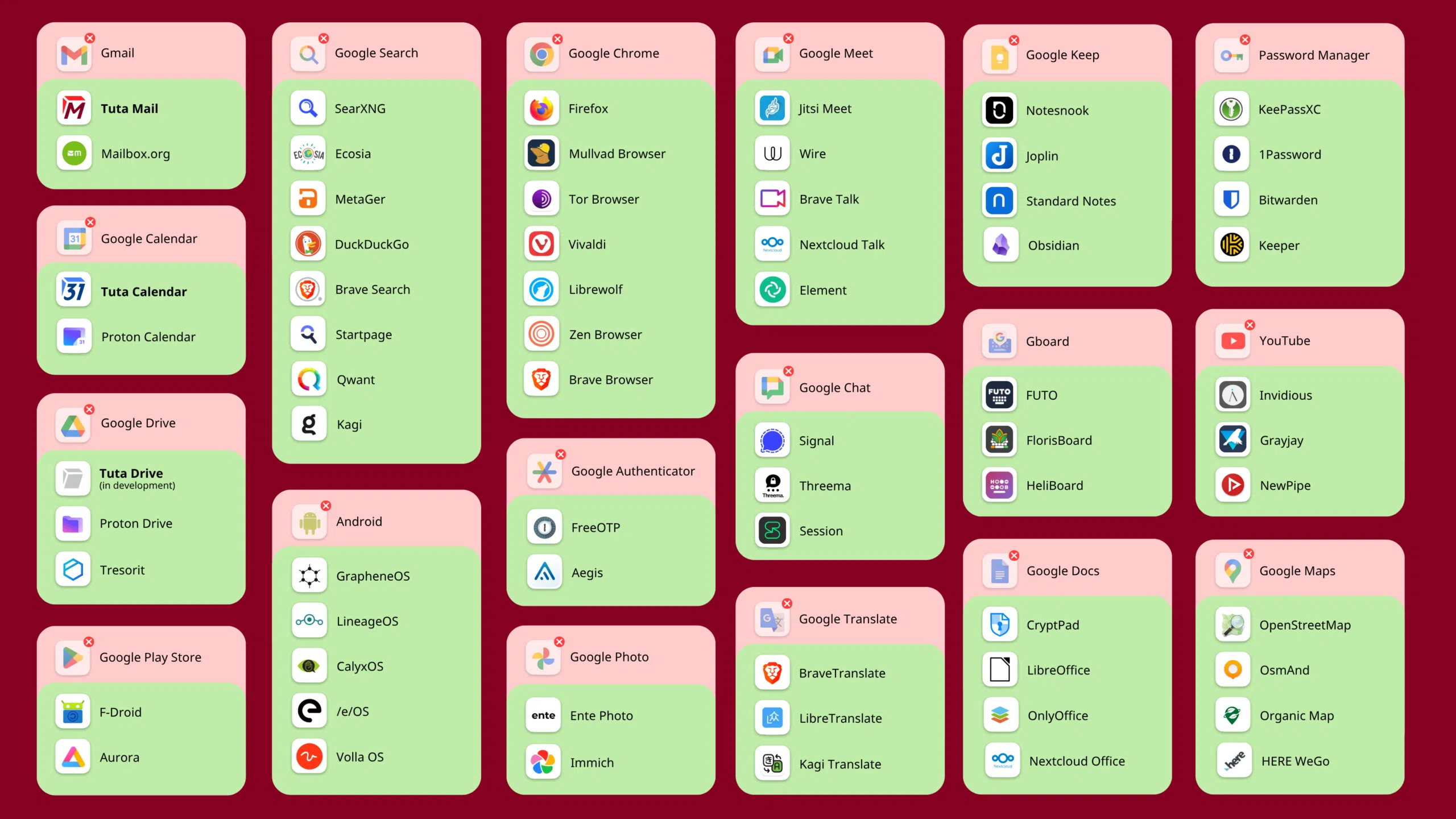
Strictly speaking, de-Google Android means minimizing or replacing Google services and applications with alternatives that don't rely on exploiting your data. This means replacing Chrome, Maps, Gmail, Drive, YouTube, Google Authenticator, Google Password Manager, Google Photos, Google Calendar, Translate, etc., with more private options, typically open source or, at least, with much clearer data policies.
This doesn't mean your phone becomes a ghost. Any smartphone that connects to a mobile network leaves a trace on the operators' antennas. This allows the police to request what's known as a "cell dump": a record of all devices connected to specific cell towers at a particular time. It doesn't matter if it's an Android with Google, an Android without Google, an iPhone, or a "dumb" phone: the operator always knows which SIM card and IMEI were present.
Therefore, although stories of geofencing orders against databases like Google's (SensorVault) have become popular , in practice, authorities combine these orders with information obtained directly from telephone companies. Removing Google services reduces the area of commercial tracking and some types of surveillance, but it doesn't make your mobile phone anonymous to the mobile network or the government.
Why do so many people want to move away from the Google ecosystem?
Google started as a university search engine in the late 90s and has ended up dominating almost every daily digital activity: email, maps, videos, documents, cloud storage, browser, mobile operating system… The problem is that this growth has not been accompanied by a proportional respect for privacy.
Through its "free" and seamlessly integrated products, Google has built an unprecedented data-gathering machine . The more you use its services, the more it learns about your habits, relationships, movements, and even your most intimate interests. Much of this data is used to refine hyper-targeted advertising models and, increasingly, to train artificial intelligence systems like Gemini.
In recent years, class-action lawsuits and sanctions against Google for misuse of data have multiplied : massive leaks of information from Gmail and Google+ users, illegal collection of data from minors through YouTube, storage and transfer of search histories to third parties, or the Chrome incognito mode scandal, after which the company has been forced to destroy billions of improperly collected data points.
Furthermore, reports and testimonies have shown that Google can train its AI models with information users never imagined would be useful for that purpose , such as the content of emails in Gmail. Although the company refers to "publicly available information," in practice the boundaries are not always clear, and the average user has no real ability to audit what is done with their data.
To make matters worse, the personalized advertising model makes Google one of the biggest influence machines on the planet . Its algorithms decide what content you see, in what order, what is suggested to you, and what gets buried. This creates echo chambers where only your existing opinions are reinforced and exposure to different viewpoints is minimized, with quite worrying effects on the quality of public debate.
Android, Google, and the limitations without a custom ROM
Getting down to brass tacks, if you have a phone like a Samsung S24 Ultra and you don't want to install a custom ROM or unlock the bootloader , your options change considerably compared to someone who buys a Pixel to install GrapheneOS or CalyxOS.
Android is technically open source (AOSP), but the Android that comes to your Samsung device is deeply integrated with Google services : Google Play Services, the Play Store, Google location services, the Google account sync engine, and so on. Although Samsung adds its own layer (One UI, its own apps, the Galaxy Store), the core Google services framework remains.
Without unlocking the bootloader, you can't replace the operating system with LineageOS, GrapheneOS, CalyxOS, or /e/OS/. This means you can't completely remove Google's proprietary components . What you can do is:
- Disable and "freeze" most pre-installed Google apps from Settings > Applications, or via ADB for those that cannot be disabled from the interface.
- Avoid signing in with a Google account Or, if you need it, limit it to the minimum and disable syncs you don't use.
- Use alternative app stores and services (F-Droid, Aurora Store, etc.) without going through the Play Store for most of the software you install.
- Replace almost all Google apps with private alternatives (email, browser, maps, cloud, messaging, translator, authenticator, password manager…).
What you won't get on a stock Samsung is a sandbox-like environment for all Google Play Services, like some third-party systems provide. There's no standard "magic container" in Android that encapsulates all Google services and prevents them from accessing anything else; the closest thing are advanced solutions with work profiles or enterprise containers, designed for businesses, not home users.
Is Apple really better at privacy and security?
Many people consider switching to iPhone thinking that Apple is the "private" alternative to Google . The reality is somewhat more nuanced.
On the positive side, Apple has historically favored a business model less reliant on advertising and more focused on selling devices and paid services. This gives it less incentive to build an advertising profile as detailed as Google's. Furthermore, iPhones receive security updates for longer than most Android devices, and the system is more closed to third-party app installations, which reduces certain malware vectors.
There are also important technical decisions, such as the local processing of much sensitive data (facial recognition, fingerprint, some suggestion functions) and the strong encryption of some content, which have led Apple to occasionally clash with governments that demanded backdoors.
However, that doesn't make Apple a privacy NGO. The ecosystem remains very closed, highly proprietary, and with telemetry and cloud synchronization practices that the user doesn't fully control. And, above all, if you're looking for free and auditable software, iOS is a wall: there are no custom ROMs, no official alternative stores, and you can't really inspect how the system works.
If your priority is "consumer" security (having patches, reducing malware, minimizing risky configurations), an iPhone is a good option compared to many Android devices with short support lifecycles . If your top priority is control and auditability, a Pixel with GrapheneOS or another Android with a well-maintained custom ROM remains a more sensible choice, even if you're hesitant to use Google hardware.
Private alternatives to the most used Google services
Stopping using Google services doesn't mean giving up the features they offer. Today, there are tons of more privacy-friendly alternatives , many of them open source, that cover virtually every Google product category.
For email, one of the strongest options is Tuta Mail, a service with end-to-end encryption and a strong focus on privacy . Unlike Gmail, the provider cannot read your messages for advertising or to train algorithms; the entire mailbox is protected with modern cryptography, including safeguards against future quantum cryptography. Other well-known alternatives include Proton Mail or self-hosting with your own server, although that requires technical expertise.
Regarding the calendar, Tuta includes Tuta Calendar, end-to-end encryption, and zero-knowledge access . This means that not even notifications are handled in plain text by the server: only you have access to your appointment details. This is a stark contrast to Google Calendar, where all your events pass through the Google cloud and can feed into profiles and automations.
For the browser, the most sensible thing to do is abandon Chrome. Firefox, the DuckDuckGo browser, and Tor Browser are fairly mature alternatives. Firefox offers a good balance between usability, extensions, and privacy; Tor prioritizes anonymity (at a significant cost to speed and compatibility); and the DuckDuckGo browser simplifies tracker protection by default. On Android, projects like Fennec (a Firefox without proprietary code) or Privacy Browser, available on F-Droid, bring this same philosophy to mobile devices.
In the realm of search, you're no longer tied to Google Search. Private metasearch engines like SearxNG (successor to Searx), MetaGer, and Startpage , as well as self-indexing engines like Mojeek, allow you to search with significantly less crawling. Ecosia also adds the feature of funding tree planting, while DuckDuckGo offers a decent mix of results with a fairly clear privacy policy, although it relies on Bing's infrastructure.
For cloud storage, Google Drive has the problem that it doesn't apply end-to-end encryption controlled by the user . Services like Tresorit or solutions being developed by providers like Tuta rely on strong encryption before uploading anything to the cloud. This prevents the provider from inspecting your documents, something that is technically possible with Google.
In office productivity, instead of Docs, Sheets, and Slides, CryptPad and LibreOffice are two very serious options . CryptPad runs in the browser, allows real-time collaboration, and encrypts documents on the client side. LibreOffice is the classic desktop suite, free and open-source, compatible with multiple formats, and backed by a huge community.
If we're talking about video calls and messaging, to replace Google Meet you can use Wire, geared towards professional use with end-to-end encryption and zero-knowledge security , or Signal, which, although initially focused on instant messaging, also allows secure calls and video calls. Again, the idea is that the provider doesn't have clear access to the content of what you send.
When it comes to passwords, relying solely on Google Password Manager is not recommended. Bitwarden, KeePassXC, and 1Password are much more robust alternatives. Bitwarden combines open-source code with encrypted cloud synchronization; KeePassXC uses an encrypted local database that you can sync with Syncthing or other methods; and 1Password, while proprietary, is very well-suited for families and businesses.
For two-step authentication, instead of Google Authenticator, there are options like FreeOTP, Aegis Authenticator, or even the TOTP support built into some password managers . FreeOTP is cross-platform and open source, Aegis adds easy exports and code container encryption, and keeping the tokens in your password manager can simplify backups and migrations.
The translator also has more than worthy alternatives. DeepL has demonstrated a translation quality far superior to Google Translate in many European languages , and it is under European jurisdiction, with stricter data protection laws than those in the United States. LibreTranslate, for its part, is an open-source engine that can be self-hosted, ideal for those who want total control over text processing.
In video, competing with YouTube's size is nearly impossible, but you can reduce tracking and dependence on the platform . NewPipe, Invidious, and Grayjay allow you to watch YouTube content without ads, without logging in, and with significantly less telemetry. For hosting or consuming videos outside of Google, platforms like Vimeo or federated projects like PeerTube are reasonable alternatives.
In the maps section, in addition to proprietary applications like Here, you have OpenStreetMap as a free map database and clients like OsmAnd that offer offline navigation, search, and routes without relying on Google Maps. An important detail: Maps saves a detailed timeline of all your movements, while with OsmAnd or other OSM apps, that information isn't centralized on Google servers.
How to unGoogle your Android without changing ROMs
If you want to practice "un-Googling" on your current mobile without touching the bootloader, the most realistic approach is to combine several levels of measures : system configuration, app selection, and changing habits.
The first step is to review which Google account you use and what you use it for . If you can't do without it because you need it for a professional app or to make purchases on the Play Store, create an account that's as "empty" as possible (without your real name or personal information) and limit its use to the bare essentials. Disable the synchronization of items you don't need: Chrome history, automatic backups, contacts, calendar, etc.
Next, go to Settings > Apps and disable all the Google apps you can : Google TV, Google News, Google Duo/Meet, Google One, Drive, Docs, etc. Some can't be disabled from the interface; if you want more control, you can use ADB from a computer to disable them for the main user without uninstalling them from the system, so they stop running and updating.
In parallel, install F-Droid, the premier open-source app store for Android . From there, you can download browsers, email clients, map apps, authentication tools, messaging apps, and more, without relying on the Play Store and with the assurance that the binaries have been compiled from open source. Many apps you may already use (such as K-9 Mail, OsmAnd+, NewPipe, or Termux) are also available on F-Droid.
For the other apps you still need that are only available on the Play Store, you can use Aurora Store as an alternative client . Aurora lets you download APKs from Play without needing to log in with your Google account on your device; you can use "anonymous" accounts generated by the app itself. This doesn't completely eliminate interaction with Google's infrastructure, but it does prevent you from having to give up your personal identity.
Once you've got the basics covered (email, browser, maps, passwords, authenticator, storage, video, and messaging), focus on adjusting permissions. Android lets you very granularly restrict access to the camera, microphone, location, contacts, call history, and more. Take some time to review which apps have access to what and ruthlessly cut back on anything that doesn't make sense. Many features will still work perfectly well without knowing your precise location or accessing your files.
From there, the rest is just routine. The less you use Google services, the less new data they'll have about you . You'll still have historical records on their servers, but you can significantly reduce future data generation. And if you ever decide to switch to a truly Google-free system (a custom ROM on a Pixel or other supported device), you'll have already done the mental preparation for living without the usual conveniences.
Learning from those who have already made the leap
Many developers and advanced users have long been experimenting with Android phones completely devoid of Google software . The classic approach is to install a ROM like LineageOS without the "GApps" (Google's suite of applications and services) and rebuild a functional ecosystem on top of it, based almost entirely on open-source software.
The process usually begins with a test phone (for example, an old Nexus or a model with official Lineage support). A clean system is installed, without a Google account, and from there only the essential components are added: F-Droid as the app store, K-9 Mail for email, Fennec (a free Firefox) with uBlock Origin, OsmAnd+ for maps, FreeOTP for authentication, NewPipe for video, Syncthing to synchronize files between devices, and services like Radicale or DAVx⁵ to manage contacts and calendars via CalDAV/CardDAV.
Tools like Syncthing allow you to synchronize notes, music, photos, or documents without going through centralized servers of large tech companies . Radicale, combined with a client like DAVx⁵ on Android and calendar/contacts applications on your desktop, makes it possible to completely abandon Google Calendar and Google Contacts, while maintaining synchronization between your mobile device, laptop, and home server or VPS.
In the realm of notes and tasks, many of these users have replaced Google Keep with plain text formats like Org-mode , which they then manage with editors on their computers and dedicated apps on their phones. This isn't so much a matter of privacy (although it helps) as it is of long-term control: the data are simply files that you can version, copy, and move without relying on proprietary APIs.
The lessons learned from these experiences are twofold. On the one hand, it 's entirely possible to have a modern and useful smartphone with very little or no Google software . On the other, achieving this requires time, patience, reading documentation, and often, your own server. It's not a plug-and-play solution for everyone, but it paves the way for those who want to go further in the future.
Ultimately, de-Googleizing your Android isn't an all-or-nothing, binary operation, but rather a gradual process of replacing services, reducing permissions, and changing habits. While a Samsung with a stock ROM will never be as clean as a Pixel with GrapheneOS, with the right tools and approaches you can greatly reduce your dependence on Google, lessen commercial surveillance, and regain significant control over your data , without needing to become an expert in flashing ROMs or completely give up the convenience of a modern smartphone.
