- WhatsApp may suspend your number for violating its rules: spam, unofficial apps, illegal content, or abuse in groups and lists.
- There are temporary suspensions, which are usually a warning, and permanent blocks in serious or repeat cases.
- To avoid penalties, respect consent, personalize messages, download only the official app, and protect your account.
- If you believe the block is a mistake, you can request a review from support, although recovery is never guaranteed.
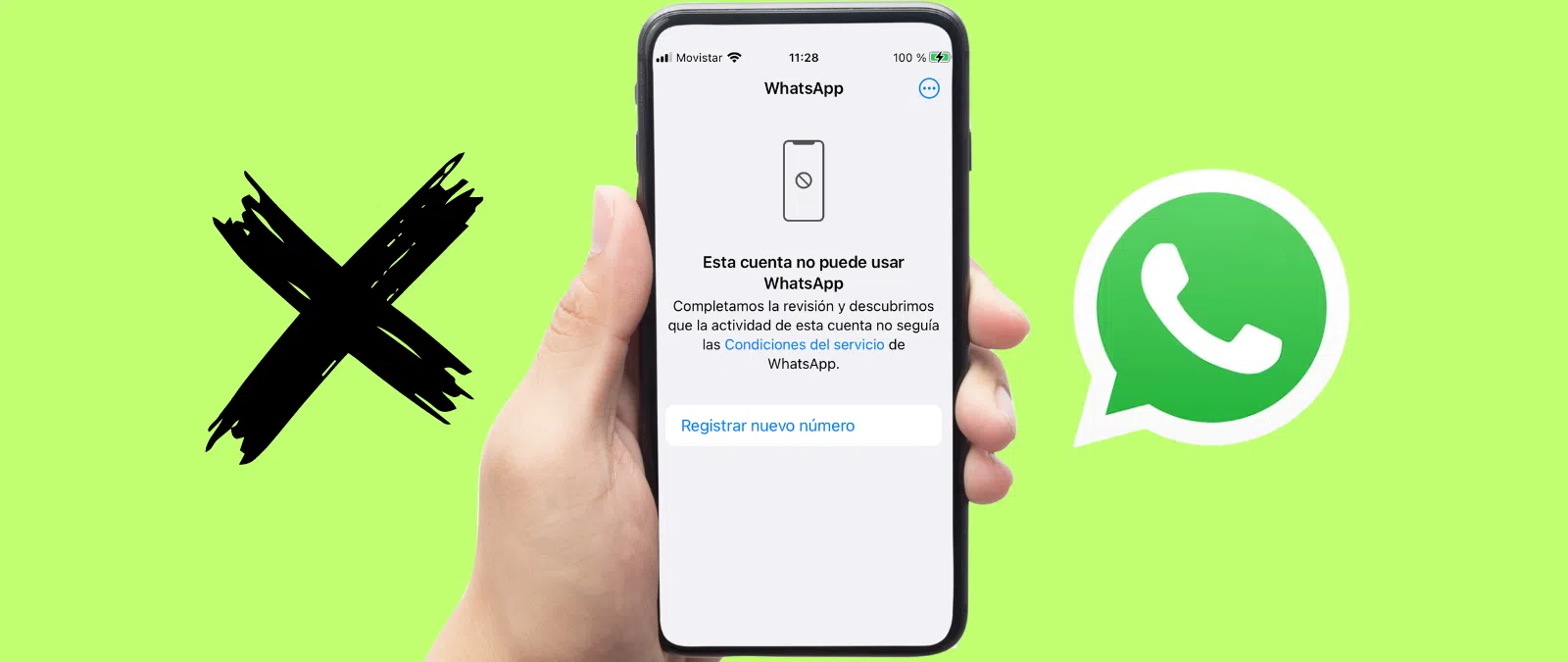
Suddenly losing access to WhatsApp can be a real headache. Having your number blocked or suspended means losing your main communication channel with family, friends, clients, or colleagues, and in many cases, being unable to recover your chats. The good news is that if you know in advance what behaviors the platform monitors, it's quite easy to avoid reaching that point.
Although many people think WhatsApp only closes accounts belonging to scammers and professional spammers, the reality is that anyone can end up with their number suspended for sending "the wrong signals" to the system : constantly forwarding the same message, abusing groups, using a modified app like WhatsApp Plus such as JTWhatsApp mod , or even going months without opening the application. In the following lines, you'll see, in detail, the reasons for suspension, how they are detected, what types of blocks exist, and what you can do if you think they've made a mistake with you.
Main reasons why WhatsApp may suspend your number

WhatsApp's Terms of Service include a section called "Acceptable Use of Our Services" that outlines what you can and cannot do within the app . When you violate these rules—whether intentionally or unintentionally—the company can restrict your access, initially temporarily, and if you repeat the offense or the case is serious, permanently.
The platform combines two types of signals to determine if an account has crossed the line: technical activity (automated behavior, mass mailings, unusual patterns) and, very importantly, reports and blocks from other users . Based on this, it classifies the infraction and applies the appropriate level of penalty.
It's also important to differentiate between what happens in regular WhatsApp and WhatsApp Business. The basic rules are the same, but in Business, the focus is on spam, unauthorized commercial use, and the quality of the messages you send to your customers , because Meta specifically protects the end-user experience.
Keep this in mind: WhatsApp doesn't need to read your messages to detect violations , as the content is end-to-end encrypted. It relies on metadata (frequency, volume, sending patterns) and what other users report, as well as contextual information when someone uses the reporting option.
Prolonged account inactivity

One of the simplest and least known causes is total inactivity for a period of approximately four months . If you don't open the app on any mobile device connected to the internet during that time, WhatsApp considers the account abandoned and deletes it.
To keep your account active, you don't need to be chatting all day, but you do need to open the app occasionally so the system registers that you're still using the service . It's a logical measure to free up resources and, incidentally, prevent numbers of deceased people or obsolete lines from continuing to "take up space."
If you haven't used your number for months and WhatsApp deactivates it, it's not a disciplinary suspension per se, but rather a deactivation due to inactivity . However, the practical effect for you is similar: you won't be able to access your old conversations if you didn't have a backup.
Use of unofficial applications and modified software
One of the most common causes of suspension, both temporary and permanent, is the use of modified versions of WhatsApp or apps that tamper with its internal workings . This includes very popular names like WhatsApp Plus, GBWhatsApp (features, risks, and alternatives) , WhatsApp Gold, and similar apps.
These apps often promise extra features—more customization, hiding your online status, reading deleted messages—but they are third-party applications that blatantly violate WhatsApp's Terms of Service . The company insists it cannot guarantee their security or how they handle your data, so anyone using them risks being banned.
In many cases, the first step is a temporary suspension accompanied by an in-app message such as "Your account has been temporarily suspended" with a countdown timer . This warning is essentially an ultimatum: if you continue using the modified version when the countdown ends, the ban may become permanent.
In addition to the infamous "mods," WhatsApp also considers the use of tools that force hidden or experimental features , such as "tweaker" apps that unlock unreleased options , as grounds for sanctions . Again, the problem isn't just breaking the rules, but the security risk this poses.
How to return to the official app without losing your chats
If you've received a temporary suspension for using a mod, the smart move is to migrate to the official app downloaded from Google Play or the App Store as soon as possible . To avoid losing your history, it's advisable to follow a specific process depending on the mod you're using.
In the case of GBWhatsApp, the usual procedure is to first create a backup from the chat settings of the mod itself , then locate the "GBWhatsApp" folder in the phone's storage, rename it to "WhatsApp", and then install the official version to restore that backup after verifying your number.
With WhatsApp Plus, in many scenarios the transfer of chat history is almost automatic . Usually, it's enough to uninstall the modified app, install the official one from the store, and verify your number; when it detects the local backup, the app will offer to restore it.
Whatever your situation, the key is that, once you've made the change, you don't reinstall unofficial apps if you don't want the ban to be permanent . Meta has been tracking these types of apps for years and is detecting them more easily each time.
Tools to spy on or monitor other users
Another type of application that WhatsApp is scrutinizing are those used to spy on the activity of third parties, download other people's statuses, or record what times someone connects even if that person has limited their privacy.
Many of these tools are presented as mere "connection monitors" or as apps for saving stories, but in practice they violate users' privacy and rights . Although technically some don't even connect directly to your WhatsApp account, if the company manages to link their use to your number, it can suspend your account.
Besides being ethically questionable, developing these types of tools can border on or cross the line into criminal activity , especially if they are used to harass, monitor, or control other people without their consent.
Mass messaging, spam, and abuse of broadcast lists
Spam is one of the company's main concerns. Sending mass, repetitive, or commercial messages to people who haven't asked to receive them is a clear reason for suspension, especially if you use WhatsApp Business or manage a large number of contacts.
This includes many dubious practices: sending communications to purchased databases, using contact lists "scraped" from the Internet, chaining daily campaigns to broadcast lists , or bombarding dozens of numbers that don't have you saved in their address book with the same text.
WhatsApp doesn't specify its exact "too many messages" limit, but it does clarify that if it detects you're systematically contacting users who haven't added you, and many of them are blocking or reporting you, it triggers a warning . In that scenario, you're likely to see a temporary suspension that could escalate to a permanent one.
Broadcast lists, which are very useful for occasional messages (greetings, important announcements), can backfire if you use them as a regular spam channel . If your messages become annoying and people start blocking you, the system will interpret this as a violation of acceptable use policies.
Mass creation of groups and addition of contacts without permission
Another typical behavior of problematic accounts is creating many groups in a short period of time and adding people who don't have your number saved . From WhatsApp's perspective, this is a textbook spam tactic.
The platform explained that if it detects that a single user creates "too many groups" with contacts who don't have them in their address book, it may temporarily suspend the service . They didn't specify an exact number of groups, but they did emphasize that you should only add people you know want to be in them.
Furthermore, adding someone to a group without asking them is intrusive and annoying . Many users react by leaving the group, blocking the administrator, and reporting the chat. If this happens to you frequently, you're likely to end up being flagged as a high-risk account.
If you manage large groups, WhatsApp recommends using the control tools to decide who can send messages , moderate the conversation, and prevent the chat from becoming a breeding ground for unwanted content that triggers mass complaints.
Illegal, harmful, or offensive content
Beyond spam, WhatsApp is very strict about content and behavior that could constitute a crime or cause serious harm to others. Conversations that incite hatred, racist messages, threats, harassment, the distribution of sexually explicit material, or extreme violence can result in immediate suspensions.
In its terms of service, the company prohibits using the app for pedophilia, distribution of child pornography, incitement to terrorism, or any other criminal act . Even unfortunate jokes about these topics—for example, group names with particularly sensitive words—have led to mass account closures in some cases.
This category also includes using WhatsApp to harass, bully, or intimidate others . If another user reports you, providing context and evidence (screenshots, description of the events), the support team may decide to suspend your number.
Finally, WhatsApp Business has additional rules on permissible content in business communications, so promoting illegal services or prohibited products may result in the closure of the business account.
Spreading disinformation, fake news and scams
In recent years, the platform has tightened its policy against fake news, hoaxes, and disinformation campaigns , especially in political, health, or security contexts. Systematically sharing objectively false content can result in penalties.
The company knows that many users forward things without malicious intent, but if your usage pattern consists of massively forwarding unverified chain messages, rumors, or "news ," your account may be categorized as problematic, especially if others report you for it.
Related to this are the classic WhatsApp scams: phishing attempts, bank fraud, links to fake websites designed to steal data, and identity theft . Sending suspicious links or trying to impersonate another person or company not only violates the app's rules but is also against the law.
Services like WhatsApp Business measure the quality of your messages with something similar to an internal "traffic light" : if people interact well with you, you stay in the green; if they mute, block or report you, your reputation drops and they may reduce your sending limit, deactivate templates or end up suspending your number.
Malware, viruses, and dangerous files
Sending malware, Trojans, viruses, suspicious executable files, or clearly malicious links is one of the most common reasons for account suspension. If WhatsApp detects that your account is being used to spread harmful software, it will suspend it to protect other users.
We're not just talking about attaching dangerous files; it also includes links that lead to pages designed to hack, steal passwords, or install fraudulent applications . This type of behavior is associated with organized cybercrime networks, but it also occurs among individual users who share things "for revenge" or just for fun.
The basic recommendation is obvious: don't share anything you wouldn't download or tap yourself . And if you ever receive something suspicious, it's wise to warn your contacts and, if you suspect the sender's account has been hacked, encourage them to regain control and find out how to tell if your phone has been hacked.
Violation of terms of service: commercial use, data, and copyright
In addition to the more obvious violations, WhatsApp considers many other forms of non-compliance that can lead to account blocking. One of these is unauthorized commercial use of personal accounts . If you're using a regular WhatsApp account to run aggressive marketing campaigns, you should switch to WhatsApp Business and still comply with its Commerce Policy.
Automated data scraping of profile pictures, statuses, phone numbers, or other information is also prohibited . Using software or scripts to collect contacts or analyze behavior violates the terms and may result in deactivation.
In the realm of intellectual property, systematically sending or distributing copyrighted content without permission (music, movies, pirated software) can lead to problems. While sharing something occasionally among friends is difficult to track, if your account becomes a pirate "channel" and you are reported, you risk facing severe consequences.
Finally, WhatsApp can suspend accounts associated with fake, temporary, or unverified numbers . The platform requires each account to be linked to a legitimate number; if it detects that you're using disposable numbers to circumvent previous blocks, it can close all those profiles simultaneously.
Reports and blocks by other users
The "Report" button and the option to block a contact are key sources of information for WhatsApp. If many people block or report you in a short period , it's almost certain that your account will be automatically reviewed.
The company doesn't publish the exact number of blocks that trigger a penalty, but it does make it clear that an abnormal volume of complaints is a strong indicator of abuse . Hence the importance of not being pushy, respecting when someone no longer wants to receive your messages, and avoiding adding strangers to groups.
When you are reported, WhatsApp may receive, along with the report, some recent messages from that conversation (those the user authorizes to be sent with the report), which are no longer protected by encryption in that context. These examples help the company analyze whether there were indeed insults, threats, spam, or any other violations.
Types of suspension: temporary vs. permanent
Generally speaking, the platform applies two main types of sanctions: temporary suspensions and permanent suspensions . Sometimes there are intermediate measures, such as partial restrictions on features or reductions in limits for Business accounts, but the outcome that most concerns users is losing access completely.
The temporary suspension is usually accompanied by an on-screen message indicating the remaining time until you can use the app again . This is quite common in cases of using unofficial apps, suspicious bulk sending, or when you have activated alerts but the violation is not yet considered "final."
If it's a permanent suspension, you'll most likely see messages like "Your phone number is suspended on WhatsApp" or "Your number is not authorized to use our service" when you open the app . In many cases, you'll also receive an email with the subject line "Your number has been suspended."
In cases of permanent account suspension, the timeframe for the account to be completely deleted can be around 72 hours after the final decision. Once that period has passed, recovering your chats will only be possible if you had a previous backup in iCloud, Google Drive, or locally.
How to tell if your account is blocked on WhatsApp or WhatsApp Business
There are several fairly clear signs that your number has been restricted. The most obvious is the one already mentioned: a direct message on the home screen indicating that your account has been suspended , sometimes with a countdown timer (if it's temporary) and other times without a time limit (if it's indefinite).
Additionally, you'll notice that you can't send or receive messages . Chats freeze, messages either don't go through or remain stuck with a single gray tick indefinitely, and the app may refuse to complete SMS or call verification if you try to register your number again.
On WhatsApp Business, if the suspension is partial, you might see reductions in your daily chat limit, temporary deactivation of your product catalog, or sudden rejection of templates . This is a sign that the perceived quality of the platform has declined.
In some cases, you'll also receive an email at the address associated with your account notifying you of the suspension. It doesn't always arrive, but when it does, it usually includes a general description of the reason and the option to contact support.
How to prevent WhatsApp from blocking or suspending your number
The best defense is responsible use. WhatsApp offers a series of simple recommendations that, if followed, greatly reduce the risk of penalties. The first is almost common sense: ask for permission before contacting or adding someone to a group . Especially in a business setting, it's advisable that the user has given their explicit consent.
It's also important to primarily communicate with people who know you and want to receive your messages . If your contact list is full of numbers you've obtained from third parties or questionable spreadsheets, something's wrong; in the platform's eyes, that's fertile ground for spam.
In terms of content, ensure that each message provides value, is useful, and is as personalized as possible to the recipient . Avoid endless, lengthy messages and generic chain letters; people tend to ignore, block, or mark them as spam, which damages your internal reputation.
Finally, always download the app from official sources: Google Play, the Apple App Store, or, for businesses, the official WhatsApp Business API . Any shortcut in the form of a modified APK or a "miracle" tool to send more messages or view more data is a surefire way to run into trouble.
Additional best practices for Business accounts and companies
If you use WhatsApp for your business, you need to be even more careful about how you communicate. The first step is to obtain the customer's consent before sending proactive messages , whether through a form, an opt-in checkbox on your website, or because they initiate the conversation themselves.
Segmentation and personalization are key: no more bombarding your entire database with the same promotion day in and day out . WhatsApp wants users to feel like they're talking to real people, not robots spewing out spam indiscriminately.
Keep your business profile complete and up-to-date (name, logo, description, hours, website) , clearly indicate that it is a business, and use message templates in a manner consistent with Meta's policies.
For security, it is recommended to activate two-step verification with a PIN , never share the six-digit code received via SMS, and be wary of any suspicious requests for personal or financial information that appear to come from WhatsApp or third parties.
What to do if you think you've been suspended by mistake
If you believe you haven't broken any rules or that there's been a mistake regarding your account, you can request a review of the suspension . In many cases, the app itself displays a "Support" or "Request Review" button when you try to log in with a blocked number.
When you tap it, a form opens where you can explain in detail what happened, indicate your number with the international prefix, your phone model and any relevant information (for example, that you have been the victim of a hack or that someone has used your account without permission).
Another option is to write directly to [email protected] or to the specific support addresses depending on whether it's WhatsApp Messenger or Business. It's recommended to attach screenshots and be as clear as possible so the technical team can review your case.
Even so, it's best to assume there's no guarantee they'll lift the block . If after several days—they usually say up to 72 hours—you don't receive a satisfactory response or they confirm the suspension remains in place, you'll have to consider the account for that number lost.
Alternatives if you can't recover your WhatsApp account
If the block is permanent and WhatsApp refuses to budge, you'll only have two options: register a new number on the platform or switch to another messaging app . In the first case, you'll start from scratch, with no history and the need to inform all your contacts of the change.
As for alternatives, there are some very solid services available today. Telegram stands out for its advanced features, channels, bots, and folder organization , as well as offering encryption in secret chats. Signal, on the other hand, is heavily focused on privacy, with no trackers or advertising use of your data.
Other options include Threema, WeChat, LINE, or even Facebook Messenger , each with its own unique features: from integrated payments to group calls or mini-games. None of them exactly replicate the WhatsApp ecosystem, but they can serve as a safety net if you lose access.
Understanding all the reasons why WhatsApp might block or suspend your phone number , adapting how you use the app (especially if you send a lot of messages or use it for business purposes), and applying the security recommendations puts you in a very comfortable position: you can continue chatting and working without surprises, and with much less chance of waking up one day to the dreaded message "your number is not authorized to use our service".
