- Free online converters can spread malware, steal credentials, and expose sensitive documents by storing them on external servers.
- Uploading files containing personal or confidential data to these tools can violate the GDPR and have serious legal consequences for companies and professionals.
- It is key to limit the type of files that are uploaded, review the service's privacy and reputation policies, and always analyze the results with a good antivirus.
- Whenever possible, it is preferable to use local conversion solutions and reliable software to maintain control over the information.
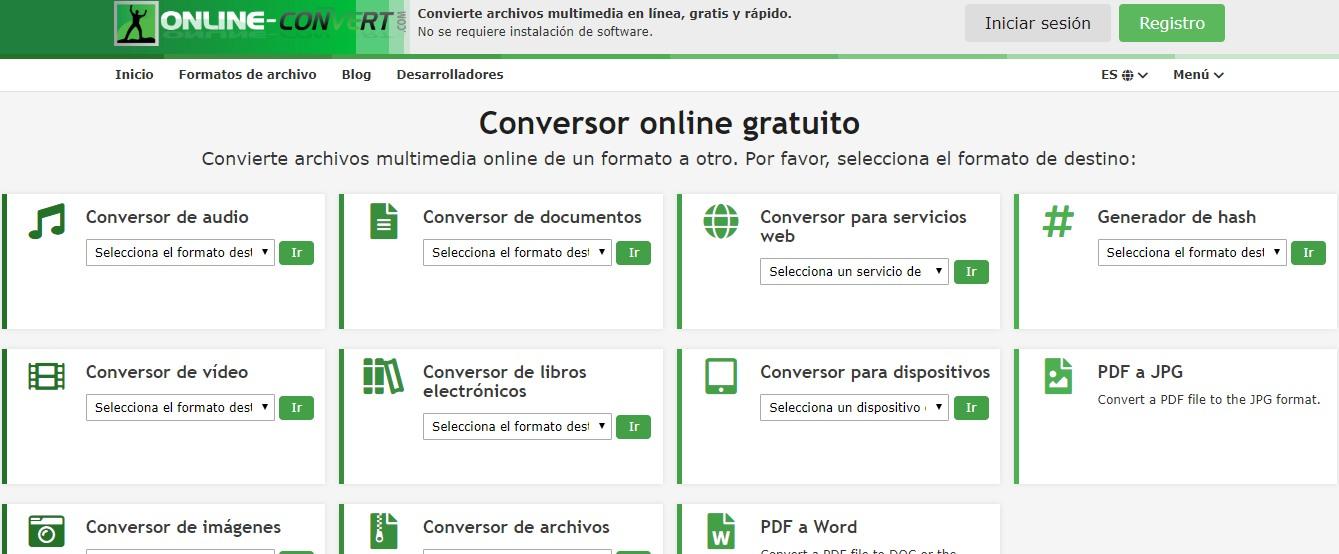
These days, we use free online file converters for almost everything: converting PDFs to Word, compressing images, extracting audio from videos , and much more. They're fast, convenient, and seemingly harmless. But behind this convenience lie technical, privacy, and legal risks that most users overlook.
Before uploading your next contract, medical report, or password list to a conversion website, it's worth pausing for a moment to consider what actually happens to that file : where it's stored, who sees it, how long it remains accessible, and whether the resulting document could be infected with malware. Throughout this article, we'll break down, in considerable detail, the real dangers of free online file converters and what you can do to minimize the risks without sacrificing ease of use.
1. Fraudulent converters and malware campaigns
In recent years, both the FBI and various cybersecurity teams have warned of campaigns where cybercriminals exploit free file conversion services to distribute malware on a massive scale . The idea is simple: they create websites that appear to be legitimate tools for converting documents, images, or videos, but the file you download at the end of the process comes with a hidden component.
On these malicious websites, users innocently upload their files, and the site returns a document that, in addition to the converted content, includes disguised malicious code . This malware can take the form of Trojans, keyloggers, spyware, or even ransomware capable of encrypting your entire computer and demanding a ransom. The trick works especially well when the result is compressed in a ZIP file, sometimes even password-protected, making it difficult for antivirus software to scan the contents before opening it.
The FBI has documented incidents where these free tools were used as bait to inject ransomware into corporate networks . An employee would upload a document, download the converted file, and upon opening it, the malware would execute, encrypting the systems and granting remote access to the attackers. Many victims don't detect the problem until they see ransomware messages or begin noticing stolen credentials and unusual activity on their accounts.
In other cases, the file doesn't even need to be manipulated: some conversion websites redirect the user to phishing pages where they are asked to log in, enter credit card information, or complete forms to "download the file," taking advantage of the trust generated by a service that appears to be a simple technical tool.
To make matters worse, some platforms promote browser extensions or small executables supposedly "necessary" for the conversion. In reality, these are installers bundled with adware or Trojans that, once installed, can spy on your activity, steal passwords, or add your computer to a botnet.
2. Data exposure and leakage: your file may never disappear
One of the less visible but more serious dangers is that files uploaded to these services remain stored on their servers , in whole or in part, even when the website claims to delete them within a few hours. The problem isn't just that they "say one thing and do another," but that even if the provider is honest, any security breach, misconfiguration, or attack on their infrastructure can leave thousands of user documents exposed.
Studies like those by Kaspersky indicate that a significant percentage of free converters retain copies of uploaded files or process them without clearly informing the user. Furthermore, organizations such as the Electronic Frontier Foundation have warned that many of these documents contain sensitive metadata (authors, change history, network paths, internal comments, company information, etc.) that can be leaked even if the main text appears harmless.
Imagine uploading an internal report, contract, payroll, client file, or a photo of an ID to a free converter. That file could contain not only the data you see at first glance, but also a whole host of hidden data about you and your organization . If the service stores copies, or if an attacker compromises those servers, the result could be identity theft, account takeovers, or targeted attacks against your company.
Even on more well-known platforms, such as services from large technology companies, the file usually remains hosted on their systems for a while , with greater or lesser encryption, or is integrated into ecosystems where content is automatically analyzed, patterns are extracted, or logs are stored that can be cross-referenced with other data.
Every time you upload a file to an online converter, you are handing over control of that information to a third party that, in many cases, you do not know, you do not know where its servers are located or under what jurisdiction it operates, and from which you have no guarantee of independent auditing.
3. Legal risks and problems with the GDPR
If you are an individual, it is already worrying that a document with your data is circulating uncontrolled, but if you work in a company or are self-employed and deal with information from clients, suppliers or employees, the careless use of free online converters can pose a very serious legal problem.
The General Data Protection Regulation (GDPR) stipulates that data controllers must guarantee the security, confidentiality, and lawfulness of personal data processing, even when using third parties. Uploading a document containing sensitive data to a free online tool without a risk assessment or a data processing agreement could constitute a serious infringement.
The penalties contemplated by the GDPR can reach 20 million euros or 4% of the company's global annual turnover, which turns a seemingly trivial gesture (uploading a PDF to a website to convert it to Word) into a potentially monumental headache if a leak or security incident occurs.
Furthermore, many of these tools host their servers outside the European Union , in countries with less stringent regulatory frameworks. Without a clear contract, standard clauses, or adequate safeguards, the data controller is transferring data to third countries without complying with GDPR requirements, which could raise concerns with supervisory authorities if a complaint arises.
From a compliance standpoint, it's also problematic that these websites often have ambiguous, unclear, or simply incomplete privacy policies . Some include clauses that allow them to "share information with partners," "use data for statistical or advertising purposes," or "analyze content" without explaining in detail the actual scope of this data processing.
That's why law firms specializing in Digital Law and Data Protection insist that, when handling confidential information or personal data , the golden rule is to avoid unaudited free tools, prioritize corporate solutions with legal guarantees, and, if in doubt, seek legal advice before incorporating these services into the workflow.
4. Viruses, Trojans and other common technical threats
Beyond privacy concerns, it's important not to forget the purely technical aspect: many online file converters are used as vectors for traditional malware infections . In other words, even if there's no clear objective of data theft, the conversion process can result in a virus entering your system.
These attacks can manifest in various ways. A classic example is that the downloaded file contains malicious macros, embedded scripts, or executable components that activate when the document is opened with a vulnerable reader or an office suite without security patches. Another variation is that, instead of delivering the document directly, the website offers an installer "to speed up conversions" that is actually riddled with adware, cryptocurrency miners, or other unwanted code.
There are also converters that work correctly for a while and then suddenly change their behavior. It's possible the domain has been purchased by malicious actors , the platform has been compromised, or the original owner has decided to monetize it aggressively by adding intrusive components without warning.
An additional problem is that some users overestimate the power of antivirus software to stop every threat . While a good security solution is very helpful and essential, it can't prevent your files from ending up stored on an external server, nor will it always detect obfuscated scripts or malicious payloads hidden in password-protected compressed files.
The sensible thing to do is to treat any file obtained from an online converter with reasonable suspicion: scan it with antivirus software before opening it , be wary of downloads in unexpected formats (for example, an EXE when you expected a PDF) and avoid anything presented as a "necessary installer" for something as simple as converting a document.
5. Privacy, metadata and covert storage
A significant part of the risk associated with these services relates to metadata and hidden information within the files we upload. This includes not only the visible content of a document, but also everything that happens "behind the scenes": version history, authors, internal paths, comments, camera data, geolocation, and so on.
Many people believe that if the file doesn't appear sensitive at first glance, it's safe to upload it. But optical character recognition (OCR) tools and artificial intelligence now allow us to extract useful information even from seemingly innocuous images . A simple photo of a screen, a document on a table, or a control panel can reveal credentials, usernames, system configurations, or financial details.
If we add to that the fact that some conversion services use uploaded files to generate statistics, train models, or improve their algorithms , we have the perfect recipe for losing total control over what we share. Even when they claim that storage is "temporary," they rarely explain who audits these processes, how the data is destroyed, or whether backups are kept for months or years.
From a more technical perspective, many of these services operate as "black boxes" : the user doesn't know whether the conversion takes place on their own servers, on infrastructure outsourced to third parties, in which country they are located, or what logs are kept regarding IPs, dates, file types, or results. All of this, combined with vague privacy policies, leaves enormous room for the use and abuse of data.
To reduce this exposure, it's essential to make it a habit to clean metadata before uploading a file . Tools like Microsoft Office's Document Inspector, specialized utilities like MAT (Metadata Anonymization Toolkit), or metadata removal features in image editors help minimize the extra information that travels with your files.
It is also good practice to carefully review the privacy policies and clauses on data retention and deletion of any converter you are going to use regularly, especially if you are going to work with sensitive or professional documentation.
6. How to reduce risks when using free online converters
While it's generally wise to avoid these services for sensitive documents, sometimes there's no other option than to use an online converter , either because the format is very rare or because you need a quick solution at a specific time. In these cases, there are several measures that can significantly reduce the risk.
The first step is to check the site's reputation . Before uploading anything, it's worth looking for reviews, checking if the website appears on blacklists, and using tools like VirusTotal or Web of Trust (WOT) to detect suspicious behavior. A converter that constantly redirects to strange pages, launches pop-ups, or asks you to install extensions should be discarded immediately.
It's also crucial to review privacy policies and terms of service . Avoid services that don't clearly explain how long they store files, whether they share them with third parties, use them for analytics or advertising, or perform any kind of profiling. A good sign is if they indicate reasonable automatic deletion periods and use robust encryption (HTTPS with updated TLS and encrypted storage, such as AES-256), although that alone won't solve everything.
It's also crucial to filter the type of content you upload . Whenever possible, avoid sending documents containing sensitive personal, financial, medical, or business information. Don't include compromising images, especially if they feature minors or identifiable third parties, and don't upload screenshots of credentials, cards, or official documents. The less valuable the information, the smaller the impact will be if something goes wrong.
Another useful tip is to use your browser in incognito mode and, if possible, a reliable VPN when using these types of services. While this won't make you completely anonymous, it will reduce the amount of data directly linked to your identity (cookies, browsing history, real IP address, etc.), making extensive profiling somewhat more difficult.
Finally, never download executables, installers, or unfamiliar compressed files when your goal is simply to convert a document. If a service forces you to install something or asks for a credit card for a one-off conversion, it's best to look for another option. And, as a general rule, always scan the result with a good antivirus program before opening it, especially if you had to extract a ZIP file or a password-protected archive.
7. Safe alternatives: local conversion and reliable software
The safest way to change a file's format is to perform the conversion locally, on your own device , without sending anything to third-party servers. For most everyday needs, there are more than enough offline alternatives that many people don't even know they already have installed.
For text documents, spreadsheets, and presentations, Microsoft Office, LibreOffice, and OpenOffice all allow you to open a wide range of formats and save them in different formats using their own "Save As" or "Export" menus. In addition, Apple's office suites (Pages, Numbers, Keynote) can also import and export in various formats compatible with Office, PDF, and other standards.
For images, on Windows you can use tools like Paint or Photos to save in different formats (PNG, JPEG, BMP, etc.), while on macOS you can convert directly from the Finder using "Quick Actions → Convert Image". You don't need a third-party website for something as simple as converting from PNG to JPG.
For video and audio formats, there are established projects like HandBrake, Shutter Encoder, Audacity , and FFmpeg that run on Windows, macOS, and Linux. In many cases, graphical user interface applications are simply user-friendly wrappers for FFmpeg, which remains one of the most powerful multimedia converters available, especially if you're comfortable with the command line.
If you work with more specialized formats (markup, ebooks, technical documentation), tools like Pandoc allow you to convert between a vast array of text formats, from Markdown to DOCX, including HTML, LaTeX, and ePub. And because it's free and open-source software, there's greater community control over what the program does and how it handles data.
However, be wary of some applications advertised as "offline" that, in practice, don't work without an internet connection because they simply act as an interface to a converter hosted in the cloud. To check this, a simple trick works: disconnect from the internet, try to convert the file, and see if the program refuses to do so. If it fails without internet, it's most likely sending your files to an external server.
In professional environments, it is advisable to support these best practices with clear internal policies and cybersecurity training , as recommended by standards such as ISO/IEC 27001. Establishing which tools are authorized, in what cases an online converter can be used, and how to evaluate new services is essential to prevent each employee from making decisions on their own and inadvertently exposing sensitive organizational information.

Free online file converters are a useful tool, but they can also be a gateway to all sorts of problems: from malware and ransomware to data breaches and penalties for GDPR non-compliance . Choosing wisely when to use them, what types of files to upload, and what local alternatives to leverage makes all the difference between simple technological convenience and an unnecessary risk that can be very costly on a personal, professional, and legal level.
Table of Contents
- 1 1. Fraudulent converters and malware campaigns
- 2 2. Data exposure and leakage: your file may never disappear
- 3 3. Legal risks and problems with the GDPR
- 4 4. Viruses, Trojans and other common technical threats
- 5 5. Privacy, metadata and covert storage
- 6 6. How to reduce risks when using free online converters
- 7 7. Safe alternatives: local conversion and reliable software