- Webminal is an online GNU/Linux terminal with lessons, screencasts, and a community.
- Includes clear limits (100 MB, 1000 files, 10 processes, MySQL rules) for safe use.
- Allows you to practice commands, bash, MySQL and languages (Python, C, Ruby, Java, Rust).
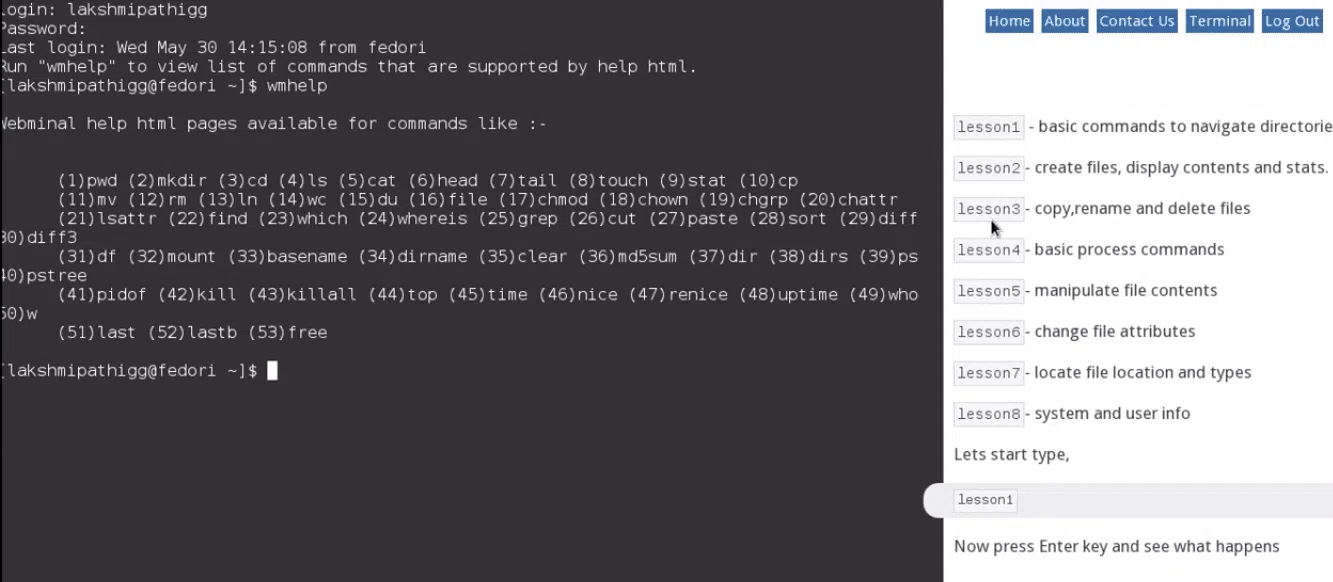
Terminal interface in the browser
If you've ever been curious about using the command line but didn't have a Unix-based system handy, you'll be interested in an option that has been bringing the command line to anyone with a browser for years. With Webminal, you can practice in a free, online Linux terminal , without installing anything, from Windows, macOS, or Linux.
The concept is simple yet powerful: a web platform for learning by doing , with guided exercises, practical examples, and a controlled environment. There's no need to complicate things with virtual machines or partitions; just register, log in, and start typing commands until you've mastered them.
What is Webminal and what is it for?
Webminal is an educational web application that provides a GNU/Linux console in your browser for experimenting with system commands, creating bash scripts, and practicing everyday tasks safely. In addition to the terminal, its social approach allows you to interact with other Linux users , share files within groups, and request help debugging your scripts.
This tool is designed to help you become familiar with the command line, from the basics (listing directories, creating and moving files) to more advanced functions such as using sudo for root user tasks within a secure environment. It also includes blocks for learning to program in several languages: Python, C, Ruby, Java, and Rust.
Another interesting feature is 'Webminal Play', a section of screencasts that replaces lengthy documents with short, direct videos. With this function, you can see the action and practice at the same time , which speeds up the learning curve when you prefer visual content to long texts.
How it works: registration, login, and split screen
To use the platform, you need to create a free account. Registration takes just a couple of minutes, and once verified by email, you can log in and access the online terminal directly from the website. The same username and password are used for both website login and the console.
The interface divides the space into two areas: on the left, you'll see a fully functional GNU/Linux terminal emulator, and on the right, detailed instructions with step-by-step lessons . This split screen eliminates the need to switch between tabs; you can read the explanation and try out the commands in the same place.
Aside from the guided lessons, there's a "play" terminal where you can practice freely, ideal for reinforcing what you've learned. On a less pleasant note, some users point out that the login captcha can be a bit tedious each time they log in , but it's a minor inconvenience for the sake of security.
Free features and environment limits
Webminal imposes a number of logical restrictions to maintain service stability and prevent abuse. In return, it guarantees an environment that is always available and ready for practice. Among the most important capabilities and limitations are these terms of use :
- Online Linux/bash terminal, no prior installation or additional software.
- Practice file system navigation, file management, and scripting with bash/awk/sed, plus MySQL exercises.
- Storage allocated to the user: 100 MB.
- Possibility of creating up to 1000 files in your workspace.
- Maximum size per file: 1 MB.
- System limit: A process can open a maximum of 15 files simultaneously, a useful quota to avoid abuse.
- Up to 10 processes running simultaneously per user, to prevent fork bombs and other malicious behavior.
- You cannot log in more than once if you have a previous session active; you must first close the previous one, which protects resources and sessions.
- Social options: create your own group and share files between members, and even pass a file to another person in the community so that they can review or debug your script.
With this controlled usage framework, the platform ensures that you can practice "real" commands, but without letting a mistake or a malicious script degrade the experience for other users.
MySQL on Webminal: What You Can Do and What Are the Limits
In addition to the system console, Webminal provides a MySQL environment for learning basic database concepts. Its purpose is educational, so it includes clear fair use rules with specific limits.
- Permission to create up to 4 tables in your database.
- Maximum total database size: 200 KB.
- Up to 200 queries per hour to keep the service running smoothly.
- Up to 100 update queries per hour.
- A single MySQL connection per user.
- It is prohibited to inspect or "snoop" other users' databases; if these rules are violated, the account may be blocked.
This approach forces you to write concise queries, optimize your workflow, and focus on the educational aspect. To further facilitate learning, there are dedicated MySQL terminal screencasts that complement the theory with brief, practical demonstrations .
Guided lessons, Webminal Play, and IDE with screencasts
The user experience isn't limited to simply opening the terminal and experimenting; Webminal structures its content with progressive lessons that cover everything from listing files and creating directories to safely moving, displaying, and deleting files. This guide helps prevent you from feeling overwhelmed if you're starting from scratch.
Webminal Play offers short screen recordings so you can see the process in real time and replicate it on the fly. It's a hands-on approach for those who learn best by watching the script run, rather than reading extensive documentation before trying it out.
In addition, the project includes an IDE with screencasting, designed to complement the terminal with an environment for writing and testing code in languages such as Python, C, Ruby, Java, or Rust. This allows you to practice shell programming while taking your first steps in programming.
One interesting detail that several users point out is the ability to choose the distribution to work with. At different times, the service has offered options such as Fedora, Ubuntu, or CentOS, allowing you to familiarize yourself with the subtle differences between popular distributions.
Community, public metrics and project status
The platform boasts a very active international community. Its official website displays regularly updated public data : over 343.000 users from 128 countries and 28,4 million commands executed, with professors and students from 117 universities using Webminal in the classroom (last reported update: August 2023).
Long before these recent figures, it was already gaining traction: its use was reported in more than 125 countries, with millions of commands executed and nearly 120 universities involved. In other words, it's not a passing fad; the project has been consolidating for years.
Interestingly, the site includes a live command counter that updates on refresh, adding a playful touch. This kind of detail reinforces the idea of learning Linux through play without sacrificing rigor.
Regarding the roadmap, the team has announced that version 3.0 is in development and has invited community members to collaborate in supporting and launching this evolution. This is an explicit call to anyone who wants to contribute to the development and continued success of Webminal.
Payment plans and how to finance them
Basic use is free, but maintaining such a platform incurs costs. That's why its creator, Lakshmipathi, offers very affordable paid plans (starting at around $4) that unlock advanced features like root access and a dedicated VM for your projects. For power users or those who need a more comprehensive environment, it's an attractive option.
These plans not only add features; they also help sustain the service, which means the free version remains available. The site itself shares demonstration videos of these improvements to show the difference in capabilities at a glance.
Advantages and possible drawbacks of using Webminal
One of its key strengths is that you only need a modern browser. Firefox or Chrome are recommended, as they offer better compatibility with the web terminal and lesson execution. This makes it a perfect tool for classes, workshops, or self-study.
Another advantage is the pedagogical approach: a single site brings together the console, guided content, and screencasts, without forcing you to jump between pages to read theory and practice . Furthermore, the file-sharing feature facilitates collaborative learning.
On the other hand, there are strict limits on storage, file size, and processes, which may fall short in advanced exercises. The access captcha can also be somewhat annoying, and the site is primarily in English , which may deter some Spanish-speaking users.
However, these are acceptable trade-offs for what it offers: a secure, free, and maintained environment for learning Linux without installing anything . If you've ever had a package manager crash and had to resort to the terminal, you now know why practicing beforehand is useful.
Comparing Linux and Windows: A Teaching Resource
The available materials include examples comparing how certain tasks are performed in Linux and Windows. This perspective is useful for understanding the advantages of the command line and how the console approach simplifies processes that, in graphical environments, might require several clicks.
It's also common for many beginner's guides to mention the "five basic commands" you should know in Ubuntu or other distributions. Webminal is a perfect fit for practicing this minimum repertoire and, from there, expanding it with new commands and simple scripts.
Alternatives for practicing terminal online
If you want to broaden your options or compare experiences, there are other projects that offer browser-based consoles. Each has its own approach and can complement what you do with Webminal in your learning routine.
- JSLinux: A complete emulator written in JavaScript, with console-based or even GUI options. It allows you to upload files to the virtual machine, useful for quick testing.
- Copy.sh: Very agile and actively maintained (code on GitHub). In addition to Linux, it emulates other systems such as Windows 98, KolibriOS, FreeDOS, and Windows 1.01, making it ideal for exploring.
- Tutorialspoint Unix Terminal: Free console for practicing commands while browsing tutorials. Simple yet effective, with file upload support.
- JS/UIX: Implements a JavaScript virtual machine with a file system and shell, without plugins; a purist solution for practicing in the browser.
- CB.VU: A stable environment with FreeBSD 7.1 for running commands without any fuss; it doesn't allow file uploads, but it's adequate for terminal exercises.
- Linux Containers (LXC): Releases a demo server with a 30-minute countdown. It's a Canonical-sponsored project and is doing very well for spot tests.
- Codeanywhere: A cross-platform cloud IDE; with the free plan, you can create a Linux container and access its console for development and testing.
These alternatives don't negate the value of Webminal; rather, they complement it. If you're looking for guided lessons and a community, the platform featured in this article is probably the most straightforward option to start with.
Recommended first steps
To get started, create your free account and confirm your email. Then, log in and go to the terminal with lessons. Begin with the basic modules (listing, creating, moving, and deleting files) and when you feel comfortable, move on to bash scripting with guided exercises.
Also, check out the MySQL section to familiarize yourself with connecting, creating tables, and running SELECT/INSERT/UPDATE queries, keeping fair use guidelines in mind. If you get stuck, share a file with someone in the community and ask for a second look to debug it.
If your browser is giving you trouble, try Firefox or Chrome, which are recommended on the project's website. And remember to log out when you're finished, especially if you're on a shared computer, because multiple simultaneous logins are not allowed.
Who should use Webminal
It's perfect if you're starting out with Linux, if you're coming from Windows and want to gradually understand the terminal, or if you need a safe environment to practice without touching your computer. It also fits very well in classrooms, workshops, and universities , where standardizing a common practice among students facilitates teaching.
If you already have experience and need more freedom (or true root access) for specific projects, paid plans with a dedicated VM might be worthwhile. For most use cases, the free version is sufficient to master the basics of the command line.
Webminal's greatest strength is that it eliminates friction. There's no need to install WSL on Windows, load an ISO into a virtual machine, or set up a dual boot. You open your browser, register, and within minutes you're typing commands that work just like on a real Linux distribution , with reasonable limits to keep it stable.
This is a well-established platform with a global community and publicly available usage figures. It combines lessons, screencasts, and real-time terminal access in your browser. If your goal is to learn Linux through hands-on experience, with an environment that guides and corrects you without breaking anything, Webminal is one of the best options you can try today.