- Arduino is an open-source hardware and software platform that integrates a microcontroller board and an IDE to create interactive electronic projects.
- Key components: microcontroller, input/output pins, connectors and voltage regulator, which allow connecting sensors, actuators and controlling energy.
- Program in C/C++-based language using the Arduino IDE; it offers libraries and a large community that facilitates learning and versatile and economical projects.
Have you ever wondered how Arduino works? Would you like to get started in the fascinating world of electronics and programming? You've come to the right place! In this article, we'll give you a complete guide to Arduino, explaining step by step how this versatile microcontroller works and how you can use it to create your own projects.
Arduino How It Works
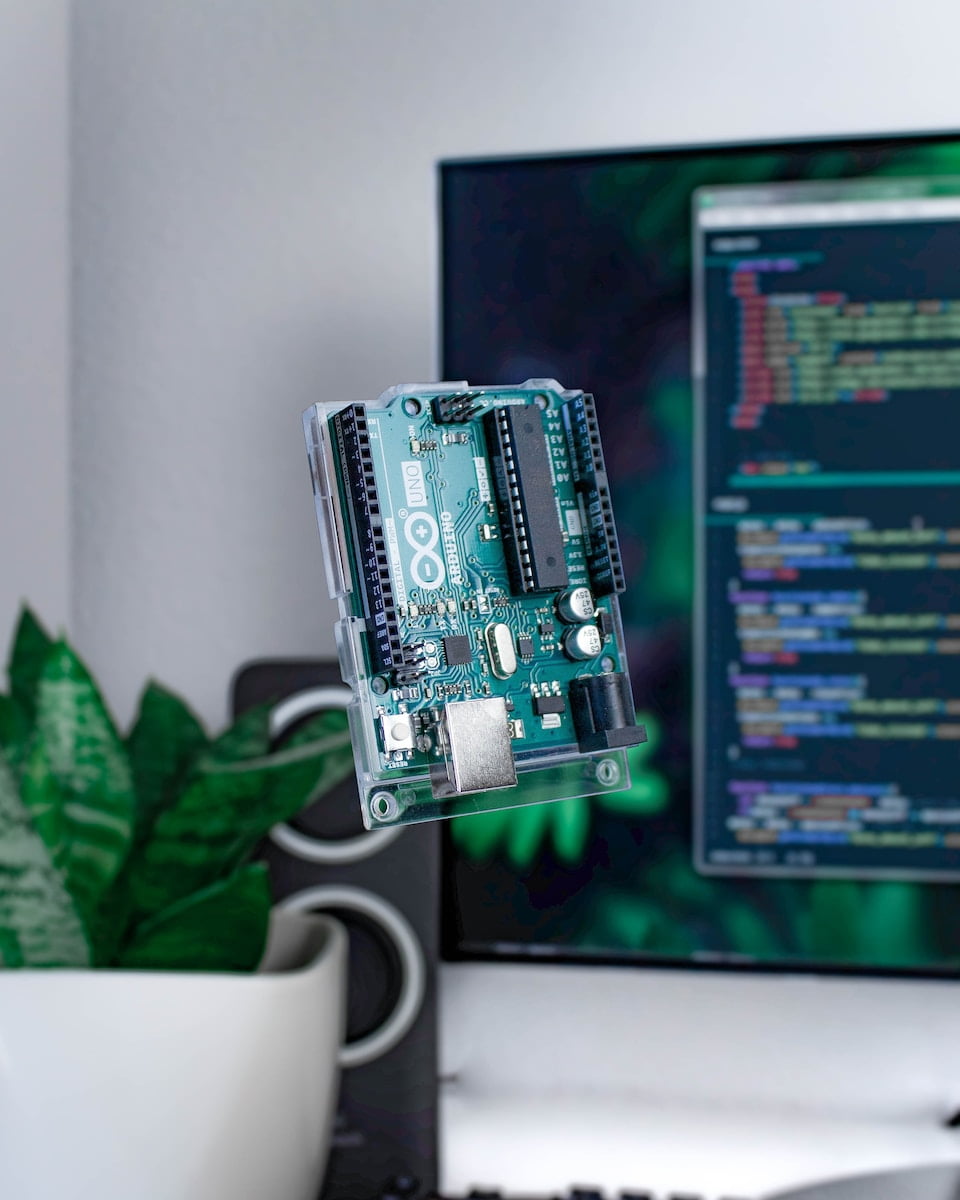
Basic Arduino Components
To understand how Arduino works, it is important to know the basic components that make up a typical Arduino board:
- Microcontroller: The microcontroller is the brain of the Arduino. It is the chip that executes the program instructions and controls the inputs and outputs.
- Input/Output Pins: Arduino has a number of pins that can be configured as inputs or outputs. These pins allow you to interact with the outside world, connecting sensors, actuators, and other electronic devices.
- Connectors: Arduino has different connectors that allow you to connect the board to other devices, such as USB, external power, and additional input/output pins.
- Voltage regulator: The voltage regulator is responsible for providing adequate power to the Arduino board and the components connected to it.
The Arduino Programming Language
Arduino uses a C/C++-based programming language to write the programs that control the microcontroller. This language has been simplified and adapted to make it easier to use, especially for those who have no previous programming experience.
The Arduino Integrated Development Environment (IDE) provides a user-friendly interface for writing, compiling, and uploading programs to the board. Additionally, the IDE includes an extensive library of predefined functions that simplify Arduino programming.
Advantages of Using Arduino
Arduino offers numerous advantages that make it a popular choice for electronic projects:
- Easy to use: Arduino has been designed to be easy to use, even for beginners with no experience in electronics or programming. The Arduino IDE and extensive documentation make the learning process accessible and fun.
- Versatility: Arduino is extremely versatile and can be used in a wide variety of projects, from home automation systems to robots, climate control devices, and more. The possibilities are virtually endless.
- Wide Community: Arduino has a huge community of users and developers all over the world. This means that you can always find help, tutorials, projects and tips online.
- Low cost: Unlike other microcontrollers and development boards, Arduino is affordable and accessible to everyone. You don't need to spend large sums of money to start exploring the world of electronics and programming.
What Can You Do with Arduino?
The versatility of Arduino means that the project possibilities are virtually endless. Here are some ideas to inspire you:
1. Automated Irrigation System
Are you tired of manually watering your plants? Using Arduino, you can create an automated irrigation system that monitors soil moisture and activates sprinklers when needed. This will ensure that your plants always receive the right amount of water.
2. Line Following Robot
Do you like robots? You can build a line-following robot that uses infrared sensors to follow a line on the ground. This type of project is fun and allows you to learn about sensors and motor control.
3. Meteorological Station
Using Arduino, you can create a homemade weather station that measures temperature, humidity, barometric pressure, and other weather data. The data can be displayed on an LCD screen or sent over the Internet for remote monitoring.
4. Electronic Musical Instrument
Are you a music lover? You can build your own electronic musical instrument with Arduino. You can create a MIDI guitar, a synthesizer controller, or even an electronic drum kit. Let your creativity run wild!
5. Robot Controller
If you like robots, Arduino allows you to create robot controllers. You can use sensors and actuators to allow your robot to interact with the environment and perform specific tasks.
6. Security System
Arduino can also be used to create home security systems. You can build an alarm system that detects unwanted movement or even a facial recognition system to control access to your home or office.
These are just a few ideas to get you started. The only limitation is your imagination!
Arduino FAQ How it Works
Here are some frequently asked questions about Arduino and their answers:
1. Is it necessary to have previous programming knowledge to use Arduino?
No prior programming knowledge is required to use Arduino. The Arduino programming language has been simplified and adapted to make it easy to use, even for beginners.
2. Where can I get an Arduino board?
You can get an Arduino board from electronics stores, online stores, or directly from the official Arduino website.
3. Is it possible to connect Arduino to the Internet?
Yes, it is possible to connect Arduino to the internet using communication modules such as Ethernet or Wi-Fi. This allows you to control and monitor your Arduino projects via the web.
4. What kind of projects can I do with Arduino?
Arduino can be used in a wide variety of projects, from home automation systems to robots, climate control devices, musical instruments, and more. The only limitation is your creativity and skills.
5. How long does it take to learn Arduino?
The time it takes to learn Arduino depends on your level of previous experience in electronics and programming. For beginners, it may take a few weeks to get familiar with the basics and start making simple projects. However, learning is an ongoing process and there is always more to discover and learn in the world of Arduino.
6. Are there any online resources to learn Arduino?
Yes, there are numerous online resources for learning Arduino. The official Arduino website offers tutorials, documentation, and project examples. There are also online communities, forums, and YouTube channels dedicated to Arduino where you can find inspiration, tips, and help.
Conclusion of Arduino How It Works
In short, Arduino is a versatile and accessible platform that allows you to delve into the world of electronics and programming. With its combination of open source hardware and software, Arduino offers a wide range of possibilities for creating interactive projects. Whether you are interested in home automation, robots, music, or any other field, Arduino can be your tool of choice.
We hope that this comprehensive guide on how Arduino works has sparked your interest and given you an overview of the possibilities offered by this platform. Now it's time to get down to business and start exploring and creating your own Arduino projects!
