- Limit time and views when sharing, and separate channels for key and context.
- Prefer encrypted managers and shipments with traceability over email or chats.
- Enable MFA and rotate passwords; in businesses, apply controls and immediate revocation.
Sharing passwords is something we all have to do sooner or later, both at work and at home, and doing it incorrectly can open the door to unwanted access. The goal is to minimize risks without hindering collaboration . While ideally we should never share credentials, there are real-world situations (technical support, an encrypted document that a colleague needs to review, user registration) where sharing a password is unavoidable.
In addition to common sense, it's helpful to know what methods exist and their pros and cons, as well as the legal framework and best practices. Understanding the context allows you to choose the best approach for each situation . Below you'll find a comprehensive guide with secure techniques, precautions to take, recommendations for businesses, and tools that facilitate the process without exposing your secrets more than absolutely necessary.
Legal framework and why it matters
The legality of sharing login credentials exists in a gray area that depends on the service and its terms, so it's advisable to review the terms of service for each platform . There have been high-profile cases, such as Netflix's stricter policies, where sharing passwords has been interpreted as a copyright infringement.
In the United States, the Computer Fraud and Abuse Act of 1986 (CFAA) has been invoked in cases of credential sharing; in 2016, a court ruled that sharing passwords with unauthorized individuals is illegal . Beyond the legal framework, the practical message is clear: prevent unauthorized third parties from accessing your accounts and limit the scope of any sharing.
In the corporate environment, the risk is multiplied because sensitive data, intellectual property, and regulatory compliance and security policies are at stake ; uncontrolled password sharing can lead to serious incidents . That's why solutions like LastPass for businesses allow you to restrict access to authorized users only, block forwarding outside the organization, and instantly revoke permissions when an employee leaves.
When planning how to share passwords, you need to consider access, traceability, data integrity , and expiration. If you can limit who sees the password, when, and how many times, you reduce your attack surface . This is the basis of the techniques you'll see in this guide, designed to minimize the time your password is exposed.
Some tools offer pre-configured options or "presets" to speed up setup (for example, duration and number of views); loading a standard preset helps you remember critical parameters . Even so, always adjust these values to suit the specific situation and the actual number of recipients.
What you should never do: uncontrolled email and chats
Sending passwords via email or in a standard chat application (Teams, Telegram, WhatsApp, etc.) is convenient, but inherently insecure. Understanding the different types of cybersecurity helps assess this risk, as you lose control over forwarding the password, and it remains stored permanently . Even if you send the password in a separate thread, the context often reveals its purpose and who is using it, making it easy to exploit if someone searches the conversation or inbox.
Another problem with chats and email is that the information remains indefinitely on the servers and devices of the participants; an account breach, a poorly protected backup, or a simple oversight can expose this history . Therefore, avoid these methods unless you implement the additional measures described below.
Essential precautions before sharing
Before sharing a password, it's wise to prepare the ground with measures that hinder its misuse, because no delivery method can compensate for poor password hygiene . Keep the following recommendations in mind: complete a cybersecurity questionnaire.
- One password per account: Do not recycle credentials between services.
- Periodic rotation: Change passwords frequently, especially sensitive ones.
- Revokes and changesIf you break up with the person you're sharing with, change that password immediately.
- Don't leave them in sight: neither in sticky notes nor in unencrypted files.
- Activate XNUMX-Step Verification (MFA) whenever possible.
Implementing these measures creates a buffer of security that reduces the impact if someone intercepts the key; they are barriers that force an attacker to overcome several obstacles . And if there is any doubt about a possible exposure, change the password without delay.
Password managers with sharing features
Modern file managers are the first line of defense for controlled storage and sharing because they combine encryption, organization, and auditing . Furthermore, they are integrated into browsers and mobile devices and offer complementary utilities such as strong password generators.
Popular solutions like 1Password, LastPass, Dashlane, Keeper, Bitwarden , and RoboForm allow you to create shared spaces or collections for families or teams; each user maintains their own private vault and only accesses what they are granted . These spaces show who can enter and with what permissions, and access logs are usually kept to investigate potential incidents.
Another advantage is that these managers can store secure notes in addition to passwords; billing information, recovery codes, or sensitive instructions can all be included in this workflow . Many also alert you if your credentials appear in known data breaches so you can change them as soon as possible.
Advanced sharing is often part of paid plans, but the real value lies in the control and visibility; when compliance or critical data is involved, traceability makes all the difference . If you work for an organization, check which enterprise resource planning (ERP) system is approved before implementing one yourself.
Temporary messages: a compromise solution
Messaging apps like WhatsApp, Telegram, Snapchat , and Signal offer disappearing messages, which can be useful in specific situations; however, it's not the most recommended method . Despite end-to-end encryption, there's still a risk of capture (although this can be blocked in certain modes) or forwarding before the message expires.
If you have no other option, use private chats and enable the disappearing messages option with the shortest possible time frame; on WhatsApp, 24 hours is a prudent setting . On Telegram, you can open "secret chats" and set automatic deletion times; always prioritize the shortest time windows.
Divide the information and use different channels
A classic technique is to break the information into several pieces so that no one can reconstruct access with a single message . For example: service, username, and password sent separately and via different channels.
This way, you could send the service information by email, the username by messaging, and the password through another channel; avoid cross-referencing messages to prevent leaving clues . If someone intercepts one part, they won't have all the necessary information to gain access.
Temporary links that self-destruct
There is a category of web tools specifically designed for sharing passwords on a one-off basis via expiring URLs; the password doesn't travel in plain text, but rather within a controlled flow . Two key ideas define their security: limiting the password's lifespan and limiting the number of times it can be viewed.
One example is Password Pusher (pwpush.com), which lets you generate a password or paste an existing one and create an expiring link; you decide how many days it works and how many times it can be opened . Ideally, you should set the parameters to the minimum necessary: fewer days and fewer views mean less exposure.
When you generate the link, avoid adding context to the password (nothing like "this is X's password with user Y"); if someone intercepts the URL, they won't know where to apply it . Copy the resulting address and share it through your chosen channel.
Important note: Some email and collaboration security filters (Microsoft 365, Gmail, etc.) scan links beforehand to check for malicious activity; this can consume views even if the recipient hasn't opened the URL . Select the option equivalent to "1-click recovery step" when available to prevent this automatic usage.
Finally, the recipient can click on the URL and copy the password to the clipboard, even without seeing it on screen, depending on the configuration; access is thus limited to a single, controlled action . And if you need greater security, combine this technique with sending the "where to use it" instructions through a different channel.
Some tools go a step further and encrypt the secret within the browser itself before sending it to the server; this way, the provider never sees the content in plain text . The typical workflow is as follows: the browser generates a key pair (public and private) and encrypts the secret locally.
The server receives only the public key and the already encrypted secret; without the private key, the stored content is useless even if someone gains access to the database . Subsequently, the tool creates a URL that includes an identifier for the secret and the information necessary for the client to decrypt it.
Thus, when the recipient opens the link, their browser retrieves the encrypted blob and decrypts it locally using the data embedded in the URL; if the original URL is unavailable, the secret cannot be reconstructed . Expiration control is based on two conditions: number of views and elapsed time, rendering it inaccessible once either condition is met.
Some implementations include a view log to audit every attempt, even those that don't display the secret because it has expired; this traceability helps validate that the recipient received it and when . It's a very practical feature for support teams and administrators.
These types of solutions often include evolution plans with integrated utilities, such as password generators or URL shorteners that facilitate distribution; they also typically include translations and help pages (FAQ, About) to reach a wider audience . Every little bit helps if it allows you to share less, but better.
Bitwarden Send and encrypted text/file sending
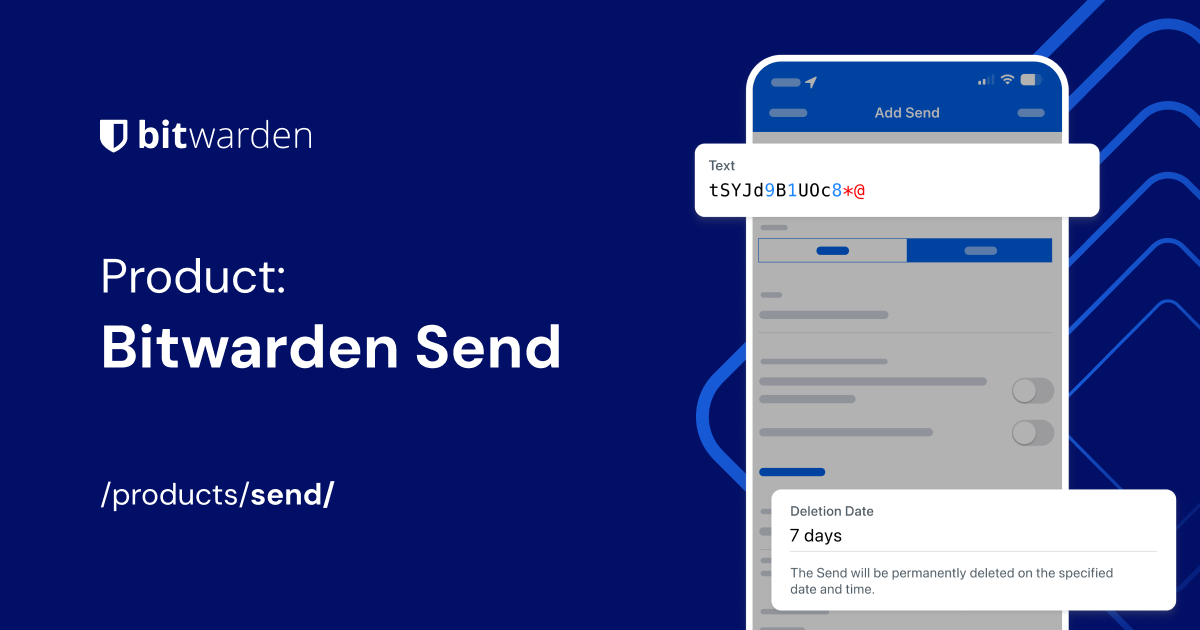
Another convenient option is to use services like Bitwarden Send to securely share fully end-to-end encrypted text or files; it allows you to transmit credentials, business documents, or sensitive notes with access controls . Its approach simplifies sending directly to another person without exposing the content to third parties.
These types of tools usually offer expiration dates, additional password protection, and download limits; always configure the minimum time and avoid reusing links . If the recipient doesn't need to keep the information, it's best if the link expires after the first view.
Practical example: encrypted document shared by a team
Imagine you've encrypted an Office document with a password and a colleague needs to open it; you must provide that password without exposing it to third parties . In this case, a good practice is to send the file through the usual corporate channel and the password via a temporary, self-destructing link.
Furthermore, it communicates via a different channel where to apply that password (for example, the file name or folder); if someone intercepts the URL or the document but not both, they will not be able to access the content . It's a simple balance to implement that adds a real layer of security.
Risks, interconnected accounts and identity
Modern accounts hold personal and banking information, conversations, photos, and more; if someone gains access with an uncontrolled, shared password, they can impersonate you or commit fraud . Furthermore, many services are interconnected, so one breach can trigger others.
Exposure also affects your reputation: whoever accesses your profiles can post on your behalf or manipulate your information; protecting access is protecting your digital identity . Hence the importance of minimizing the circulation of credentials and opting for methods that leave the smallest possible trace.
Controls and policies in companies
In organizations, the standard should be to share as little as possible through managed spaces with role-based permissions; restrict password use to authorized users and prevent them from leaving the domain . Appropriate business tools allow for the centralized application of these policies.
Another key control is immediate revocation when someone leaves the company; cutting off access to credentials and resources should be an automated process . In parallel, periodically review shared access and remove anything that is no longer needed.
Recommended step-by-step flow with temporary links
For specific cases, a robust flow with single-use links and short expiration works very well; it minimizes time exposure and limits the number of people who can see the key . The sequence would be:
- Generate a random password or paste your existing one into the temporary tool field.
- Define expiration by days and views. Tip: Add an extra view in case you review the link yourself.
- Enables the option that prevents automatic scanners from consuming views (equivalent to “1-click recovery”).
- Create the link and copy it to the clipboard without adding any service/user context.
- Send the URL through one channel and communicate through another channel where it applies.
If you combine this with MFA enabled on the target account, the risk is drastically reduced; even if someone steals the password, they won't be able to log in without the second factor . And remember to delete the link when it's no longer needed, if the tool allows it.
Whichever method you choose, the common goal is to leave no lasting trace, control who has access, and be able to cut it off at any time. If you implement time limits, view limits, and separate channels, you're on the right track . With these habits and the right tools, sharing a password ceases to be a game of Russian roulette and becomes a controlled process.
