- Native omnimodal model with text, image, audio and video, and real-time streaming.
- SOTA in 22/36 audio/video benchmarks and multilingual (119/19/10 languages).
- Thinker–Talker architecture with MoE, low latency, and system prompt control.
- Recommended deployment with vLLM/Transformers, Docker and official utilities.
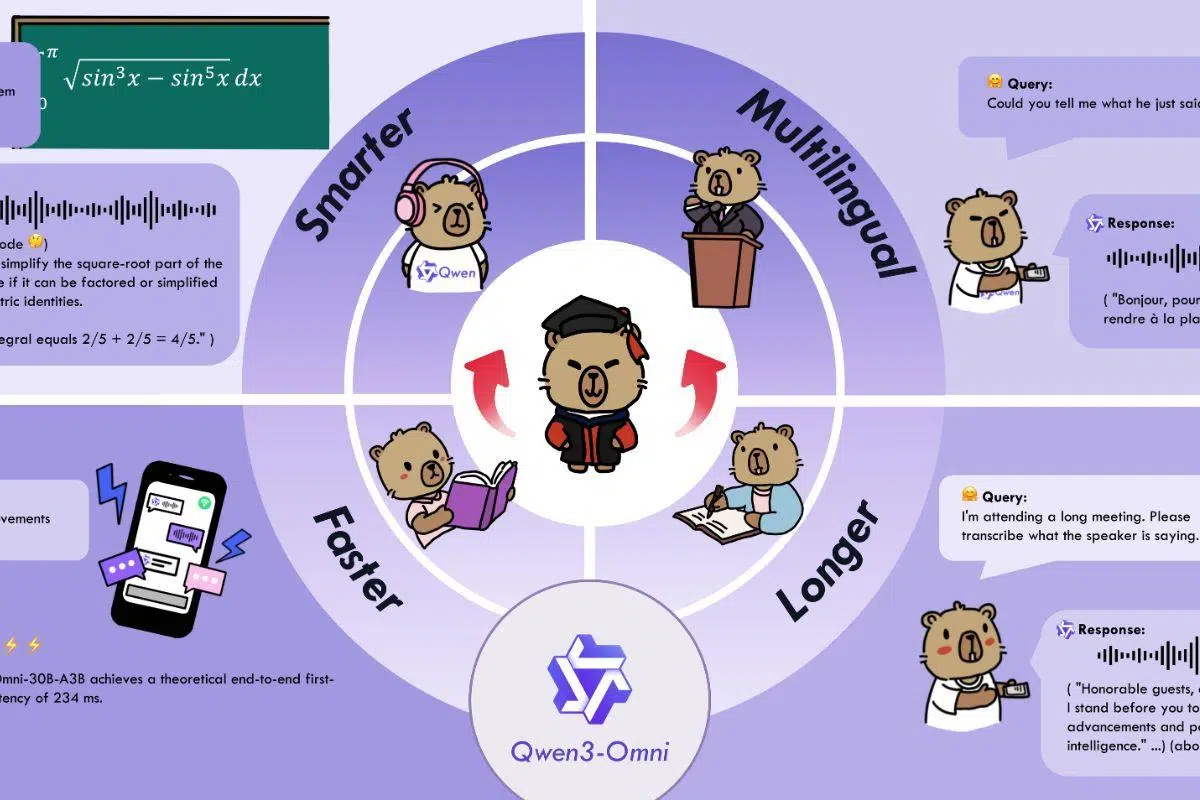
The arrival of Qwen3-Omni has shifted the landscape of AI: a single native model capable of understanding and responding to text, images, audio, and video , with on-the-fly responses in both written and spoken form. We're not talking about multimodal "patches," but rather a fundamentally designed architecture for integrating modalities with low latency and fine-tuned behavioral control.
At a time when almost everyone is testing chatbots and assistants, Qwen3-Omni arrives with ambition: it supports 119 languages via text, recognizes speech in 19 and speaks in 10 , understands long audio (up to 30 minutes), and boasts benchmark scores in dozens of tests. Furthermore, its Thinker-Talker design and Mixture of Experts approach aim for speed of response and quality of reasoning in real-world scenarios.
What is Qwen3-Omni and what does it offer?
Qwen3-Omni is a family of foundational, omnimodal, and end-to-end multilingual models designed to process text, images, audio, and video, with output in both text and natural speech. The key lies not only in the variety of inputs and outputs but also in its streaming functionality with fluid conversational turns and the ability to respond immediately.
The team has introduced several architectural improvements for performance and efficiency: early “text-first” pre-training combined with mixed multimodal training, and a design with a Mixture of Experts (MoE) that maintains its performance in text and image while boosting audio and video. With these improvements, the model achieves SOTA in 22 out of 36 audio/video benchmarks and open-source SOTA in 32 out of 36, with results comparable to Gemini 2.5 Pro in ASR, audio comprehension, and speech conversation.
Key capabilities and modalities
Qwen3-Omni is ready for real-world audio, vision, and audiovisual applications, with extensive multilingual support: 119 text languages, 19 voice input languages, and 10 voice output languages . Voice input languages include English, Chinese, Korean, Japanese, German, Russian, Italian, French, Spanish, Portuguese, Malay, Dutch, Indonesian, Turkish, Vietnamese, Cantonese, Arabic, and Urdu; and output languages include English, Chinese, French, German, Russian, Italian, Spanish, Portuguese, Japanese, and Korean, among others.
The suite of official cookbooks illustrates the breadth of its uses. In audio, it showcases multilingual and long-audio speech recognition (ASR) , speech-to-text and speech-to-speech translation, music analysis (style, rhythm, genres), sound effect description, and captioning of any audio . It also supports mixed analysis of tracks with speech, music, and ambient sounds.
In vision, it offers "hard" OCR for complex images, object detection and grounding , image QA, image math solving (where the Thinking model shines), video description, first-person video-based navigation, and scene transition analysis . In audiovisual scenarios, it demonstrates audio-video QA with time alignment, guided interaction with AV inputs , and dialogues with assistant behavior.
As an agent, it stands out for its ability to function calling from audio , which opens voice workflows that activate tools, and in derived tasks there is an Omni-Captioner for subtitling with great detail, which demonstrates the generalizability of the foundational one.
Thinker-Talker Architecture and Design with MoE
One of the key differentiators is the separation of responsibilities: the Thinker generates the text (with variations that include explicit chain-of-thought reasoning), and the Talker produces real-time audio . This decoupling allows for natural voice conversation while the system maintains a high level of text comprehension and planning.
The MoE database distributes the workload among experts and relies on AuT pre-training for powerful general representations. Furthermore, the use of multi-code encoding in the audio channel reduces latency to a minimum, which is crucial for calls or assistants where every hundredth of a second counts.
Performance and benchmarks: text, vision, audio and audiovisual
The Qwen3-Omni maintains cutting-edge text and image performance without degrading compared to similarly sized Qwen models focused on a single mode, while in audio and audiovisual performance it sets the pace in most tests . In the battery of 36 audio and audiovisual benchmarks, it achieves open-source SOTA in 32 and total SOTA in 22, surpassing the Gemini 2.5 Pro and GPT-4o in several points.
Some notable milestones in text: in AIME25 the Flash-Instruct variant scores around 65,9; in ZebraLogic the Instruct reaches 90, and in MultiPL-E it achieves competitive figures against GPT-4o. In alignment tasks such as IFEval and WritingBench, the Instruct and Thinking models show high and consistent scores.
In audio, the ASR results for Chinese and English are excellent: in WenetSpeech and LibriSpeech, it significantly reduces the word error rate, with figures close to 1,22/2,48 in LibriSpeech clean/other, and in sets like FLEURS (multilingual), it offers very low rates. In VoiceBench, metrics such as AlpacaEval, CommonEval, and WildVoice place Qwen3-Omni on par with closed reference systems, and it excels in audio reasoning in MMAU v05.15.25.
In audiovisual applications, the most frequently cited metric is WorldSense (approximately 54,1 ), surpassing Gemini-2.5-Flash. Furthermore, in suites like DailyOmni and VideoHolmes, the Thinking variant achieves improvements over previous open-source SOTA applications. In pure vision, it excels in MMMU, MathVista, MathVision , and document comprehension (AI2D, ChartQA), with very good scores in counting (CountBench) and video comprehension (Video-MME, MLVU).
Zero-shot voice generation was also measured: compared to families like CosyVoice and Seed-TTS, Qwen3-Omni shows better content consistency across multiple languages and high speaker similarity . In the multilingual section, the "Content Consistency" and "Speaker Similarity" tables show Qwen3-Omni 30B-A3B to be very competitive in Chinese and English, and solid in German, Italian, Portuguese, Spanish, Japanese, Korean, French, and Russian. In cross-lingual TTS , it achieves better WER/consistencies across several pairs (e.g., zh→en, ja→en, ko→zh) compared to CosyVoice 2/3.
Available models and what each one is used for
The Qwen3-Omni line includes three main pieces, each designed for a specific use: Instruct , Thinking , and Captioner . They all stem from the same core but with different capabilities activated or fine-tuned for specific tasks.
Qwen3-Omni-30B-A3B- Instruct contains Thinker and Talker, accepts audio, video, and text , and returns text and audio. It is the right choice if you want full interaction and real-time spoken results, and is recommended for voice or video demos .
Qwen3-Omni-30B-A3B- Thinking focuses on the Thinker with chain reasoning , supporting audio, video, and text with textual output. It is useful for in-depth analysis, solving complex problems, visual mathematics, or workflows where you don't need voice output but do need the best structured thinking.
Qwen3-Omni-30B-A3B- Captioner is a refined derivative of high-precision, low-hyperactivity audio subtitling . It is open source, covers a wide range of audio in great detail, and fills a historical gap in the open-source ecosystem: reliable and rich captions for general-purpose audio.
Latency, real time and behavioral control
The system is optimized for instant interaction, with response times of approximately 211 ms for audio and 507 ms for audio-video . In addition to streaming, emphasis is placed on natural conversational turns and stable voice delivery, aided by the clear roles of Thinker (text) and Talker (voice).
For fine-tuning, you can customize the style with system prompts . In AV scenarios where the video audio is used for reference, the team suggests a system prompt that maintains the Thinker's reasoning while providing more readable and conversational text, making it easier for the Talker to speak fluently . It's also recommended to keep the `use_audio_in_video` parameter consistent throughout a multi-turn conversation.
In evaluation, there are specific guidelines: do not set system prompt , follow the ChatML format of each benchmark and, when there is no prompt, use the following by default: Chinese ASR (“请将这段中文语音转换为纯文本。”), ASR other languages (“Transcribe the audio into text.”), S2TT (“Listen to the provided <source_language> speech …”), and song lyrics (“ Transcribe the song lyrics” … without punctuation, lines separated by breaks”).
Deployment, requirements and tools
For a complete local experience, the team recommends Hugging Face Transformers and reviewing the software engineering phases , but be aware: being a MoE architecture, it can run slowly with HF inference; for production or low-latency applications , they advise using vLLM or the DashScope API , and even provide a Docker image that includes environments for both. The Transformers code has already been merged, but the PyPI package has not yet been released and must be installed from source.
They provide utilities for handling audio and image/video (base64, URLs, interleaved inputs), and recommend FlashAttention 2 with Transformers to reduce GPU memory whenever loading in float16 or bfloat16 . With vLLM, FlashAttn2 is included, and parameters such as limit_mm_per_prompt (pre-allocates GPU memory) and max_num_seqs for parallelism are detailed ; in addition, increasing tensor_parallel_size enables multi-GPU inference.
There are some useful resource-saving tips: if you don't need audio, you can disable the Talker after initialization, saving approximately 10 GB of VRAM. And if you want faster text output, use `return_audio=False` during generation. Minimum theoretical memory requirements for BF16 with FlashAttn2 are also provided: for example, the Instruct 30B-A3B uses approximately 78,9 GB with 15 seconds of video and 144,8 GB with 120 seconds; the Thinking uses approximately 68,7 GB and 131,7 GB, respectively.
To set up a local web demo , they recommend preparing your vLLM environment (or the slower Transformers environment), ensuring you have ffmpeg installed , and using their scripts. They offer GPU-ready Docker images “qwenllm/qwen3-omni” with the NVIDIA Container Toolkit , port mapping (e.g., host 8901 → container 80), and the option to serve from 0.0.0.0. You can re-enter or delete the container as needed.
Demos, APIs, and ecosystem
If you don't want to deploy locally, you can try demos on Hugging Face Spaces and ModelScope Studio , with experiences for Qwen3-Omni-Realtime, Instruct, Thinking, and the Captioner. Qwen Chat with real-time streaming is also available: simply select the voice/video call option in the interface.
For scalable integration with low latency, the recommended approach is the DashScope API , which offers the most predictable performance. Furthermore, the community coordinates through channels like Discord and WeChat , and publishes cookbooks with real execution logs that allow users to reproduce results by changing prompts or models.
Roadmap and ongoing improvements
The team is working on additional features such as multi-speaker speech recognition , OCR applied to video, improvements to proactive audiovisual learning, and richer agent workflows . They also indicated that audio output support in vLLM for the Instruct model will be available soon, completing the real-time deployment cycle from that backend.
FAQ: Runtime support and quantization
Some users have commented that they can't run Qwen3-Omni even with the usual suspects and that they don't see quants in Hugging Face ; furthermore, the native 16-bit format is around 70 GB, a size that's problematic for modest computers. The project itself clarifies that Transformers is already merged but without the PyPI package , which must be installed from source, and that vLLM is the preferred option for inference, although Instruct audio support in vLLM will be released in the near future.
Regarding quantization, there are no placeholders yet listed in HF for Qwen3-Omni 30B-A3B, and it's worth remembering that the MoE and multimodal nature complicates immediate compatibility with runtimes like llama.cpp. For those who need to test now, the official recommendation is to use Docker + Transformers/vLLM from source or the API , and keep an eye on the repository for support pull requests and future quantizations when they are available.
Good evaluation practices and prompts
To reproduce the numbers, the following guidelines are detailed: most benchmarks use greedy decoding in Instruct without sampling, and for Thinking, the parameters in generation_config.json must be respected . The video frame rate is also set to fps=2 during evaluation, and it is indicated that the user prompt should follow the multimodal data unless the dataset specifies otherwise.
When a benchmark does not include a prompt, the default prompts can be used (Chinese ASR/other, S2TT, song lyrics). Additionally, the system prompt should not be set during evaluation to ensure that results are comparable across systems and runs.
Qwen3-Omni positions itself as a true omnimodal platform, with low latency, broad multilingual support, cutting-edge audio and video capabilities , and a clear deployment path using Transformers, vLLM, and Docker. For those seeking a single model that handles text and images seamlessly without sacrificing performance, and that also listens, speaks, and understands video , it's a proposition that's hard to beat today.