- iOS 26.4 incorporates new emoji, security improvements, and visual changes with Liquid Glass.
- Playlist Playground on Apple Music and RCS encryption with Android are the big features in testing.
- iOS 26 enhances iPhone customization, adaptive battery, and real-time translation.
- Public betas allow you to try almost all the new features, with some regional limitations.
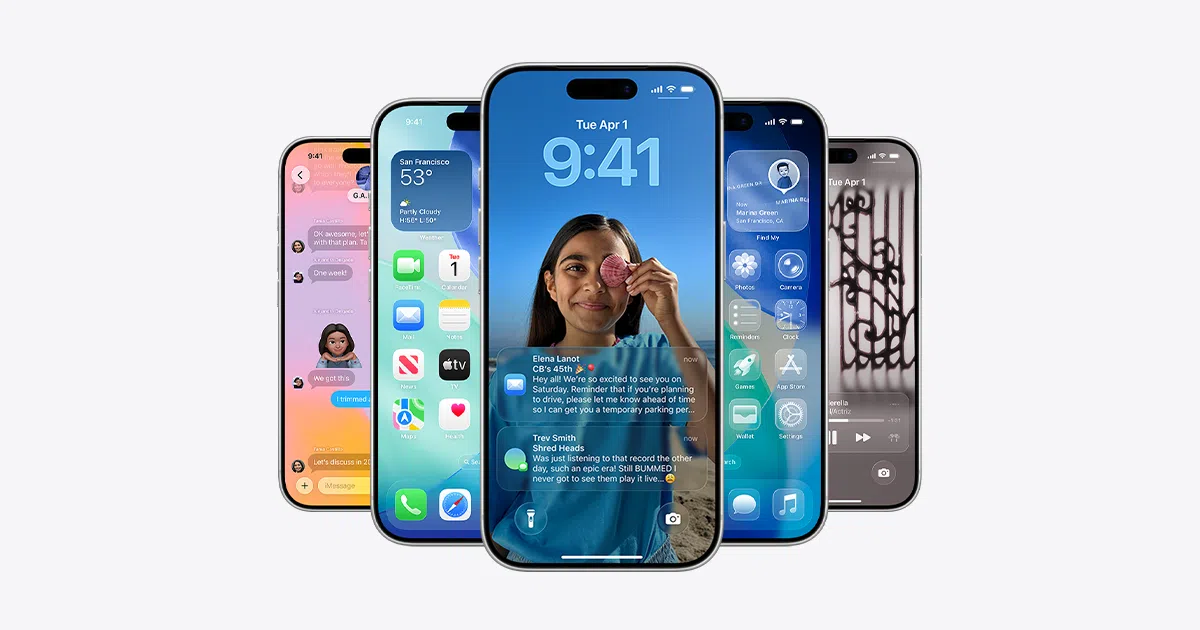
If you've heard of iOS 26 and the 26.4 update But if you're still not entirely sure what it actually offers, don't worry: there are plenty of changes coming, some very noticeable and others more subtle but equally important. From new artificial intelligence features to improvements in security, battery life, and design, this version is packed with details worth exploring at your leisure.
In the latest betas of iOS 26.4, Apple has been refining the system and adding key features such as The new emoji, AI-powered playlist creation in Apple Music, RCS encryption with Android and a good number of tweaks to apps like Photos, Podcasts, and even the home screen. Below, we'll go over everything we know so far and how you can get the most out of it on your iPhone.
iOS 26.4 Calendar and Beta Status
Apple is finalizing iOS version 26.4, currently in beta 3 for developersPublished just one week after beta 2. The company's plan is to launch the stable version between the end of March and the beginning of April, so the margin for maneuver to close pending features is becoming increasingly tight.
So far, each beta has introduced significant changes: the first one hinted at new emojis and Playlist Playground in Apple Music; the second one appeared end-to-end encryption for RCS messages between iPhone and AndroidAnd in the third one, the new emoji have finally been activated, although they are not yet shown in their final form.
It's worth remembering that, although many of these new features are already available in the betas, Apple may delay or limit some features to certain countries, iPhone models, or even later versions of the system. Not everything that appears in a beta is guaranteed to be in the immediate final version.
New emoji in iOS 26.4: present, but still incomplete
One of the major absences in the first two betas of iOS 26.4 was the latest Unicode emoji, something that has been partially corrected in beta 3: The icons are already integrated into the system, but for now they look like question marks.That means the code is there, but Apple hasn't finished the visual design of each one yet.
These new characters include icons such as the trombone, the treasure chest, the orca, the landslide, and Bigfootalong with other minor symbols. These are exactly the same emoji that were announced the previous year and which, following tradition, Apple usually releases in the ".4" versions of iOS, taking advantage of the fact that these are spring updates with quite a few changes.
The fact that they already appear in beta 3, even if only as question marks, is a pretty clear sign that Its final version is very close.The reasonable bet is that in beta 4 (or even through a minor update prior to the public release) Apple will finish activating the final designs and they can be used normally in messaging apps, social networks and others.
Playlist Playground: Apple Music playlists powered by AI still blocked in the US
Another of the major new features of iOS 26.4 is Playlist Playground, an Apple Music feature that lets you create playlists using artificial intelligenceThe idea is that you can describe in words the type of music you want (ambience, style, time of day, mood…) and the system will automatically generate a playlist according to those criteria.
The problem is that, after three consecutive beta tests, Playlist Playground is still only available in the United StatesThis geographical limitation is starting to worry many users, because it's not just Europe: the feature is also missing in key Apple countries like the UK and Australia, where many new features are traditionally tested before their global rollout.
The reasons for this regional blockade are far from clear. Several possibilities are being considered: music rights agreements with record labels in different regionsTechnical limitations of the servers that manage AI recommendations, or even issues of quality of results in other languages that are not yet up to the standard of American English.
In any case, Apple still has room to expand to other regions before the final release of iOS 26.4, and technically could Activate Playlist Playground for more countries overnight from their serversIf this doesn't happen before the public release, the feature will likely debut officially as a US-exclusive feature for at least a few months.
Everything included in iOS 26.4 up to beta 3
Beyond emojis and Apple Music, iOS 26.4 comes with a fairly extensive set of changes spread across various system apps and settings sections, forming part of the new mobile phones and appsSome are visual improvements, others focus on security, and still others on new entertainment and productivity features.
On Apple Music, in addition to Playlist Playground for creating playlists with AIThe app is receiving a noticeable redesign of the album and playlist screens, which are now using almost full-screen cover art, reinforcing the prominence of the album artwork, something we analyzed in iOS softwareThere is also a new section called “Concerts near you”, designed to help you discover performances and musical events in your area.
The Podcasts app gets an update by introducing native support for video in episodeswith the option to download content for offline viewing or stream it with automatic quality adjustment based on the connection. This brings it closer to platforms like YouTube or Spotify, which already combine audio and video in many programs.
On the messaging front, iOS 26.4 begins testing end-to-end encryption for RCS messages between iPhone and AndroidUntil now, iMessage already protected conversations between iPhone users, and Google did the same between Android phones, but mixed communications using RCS were left without that additional layer of security.
On the side of general device security, Apple activates by default enhanced protection against iPhone theft, designed to make it difficult for whoever steals or finds your mobile to change critical settings, access passwords, or disable tracking features without additional verification.
A new one is also being released Ambient music widget for the home and lock screensDesigned to keep relaxing sounds or background content readily available. The Internet Sharing section is now more informative, displaying data usage reports broken down by each device connected to the iPhone—very useful if you frequently use your phone as a hotspot.
In the Health app, iOS 26.4 introduces new metrics for sleep tracking, including the average time you go to bedThis helps detect patterns and improve sleep routines. The wallpaper gallery has also been redesigned with a look reminiscent of the App Store: categories, clearer navigation, and on-demand downloads to save space. This same organizational system is also being implemented on Apple Watch faces.
iOS 26: Visual changes and customization of the iPhone
With the arrival of iOS 26 for all compatible iPhones, one of the most striking changes is the redesign of the overall interface with the new language of Liquid Glass, which completely alters the appearance of the systemNot since iOS 7 has there been such a drastic change in the iPhone's visual style.
This new approach not only affects backgrounds, transparencies, and menus, but also brings Additional designs for home screen icons and widgetsNow, by pressing and holding on an empty area of the screen until the icons start to move and tapping on “Edit” in the upper right corner, the “Customize” option appears, where you can change the visual style of the icons.
Apple offers four distinct modes: the classic look with colorful icons, a Dark mode with a black background under each icon, a translucent mode that gives apps a more ethereal look and a tinted mode, in which you choose the dominant tone to homogenize the desktop colors.
The default mode remains the most balanced and recognizable; the new translucent and tinted modes have an interesting effect, but by unifying so many tones they can make it It may be somewhat more difficult to locate apps at a glanceUltimately, it comes down to personal taste: some prioritize aesthetics, while others prefer to identify apps instantly by their unique colors.
More freedom on the lock screen
The lock screen also takes center stage in iOS 26 thanks to new customization options that go beyond the usual wallpapers. By pressing and holding the lock screen, you can directly access the editing menu and, from there, tap on "Customize" to adjust various elements.
The most visible change is that now You can stretch the clock to take up more screen spaceThis option is limited to the first of the available fonts; the other three maintain a more standard size. You can adjust the text length and font weight, and the system will automatically reposition notifications so they don't obscure the time.
In addition, the possibility of using space photos on the lock screenProvided the image contains the necessary information to create the effect (it works especially well with photos of people and pets). Within the customization options, you'll see a hexagonal icon: tapping it visually separates the main subject from the background to produce a sense of depth that is perceived when moving the iPhone, like a kind of subtle 3D effect.
New Photos app: more order and less chaos
With iOS 18, Apple introduced a new Photos app that, although powerful, proved difficult for many users. too confusing and unintuitiveThe organization of collections, mementos, and albums never quite came together, and finding certain images was more difficult than expected.
In iOS 26, Apple restructured Photos to make it much more logical. Now the app is organized into two main tabs: the photo library, where all the photos are displayed in chronological orderand a collections section that groups different blocks of content. Within this second section you'll find classic albums, pinned collections, featured photos, memories, and other automatic groups.
The key is that if you scroll to the bottom of the screen within collections, you'll find an option called "Reorder". From there, You can decide which sections you want to see above and in what order, giving priority, for example, to your manual albums over the memories automatically generated by the system.
Currently, Apple doesn't allow you to completely hide any of these blocks, but you can expand or collapse them by tapping the corresponding arrow. thus reducing “visual noise” and shortening the scroll required to find what you're looking for. With these changes, finding a specific album is no longer a minor odyssey through automatic suggestions.
Visual Search and Apple Intelligence in iOS 26
Within the Apple Intelligence umbrella, one of the features that is proving most useful in iOS 26 is the integrated visual search systemTo use it, simply take a screenshot and, in the preview that appears, select the specific visual search icon in the lower right, or draw a circle around the element you want to identify, in the style of Google's "Circle to search".
After a few seconds, the iPhone will display a page with Results related to the content you have selected in the imageFor example, if you take a screenshot of a mobile phone that appears in an article and select it, the system can locate similar models on second-hand websites or online stores, as has already been seen with results that link to sites like Wallapop.
Another interesting possibility is that You can send a ChatGPT query directly from this interface.so that the response takes into account the context of what is seen on the screen. This greatly expands the possibilities: from asking for explanations about graphics or technical texts to identifying unusual objects or translating billboards in other languages.
Siri call filter for unknown numbers
Among the standout features of iOS 26 is a rather aggressive system of Siri call filtering for unknown numbersDesigned to drastically reduce spam calls. You can activate it from Settings > Phone, where you'll see the specific filtering options.
By enabling it, all calls from numbers you haven't saved are first routed to Siri, which answers on your behalf and Ask the other person to explain the reason for the callMeanwhile, on your screen you'll see a real-time transcript of what that person is saying, and you can decide whether to reply, ignore, or hang up.
There is even a more radical way in which The iPhone doesn't even ring when an unknown number calls.It's an effective solution against spam, but it has an obvious risk: you could also miss legitimate calls from doctors, couriers, workplaces, or other important contacts that you haven't yet saved.
That's why many users choose not to activate the most extreme mode and stick with just the transcription filter, which already helps a lot in separating relevant calls from those that are not, while still seeing alerts when they may be of some importance.
Real-time translation in conversations and messages
Another significant improvement in iOS 26 is real-time translation through the Translate app and the Messages app itself. From Translate, you can start a conversation by selecting the languages of each speaker and by pressing on the microphoneThe iPhone captures what you say and immediately displays it translated on the screen, in addition to being able to reproduce it in speech.
This system is especially useful when you're speaking face-to-face with someone who doesn't speak your language, as the interface is designed to be placed between you and to encourage a fluid dialogue, with alternating turns in speechThere's no need to type: simply press the microphone button when each person is about to speak.
Translation is also integrated into Messages. If you receive a message in another language, you can press and hold the message bubble and choose the translation option. “Translate conversation” so that they are translated automatically. All messages that arrive in that thread are automatically copied. This way, chatting with someone in another language feels much more natural, without constantly copying and pasting to another app.
Adaptive battery mode to maximize battery life
In terms of energy, iOS 26 incorporates a adaptive battery mode that complements the classic low power modeWhile the latter quite aggressively cuts back on certain functions (background updates, brightness, visual effects, etc.), adaptive mode seeks to balance performance and battery life according to your actual usage pattern.
The idea is that the system will analyze how you use your iPhone throughout the day and apply dynamic adjustments to screen brightness and the frequency of certain background tasks and in other details that affect consumption. All this without you having to manually activate and deactivate anything each time.
Apple has acknowledged that, right after installing a major update like iOS 26, Autonomy may be temporarily affected due to reindexing processes and internal adjustments. That's why this adaptive mode is especially important: it helps smooth out that initial period and keep the phone operational throughout the day with fewer interruptions.
iOS 26.4 Beta 2: RCS encryption and other minor changes
The second beta of iOS 26.4 introduced one of the most striking technical innovations of the cycle: end-to-end encryption for RCS messages between iPhone and AndroidThis is the first time this system has been seen in operation, although it is still in the testing phase.
When encryption is active, RCS messages between both devices show a padlock icon within the conversationThis indicates that the content is protected during transit. Until now, iMessage already offered this security between iPhones, and Google's Messages app did the same between Android phones, but cross-platform communications lagged behind.
However, the rollout is limited: the iPhone must have the iOS 26.4 beta installed and The Android phone needs the latest compatible version of Google MessagesFurthermore, Apple has made it clear that this encryption will not be activated globally in version 26.4 itself; its final release will come later in the year.
In terms of visuals, this beta 2 also adjusts the behavior of Liquid Glass in the “Edit” menu on the home screenNow the effect is more transparent and refined, allowing the background behind it to show through better. It's a subtle change, but it demonstrates that Apple continues to refine the new graphic style iteration after iteration.
The Games app moves its search bar from the bottom to the top of the screen to make it more convenient to use. aligning with the design pattern of other system appsThe App Store and Apple Music are changing the text "Apple Account" in the account section: it is now left-aligned and adopts the rainbow logo that we already saw in Settings.
In Accessibility, a new option appears under “Display and text size” called “Reduce highlighting effects”This is useful for people sensitive to certain visual effects or who prefer smoother animations. When updating iOS, it's now possible to tap on the update name to immediately see the exact build number, which is very handy for developers and advanced users.
Finally, if you have betas enabled on your device but don't install any for four months, Apple automatically returns you to the public channelIt's a hygiene measure designed to prevent someone from unintentionally getting stuck in an abandoned beta channel without receiving stable updates.
How to install the iOS 26.4 betas right now
If you develop apps or simply want to try out new features before anyone else, you can install the iOS 26.4 betas relatively easily. Registered developers have direct access from developer.apple.com, where you can download the necessary profiles or activate the betas from the system settings.
If you're not a developer, there's also an official option: the iOS 26.4 public beta usually arrives a few hours or days after the developer beta. To access it, you must register with your Apple ID at beta.apple.com and, once the process is completeOn your iPhone, go to Settings > General > Software Update, enable beta updates, and choose the iOS 26.4 public beta from the list.
Even so, caution is advised. Since this is software in testing, Betas may include bugs, unexpected crashes, increased battery drain, or incompatibilities. with certain apps that are critical for your daily life. It's recommended to install them on a secondary device or, at the very least, make a full backup to iCloud or a computer before updating, in case you need to revert.
If you develop apps or simply want to try new features before anyone else, you can follow our Key tips about iOS software And, if you decide to do so, download the profiles from developer.apple.com or activate the public beta in Settings.
With all these changes, iOS 26 and iOS 26.4 point to a new generation of software heavily focused on personalization, artificial intelligence, and security, while continuing to refine the new Liquid Glass design and adding small quality-of-life improvements to almost every aspect of the system. If you take advantage of its new features—from Siri's call filter to Adaptive Battery mode and the Photos reorganization—your iPhone can feel much more comfortable and tailored to your everyday usage.
Table of Contents
- iOS 26.4 Calendar and Beta Status
- New emoji in iOS 26.4: present, but still incomplete
- Playlist Playground: Apple Music playlists powered by AI still blocked in the US
- Everything included in iOS 26.4 up to beta 3
- iOS 26: Visual changes and customization of the iPhone
- More freedom on the lock screen
- New Photos app: more order and less chaos
- Visual Search and Apple Intelligence in iOS 26
- Siri call filter for unknown numbers
- Real-time translation in conversations and messages
- Adaptive battery mode to maximize battery life
- iOS 26.4 Beta 2: RCS encryption and other minor changes
- How to install the iOS 26.4 betas right now