- Tricount organizes and distributes expenses into groups with multi-currency support, offline use, and optimized settlements.
- It allows for flexible distributions, ticket photos, categories, statistics, and real-time notifications.
- Free card integration with Apple/Google Pay to automatically record expenses.
- Banking security with bunq, an app without ads or subscriptions and growing adoption in Spain.
Trips, dinners, shared apartments, or events: when it comes to balancing the books, doubts, lost receipts, and endless chats are common. With Tricount, that chaos is transformed into a clear, shared view of what everyone has paid, how much is owed, and how to settle up without complications or arguments, with an app designed to split expenses fairly.
If you're wondering what Tricount is and how it works, here's a practical and detailed guide. The tool lets you create groups, record expenses by category, divide them into equal or customized splits, and settle them with the fewest possible transfers—all with useful features like multi-currency support, offline access, receipt photos, and notifications.
What is Tricount and what is it for?
Tricount is a mobile app that organizes shared expenses among several people so no one has to pay back small amounts each time. You can create groups (tricounts) with up to 50 participants, keep several open at the same time, and decide when to close the account to settle the balance. It's especially useful for travel, but it also works well for everyday life with roommates, partners, friends, or siblings.
The idea is simple: someone pays for an expense, registers it in the group, and the app automatically divides the corresponding amount among everyone (equally or however you choose). This way, even if an expense only affects four out of eight members, you can easily indicate it. With the advanced mode, each person can even contribute a different amount if, for example, they each consumed or spent a different amount.
It's worth noting that, by default, you can manage multiple Triaccounts simultaneously, and there's a useful "trick": when you register with your email, you can increase the number of active groups you have at the same time. This way, you'll have one Triaccount for a trip with friends, another for your home, another for a project, and even one for gifts or celebrations with several people.
Besides being flexible, the app is very accessible. It works online and offline, can be used without registration, and boasts an ad-free, limit-free, and subscription-free experience. In some markets, Tricount has become so common that many people now say "let's do a Tricount" when they want to split expenses quickly.
How Tricount works step by step
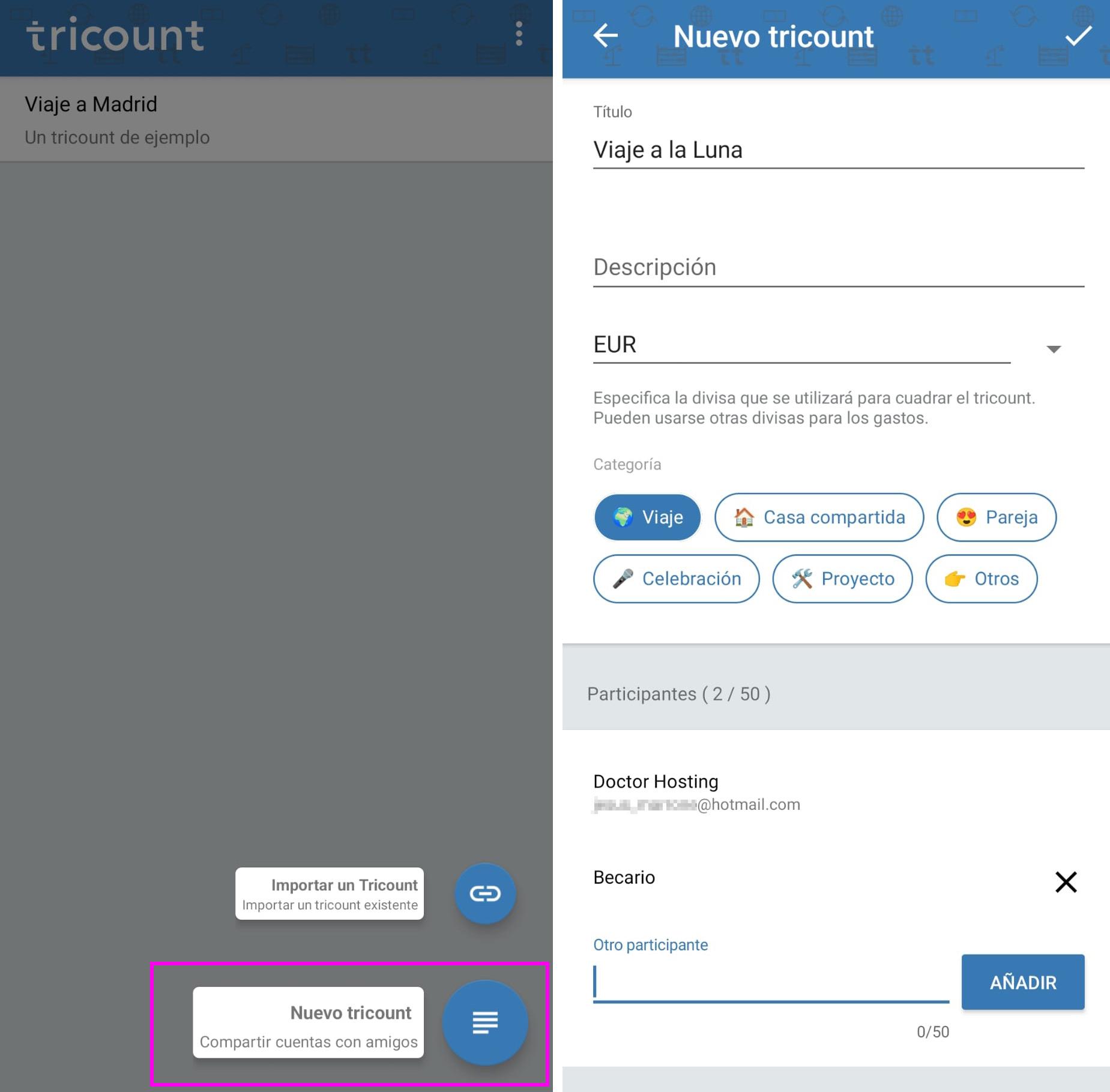
Getting started is easy. First, go to Tricount (or download the app for your operating system), tap the + button, and create a new group. Give it a title, add participants (up to 50), and choose the main currency. Optionally, you can also import a Tricount group using a link if someone has already created one.
Share the link with your colleagues so they can join from their devices. Each member can add their own expenses and instantly see those added by others. Coordination is simple because the app sends notifications when there are changes, so everyone stays up-to-date without having to chase anyone down via chat.
Add and categorize expenses
To record an expense, tap the + button again. Enter the description (for example, "dinner at a restaurant"), add emojis if you like, enter the amount (you can change the currency for this specific expense), indicate who paid, and upload a photo of the receipt if you wish. If you don't have an internet connection at that moment, no problem: the app saves everything and syncs it when you're back online.

A major advantage is the flexible splitting. By default, Tricount divides equally, but with advanced mode you can assign custom amounts. This is useful when someone has spent more or less: for example, if at the supermarket each person bought items for a different amount, you can enter €15, €8, €30, etc., so that each person pays exactly their share.
View expenses and balances
Within the group, the "Expenses" section displays a list of transactions with their amounts and who paid. In "Balances," you'll see the balance for each participant: who has a credit and who is in the red. The app presents this visually, with bars that help you quickly identify who has contributed the most and who owes the most—very useful for deciding who might pay for the next purchase.
Tricount automatically calculates how much each person owes and to whom. A key detail: sometimes you'll see that you owe someone who never paid you directly. This isn't a mistake. The app optimizes transfers so that, when settling a balance, there are as few payments as possible , even if that means paying a third party other than the one who originally paid you.
Real-time and multi-currency exchange rates
If you're traveling abroad, you can enter each expense in its local currency, and Tricount will convert it to your preferred currency in real time. Say goodbye to spreadsheets and mental calculations: the app keeps everything organized and up-to-date, even when someone updates information, adds a photo, or changes a split. Notifications alert you instantly so no one misses an important update.
Another convenience for travelers and multitasking groups is that Tricount works offline. You can continue recording expenses on a plane, underground, or in areas with limited coverage, knowing that everything will be updated securely and neatly later.
Highlighted features that make your life easier
Tricount eliminates confusion from the start. Split bills of any kind (travel, rent, groceries, restaurants, and more) with automatic calculations, real-time tracking, and effortless settlements.
- Flexible distributions: equal shares, customized amounts, or with different shares, always transparent for everyone and without dispute.
- Multi-currency support with real-time conversion: ideal for international groups and getaways, allowing you to pay in local currency without manual calculations.
- Use offline anytime, anywhere: Add expenses offline and sync later, keeping track of everything.
- Share high-quality photos: Keep tickets and invoices in one place, avoiding questions and "I lost my receipt."
- Clear balance view: Check your balance whenever you want and understand who owes whom without the need for spreadsheets.
- User-friendly, frictionless design: An interface designed for everyone, with ad-free, unlimited, and subscription-free experiences.
In addition, Tricount incorporates tools to go beyond simple recording: from spending categories (housing, food, transport, leisure…) to month-to-month statistics and comparisons to detect habits and plan better.
For those looking to automate, the app offers a free credit card option that automatically adds expenses to your Tricounts account, with no interest or annual fees. You can also link it to Apple Pay or Google Pay to pay in stores or online, and take advantage of the fact that every transaction is recorded without you having to type anything.
When it's time to settle accounts, sending payment requests takes only seconds, and the funds can go directly to your bank account. Since the app handles all the calculations for you and minimizes the number of transfers, closing a group becomes the easiest part, not a complex task with a calculator.
And if you're worried about connectivity while traveling, Tricount integrates eSIM capabilities: installing one helps you stay connected and, depending on the situation, save up to 90% on roaming charges. This is perfect for intensive use during trips abroad or extended periods as a digital nomad.
Why travelers and digital nomads love it
When traveling between cities or countries, the key is simplicity. Tricount lets you focus on the adventure while the app handles the bills: categories for flights, accommodation, local meals, and activities; expenses in local currency with automatic conversion; and settlements that minimize final payments. The whole group can add expenses, see each other's, and track the budget in real time.
If you also activate the linked card, recording purchases is automatic and compatible with Apple Pay or Google Pay. Add to that the fact that the app works offline, you can attach high-quality photos of receipts, and there are instant notifications when someone makes changes, and you have the perfect travel companion for teams large or small.
Why do I sometimes owe someone who didn't pay me?
One of the most common questions arises when you realize you owe money to someone who never paid you directly. Tricount addresses this to optimize the final settlement: instead of dozens of cross-payments, the app calculates the debt chain so that each person makes one or two payments at most. Therefore, even if people A and B paid you in advance, the final transfer might be to C, because the system has found the method with the fewest total transactions.
This approach reduces friction and saves time. When closing a tricount, you no longer have to figure out exactly who paid for every detail; simply follow the app's instructions. And if you want to see your progress, the balance section, with its green and red bars, clearly shows who's ahead and who owes.
Common use cases
Trips: from a weekend getaway to a multi-country road trip, one person pays for accommodation, another for fuel, another for museums, and another for dinner. Tricount takes care of everything, allows you to split expenses only among those who participated, and applies the correct currency in each case with automatic, real-time conversions.
Shared apartments: rent, groceries, utilities, or small household items are all handled by a single group. Every expense is labeled for immediate visibility of who owes what.
Couples: manage your shared finances without manual accounting. Whether you split 50/50 or in different proportions, everything is recorded transparently.
Events and celebrations: birthdays, barbecues, getaways, or dinners with friends. Each payment is entered into the app, with photos of receipts if desired, and at the end, a single round of transfers closes the loop without any arguments.
Projects and collaborations: from setting up a website and paying for ads to hiring a freelance designer, each contribution is recorded and distributed as agreed, with statistics that make it easy to review the spending history.
Tips to keep track of your expenses
Use categories wisely. Sorting by housing, food, transportation, leisure, or other labels gives you a clear picture of where your money is going. Over time, you'll see patterns and be able to adjust your budget or allocate it more effectively based on your actual spending habits.
Attach photos of receipts when there might be doubts. It's quick, keeps everything together, and prevents future arguments. Plus, if an expense is disputed, a picture saves the explanation and provides proof of dates, amounts, and taxes.
Activate notifications so you don't miss a thing. In large groups, alerts keep you in sync: new expenses, changes in allocation, currency adjustments… all instantly so you don't miss a thing.
Take advantage of multi-currency when you travel. Record in the local currency and let Tricount convert to your preferred currency. You'll gain accuracy and zero stress with exchange rates, avoiding common mistakes when adding up international entries.
Consider automating with the free card. Add it to Apple Pay or Google Pay and forget about manually registering every coffee or toll. If you travel a lot, the built-in eSIM helps you stay connected and can significantly reduce roaming charges.
What users and the media say
Those who use Tricount highlight how intuitive it is and how much it simplifies sharing expenses with friends, partners, or roommates. For many, it has become an essential daily tool, and quite a few say they can no longer imagine life without it for organizing purchases and settling accounts.
Leading media outlets have recommended Tricount for its clear mobile expense reporting system, which allows users to easily share their share and provide a detailed breakdown via a link. They also highlight it as a great solution for splitting group costs without any hassle.
The social adoption is palpable: in some countries, “doing a tricount” has become an everyday expression. In Spain, the app is one of the fastest-growing markets, driven by users between 18 and 35 years old who value shared experiences, travel, and a simple way to manage everyday tasks.
Security, privacy and the tricount ecosystem
Tricount is part of bunq, a licensed European bank. This means that security and privacy are handled to banking standards: data and payment protection benefit from cutting-edge technologies and processes. On a practical level, you can use the app without registering if you prefer, and still enjoy key features seamlessly . See our disclaimer.
As for the model, the experience is free and ad-free, and the associated credit card is also free, with no interest or annual fee. Thanks to its integration with bunq, the app can offer valuable extras—such as automatic expense tracking—without sacrificing simplicity or clarity.
The team actively listens to user feedback and prioritizes keeping the product simple and useful for everyone, even if that means saying "no" to some features. They don't usually provide details about their future roadmap in advance, but you can expect continuous improvements focused on the real-world experience of groups.
Numbers and scope
Tricount is used by millions of people worldwide. The brand has reported figures such as "more than 17 million users" and, together with bunq, "more than 12,5 million registered users," with a particularly strong presence in Europe (France, Belgium, Spain, Germany, and Italy, among others). What's relevant for you is that if your social circle already uses it, it will be even easier to invite friends and family and join their shared experience.
Tricount offers everything you'd expect from a group expense app: it's clear, flexible, fast, and reliable. From creating a group and inviting friends to adding expenses, viewing balances, and settling accounts almost effortlessly, everything is integrated into a seamless experience that lets you focus on what matters: enjoying the trip, the dinner, or the project, while the app takes care of everything to ensure the accounts are perfectly balanced.