- Windows offers a wider variety of hardware, more customization, and better support for video games and business software.
- macOS stands out for its stability, security, integration with the Apple ecosystem, and optimization with Apple Silicon.
- The choice depends on the type of use: games and business tend to favor Windows, while creativity and ease of use tip the scales towards macOS.
- Price, essential software, and devices you already use are the key factors in deciding between the two systems.
Choosing between a Windows PC and a macOS Mac is more than just a matter of personal preference: it involves committing to a specific ecosystem, user experience, and set of limitations . If you're considering upgrading your computer, or simply want to improve your current setup, understanding these differences can save you a lot of money and frustration.
Over the years, a minor war has developed between loyal Windows users and die-hard Apple fans . However, beyond personal opinions, objective data on history, interface, performance, security, software compatibility, price, and integration with other devices clearly defines each operating system's strengths and which type of user it best suits.
A brief history of Windows and macOS: two very different paths
Windows and macOS were born with practically opposite philosophies , and that is still noticeable today in how they are used and in the type of user they attract.
Microsoft launched the first commercial Windows in 1985, Windows 1.0, as a graphical layer on top of MS-DOS. Since then, the system has evolved through milestones such as Windows 95, XP, 7, 8, 10, and the current Windows 11. This trajectory explains its enormous presence in businesses, educational institutions, and homes, as well as its broad compatibility with all types of hardware.
Apple, for its part, shaped the current macOS from Mac OS X, introduced in 2001 and a successor to Unix technologies. The combination of a solid Unix foundation with a meticulously crafted interface made Macs especially popular with creatives, developers, and users who prioritize stability and design. Over time, macOS has incorporated features such as Launchpad, Mission Control, and deep integration with iPhone and iPad.
Although Windows maintains a significantly larger global market share , macOS usage has grown strongly in the last decade, especially in professional and creative environments where reliability and the integration of the Apple ecosystem are highly valued. You can consult an analysis of the most common operating systems to see how both stand in the current landscape.
Interface and user experience: minimalism versus customization
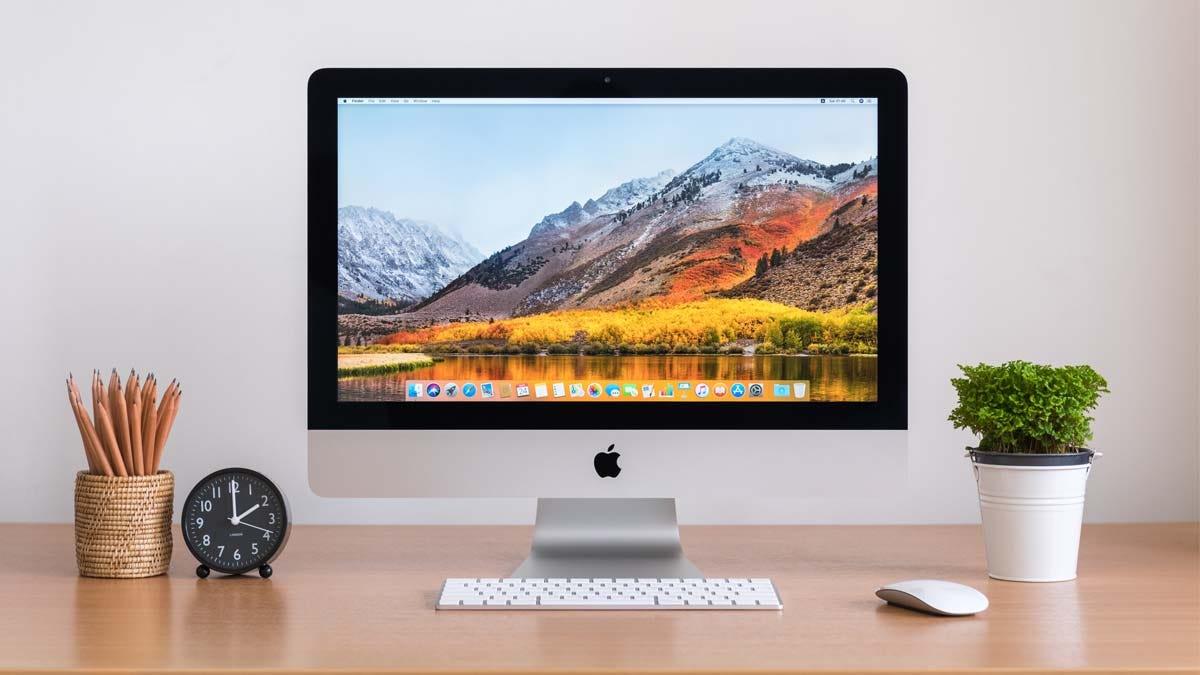
From a visual and everyday user perspective, the difference between Windows and macOS is noticeable from the very first minute of use . Both have improved significantly over the years, but they still rely on very different approaches.
On macOS, the interface is based on a fixed menu bar at the top of the screen and a Dock for applications. The design is clean, minimalist, and highly consistent across programs , making it easy for even novice users to become comfortable in a short time. Features like Mission Control, multiple desktops, and Spotlight make it easy to organize windows and quickly find files and apps.
Windows, especially in Windows 10 and Windows 11, has refined its appearance to make it more modern, but it retains very familiar elements such as the Start menu and the taskbar . In Windows 11, the Start button is centered by default, with rounded icons and smoother animations. Microsoft's greatest strength here is flexibility: users can move, change, and customize almost everything to their liking.
This flexibility has another side: Windows tries to encompass mouse, keyboard, touchscreen, and digital pen simultaneously . This offers many possibilities, but it can also lead to inconsistencies, especially with older programs that weren't designed for touch interfaces and sometimes seem like they're from another era.
In contrast, macOS takes a much stricter approach: everything is designed to be used with a keyboard, mouse, or trackpad , with a highly refined array of multi-touch gestures. The overall feeling is one of a homogeneous system where almost all applications follow the same design guidelines. The price of this consistency is that you'll have less room to customize the interface to your liking if you enjoy tinkering with every detail.
Hardware and compatibility: variety versus absolute control
If there's one thing that defines the Windows and macOS experience, it's how they interact with hardware. They are two radically different models.
Windows can be installed on computers from countless manufacturers: HP, Lenovo, Dell, ASUS, Acer, and many more. This means you can find Windows PCs for under €300 and professional workstations for several thousand euros . You can also build your own PC from parts, upgrade components whenever you want, and choose from a wide range of accessories, from mice and keyboards to graphics cards and specialized monitors.
On macOS, the opposite is true: the system is only officially available for Mac computers, such as the iMac, Mac mini, MacBook Air, and MacBook Pro. Apple designs the hardware and software as a closed system , with very little room for internal upgrades. The advantage is that the system is optimized down to the last detail for those components, resulting in very stable performance and a highly consistent experience across the entire product range.
This controlled approach has made even more sense with the move to Apple Silicon (M1, M2 chips, etc.), where the integration between the processor, graphics, and operating system is very tight . The result is spectacular energy efficiency and very solid performance even in demanding tasks, but you're still limited to the hardware Apple chooses to sell.
It is possible to install macOS on a standard PC (the famous "Hackintosh"), but besides violating Apple's license , the process is complex and the performance is never as seamless as on a genuine Mac. In practice, if you want to use macOS, the logical thing to do is buy a Mac.
Software, applications and games: massive ecosystem vs more select catalog
In terms of program compatibility, Windows still has a clear advantage , although the gap has been narrowing in some areas.
On Windows you'll find practically everything: business software, highly specialized professional tools, most office suites, thousands of utilities, and the bulk of the video game catalog . Platforms like Steam, Epic Games Store, and Xbox Game Pass are optimized for Windows, and most AAA titles are released with this platform in mind.
For years, macOS had a reputation for having fewer apps and games. However, its catalog has grown considerably. The Mac App Store and direct distribution by developers offer a good selection of professional apps for video editing, graphic design, music production, and development. Programs like Final Cut Pro and Logic Pro are highly optimized for Mac and have few direct equivalents on Windows. You can learn more about which systems are most used in business environments in the section on business operating systems.
In the realm of office software and general applications, many tools are now cross-platform : browsers like Chrome or Firefox, suites like Microsoft 365, services like Slack and Zoom, and progressive web applications function identically or nearly identically on both systems. The difference lies in very specific niches: certain enterprise management programs or legacy solutions only work on Windows, while developing apps for iPhone and Mac absolutely requires macOS.
When it comes to gaming, the picture remains clear: if you want to play almost everything that comes out, Windows is the safe bet . There are games for Mac, yes, but the selection is smaller and support usually arrives later or with limitations. Many gamers opt for a Mac for work and a Windows PC just for gaming, or they simply go for Windows for everything if gaming is a priority.
System security, stability and maintenance
Security is one of the most frequently cited arguments in this comparison. Traditionally, macOS has been perceived as a more secure and stable system than Windows , but the context has changed over the years.
For a long time, Windows' enormous market share made it a prime target for viruses, Trojans, and all kinds of malware. Installing third-party antivirus and additional security tools was almost mandatory , sometimes impacting performance and resource consumption. With improvements to Windows Defender and frequent security updates , the situation has improved considerably, although it remains a more vulnerable system than macOS.
Apple, on the other hand, opted from the beginning for a more closed approach: mechanisms such as Gatekeeper, FileVault encryption, and application signing reduce the risk of malware installation. Furthermore, the smaller user base compared to Windows has historically made macOS less profitable for attackers to target.
Today, however, Macs are no longer invisible to malware. The growing popularity of macOS has brought with it an increase in interest from cybercriminals . Although massive attacks like those on Windows are still less common, it's unwise to assume a Mac is "invulnerable" and completely disregard good security practices.
Regarding system maintenance, Apple focuses on automating almost everything: cleaning, optimizations, and many maintenance tasks run in the background , requiring minimal user intervention. Windows, on the other hand, offers more control over when and how updates occur, but this also means being more attentive to regular cleanups, disk space management, driver updates, and other basic maintenance tasks.
Ecosystem, integration, and AI assistants
Beyond the operating system itself, the experience you get with Windows or macOS depends heavily on the surrounding ecosystem and how your devices communicate with each other.
Apple offers a very closed but extremely well-integrated environment: if you have an iPhone, an iPad, an Apple Watch, or AirPods, macOS becomes the perfect command center . Handoff lets you start a task on your iPhone and continue it on your Mac, AirDrop makes it easy to send files between Apple devices in seconds, and iCloud syncs photos, notes, passwords, and documents with virtually no user input.
Windows, on the other hand, doesn't control hardware in the same way, but it offers very broad compatibility with all kinds of devices and services . Furthermore, Microsoft is increasingly integrating cloud-based and artificial intelligence features, such as synchronization with Android mobile devices, the use of OneDrive, and the presence of web and progressive web applications within the system.
In the field of AI, the difference is also significant. Windows 11 incorporates Copilot, an artificial intelligence assistant far more ambitious than traditional assistants . Copilot not only answers questions, but can also summarize long documents, help troubleshoot system problems, analyze images, and even assist with programming using GitHub Copilot, all with deep integration into the operating system itself.
On macOS, the built-in assistant is Siri, with a more conservative approach focused on basic commands : opening applications, searching for files, dictating text, managing reminders, or looking up simple information. Its greatest strength is its consistent presence across all Apple devices, with a strong emphasis on privacy and local data processing whenever possible.
This difference in approach also reflects the philosophy of each company: Microsoft pushes AI as a central element of the Windows experience , while Apple prefers to introduce gentler changes and prioritize user control over their data, even at the cost of moving somewhat more slowly in spectacular features.
Performance, efficiency, and upgrades
In day-to-day use, performance depends on both the system and the hardware. Windows can be extremely powerful on the right machine , but its interaction with a wide variety of components makes the results more variable.
A well-built PC with Windows 11, a fast SSD, a good amount of RAM, and a capable graphics card can significantly outperform many Macs in raw tasks like gaming or intensive computing . However, less powerful or poorly configured machines may experience sluggishness, occasional crashes, or require fine-tuning to keep everything running smoothly.
macOS is in a league of its own: designed for only a few models, the system makes better use of resources without requiring extensive manual configuration . With Apple Silicon, energy efficiency has taken a significant leap: MacBooks with M1 or M2 chips can offer many hours of battery life with very solid performance, something especially appreciated by those who work on the go.
Regarding updates, Windows offers more control: you can postpone installations, choose schedules, and decide which patches to apply , although this comes at the cost of spending time monitoring the process. macOS, on the other hand, typically offers more automated, faster, and consistent updates across all compatible devices, significantly simplifying maintenance but at the expense of some control.
In both cases, the new versions bring interesting new features: Windows is moving towards stronger AI integration and compatibility with Android apps and progressive web applications , while macOS is reinforcing its optimization for Apple Silicon and its integration with iPhone and iPad.
Price, user profile, and recommended use cases
One of the most important factors in the decision is, of course, budget. Windows offers options for almost every budget , from very basic laptops to high-end gaming rigs or professional workstations.
With Windows, you can buy an inexpensive laptop for basic tasks, invest in a powerful desktop for video editing and gaming, or upgrade an old PC by installing a modern version of the operating system. You can even purchase just a Windows license and install it on a computer you build yourself , giving advanced users a great deal of flexibility.
Macs, on the other hand, are positioned in a higher price segment from the outset. The initial investment is greater, but in return you get a well-built machine with excellent battery life and a long lifespan . Many professional users find it worthwhile to pay more upfront for several years of stable use with minimal performance degradation.
Regarding the type of user, there are certain profiles for which each system tends to be a better fit:
- Beginner usersThey tend to adapt to macOS sooner, due to its more uniform interface and the lesser need to "touch" internal settings.
- Business usersThey tend to prefer Windows because of its enormous compatibility with enterprise software, legacy systems, and corporate tools.
- GamersIt is practically inevitable to recommend Windows, both for its game catalog and for its hardware support and technologies like DirectX.
- Creatives and developersIn video editing, music, design and development for iOS/macOS, many professionals especially value macOS's Unix-based environment and the stability of the Apple ecosystem.
- Students or those on tight budgetsThey often lean towards Windows because of the wide variety of affordable equipment and the ease of finding deals.
It's also important to consider the learning curve: if you've been using Windows for years, switching to a Mac can be a bit of a shock at first , and vice versa. Sometimes, the most efficient approach isn't so much changing systems as learning to get more out of the one you already know.
In many cases, the final decision isn't determined by a single factor, but by a combination of priorities: what software you need, how much you want to spend, whether you'll be gaming, whether you already use an iPhone, whether you value customization or simplicity, and how much time you want to dedicate to system maintenance. Both Windows and macOS have matured into very solid options ; the key is choosing which one best suits your work, gaming, and daily workflow.
