- Docker Compose simplifies local environments and testing; Kubernetes orchestrates workloads at scale with autoscaling, rolling updates, and self-healing.
- Compose operates on a single host and with Docker; K8s supports multiple runtimes, multi-node clusters, and cloud deployments.
- Kompose accelerates the migration from Compose to Kubernetes; it supports providers, alternative objects, and tags to fine-tune Services.
- Use cases: Compose for dev/CI; Kubernetes for production, IoT/edge, big data/ML and multi/hybrid cloud scenarios.
If you work with containers, sooner or later the big question arises: Docker Compose or Kubernetes? Both tools are used in the containerized application lifecycle , but they aren't designed to solve the exact same problems or in the same context. In this article, we compare them in depth, with practical examples, real-world scenarios, and tips for migrating from one to the other smoothly.
Beyond the technological posturing, the decision impacts daily operations: deployment times, scalability , resilience, security, and costs . It also affects typical data engineering use cases—pipelines, databases, streaming, batch processing, data formats, and governance—where orchestration makes all the difference in productivity.
What are Docker and Docker Compose (and what are they really for)?
When we talk about Docker, we're really talking about an ecosystem: Docker Engine, Docker Hub, Dockerfile, Docker Compose … The engine creates and runs containers from images; the Hub makes it easy to share them; and Compose allows you to define several pieces of the stack in a YAML file to launch them with a single command.
Compose was created to save us from endless scripts and isolated commands. With a single docker-compose.yml file, you describe services, networks, and volumes , and you get everything up and running with a single "docker compose up" (or "docker-compose up" in V1). Ideal for local development, integrated testing, demos, or CI environments.
A canonical example of Compose might be this, with an API and a Postgres database. Notice how dependencies, variables, and ports are declared in a readable block:
version: '3.8'
services:
  db:
    image: postgres:latest
    restart: always
    environment:
      - POSTGRES_USER=postgres
      - POSTGRES_PASSWORD=postgres
      - POSTGRES_DB=postgres
    ports:
      - '5432:5432'
    volumes:
      - db:/var/lib/postgresql/data
    networks:
      - mynet

  my-api:
    container_name: my-api
    build:
      context: ./
    image: my-api
    depends_on:
      - db
    ports:
      - '8080:8080'
    environment:
      DB_HOST: db
      DB_PORT: 5432
      DB_USER: postgres
      DB_PASSWORD: postgres
      DB_NAME: postgres
    networks:
      - mynet

networks:
  mynet:
    driver: bridge

volumes:
  db:
    driver: local
To manually scale in Compose, you can use the service's scaling option. In Compose V2, it's common to do this with `up --scale` (in V1 there was `docker-compose scale`):
docker compose up -d --scale my-api=3Beware of the limitations: Compose is designed for a single host , it does not load balance between nodes or autoscaling, and updates are usually manual recreations of containers with "build" and "up -d".
What is Kubernetes and what does it offer over Compose?
Kubernetes (K8s) is a distributed container orchestration platform. It manages deployments at scale across multi-node clusters , with concepts such as Pods, Deployments, and Services to operate production workloads.
In Kubernetes, you don't manage individual containers; you manage Pods (which can contain one or more containers). The control plane schedules where each Pod runs , exposes services, distributes traffic, scales horizontally, and monitors the health of workloads.
A basic deployment might look like this, with 3 replicas of a web service. Define templates, labels, and exposed ports :
apiVersion: apps/v1
kind: Deployment
metadata:
  name: web-deployment
spec:
  replicas: 3
  selector:
    matchLabels:
      app: web
  template:
    metadata:
      labels:
        app: web
    spec:
      containers:
        - name: web
          image: my-web-image
          ports:
            - containerPort: 8000
To expose it with load balancing, a LoadBalancer service is typical in the cloud. The selector matches the Pod's labels to route traffic.
apiVersion: v1
kind: Service
metadata:
  name: web-service
spec:
  selector:
    app: web
  ports:
    - protocol: TCP
      port: 80
      targetPort: 8000
  type: LoadBalancer
In production, Kubernetes shines with capabilities such as high-performance automation (HPA), rolling updates, and self-recovery. HPA adjusts replicas based on metrics (e.g., CPU usage) :
apiVersion: autoscaling/v2beta2
kind: HorizontalPodAutoscaler
metadata:
  name: web-hpa
spec:
  minReplicas: 1
  maxReplicas: 10
  scaleTargetRef:
    apiVersion: apps/v1
    kind: Deployment
    name: web-deployment
  metrics:
    - type: Resource
      resource:
        name: cpu
        target:
          type: Utilization
          averageUtilization: 50
Container health is monitored with probes; if they fail, K8s restarts the container. This is the basis of "self-healing" :
apiVersion: v1
kind: Pod
metadata:
  name: web-pod
spec:
  containers:
    - name: web
      image: my-web-image
      ports:
        - containerPort: 8000
      livenessProbe:
        httpGet:
          path: /healthcheck
          port: 8000
        initialDelaySeconds: 15
        periodSeconds: 15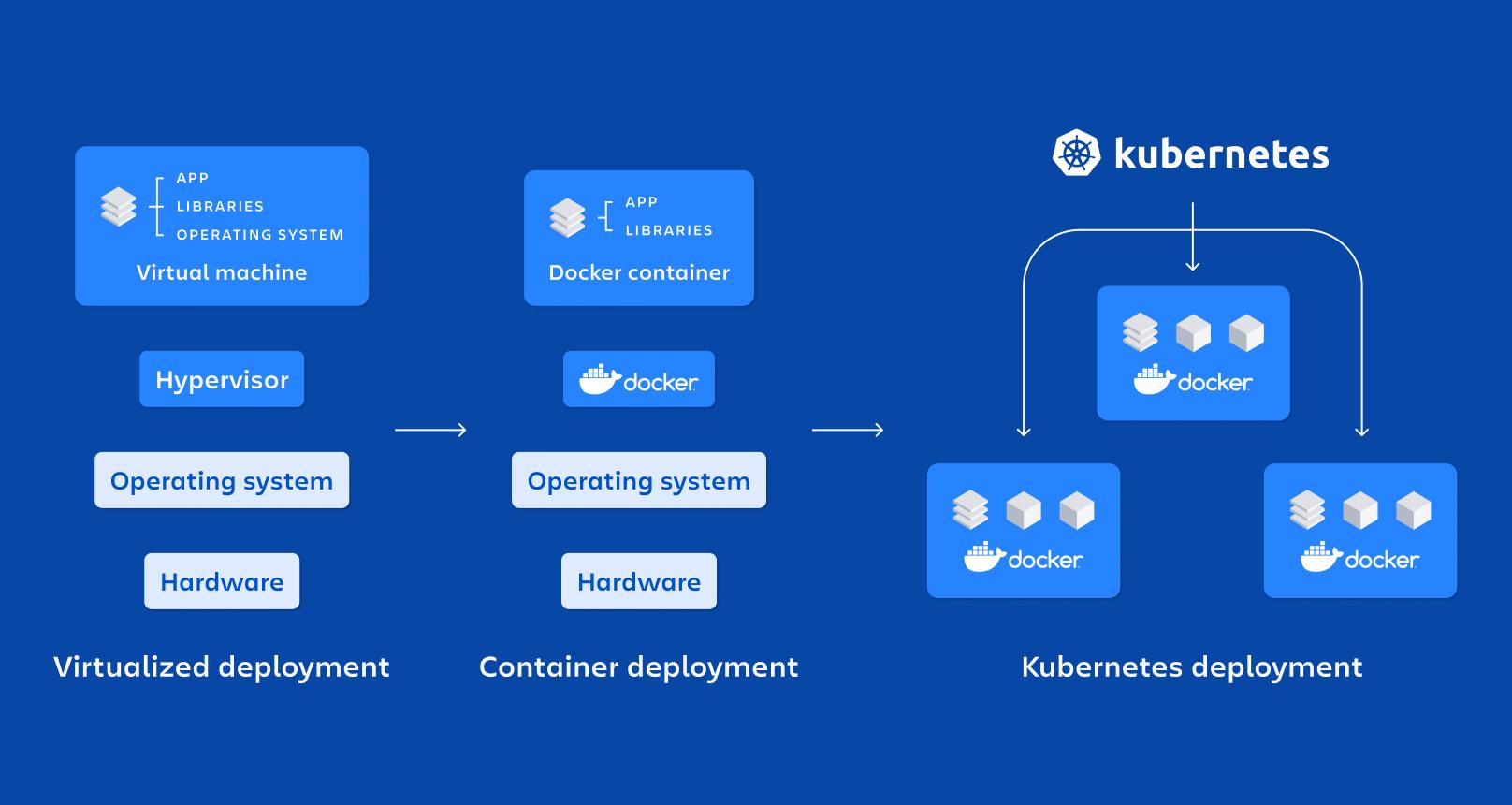
Key similarities and differences (the essentials without beating around the bush)
What they have in common: they work with containers and define deployments via YAML. Both solutions are useful for developers and operators , and complement each other very well in a dev→prod workflow.
The crucial difference lies in the scope: Compose is Docker-centric and single-host ; Kubernetes supports multiple runtimes and multi-node clusters, with direct integration into clouds and managed services.
More important contrasts: Kubernetes offers autoscaling, rolling updates, and self-healing ; Compose does not. Kubernetes abstracts with Pods; Compose interacts directly with Docker containers.
Furthermore, Kubernetes includes Jobs and CronJobs for one-off or scheduled tasks. This avoids system cron jobs and extra containerized processes , keeping the platform as the natural place to define automations.
On-premises, Compose wins in terms of speed and simplicity. For scaling to hundreds of nodes or multi-cloud environments, Kubernetes is the logical choice . Compose can leverage Docker Swarm for multi-host deployments, but its adoption rate and capabilities don't match the ecosystem and maturity of Kubernetes.
Why you need orchestration (and when each one fits best)
A good orchestrator gives you: unified provisioning and deployment, scheduled startups, communication between services , load balancing, and added security through additional governance over each service.
Compose covers the basics in a streamlined and readable way, making it a great tool for development, testing, and demos. However, its limitations become apparent when you need multiple nodes, native load balancing and autoscaling , or incremental deployments without downtime.
Kubernetes, on the other hand, is "the platform" when the load grows: multi-node, autoscaling, high availability and a gigantic ecosystem , with native support on AWS, Azure, GCP and managed options.
Real-world use cases (dev, data, and more)
Compose shines in: reproducible local environments, E2E testing, CI/CD, and training . Defining the entire stack in YAML and launching it with a single command eliminates a lot of noise.
Kubernetes is ideal for: production applications, IoT and edge computing, big data and machine learning , and multi/hybrid cloud environments. It manages distributed workloads where latency, resilience, and observability matter.
In data engineering, K8s is perfect for streaming and batch pipelines, databases, queues, and analytical engines , with per-pod resource control and automatic scaling on peaks.
If your project is small and fits on a single host, Compose will do the trick without any hassle. But when your user base grows and you need serious fault tolerance and load balancing , it's time to consider Kubernetes.
Networking, scaling, and upgrades: a practical comparison
Compose creates a network per project and resolves names per service. Communicating with containers is trivial and secure within the project , but external load balancing and multi-hosting are not native features.
In Kubernetes, Services offer DNS discovery and load balancing within the cluster; outward you can use LoadBalancer, NodePort or Ingress to route HTTP/S traffic.
Scaling: Compose scales manually and only on one host. Kubernetes scales horizontally with HPA and programmatically with metrics and/or events. It can also grow to more nodes if the cluster allows it.
Updates: In Compose, these are usually manual recreations. K8s does rolling updates with progress control (kubectl rollout) and the ability to revert if something goes wrong, minimizing impact.
Self-healing: Compose can restart containers, but it doesn't resolve host or runtime crashes. Kubernetes relocates Pods to healthy nodes , transparently to users.
Developer productivity and operational experience
Compose is a thin layer on top of Docker. It's quick to learn and its feedback loop is immediate , perfect for iterating.
Kubernetes adds new concepts (Pods, Deployments, Services, Ingress, ConfigMaps, PVCs, etc.). There is a learning curve, but in return you gain fine-grained control over deployments, security, observability, and scalability.
In terms of compatibility, Compose is “Docker-first”. Kubernetes supports various runtimes and integrates with cloud providers , which is key for companies with multicloud or hybrid strategies.
Migrating from Docker Compose to Kubernetes without going crazy
When to migrate? When your application is no longer "small", you need multi-node, observability, scalability and high availability , or you are asked for canary and blue/green deployments.
Typical challenges: mapping the service network, designing Storage with PV/PVC , separating configuration into ConfigMaps/Secrets, and reviewing the health and readiness patterns of each container.
The architecture also needs to be reconsidered: the Pod as the deployment unit , services to expose endpoints, and resources per container (CPU/Mem) so that the scheduler can do its job.
Kompose: from Compose to K8s in a few steps
Kompose converts docker-compose.yml files into Kubernetes or OpenShift manifests. It's the most direct way to start a migration without manually rewriting all the YAML.
Before you begin, you need a Kubectl cluster and kubectl configured. At least two worker nodes (not control planes) are recommended if you're testing anything stateful. Check your version with `kubectl version`.
Installation: The recommended method is to download the binary from the latest GitHub release. You can also use a tarball, Homebrew on macOS, or "go get" (this last option uses the master with changes in development).
Basic conversion: navigate to the docker-compose.yml directory and run :
kompose convert
kubectl apply -f <archivos-generados>
Kompose generates Deployments and Services by default. The log usually lists each file created , and once applied, you will see Deployments and Services "created" in the cluster.
Access: If you're using Minikube, you can easily expose or query services. In the cloud, check "LoadBalancer Ingress" to get the public IP address of the LoadBalancer service; with NodePort, you'll have an open port on the nodes.
Cleanup: When you finish the test, remove the applied resources. Keep your cluster clean to avoid conflicts between iterations.
Kompose advanced options (providers, objects, and tags)
Kompose supports Kubernetes and OpenShift. If you don't specify "--provider", it uses Kubernetes by default . With OpenShift, it can generate DeploymentConfigs and ImageStreams, and even BuildConfigs if you use build directives.
It also supports various outputs: JSON with "-j", ReplicationControllers, DaemonSets, or Helm Charts . The "--replicas" flag lets you change the number of replicas in RCs; for Helm, it generates the basic chart structure.
Kompose-specific tags within the compose process influence conversion. For example, you can define the Service type or whether to expose an endpoint through an Ingress/Route.
| Golden Label | Values |
|---|---|
| kompose.service.type | nodeport/clusterip/loadbalancer |
| kompose.service.expose | true / hostname |
Details to keep in mind: names with “_” are converted to “-” (K8s does not allow underscores) and, if a service uses volumes, the deployment strategy changes to “Recreate” to avoid conflicts with multiple writers.
Kompose supports multiple versions and files
Kompose supports Compose V1, V2, and V3 (with limited support for 2.1 and 3.2 due to their experimental nature). If you pass multiple docker-compose files at once, they are merged , and the common elements are overwritten by the latest one, just as you would in an override.
During the Kubernetes conversion, you'll see messages like "WARN Unsupported key build – ignoring" if there are incompatible keys. Don't worry, the tool will continue with what it understands and leave the rest for later manual adjustment.
Beyond Kompose: Move2Kube and manual migration
If you need more control, there are tools like Move2Kube that analyze your Compose and generate more fine-tuned Kubernetes artifacts. They are useful when you want to adapt business patterns or templates from your platform.
Manual migration is perfectly valid and almost always recommended after the initial migration. Typical steps include: converting services to Deployments/StatefulSets , networks to Services/Ingress, and volumes to PV/PVC with storage classes.
A minimal example of converting a Compose service to Deployment might look like this: transfer ports, image, and labels to the Pod template:
# docker-compose.yml
version: '3'
services:
  web:
    build: .
    ports:
      - '8000:8000'
    depends_on:
      - db

# Kubernetes
apiVersion: apps/v1
kind: Deployment
metadata:
  name: web-deployment
spec:
  replicas: 1
  selector:
    matchLabels:
      app: web
  template:
    metadata:
      labels:
        app: web
    spec:
      containers:
        - name: web
          image: my-web-image
          ports:
            - containerPort: 8000
For state (databases, queues), consider StatefulSets and PersistentVolumes. Not everything that went "together" in Compose should go in the same Pod ; separate responsibilities and use Services to communicate between components.
Data scenarios: streaming, batch, and governance
In complex data pipelines, K8s fits like a glove: Jobs for batch processes, CronJobs for time windows , Deployments for APIs and operators for systems like Kafka, Spark or Flink.
For streaming and databases, community operators and charts facilitate launch. The Service Mesh network and resource control ensure more predictable latencies and SLOs compared to a single-host solution.
In data governance and security, Kubernetes offers namespaces, policies, and RBAC control for auditing and separating environments. This is a practical advantage over Compose's local approach.
Best practices and small operational tricks
In Compose: keep your YAML small and modular ; use environment variables and .env files; document ports and dependencies; and reflect in CI what you run locally.
In Kubernetes: define CPU and memory requests/limits , use Readiness/Liveness probes, separate configuration into ConfigMaps/Secrets, and apply appropriate deployment strategies to each service.
For Kubeck's updates: use `kubectl set image` and `kubectl rollout status` to monitor progress and roll back if something goes wrong. This will prevent downtime in production.
If you need specific jobs in Compose, you can simulate them, but in Kubernetes it's cleaner with CronJobs/Jobs ; you don't clutter containers with extra processes or host crons.
Quick FAQ to avoid confusion
Does Compose replace Kubernetes? No. Compose simplifies multi-container stacks on a single host; Kubernetes orchestrates at cluster scale with high availability.
Is Compose still used? Yes, very much so. It's the ideal development and testing tool for setting up complete environments with just a couple of commands.
Is Kubernetes "better" than Docker? They are different things: Docker is the container platform ; Kubernetes orchestrates them in a cluster and adds advanced operations.
Can I bring my Compose to Kubernetes without rewriting it manually? Yes, with Kompose or Docker Desktop integration. It gives you a quick first step that you can then refine.
Fine details: programming, OpenShift, and alternative conversions
K8s is not just continuous deployment: Jobs and CronJobs cover one-off or planned tasks without you having to manage system crons.
In OpenShift, Kompose can generate DeploymentConfigs and ImageStreams, and even BuildConfigs if Compose had a build associated with a Git repository. The “--build-repo” and “--build-branch” flags are used to adjust the source.
If you want a different output, Kompose allows DaemonSets, ReplicationControllers, or Helm Charts instead of the default Deployments and Services. It can also generate JSON, not just YAML.
Compatibility, warnings, and minor issues
Compose V1/V2/V3 are supported by Kompose (with limitations in 2.1 and 3.2). Unsupported keys are ignored with a WARN , leaving room for manual adjustments.
If your service has volumes, Kompose changes the strategy to "Recreate" to avoid concurrency on the same volume . This is normal for stateful services.
Underscores in names are converted to hyphens. This is a Kubernetes restriction on object names , so make sure you name them correctly in Compose to avoid surprises during conversion.
To access from outside, check the Service type: ClusterIP (internal), NodePort (port on nodes), or LoadBalancer (public IP in the cloud). With Ingress, you'll have clean HTTP/S routes and centralized TLS.
If you test in Minikube, commands like “minikube service <svc> –url” will return a quick URL . In Cloud, look at the “LoadBalancer Ingress” field when describing the Service.
One interesting point: within the community, you'll find references to salaries for Kubernetes profiles and adoption rates close to 88% in production environments. Nothing unusual: it's the de facto standard.
To complete the picture, there's more to Kubernetes than HTTP: Service Mesh, operators, and CRDs extend the reach of Kubernetes. If you're coming from Compose, it's normal to feel overwhelmed at first, but that extra power translates into more robust operations.
Reset policies: useful equivalencies
Compose allows “restart: always/on-failure/no”. In Kubernetes, depending on the case, you will have individual Pods or controllers (Deployments or RC) with appropriate restart policies.
| docker-compose restart | Object in K8s | restartPolicy |
|---|---|---|
| «» / always | Controller (Deployment/RC) | Always |
| on-failure | Under | OnFailure |
| No. | Under | Never |
If in Compose you had "calculation" containers or ephemeral tasks (like a quick "pi"), simply implement it in K8s as a Job or CronJob with the appropriate policy and you're all set.
Choose Compose for fast local deployments and Kubernetes when your environment demands more power: multi-node support, autoscaling, seamless deployments, and true resilience . With Compose, Move2Kube, and a little care, the transition is smooth.
Ultimately, the choice depends on scale and complexity: Compose is a great fit for development, testing, and single-host stacks ; Kubernetes is the way to go for enterprise, multi-cloud deployments and teams that need advanced automation, high availability, and an ecosystem with thousands of integrations.
