- Agent Bricks, AI Playground, and MLflow cover everything from prototype to deployment with governance in Unity Catalog.
- ResponsesAgent brings streaming, multi-agent, and rich traces integrated with MLflow and AI Gateway.
- Deploying with deploy() creates secure endpoints, with real-time tracking and review.

Building AI agents in Databricks is no longer the exclusive domain of ultra-technical profiles: between visual environments like AI Playground , automation with Agent Bricks, and MLflow frameworks, you can now go from idea to prototype and from prototype to production without getting lost in the process. In this guide, we condense everything you need to create, evaluate, and deploy agents that call tools, query data, and integrate with Unity Catalog governance.
In addition to exploring the no-code approach and Python development, you'll learn how to package agents with MLflow (ChatAgent and ResponsesAgent) , register resources in the catalog, enable real-time monitoring, and scale using Model Serving. We also include a sample app built with React and FastAPI to seamlessly integrate your agent into an enterprise web interface.
Options for creating agents in Databricks
If you prioritize speed and simplicity, Agent Bricks provides an automated workflow for building high-quality, domain-aligned agent systems. You specify your use case and connect your Unity Catalog data ; the platform generates agent variants, optimizes with evaluation, and allows you to refine, all with built-in governance and security.
When you need fine-grained control and want to reuse familiar libraries, the code-based approach combines the Mosaic AI Agent Framework and MLflow . With Python, you can define agent logic, enable tool calls, perform detailed tracking, and ultimately package and deploy to production with the Databricks ecosystem.
If you already use third-party frameworks, there's native support for LangGraph/ LangChain , LlamaIndex , or custom Python implementations. Thanks to MLflow's model signatures and agent interfaces, you can plug them into the evaluation and monitoring capabilities without rewriting from scratch.
Want to prototype at lightning speed? With AI Playground, you choose the model and virtual machine, add tools to the LLM via a low-code interface, and chat to validate. Then, you export the agent to production-ready code and continue with the standard development lifecycle.
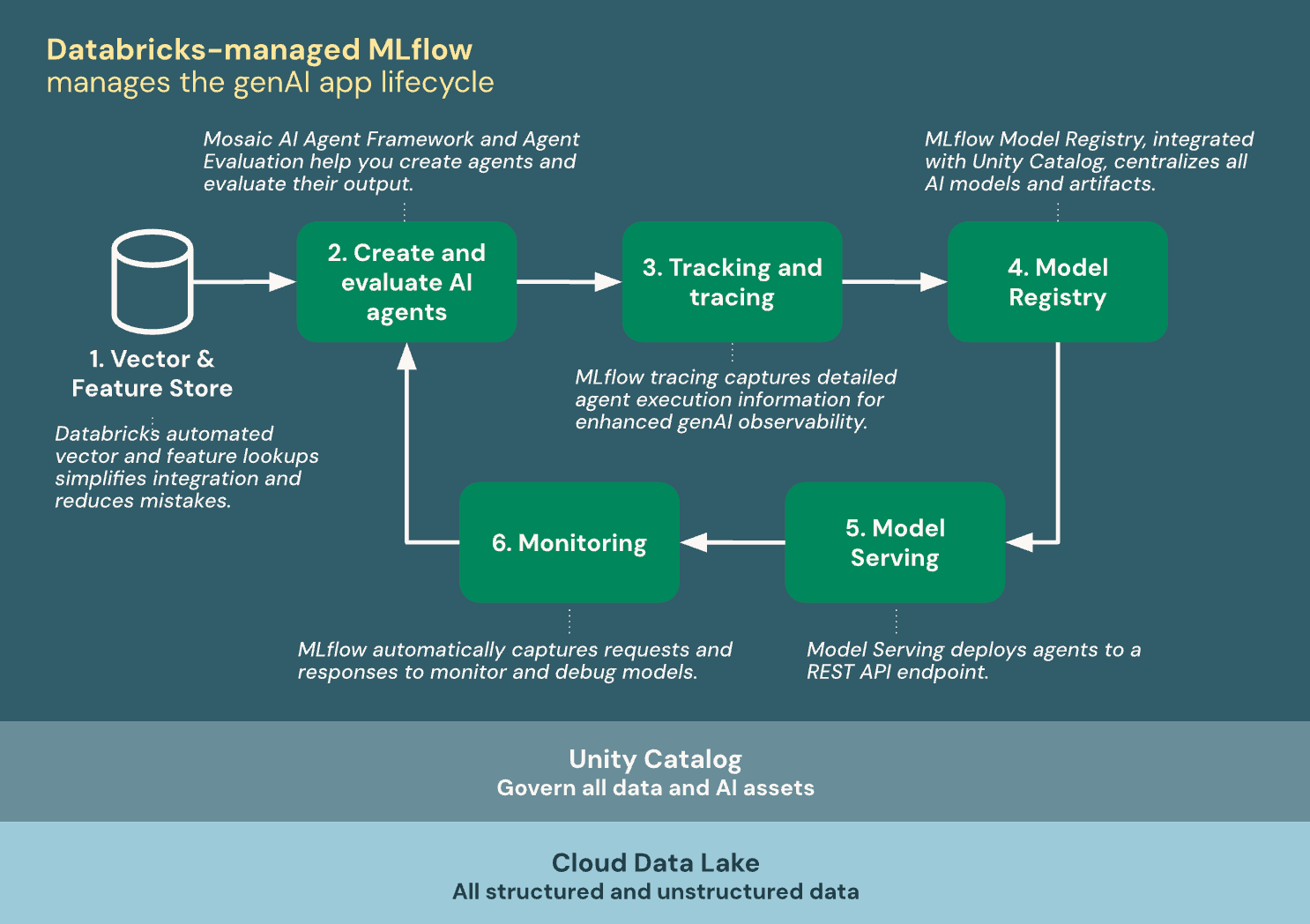
Model signatures and compatibility with platform features
Azure Databricks uses MLflow model signatures to describe the input and output schema of agents. Product features—such as AI Playground or assessment—require the agent to conform to one of the supported signatures to ensure interoperability.
If you follow the recommended approach when building the agent, MLflow automatically infers the compatible signature without any extra steps. Otherwise, verify that your implementation conforms to one of the signatures in the legacy schema for agent input and output, avoiding surprises when integrating with Databricks tools.
Quick Tutorial: First Agent with Mosaic AI Agent Framework
The goal is to create an agent that reasons with a LLM hosted at Databricks and be able to run tools, for example the built-in function system.ai.python_exec from the Unity Catalog to run Python code. Additionally, we will enable the tracking with MLflow for inspecting traces and diagnostics.
Basic workspace requirements: enable agent features and have access to Model ServingIn the runtime environment, install packages such as mlflow, databricks-openai and the agent packer (databricks-agent o databricks-agents(depending on the guide you follow and the version), and restart Python to load dependencies.
Define the connection to the model service using the OpenAI client that it exposes WorkspaceClient, active mlflow.openai.autolog() for automatic instrumentation, and records the available tools. Among them, system.ai.python_exec It serves as a stateless Python interpreter and allows the LLM to solve calculations or manipulate data during the dialogue.
With a function like run_agent(), you send the user's prompt to the chat endpoint (For example, a model like «databricks-claude-3-7-sonnet«and manage possible calls to tools returning the assistant messages and tool responses in a coherent list.
To test, run a query that requires code (e.g., calculating the 100th Fibonacci number ) and review both the wizard output and the MLflow traces logged in the associated notebook or experiment. This will allow you to refine the orchestration before packaging.
Packaged with MLflow and deployed in Model Serving
A recommended way to prepare the agent for production is by implementing the interface MLflow ChatAgentYou need a method predict() that accepts messages, calls your agent logic, and returns a ChatAgentResponse with the message list (including intermediate messages associated with tools, if applicable).
To facilitate servitude, consolidate all the code into a single Python file (for example, by using %%writefile quickstart_agent.py (if you're working on a laptop). In the final part, call mlflow.models.set_model() passing the instance of your class (e.g., QuickstartAgent) to establish the entry point of inference.
Register the agent in Unity Catalog with mlflow.pyfunc.log_model, including resources that you will need in production: the LLM model endpoint (e.g., DatabricksServingEndpoint) and the catalog functions that the agent will invoke (e.g., DatabricksFunction with system.ai.python_execThus, Databricks can Configure authentication for these resources when deploying.
Finally, use the Agent API to to deploy the model to a service endpoint: from databricks import agents y agents.deploy(model_name, model_version)When the endpoint starts, you will be able to Chat from AI Playgroundshare it with interested parties and start collecting feedback.
If you want to continue improving, Databricks offers guides for measuring agent quality , building agents with retrieval (RAG) on unstructured data and controlling multi-turn conversations, as well as alternatives with LangGraph, pure Python or OpenAI.
ResponsesAgent: The modern interface for production agents
Although ChatAgent It works well, MLflow recommends it today ResponsesAgent For serious agents. This interface is compatible with the scheme Responses from OpenAI and allows the integration of agents from any framework with Databricks' capabilities (registration, tracking, evaluation, deployment, and observability) without friction.
Key advantages: native support for systems multi-agent, exit mode streaming, complete history of messages and tool calls, confirmation of tool calls and long-lasting tools. In addition, it offers typed interfaces In Python, automatic signature inference, automatic tracking of predict y predict_stream and improved inference tables via AI Gateway.
Installation requirements for this approach: databricks-agents 1.2.0+, mlflow 3.1.3+ y Python 3.10 + (using Serverless or Databricks Runtime 13.3 LTS+). Databricks also recommends the following packages: AI Bridge for common integrations.
Useful integrations: databricks-openai (OpenAI), databricks-langchain (LangChain/LangGraph), databricks-dspy (DSPy) and databricks-ai-bridge (Agents in pure Python). With these pieces you can build anything from simple agents to complex pipelines with recovery and tool call.
If you already have a built-in agent, wrap it in a class that inherits from mlflow.pyfunc.ResponsesAgent. Implement predict to convert the inputs and outputs to ResponsesAgent schemaFor streaming, rely on predict_stream, emitting deltas and a final event response.output_item.done Please add the complete answer.
Regarding streaming errors, Mosaic AI propagates the failure along with the last token within databricks_output.errorYour client should capture and display it correctly, improving the depuration experience.
Recovery systems, custom inputs, and traceability
Many agents use recoverers for RAGs over vector indices. If your retrieval spans expose a different scheme, you can map it with mlflow.models.set_retriever_schemadeclaring primary_key, text_column, doc_uri and other columns. Thus, AI Playground will show Links to sources recovered and the evaluation will apply relevance scorers automatically.
In cases where your agent requires additional information (for example, client_type o session_id), use custom_inputs and returns metadata in custom_outputs that should not contaminate the chat history. Both AI Playground and the review app allow you to enter custom_inputs from the UI.
Deployment with deploy(), requirements and automated actions
To publish your agent on Mosaic AI Model Serving, use the function deploy() of the Python API. In MLflow 3, install mlflow >= 3.1.3 y databricks-agents >= 1.1.0 (if you deploy outside of notebooks). In MLflow 2.x, the minimums change (for example, mlflow >= 2.13.1 y databricks-agents >= 0.12.0Make sure Register the agent in the Unity Catalog before deploying.
Call to deploy() build a scalable endpoint with automatic balancing, configure the secure authentication for Databricks resources (vector indexes, catalog functions) —checking owner permissions—, and activates the review application for collaboration with stakeholders.
It also enables real-time monitoring in MLflow (with traces in the active experiment and in inference tables). In MLflow 3, production monitoring with automatic quality assessment can be configured; REST requests and comments are logged in inference tables (using modern feedback APIs).
To customize, pass arguments to deploy() , the scale_to_zero_enabled=Truereducing costs after downtime at the expense of higher latency on the first request. Additionally, you have utilities for list, get and delete deployments via the Agent API.
Good practices for state, configuration, and execution patterns
Model Serving is distributed: avoid local caches and assumes that different replies can handle different turns in a conversation. It reconstructs the state from the dictionary of ResponsesAgentRequest in each predict and design the state to be thread-safe.
Initializes the state within predict and not in the agent constructor, since a single replica could handle conversations from different users. This prevents information leaks and concurrency conflicts in high-throughput environments.
Parameterize the agent's behavior with ModelConfig (dictionary or YAML). Define, for example, model_serving_endpointLLM parameters and prompt templates; load that configuration into development and promote it to production without touching the code.
Avoid introducing event loops or asynchronous frames on the agent server: Databricks handles concurrency internally . Use synchronous code or callbacks; otherwise, you may encounter errors such as "This event loop is already running" and erratic behavior.
Agent Bricks: "no code" automation to accelerate value
Agent Bricks, introduced in 2025, offers a seamless agent creation workflow that requires no coding . You input the task in natural language, connect your data, and the platform selects models, generates synthetic data , evaluates, and refines the process until it delivers a production-ready agent with Unity Catalog governance.
Among its advantages are end-to-end automation , scalability in Databricks —with endpoints that can scale to zero after 3 days of inactivity—, usage and cost analytics on Lakehouse and ready agent types (information extraction, custom LLM , knowledge assistant and multi-agent supervisor for complex orchestration).
Limitations include the fact that the generated code is not currently downloadable , which reduces deep customization, and the template catalog is geared towards organizations already integrated with Lakehouse and Unity Catalog. Some users also find the cost metrics lacking granularity .
Examples, multi-agent and stateful agents
In the official documentation, you'll find notebooks with OpenAI (simple chat and tool calls, for both Databricks and OpenAI hosted models), LangGraph (tool invocation), and DSPy (tool calls in a single turn). These are excellent foundations for extending the functionality with custom tools and quality assessments.
To orchestrate multiple specialists, you can set up cooperating systems using tools like Genie. And if you're interested in conversation memory, there's support for stateful agents that allow checkpoints and chat thread persistence.
In the official documentation, you'll find notebooks with OpenAI (simple chat and tool calls, for both Databricks and OpenAI hosted models), LangGraph (tool invocation), and DSPy (tool calls in a single turn). These are excellent foundations for extending the functionality with custom tools and quality assessments.
Apps on Databricks: UI with React and backend in FastAPI
Databricks Apps provide a robust platform for delivering rich interfaces without setting up external infrastructure. They integrate natively with Databricks SQL, Unity Catalog , Model Serving, and Jobs, and inherit the platform's security and compliance controls.
A very practical pattern is to create a frontend with React (supporting streaming, message rendering, and Markdown UX) and a backend with FastAPI that acts as a bridge to the agent endpoint. The backend routes the user's request to the model service and returns the structured response to the client.
In FastAPI, the assembly order of sub-applications is important: app.mount("/api", api_app) directs API routes (for example, /api/chat) and app.mount("/", ui_app) It serves the static files from the React build in the root directory. This scheme maintains clarity of routes and separates UI from endpoints.
Configure environment variables (e.g., SERVING_ENDPOINT_NAME or the FQN of the agent model in Unity Catalog) from the app definition in Databricks. Compile the frontend (npm run build), synchronizes files, declares dependencies (requirements.txt) and starts with Gunicorn + Uvicorn workers for ASGI.
Real case: chatbot for manufacturing operations
In Manufacturing Operations Management (MOM) scenarios, a Databricks chatbot can assist production managers with bottleneck analysis , inventory tracking, and report generation. Functions are exposed as tools in the Unity Catalog (via SQL or Python), and the agent invokes them based on the context.
Examples: a function identify_bottleneck_station It runs queries in Databricks SQL to detect the stage that causes the most delays; another, check_inventory_levelsIt returns real-time stock. The agent can also send e-mails, produce reports and perform sentiment analysis, all orchestrated with tool-calls.
Deploying the Model Serving endpoint acts as the standard backend . The React app consumes this endpoint, displaying real-time responses with a polished user experience and supporting token streaming when enabled in your ResponsesAgent.
Migration from ChatCompletions and compatibility
If your legacy agent uses OpenAI's ChatCompletions API , you can migrate to ResponsesAgent with a container that translates incoming/outgoing messages and, optionally, maps streaming deltas to ResponsesAgentStreamEvent . This modernizes telemetry and observability without rewriting the core logic.
For listing and managing deployments, the Agent API lets you list existing deployments, retrieve a specific deployment (by name and version), and remove endpoints you no longer need. Remember to manage external resource credentials using environment variables and secrets.
Databricks offers a complete path: from ideation with AI Playground or automation with Agent Bricks, through code development (Mosaic AI, MLflow, LangGraph, DSPy), to packaging, registration in the Unity Catalog , deployment with deploy() , and production monitoring. With best practices such as proper model signatures , secure state in distributed environments, and parameterized configuration, you can deliver reliable, governed agents ready for integration into web applications on the platform.
