- Based on Debian 13 “Trixie”, up-to-date desktops (Xfce 4.20, KDE 6.3.6 with Wayland, Fluxbox 1.3.7) and LTS/AHS kernels.
- Updated installer with reinstallation preserving /home, automatic zram and Secure Boot support in standard editions.
- Updated MX Tools: MX Tools in Qt6, mx-updater replaces apt-notifier, deb822 (.sources) and more powerful Cleanup.
- Dual systemd/SysVInit and beta warnings: minor visual glitches, encryption limitations, and AHS without Secure Boot.
MX Linux has gained fame as one of those distributions that makes life easier without requiring a top-of-the-line machine. Based on Debian and the result of collaborative work between the antiX and MEPIS communities, it stands out for its well-balanced mix of stability, performance, and simplicity . In its new 25th edition, "Infinity," the project focuses on modernizing the core, refining tools, and simplifying installation for users of all skill levels.
This release, based on Debian 13 “Trixie” , is now available for public testing, offering a glimpse of what we'll see in the final version: updated desktops, a more flexible installer, more mature support for recent hardware, and revamped utilities. Although it's a beta , it provides a very clear vision of the system's direction and how it intends to balance MX tradition with current demands.
What is MX Linux 25 “Infinity” and what does it offer compared to previous editions?
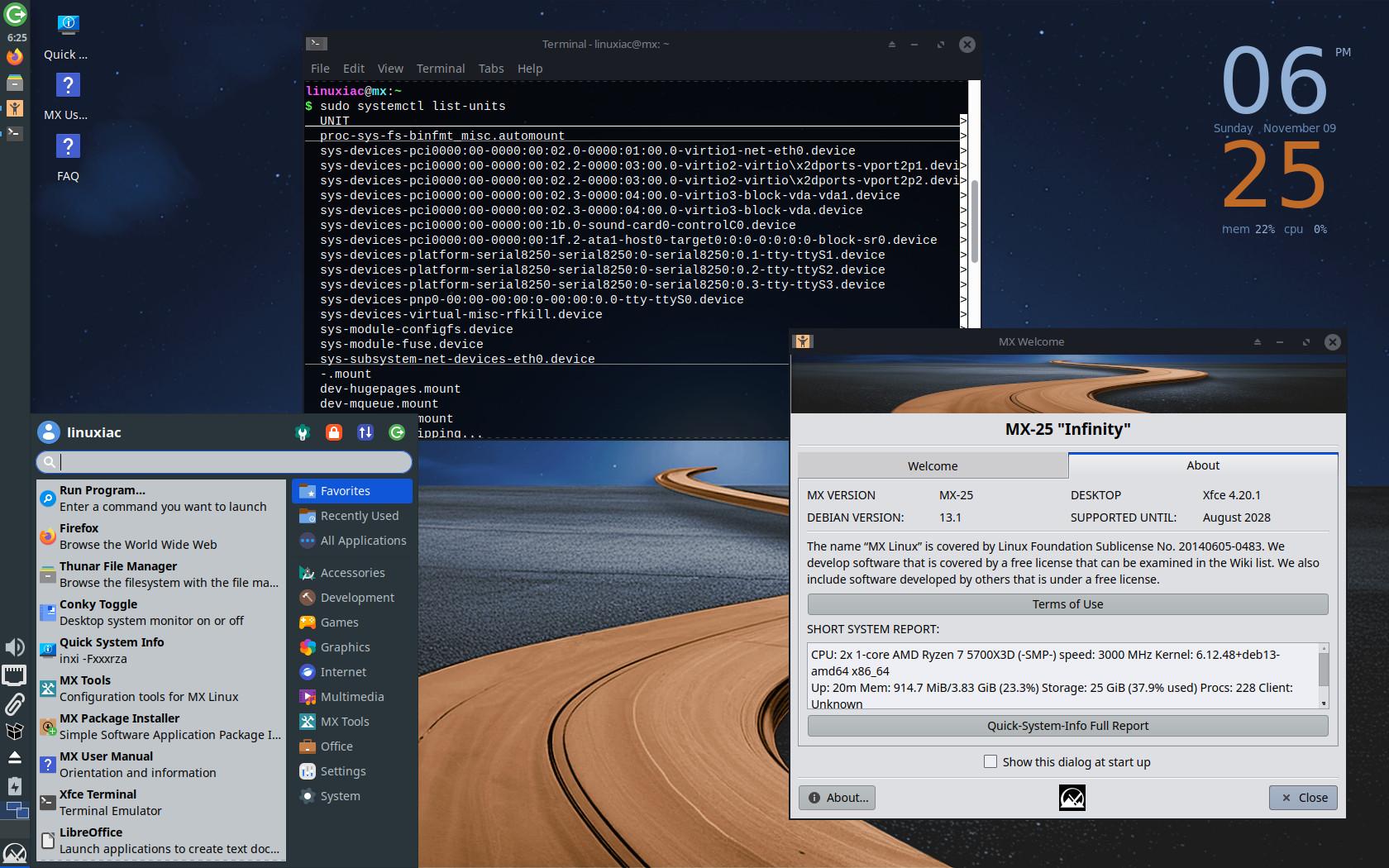
The move to Debian 13 “Trixie” brings significant changes: developers have opted to include their own repositories instead of the default Debian ones, with the aim of gaining control over the software pace and providing a more cohesive experience. Furthermore, all editions now use systemd by default , although alternative versions that maintain SysVInit remain available for those who prefer that boot philosophy.
The spirit of MX remains intact: an agile, secure, and user-friendly system designed for modest computers, yet one that doesn't compromise on modernity. The combination of a Debian base with its own tools (MX Tools) makes everyday administration tasks much easier, ideal if you're just starting out or simply want something that works without any hassle. If your goal is to set up a server, check out the best Linux distributions for servers.
- Users seeking stability with a fresh perspective: updated base, modern desktops and polished utilities.
- Those who value choosing the startup systemThere are editions with systemd and others that retain SysVInit.
- Profiles with new hardware: variants with advanced kernel for up-to-date compatibility.
- Veteran teams They appreciate lightweight environments like Fluxbox, without losing access to the MX ecosystem.
Desktops and kernel: lightness, power and Wayland where it matters
To cater to diverse tastes and needs, MX Linux 25 “Infinity” offers three main desktop environments. All come updated to the latest versions and with fine-tuned improvements that are noticeable in everyday use.
- Xfce 4.20It remains the flagship model. Lightweight, stable, and with everything you need without the frills. Ideal if you want performance and good battery life in your laptop.
- KDE Plasma 6.3.6: a step forward in aesthetics, performance and modern support. Wayland is the default session, a significant change for those seeking smoother graphics experiences.
- FluxBox 1.3.7: the ultralight option for very old equipment or for those who prefer a minimalist and highly configurable environment.
In terms of the kernel, the standard editions use Debian's 6.12 LTS kernel (specifically, 6.12.48 according to the release notes), which is sufficient for most scenarios without any surprises. For those who need to push the limits of very recent hardware , there are AHS (Advanced Hardware Support) variants that introduce Liquorix . Here you'll see references to Liquorix 6.16 in the Xfce AHS edition and, in other release notes, Liquorix 6.15 for AHS in general; in both cases, the goal is the same: better compatibility and responsiveness on modern hardware.
An important distinction if your system uses Secure Boot: Standard editions support UEFI Secure Boot thanks to kernels signed by Debian, but AHS variants with Liquorix do not support Secure Boot. This detail should be checked before installation, especially on corporate laptops or devices with restrictive firmware.
Installer and installation process: this is how to install MX Linux 25 “Infinity”
The MX installer comes with several very practical improvements that simplify both clean installations and migrations from other distributions. The new option to reinstall while keeping your home directory is a standout feature, incredibly convenient if you want to refresh your system without losing your data in /home.
Furthermore, the wizard can automatically configure zram swap , which is especially noticeable on systems with limited RAM as it reduces disk usage in memory-constrained situations. Anyone with resource-constrained machines will greatly appreciate this feature.
Another new feature to note is the support for Secure Boot on 64-bit systems when using Debian-signed kernels. If you choose AHS with Liquorix, remember that Secure Boot will not be available , so you will have to disable it in the UEFI if your firmware does not allow exceptions.
To perform a clean install, the general process is simple and familiar: download the official MX Linux 25 “Infinity” ISO, create a bootable USB drive (for example, using Ventoy, Rufus, or balenaEtcher), boot from it, and launch the installer. If you plan to run Windows or another distribution alongside your existing system, carefully reserve partitions or use the " Replace another Linux installation" feature , which avoids having to manually adjust the partitioning. However, in this beta version, the replacement feature does not work with encrypted systems.
During the process, the installer will ask for your time zone, keyboard layout, and username , and will allow you to choose the partitioning scheme. On modern computers, it's common to use GPT and an EFI partition for UEFI. If you enable Secure Boot, be sure to choose a compatible edition (not AHS with Liquorix). After copying the files and configuring the boot manager, the system will be ready for its first boot.
As a beta update, some visual glitches have been reported in the installer under lightweight environments (for example, icons not displaying). These do not affect the installation itself, but it's worth noting that there may be minor cosmetic quirks that the team will be ironing out.
Update from a previous version: with MX Updater or via terminal
If you're already using MX Linux, there's no need to reinstall to enjoy the improvements. The easiest way is to use the graphical tool MX Updater , the successor to apt-notifier. This utility lets you check, download, and install packages with just a couple of clicks, and if you want, choose apt or nala as your package management backend.
Those who prefer the terminal can opt for a complete update of repositories and packages . The following command refreshes indexes and applies all available changes in full:
sudo apt update && sudo apt upgrade && sudo apt full-upgradeBuilding on the Debian 13 base , MX also adopts the deb822 format for repository sources, resulting in clearer and more secure .sources files . If you prefer the traditional .list format , don't worry: compatibility is maintained , so you can use both without any issues.
Our recommendation: Before making a big upgrade, back up your personal folder and any sensitive data. The upgrade process usually goes smoothly, but it's worth taking the risk of losing your files.
MX tools and application changes: Qt6, new updater, and finer cleanup
One of the most significant advancements is MX Tools' migration to Qt6 , aligning its core utilities with the technology used by many desktop applications today. This transition not only modernizes the foundation but also paves the way for performance and user experience improvements.
The classic apt-notifier is replaced by mx-updater , a more flexible utility that, in addition to apt, can use nala to manage packages with added ergonomics and speed. This is especially welcome on systems where updates are a routine part of the process.
On the maintenance front, MX Cleanup gains new features : it can now detect and remove unused DKMS drivers and unnecessary language manuals . They're small things, yes, but they help keep the system running smoothly, lightweight, and uncluttered over time.
There are also changes to the default catalog: Audacious replaces Deadbeef as the audio player; in the KDE environment, Qimgv replaces Gwenview as the image viewer; and in Xfce, Engrampa takes over from File Roller as the compressed file manager. New themes, artwork, and translations have also been added , bringing the distro up-to-date in terms of visual consistency and language support.
systemd vs SysVInit: two ways to boot the system
Historically, MX Linux has given users options to choose how they prefer to boot their system. In "Infinity," systemd is the default in all editions, aligning with the demands of increasingly modern applications and workflows. Even so, the project maintains versions with SysVInit for those who prioritize the classic approach and the granular control it offers.
In practice, this means you can choose the edition that best suits your preferences or needs. Some variants, such as certain KDE editions, might only be available with systemd, while others, like Xfce or Fluxbox, continue to offer both options. This duality is a defining characteristic of MX that the project is determined to maintain.
Compatibility, Secure Boot, repositories, and other details to keep an eye on
UEFI Secure Boot support is now available for 64-bit editions with Debian-signed kernels, which is important if your firmware doesn't allow you to disable Secure Boot. Remember that AHS editions with Liquorix do not support Secure Boot , so if you rely on this feature, you'll need to use the standard version.
Another change that modernizes administration is the switch to the deb822 (.sources) format for defining repositories and keys. It's clearer and more secure than the old .list format, although, we reiterate, you can continue using the traditional method if you prefer. Having your own repositories also gives MX more control over the software it delivers, balancing stability and freshness.
Like all beta versions, “Infinity” comes with some caveats to keep in mind: the installer may exhibit minor icon glitches in lightweight environments; some mx-updater functions (such as hiding updates until a new revision) might behave erratically; in KDE, root-privileged actions are not fully integrated into the file manager; and the installation replacement feature does not support encrypted disks . Ideally, this version should be used for testing and not on mission-critical systems.
Performance and maintenance: zram, cleaning and environment selection
If your priority is a lightning-fast system on a modest machine, choose Fluxbox or Xfce and enable zram. The combination of a lightweight desktop, an LTS kernel, and compressed memory makes all the difference on older laptops, netbooks, or desktops with limited RAM.
For new machines, a KDE desktop environment with Wayland by default offers a modern experience that feels ready for everyday use. If you also opt for AHS and Liquorix, you'll gain support for recent hardware , although this comes at the cost of secure booting under UEFI.
It's worth occasionally running MX Cleanup to remove unused DKMS packages and language manuals you don't need. These preventative maintenance tasks keep your system lightweight and tidy with minimal effort.
Download and clean installation options
For a clean installation, simply download the official MX Linux 25 “Infinity” ISO , create a bootable USB drive, and follow the wizard. If you're migrating from another distribution, the Linux installation replacement feature saves you from manual partitioning, provided you don't rely on encryption. If you're interested in preserving your data, the option to reinstall while keeping /home is one of those improvements that's truly appreciated in the real world.
Those who prefer to proceed step-by-step from a previous MX installation can use MX Updater or the terminal procedure described above. In both cases, the result is an up-to-date system with recent desktops , modern repositories, and the utilities rewritten in Qt6.
MX Linux 25 “Infinity” represents an evolution with a clear intention: to modernize without losing the essence that has made it popular. Based on Debian 13, with modern desktop environments, kernels for all tastes (LTS and Liquorix), Secure Boot support where applicable, MX Tools in Qt6, and improved utilities like mx-updater and MX Cleanup, the package feels solid even in beta. If you need a stable, fast, and easy-to-maintain distribution, this is a top contender that also takes great care of both older and newer hardware.
