- Newelle is an open source AI assistant for GNOME that combines cloud and local models with high customization and control.
- The app integrates voice, file manager, command execution, profiles and extensions, differentiating itself from simple web chatbots.
- It allows for fully offline operation with local models and voices, reinforcing privacy at the cost of higher hardware requirements.
- Its modular approach and ecosystem (including Nyarch Assistant) make it a benchmark for the ethical integration of AI into the Linux desktop.
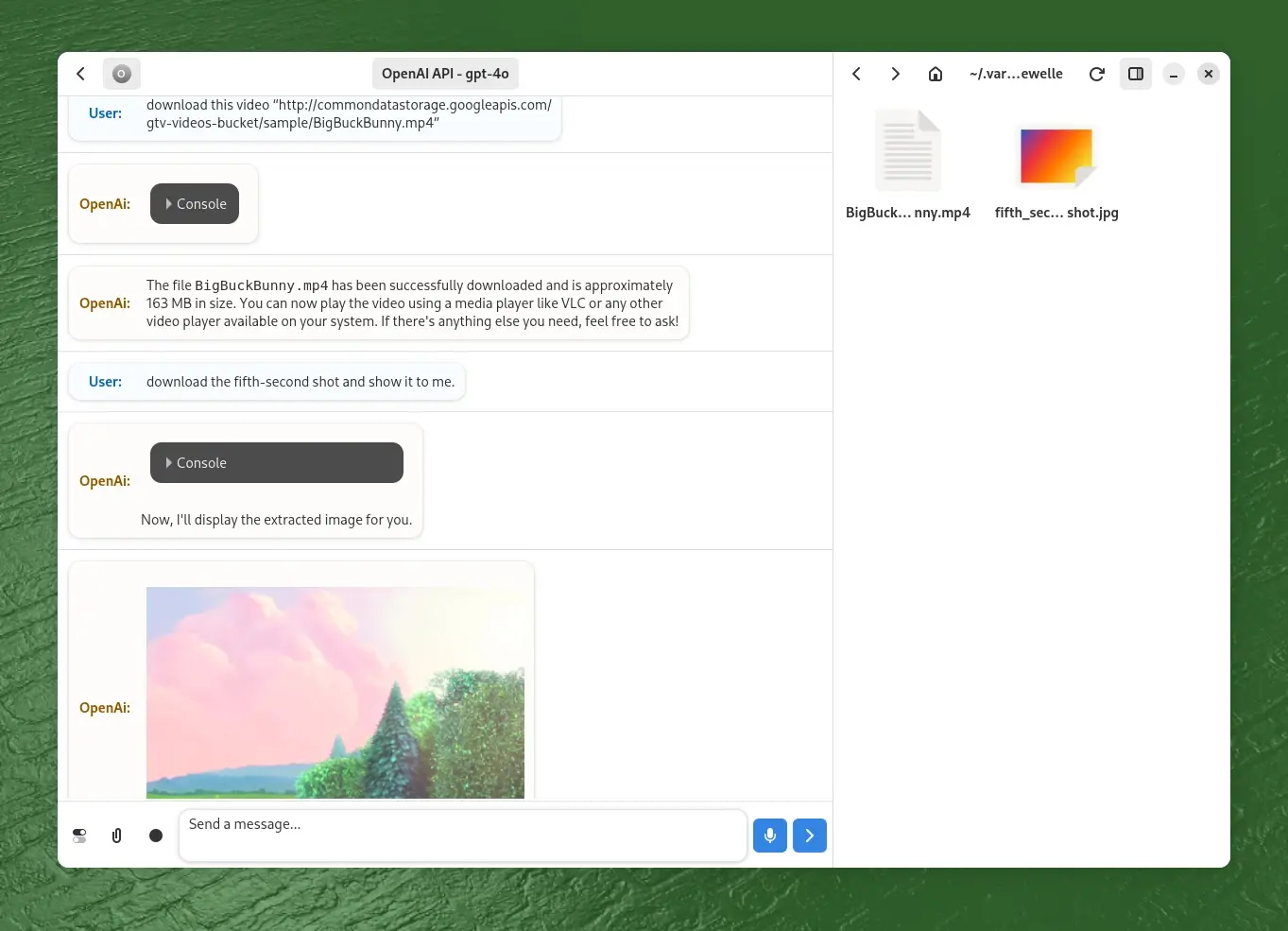
The arrival of AI assistants on the GNOME desktop is changing how many Linux users interact with their system . Instead of always opening a browser or IDE to talk to a chatbot, native applications are emerging that integrate language models directly into the desktop environment, offering greater control, privacy, and customization options.
Within this new landscape, Newelle stands out as a powerful open-source virtual assistant designed for GNOME and demanding users who want to combine the power of major language models with the philosophy of free software. It's not a toy or a simple web wrapper: it's a very complete GTK4/libadwaita application, with support for voice, local models, command execution, a file manager, and an extension system capable of completely transforming its behavior.
What is Newelle and why is it generating so much buzz?


Newelle is a virtual assistant application for GNOME, developed with GTK4 and libadbita, and completely open source . It was created by the developer known as qwersyk. Its goal is to provide a modern, native graphical interface for interacting with language models, both remote (in the cloud) and local (running on your own machine).
Unlike the aggressively integrated business assistants found in other operating systems , Newelle doesn't impose a single AI vendor or a closed way of using it. It's essentially a kind of intelligent "control panel" from which you can connect services like ChatGPT, Gemini, Claude, or Groq, or work with open models through Ollama or similar tools.
The idea is not to shout at it from the living room to order groceries or bring you antacids , but to have a well-integrated desktop environment for programming, searching for information, managing files, analyzing documents, or automating tasks, all while maintaining maximum control over what data leaves your machine and which model processes it.
Newelle has carved out a niche among technical Linux users because it combines several rarely seen features : a polished GNOME interface, a high degree of customization, support for local models, long-term memory, programmable Python extensions, and a philosophy clearly aligned with free software. It doesn't try to be a clone of proprietary wizards, but rather a different and much more flexible alternative.
Furthermore, the project has spawned variants like Nyarch Assistant , which offers a distinct aesthetic and personality, geared towards anime fans. All of this points to Newelle not just as a specific app, but as a "platform" of customizable assistants built on GNOME.
Supported AI models: cloud, on-premises, and custom profiles
One of Newelle's key strengths is its compatibility with multiple AI models . It doesn't force you to use a single provider, but instead acts as an interface layer that can work with:
- Third-party cloud services such as ChatGPT from OpenAI, Gemini from Google or Claude from Anthropic.
- Local open source models that you run on your own machine, especially through Ollama or other compatible backends.
- A demonstration model hosted by the project itselfdesigned for you to try the application without configuring anything, although limited to around 10 responses per day.
To work with commercial providers like OpenAI, Google, or Anthropic, you'll need to provide your own API keys , as Newelle doesn't include unlimited access to these services. This might seem like a minor initial hurdle, but in return, it allows you to choose the combination of price, performance, and privacy that best suits your needs.
Local models offer a clear advantage in privacy and data control : conversations don't leave your computer, and you can better audit which model you're using and how it's updated. The trade-off is resource consumption: large LLMs are very RAM-intensive, require a powerful GPU, and often involve downloads of several gigabytes, so they're not the ideal option for modest computers.
Newelle resolves configuration chaos with a profile system that lets you save different sets of options for each model or work scenario. This way, you can have one profile for a quick cloud model, another for a resource-intensive local model used only when maximum privacy is required, and yet another specifically for programming or image generation tasks.
When you switch profiles, the application automatically adjusts the model, parameters, response mode, and additional capabilities (for example, whether that profile supports LaTeX, document analysis, or image generation). This makes switching between providers much easier without having to reconfigure everything each time.
Linux installation and available variants
Newelle is primarily distributed via Flathub in Flatpak format, with an official package . This means it can be installed fairly seamlessly on most modern distributions without dealing with unusual dependencies.
In a typical distro with Flatpak support, simply run a command in the terminal like this:
Installation command: flatpak install flathub io.github.qwersyk.Newelle
Once installed, Newelle runs in isolation within the Flatpak sandbox . This is good for security, but it means that if you want it to be able to execute system commands, access certain folders, or interact with the session bus, you'll need to adjust some permissions.
To fine-tune these permissions, it's highly recommended to use Flatseal , a graphical tool that lets you grant access precisely where needed: to specific directories, the session bus, the terminal, and so on. If you want to take full advantage of the advanced features (especially command execution and file management), it's worth spending a few minutes on this initial configuration.
In addition to the main version, there's a lighter edition known as Newelle Lite . This variant is designed to launch almost instantly and can be associated with global keyboard shortcuts, such as Ctrl+Space, so you can launch it in "mini mode" while working in another application.
Newelle Lite is perfect for devices with limited resources or for those who want a quick assistant always at hand , without having to open the entire interface. The philosophy is similar to floating app launchers, but with an AI assistant at its core.
Main features: much more than just a simple chat
The beauty of Newelle lies not only in letting you chat with language models , but in the whole set of tools that surrounds it to integrate it into the GNOME desktop workflow.
First, it allows for both text and voice conversations . Thanks to support for speech recognition (STT) and text-to-speech (TTS) engines, you can have a virtually hands-free dialogue. Ideal if you're programming, cooking, or simply don't feel like typing.
The application incorporates a long-term memory system that can retain certain information between sessions , so you don't have to repeatedly enter the same personal data, project context, or preferences. This memory can be adjusted in the settings to control how much and what is saved.
Another standout feature is the message editor and history : you can modify previous chat entries to refine a conversation, correct a prompt, or experiment with new instructions without starting from scratch. It's a very useful tool for anyone who does a lot of prompt engineering.
Newelle also supports Markdown formatting and LaTeX rendering with certain models , which is great for writing technical documentation, scientific notes, code snippets, or mathematical explanations directly in the wizard's interface.
In practice, this makes Newelle a very convenient tool for developers who want to request code generation, library explanations, quick documentation, or error summaries without leaving the GNOME environment.
File manager, document analysis, and command execution
One of the features that most distinguishes Newelle from typical web chatbots is its integration with the file system and the terminal . It doesn't just answer questions: it can manipulate your environment if you allow it.
The application includes a built-in file manager that uses AI to organize and work with documents . You can drag and drop files directly onto the Newelle window for the model to analyze, summarize, translate, or generate related content.
For example, you can ask it to read a long technical PDF and summarize it , extract the key sections, prepare flashcards, or generate derivative documentation. Some of these functions depend on the capabilities of your active model, so not all providers support the same features.
Regarding command execution, Newelle can suggest and launch terminal commands directly . You can type things like “create a directory called 'Projects' in my home folder” or “establish an SSH connection to such-and-such server” in natural language and let the wizard generate the corresponding command and execute it.
This feature is incredibly powerful, but naturally, it demands a great deal of responsibility . Before granting it the ability to execute commands, you must carefully review the permissions, understand how Flatpak's sandbox works, and, if possible, enable confirmation options to avoid risking a potentially dangerous command.
Combining file management, document analysis, and command execution , Newelle becomes more of an "intelligent orchestrator" for your work environment than a simple chat application. You can automate parts of your daily workflow without constantly writing scripts by hand.
Extensions and ecosystem: expanding the assistant to your liking
Extensibility is another of Newelle's crown jewels . The extension system allows you to add new features, integrate external services, or expand compatibility with more LLM models in a modular way.
Extensions are usually written in Python, and the community has already started sharing modules for all kinds of tasks : new text-to-speech engines, connectors with specific APIs, integration with databases or development tools, desktop automation, etc.
Among the most striking extensions is the ability to generate images with Stable Diffusion . Instead of being limited to text, you can ask the wizard to create illustrations or graphics from descriptions, provided the image model and backend are correctly configured.
Newelle's modular design makes it easy for other projects to adapt or fork it with their own unique style . A good example is Nyarch Assistant, maintained by the Nyarch Linux team, which reuses the core technology but wraps it in a very different style.
This modular approach makes Newelle a kind of "assistant platform" within the GNOME and Linux ecosystem . Instead of relying on a single central team, anyone can contribute extensions, minor modifications, or even versions tailored to specific user niches.
Nyarch Assistant: the variant with anime aesthetics and a playful approach
Nyarch Assistant is an official fork of Newelle that maintains compatibility with its extensions and many of its improvements , but completely overhauls the user experience, geared towards those who enjoy anime aesthetics and Japanese culture.
This assistant introduces animated Live2D or LivePNG avatars , support for "multi-waifu" with dynamic character switching, and a much more lighthearted personality. The basic idea is to turn the assistant into a kind of customizable "digital waifu," both visually and behaviorally.
In addition, Nyarch Assistant integrates with voice engines like VoiceVox and voice cloning systems , reinforcing that feeling of a companion character that speaks to you more naturally.
Beyond the anime-style packaging, the key point is that Nyarch leverages Newelle's modular structure : the same concepts of profiles, extensions, local and cloud models, but with an aesthetic and interaction layer designed for users who want something more "fun" than a sober panel.
For those seeking maximum immersion, the combination of Live2D, synthetic voice, and local or cloud-based language models allows you to create a highly personalized assistant, almost like a recurring desktop character that helps you with real tasks on your Linux system.
Privacy, offline use, and hardware requirements
Both Newelle and Nyarch Assistant can be configured to run completely offline , which is practically a requirement for many Linux users. In this mode, everything is processed on your computer, and no sensitive data leaves your machine.
To achieve this, it is common to use local models through tools such as GPT4All or Ollama , with Ollama being one of the most interesting options due to its performance and ease of managing large models such as Llama 3, Mixtral or similar.
The downside of this 100% local approach is that it demands a good GPU and plenty of memory . Heavyweight models like Llama3-70B, DeepSeek, or Mixtral aren't exactly designed for modest laptops; they require machines with serious resources or, failing that, a willingness to accept slower response times.
You can also use local voice engines like Vits or VoiceVox , which completely closes the circle: speech recognition, synthesis, language modeling and data processing, all running on your own hardware without going through third-party servers.
Those who want to delve even deeper can combine this approach with virtualization and GPU management techniques to optimize resources, dedicate specific cards to models, or balance workloads. It's a slightly more advanced area, but it fits perfectly with the technical user profile these tools are aimed at.
In any case, the key is that you decide the extent to which you depend on the cloud . You can use only local models, only external ones, or a combination of both depending on the type of task, always keeping clear what data is shared and with whom.
Comparison with other privacy-focused solutions and alternatives
Newelle is not the only player in the field of privacy-friendly AI assistants , but it is one of the most interesting when it comes to integration with GNOME and technical customization capabilities.
In the realm of desktop applications and open-source projects, it is often compared to tools like NectarGPT . The latter is also open source and uses powerful models like GPT-4, but it is designed more for browser integration and intelligent web browsing, and less as a "command center" for the Linux desktop.
In the world of business assistants, the usual parallel is drawn with Meta AI or other bots integrated into social networks and mobile platforms . They are convenient for quick use, but they are heavily tied to the provider's ecosystem and raise many questions about what actually happens to your data and conversations.
Other privacy-focused services that have emerged as alternatives to ChatGPT, Copilot, or Gemini include:
- DuckDuckGo AI Chat, integrated into the DuckDuckGo search engine, which offers several models (including open options) and promises not to record or use your conversations to train models.
- AnonChatGPT, which serves as an anonymous gateway to popular models without the need to register or provide personal data.
- Leo, Brave's assistant, incorporated into the Brave browser and search engine, which prioritizes privacy and does not track queries.
In contrast to these proposals, Newelle stands out for being designed from the ground up for the Linux desktop , not for the browser, and for giving the user a deeper level of control over which models it uses, how it manages memory, which extensions are loaded, and what access it has to the system.
For technical profiles and developers, this combination of control, extensibility and the ability to operate offline puts Newelle and its derivatives in a league of their own within the assistant ecosystem, quite far removed from the closed bots of large technology companies.
Debate in the Linux community: choice, dedicated keys, and the future of AI in GNOME
The rise of assistants like Newelle fits perfectly into a broader debate within the Linux community : how to integrate artificial intelligence into the desktop while respecting user freedom of choice and privacy.
While Microsoft is pushing dedicated keys like the Copilot key on PC keyboards to summon its assistant , and Google is increasingly merging Gemini with Android and its services, many Linux users are wondering to what extent they want something similar in their distros.
Some have suggested the possibility of having an "assistant key" in Linux that would launch a free assistant , perhaps based on the future ethical AI that Mozilla is developing, or on projects like Newelle. GNOME already makes extensive use of the "Super" key for its shortcuts; it's not unreasonable to imagine something similar for an integrated assistant.
In parallel, discussions are underway about whether an assistant could replace or complement indexing and search technologies like Tracker in GNOME or Baloo and Akonadi in KDE . A system that understands natural language and can cross-reference information from files, calendars, emails, or notes could offer much richer searches… provided that the principles of transparency and user control are respected.
There is also some apprehension, especially among those who criticize the overexposure of AI . Some fear that the desktop will become cluttered with intrusive "smart" functions or that the classic approach of small tools that do one thing well will be lost.
In this context, Newelle functions almost as a practical experiment of what a well-integrated GNOME assistant could be without falling into the practices of the big vendors : voluntary, deactivatable, configurable to the extreme, and with the option of not sending a single byte to the cloud if the user so decides.
Other Linux assistant projects: ideas and proposals
In addition to Newelle, the community has begun proposing and developing other assistants specifically designed for Linux . A prime example is the Jarvis concept project, conceived as a voice assistant that translates natural language into terminal commands.
The idea behind Jarvis is that you can say things like “install Nginx”, “restart WiFi” or “show RAM usage”, and that the wizard generates and executes the corresponding commands: from sudo apt install nginx -y to free -h, to systemctl restart NetworkManager.
Jarvis also emphasizes an educational mode , in which it explains step by step what each command does before executing it, helping novice users learn Linux while automating tasks.
These initiatives demonstrate that the desire for integrated assistants in the GNOME desktop and other interfaces doesn't come solely from large companies . The free software community itself is exploring ways to make Linux more accessible to beginners and more productive for advanced users, without compromising its core principles.
Meanwhile, threads continue to appear in GNOME forums and Linux communities explicitly asking for "native AI clients for GNOME ," with integration for applications like Clock, Calendar, or Nautilus. Newelle and similar projects respond, at least in part, to this demand.
The big question is how all these efforts will combine in the future : Will we see a standard API for open-source desktop assistants? Will they be linked with Mozilla's potential AI solutions? Will they remain as side projects that users install optionally, as is the case today with Newelle via Flathub?
For now, what is clear is that Newelle embodies quite well the way in which a large part of the Linux community wants AI to arrive on the desktop : as a powerful, transparent and modular option, not as something imposed from above.