- Chrome dominates due to its integration with Google and full synchronization between devices, while Samsung Internet shines on Galaxy phones.
- Samsung Internet offers more customization, better privacy controls, and extension support, including ad blocking.
- Galaxy AI brings exclusive features to Samsung Internet such as summarizing, translating, and reading web pages aloud.
- Chrome remains strong in password management, cross-platform compatibility, and unified use across desktop and mobile.
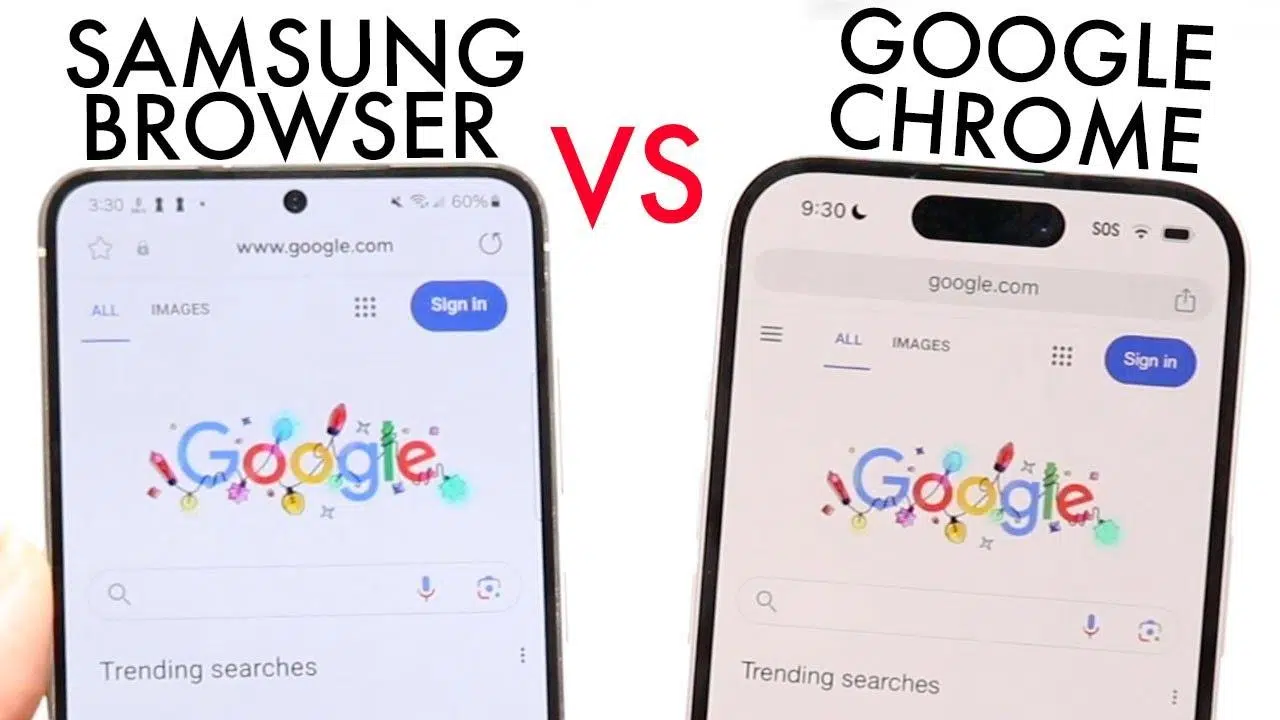
If you have an Android phone, chances are your personal battle is Samsung Internet vs. Google Chrome . One comes pre-installed on Galaxy devices, the other is the undisputed king of the market and the perfect partner for your Google account. Choosing isn't as obvious as it seems, especially now that Samsung has stepped up its game with privacy, AI, and features designed for everyday use.
For years, millions of users have relied on Google Chrome as their primary browser , both on mobile and desktop, although some choose to use multiple browsers simultaneously to enhance security and productivity. However, a growing number of Galaxy users are switching to Samsung Internet because it offers a refined user experience on the phone, improved tracker blocking options, extensions, and powerful integration with Galaxy AI. Let's break all this down so you can see which option is best for you.
Market share and context: the reign of Chrome and the Samsung guest
Currently, the landscape is very unbalanced: Chrome holds around three-quarters of the browser market, with figures of approximately 70-75% according to various analyses. In contrast, Samsung Internet operates at a very modest percentage, around 2% globally, despite coming pre-installed on millions of Galaxy phones.
This contrast is due to the fact that Chrome is present on almost every device : Windows, macOS, Linux, Android, ChromeOS… and it's also deeply integrated into the Google ecosystem. Your tabs, bookmarks, passwords, payment methods, and even browsing history follow you wherever you log in with your Google account, making it much easier to switch between mobile, tablet, and computer.
Samsung Internet, for its part, plays a significant role within the Galaxy ecosystem . While available for other Android phones via Google Play, it truly shines on recent Samsung smartphones, especially the Galaxy S24 series and models with Galaxy AI. This is where synchronization with your Samsung account, Phone Link with Windows, and some exclusive features come into play.
In the end, the situation is curious: Chrome dominates due to presence and habit , but many users who thoroughly test Samsung Internet end up finding very clear advantages, to the point of relegating Chrome to occasional uses.
Design and mobile usage: Samsung Internet plays on home turf
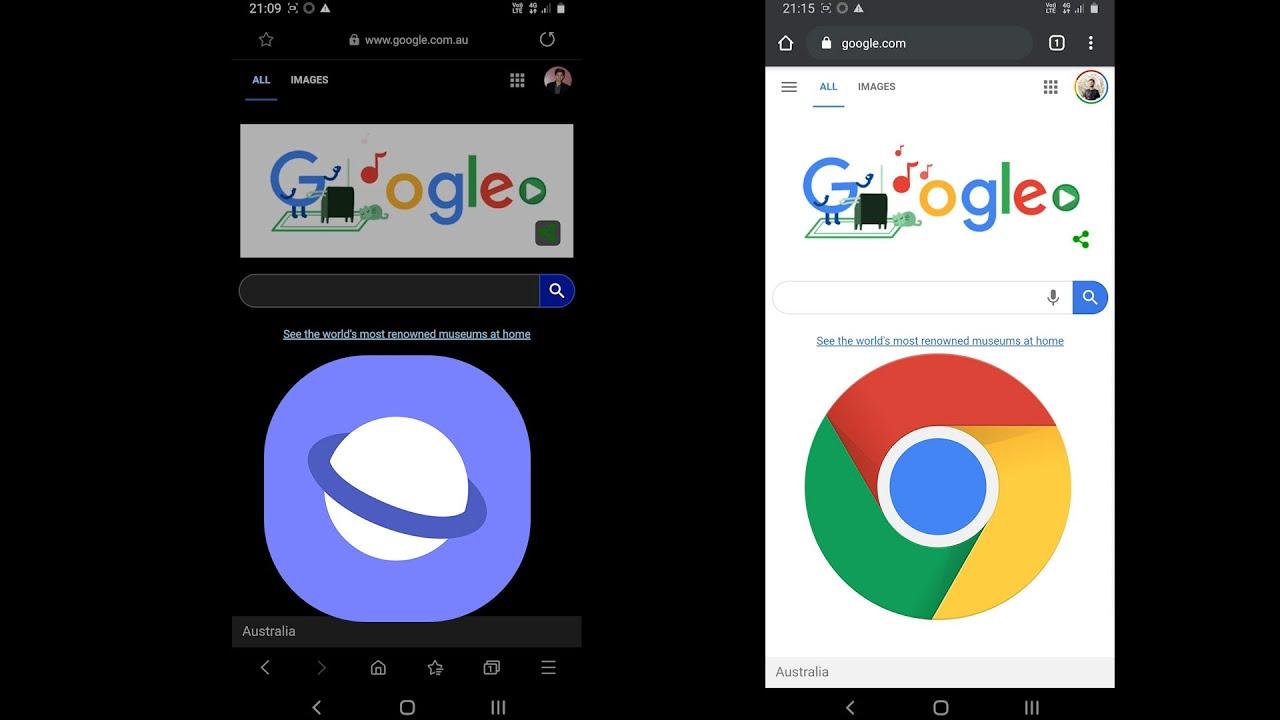
One of the areas where each browser's focus is most noticeable is the interface design on smartphones . Chrome maintains a very clean, yet fairly uniform aesthetic across mobile, tablet, and desktop, while Samsung Internet is clearly designed for use on large mobile screens.
On current Galaxy devices, the Samsung Internet toolbar is located at the bottom . This allows for one-handed access to tabs, menus, settings, and the home page, which is a huge plus on larger phones like the Galaxy S24 Ultra. With Chrome, reaching the top menus can require some serious thumb maneuvering.
Google has started to react and now allows you to move the address bar down in Chrome for Android , but the general feeling is that Samsung Internet offers more flexibility. Samsung's browser lets you rearrange bars, show or hide elements, and adapt the interface to suit your actual usage habits.
In addition, Samsung Internet offers very direct access to tabs, bookmarks, and settings from the bottom area , while Chrome continues to opt for a more "traditional" interface, designed to be similar to the desktop version and facilitate switching between platforms, but not so much one-handed use.
In short, if you use your mobile phone extensively for browsing, Samsung Internet feels more "mobile-first ." Chrome, on the other hand, feels more like a desktop-to-mobile adaptation, with some recent improvements, but still less customizable in this respect.
Personalization and small features that make all the difference
If there's one thing that defines Android, it's the ability to customize it to your liking, but Chrome for Android falls surprisingly short in this area. Samsung Internet, however, takes that customization philosophy to the next level with many more settings to shape the browser to your preferences.
In Samsung Internet, you can move the address bar up or down, show the tab or bookmark bar above or below it, and choose whether they remain visible while scrolling or hide to make better use of the screen. This flexibility is especially useful when managing many tabs at once.
You can also customize the menu and toolbar by adding shortcuts to the functions you use most and hiding those you don't. Some people configure shortcuts to new tabs, sharing, incognito mode , read-aloud mode, download manager, or the on-page text search function—all just a tap or two away.
Even the tab switcher is customizable: you can toggle between List, Stack, or Grid view . When you only have a few tabs open, the grid view works perfectly; if you have 20 or more, the list or stack view makes navigating between them much easier. Chrome, by comparison, doesn't offer such detailed options.
Another of those little details that really hook you is the floating button for quickly returning to the top of the page , which appears as soon as you start scrolling in Samsung Internet. In the settings, you also have the option to add a button to jump to the bottom of the page, something that seems minor until you get used to it… and then you miss it in Chrome.
The way to open new tabs is also more streamlined: on Samsung Internet, a long press on the tabs button is all it takes to create a new one, without any intermediate menus. In Chrome, although they've improved the process, it's still somewhat more complicated than that direct gesture.
Finally, there are some interesting features, such as the ability to change the search engine on the fly from the address bar . You tap the search engine icon (Google by default) and you can switch to Yahoo, Bing, DuckDuckGo, or even YouTube for that specific search, without affecting the browser's default search engine.
Ad blockers, tracking, and privacy
Both Chrome and Samsung Internet are secure browsers, but their approach to privacy and advertising differs . This is where many users favor Samsung Internet, especially on mobile.
While Chrome for desktop supports extensions, Chrome for Android doesn't allow ad blockers to be installed through extensions as such. It relies on its own internal filters and external system-level solutions, but lacks a native add-on system like the PC version.
Samsung Internet does integrate compatibility with specific extensions , including several ad blockers designed for the browser. This means you can drastically reduce intrusive advertising on poorly optimized pages, which is especially welcome when the website's design is undesirable and hinders reading the content.
In addition, Samsung has significantly strengthened its focus on privacy with a dedicated panel within the settings that displays how many trackers have been blocked each day or week. From this panel, you can activate options such as Smart Anti-Tracking or malicious website alerts.
Among the security tools, options like Block Automatic Downloads and Warn of Potentially Malicious Sites stand out , reducing the chances of accidentally installing malware. There's even an option to skip certain CAPTCHAs on compatible websites, preventing these systems from collecting additional data about your browsing.
Overall, Samsung Internet offers more visible and accessible control over what is blocked and how , whereas in Chrome much of the management of trackers and ads is less configurable by the user in its mobile version.
Extensions and extra features in Samsung Internet
Another area where Samsung's browser excels is in its extension support for Android . While not as extensive an ecosystem as Chrome's on desktop, it's sufficient to make a clear difference on mobile.
The most popular are ad and tracker blocking extensions , which we have already discussed, but there are also interesting add-ons such as those focused on artificial intelligence, translation, or real-time subtitles for videos played in the browser.
One of the most striking extensions is the one that lets you display live subtitles for any video you watch on Samsung Internet, with the ability to translate those subtitles into your chosen language in real time. For those who watch a lot of videos in other languages, it's a truly useful addition.
However, there are some caveats: on non-Galaxy devices, Samsung limits the use of some extensions and, in many cases, only allows ad blockers to be downloaded. Other add-ons are usually available through the Galaxy Store, which significantly reduces the options on phones from other brands.
Chrome for Android, meanwhile, doesn't yet offer a comprehensive extensions system . It benefits from the power of the desktop version on computers, but on mobile it still can't compete in this area with what Samsung Internet offers, at least not yet.
Dark mode, contrast, and reading options
One of the features that many users find appealing about Samsung Internet is its handling of content display. The browser has a dark mode that can force a dark theme on virtually any website , even if the page doesn't have it natively implemented.
This mode can be configured to follow the system theme or remain active at all times , depending on your preferences. If you're someone who spends hours reading on your phone at night, it's great not to have to struggle with websites that refuse to abandon the white background.
In addition, Samsung Internet includes a high-contrast mode designed to improve accessibility and make reading easier for people with visual impairments, or simply for those who prefer a stronger contrast between text and background. This mode is complemented by the option to change the system fonts used in the browser, adapting the font type to what is most comfortable for you.
Regarding reading options, many models include a Reading Mode that removes secondary visual elements (banners, sidebars, embedded videos) from the page, leaving only the text and perhaps a relevant image. It's ideal for long articles and helps you focus on the content.
Chrome has also taken steps in this direction, but the implementation of dark and reading modes is usually less aggressive and less configurable at the user level than in Samsung Internet, where everything is more exposed in the menus and more geared towards you using it regularly.
Galaxy AI and exclusive smart features
One of the changes that has most encouraged many Galaxy users to give Samsung Internet a try is the arrival of Galaxy AI integrated into the browser , especially on devices like the Galaxy S24 and other compatible models that have received this feature.
Within the browser, this artificial intelligence manifests itself through tools like Browsing Assist or options for summarizing, translating, and reading content aloud . These are typically accessed by clicking an icon (for example, a star) that displays these functions on the page you are visiting.
The Summarize function is one of the clearest: when activated, the browser generates an outline or summary of the main points of the article or report you're reading in a matter of seconds. It's very useful when you're dealing with dense texts and don't want to wade through paragraph after paragraph just to grasp the key ideas.
There's also the option to translate content on the fly , without having to switch to another app, and the ability to have the browser read highlighted sections aloud . This reading of key points is very useful when you're doing other things or simply want to hear the information instead of reading it.
At first, many users saw these AI features as an almost "showy" extra, but with daily use they become a real time-saving tool , especially if you work with long reports, very extensive posts, or technical documentation.
It's important to note, however, that Browsing Assist and some Galaxy AI features are exclusive to Samsung phones . On other Android devices, you'll only find more basic features, such as Reader Mode, but not the full suite of advanced AI integrated into the browser.
Synchronization, ecosystem, and password compatibility
If there's one area where Chrome remains incredibly difficult to beat, it's in its integration with the Google ecosystem and cross-device synchronization . For those who spend their days switching between a computer and one or more mobile phones, this makes a huge difference.
Chrome on your PC (Windows, Mac, or Linux) syncs your history, open tabs, bookmarks, extensions, forms, payment methods, and passwords with your Google account. When you open Chrome on your mobile device and sign in with that same account, everything is exactly the same, ready to pick up right where you left off.
In contrast, Samsung Internet only syncs with your Samsung account . This means you can keep your data aligned across different Galaxy devices, Samsung tablets, and even some Windows integrations via Phone Link (which allows you to continue browsing from your mobile device on your PC or vice versa).
However, there's no native way to directly sync your Chrome history and data with Samsung Internet . If you've been using Chrome on your desktop for years, you can't simply "import everything and go" so seamlessly; you'll have to take more manual steps or accept that Samsung's browser is a bit more isolated in this regard.
Another sensitive area is password management . Chrome integrates Google's password manager and works quite well with third-party managers like 1Password, LastPass, etc. They automatically fill in forms, suggest strong passwords, and sync across platforms without much friction.
Cross-platform compatibility and computer use
Another factor influencing the choice is the browser's availability on different platforms . Here, Chrome's advantage is clear: it's available on almost any operating system, with a very similar experience across all of them.
This allows Chrome to be the single browser for your entire digital ecosystem : Mac, Windows laptop, Chromebook, Android mobile, even iOS. You sign in with your Google account and everything syncs. This sense of continuity is one of the main reasons why many users don't even consider switching.
Samsung Internet, on the other hand, focuses almost entirely on Android and, above all, on Galaxy devices . It doesn't have a proper desktop version like Chrome, so if you want the exact same experience on your computer and mobile, it falls a bit short.
To mitigate this issue, Samsung offers Windows integrations through Phone Link , which allows you to open pages on your PC that you were viewing on your mobile device or continue browsing from your phone. It's useful, but it doesn't replace having the same full browser on all platforms.
In short, if your priority is having a single, consistent browser across all your devices , Chrome remains the more convenient option. However, if your focus is primarily on the mobile experience, that's where Samsung Internet becomes more competitive.
Clear advantages of Samsung Internet over Google Chrome
After reviewing all the features, the main practical advantages of Samsung Internet over Chrome for Android can be grouped together, especially on current Galaxy phones.
- Interface optimized for large mobile phones: bottom bar, easy one-handed access, more convenient on large screens.
- High customization: configurable menus and bars, varied tab views (list, stack, grid), visible controls for dark mode, etc.
- Mobile extensions: support for ad blockers and other add-ons, something that Chrome for Android does not offer natively.
- Privacy and anti-tracking better explainedPrivacy panel with blocked tracker counters, automatic download blocks, protection against malicious sites, etc.
- Galaxy AI features (on compatible devices): page summaries, contextual translations, and text-to-speech functionality integrated into the browser itself.
For many users, these points make daily life with Samsung Internet more comfortable and enjoyable , to the point of relegating Chrome to uses where its integration with Google is more necessary.
Although Samsung Internet has many advantages on mobile, Chrome doesn't fall short in key areas that can be decisive depending on how you work or browse.
The first major factor is complete synchronization with your Google account . If you frequently use Google services (Gmail, Drive, Docs, YouTube, Calendar, etc.), Chrome integrates seamlessly, allowing you to switch between devices without worrying about exporting or importing anything.
Secondly, there's compatibility with password and payment managers . Chrome not only works well with Google's Password Manager, but also integrates seamlessly with third-party solutions, enabling frictionless autofill for logins, cards, and forms.
Furthermore, with its desktop version and massive extension support, Chrome on a computer is a true Swiss Army knife for productivity, web development, entertainment, and more. This PC power is indirectly transferred to mobile devices through synchronization, something Samsung Internet can't compete with due to the lack of a desktop counterpart.
Finally, while Chrome may sometimes seem more conservative with new features, it generally prioritizes stability, compatibility, and overall performance across all types of websites (and there are guides available for reducing RAM usage in Google Chrome ). For those who don't want the hassle of switching browsers, it remains a solid, tried-and-tested option that is very well supported by virtually every online service.
With all this in mind, the choice between Samsung Internet and Google Chrome ultimately depends on where you place your priorities: if you value full integration with Google and synchronization across devices, Chrome remains hard to beat; if you value a more polished mobile experience, enhanced privacy, extensions, and AI features integrated into the browser itself, Samsung Internet becomes a very serious alternative, especially if you have a modern Galaxy device.


Table of Contents
- 1 Market share and context: the reign of Chrome and the Samsung guest
- 2 Design and mobile usage: Samsung Internet plays on home turf
- 3 Personalization and small features that make all the difference
- 4 Ad blockers, tracking, and privacy
- 5 Extensions and extra features in Samsung Internet
- 6 Dark mode, contrast, and reading options
- 7 Galaxy AI and exclusive smart features
- 8 Synchronization, ecosystem, and password compatibility
- 9 Cross-platform compatibility and computer use
- 10 Clear advantages of Samsung Internet over Google Chrome
- 11 Where Chrome continues to win against Samsung's browser