- Spyware is stealthy malware that steals personal, financial, and credentials data without the user noticing.
- It is installed through exploits, phishing, fraudulent apps, bundled programs and Trojans on both PCs and mobile devices.
- Effective removal combines safe mode, manual review, specialized anti-spyware scanners, and, if necessary, a factory reset.
- The best defense combines up-to-date security software with good habits: safe downloads, updates, 2FA, and beware of phishing.

Spyware is one of those unwelcome guests These programs sneak onto your computer or mobile device without permission, hide well, and stay there watching everything you do. Whether you're browsing the web, shopping online, or checking your social media, if you have spyware on your device, someone on the other end could be collecting your passwords, bank details, or even your private conversations.
The good news is that you can stand up to it. If you understand exactly what spyware is, how it gets onto your devices, what types exist, and, above all, how to detect and remove it with specialized tools and good security practices, you'll find a comprehensive guide throughout this article. It's supported by information on leading security solutions and reinforced with practical, everyday recommendations.
What is spyware and why is it so dangerous?
Spyware (or spy program) is a type of malware Designed to secretly monitor what you do on your device and send that information to third parties without your permission. It can record the websites you visit, what you download, your keystrokes, the data you enter into forms, your login credentials, your photos, your location, or even record audio and video.
Unlike other malware that “breaks” the system all at onceSpyware is usually discreet: it installs itself without you noticing, attaches itself to the operating system, and runs in the background trying not to attract attention. Often, it sneaks in by taking advantage of you accepting the terms and conditions of a seemingly legitimate program or a free app that comes with a "gift" in the form of a spyware component.
Their modus operandi is based on persistence and stealth.: collects information for weeks or months, modifies settings, injects content into the Web navigatorIt redirects traffic or opens backdoors, giving the attacker continuous access to the computer. And to top it all off, it usually doesn't come with a convenient uninstall button, which is why many standard tools fall short when it comes to cleaning a compromised system.
The real impact goes far beyond mere inconvenience.Identity theft, bank account emptying, access to corporate dashboards, use of your accounts for spam or phishing, blackmail with photos or private documents… any data that can be sold or used for extortion is of interest to whoever is behind the spyware.
How spyware gets installed on your computer or mobile device
Spyware enters through the same doors as the rest of the malwareBut it's usually better disguised. Knowing the most common vectors of infection is key to closing those doors before they get in.
1. Vulnerabilities, exploits and backdoors
Security flaws, known as computer vulnerabilities, in the operating system, in the browser or in other programs allow an attacker to execute code without your consent. An exploit takes advantage of a bug or error The attacker infiltrates the software to gain access, and once inside, they typically install a backdoor to return whenever they want. Sometimes this backdoor is even left in by manufacturers or developers for maintenance, but in practice, it becomes a highway for malware.
2. Phishing and spoofing
In this case, The trick is to deceive you directly.Emails, SMS messages, or social media posts that appear to be from your bank, a well-known company, or a trusted contact, but actually contain links to malicious websites or infected attachments (malspam). Identity theft makes the message seem authentic, so you click on it without suspecting anything.
3. Deceptive marketing and false profits
Spyware creators love to disguise their “products” as useful tools: Internet accelerators, magic cleaners, download managers, alternative search engines, or supposed system improvementsYou install something that seems harmless, and even if you uninstall it later, the spyware remains inside, well hidden.
4. Packaged programs (bundleware)
The classic "next, next, accept" when installing freeware opens the door to additional components you didn't want. Many free applications include extensions, toolbars, or add-ons These are selected by default in the wizard. The fine print of the terms of use usually states that you agree to their installation, and among that junk can be spyware that remains even after you remove the main program.
5. Trojans as spyware loaders
A Trojan horse is a file or program that It pretends to be something legitimate but contains malicious code insideToday, many Trojans function as "launchers": their job is to download and install other threats, such as ransomware, cryptocurrency miners, or, in our case, specialized spyware modules.
6. Spyware on mobile phones (Android and iOS)
Mobile phones are also a tempting target. Mobile spyware often comes in legitimate apps recompiled with malicious code, fake apps that imitate popular ones or apps downloaded from links in messages and websites, outside of official app stores. Once inside, it hides without an icon, runs in the background, and starts stealing SMS messages, call logs, contacts, photos, history, location, keystrokes, and even audio and video.
Types of spyware and what each one can do to you
The term “spyware” covers many different families.with specific functions depending on what the attacker is looking for. Understanding what each type does helps to assess the risk and prioritize the response.
Password stealers
These are programs designed for extract all possible credentials from a device: passwords saved in the browser, operating system login data, email keys, application access, etc. They usually dump this information into local files or send it to a remote server.
Banking Trojans
This type is focused on steal credentials and manipulate financial transactionsThey interact with the browser to modify bank or digital wallet pages in real time, insert hidden transactions, or alter amounts without you or the website itself detecting it. They can affect banks, brokers, financial portals, payment gateways, and cryptocurrency services.
Infostealers or general information thieves
They go one step further and They aim to collect any type of useful dataUsernames, emails, browsing history, log files, system data, documents, spreadsheets, photos, multimedia files… They can also scrape information from forums, online services and social networks, transmitting it later to the attacker's server.
Keyloggers and system monitors
Heart rate monitors are especially dangerous because They literally capture everything you writePasswords, messages, emails, forms, searches. These are usually accompanied by periodic screenshots, a log of visited websites, and, in many cases, the capture of audio, video, or printed documents. Everything is packaged and discreetly sent to the attacker.
Audio, video and tracking spyware
On mobile phones and laptops, some spyware programs They activate the microphone, camera, or GPS to record your surroundings or track your location. The device becomes a true portable surveillance device.
Stalkerware: the special case of “domestic” espionage
Here we enter delicate territory: apps that are sold as parental control or employee monitoring toolsBut these apps are often used to spy on partners, family members, or close friends. They typically require physical access to the victim's phone or account credentials and allow attackers to view messages, locations, call logs, social media activity, and more. It's not always "anonymous" cybercriminals behind it; sometimes it's someone you know.
Spyware on Windows, Mac and mobile devices
For years, Windows has been a favorite target of spyware.This was primarily because it was the dominant operating system on PCs. However, the growth of macOS and, above all, smartphones, has led attackers to diversify their efforts.
Spyware on Windows
On Windows computers it is common to find combinations of adware, toolbars, suspicious extensions, and spyware modules These programs alter the browser, open pop-up windows, consume resources, and act as a gateway to more serious threats. Often, users notice their PC is slower, the browser becomes unusable, and strange processes are running in the background.
Spyware on Mac
Although for a while the saying "there are no viruses on Macs" was repeated, the reality is that Since 2017, malware for macOS has skyrocketed.And many of these are spyware programs and backdoors. On Macs, password stealers and general-purpose backdoors abound, capable of executing remote code, logging keystrokes, taking screenshots, uploading and downloading files, and launching phishing windows to steal passwords.
There is also what is sold as "legitimate spyware" for MacCommercial software designed to monitor children or employees, which anyone can buy and use without extensive technical knowledge. The problem is that these same capabilities allow for serious privacy abuses if they fall into the wrong hands.
Spyware on smartphones (Android and iOS)
Mobile phones are a tempting target because They concentrate almost your entire digital lifeMobile spyware typically hides without an icon, runs on startup, and periodically sends SMS messages, call logs, contacts, emails, browsing history, photos, and messaging app data. It can also activate the microphone, camera, and GPS, or receive commands via SMS or remote servers.
In corporate environments, the risk doubles.Because a compromised phone can serve as a backdoor into the company network or internal applications. Furthermore, security teams often lack direct visibility into these personal devices.
Recent examples of spyware on Android
The cases detected in recent years show how spyware evolves and how it relies on social engineering, fake apps, and creative distribution channels.
RatMilad (2022)
This is Android spyware detected mainly in the Middle East. It was distributed as a fake app called “NumRent”It was a supposed virtual number generator for verifying social media accounts. The app requested excessive permissions and then sideloaded the malicious RatMilad payload, capable of spying on victims, stealing data, and eavesdropping on conversations. It was promoted through Telegram and social media, outside of Google Play.
FurBall (continuous campaigns since 2016)
Associated with the Domestic Kitten group (APT-C-50), FurBall has been used in mass surveillance operations against Iranian citizensThe latest detected version reuses many previous features but adds strong obfuscation techniques. It is distributed through fake websites that mimic legitimate ones, which victims access via links on social media, direct messages, emails, SMS, and unethical SEO techniques.
PhoneSpy (2021)
Discovered in South Korea, PhoneSpy It was hidden in seemingly normal apps Yoga, video streaming, and messaging apps, not available on Google Play. Once installed, it gave attackers remote control of the device and allowed them to steal personal data. It is estimated to have infected over a thousand Android devices.
GravityRAT (evolving since 2018)
Originally aimed at Indian armed forces in Windows environments, GravityRAT expanded its reach to AndroidOne documented case involved a modified app, “Travel Mate Pro,” based on the legitimate Travel Mate app published on GitHub. The attackers added a spyware module and changed the name, targeting the app at people traveling to India.
How to detect if you have spyware on your PC or mobile device
Good spyware is designed so that you don't notice anything unusual.But in practice, it usually leaves a trace if you pay a little attention to the team's behavior.
Low performance and strange crashes
If your computer or mobile device is running much slower than usual, The computer is running much slower.If apps take a long time to open, crash, or the system becomes sluggish for no apparent reason, there may be hidden processes consuming resources to spy on you or communicate with their server.
Battery and data that fly
Mobile spyware often remains active in the background. constantly uploading informationThis translates to significantly shorter battery life and disproportionate data usage when you're not using Wi-Fi. If you have any doubts about this, see how to detect if Your mobile phone has been hacked.
Applications or settings you don't recognize
Seeing apps you don't remember installing, strange icons, changes to the browser's homepage or altered settings These are clear signs that something has slipped through without a reason.
Constant overheating
It's normal for the device to get warm during gaming or heavy tasks, but if it gets hot often with the screen off or in standby modeThis could be due to malicious processes running in the background; here's a guide to check. if your computer overheats due to a virus or dirt.
Intrusive ads and pop-ups
Many spyware programs come "accompanied" by adware: pop-up windows, intrusive banners, tabs that open automatically or constant redirects to dubious websites. It's not just annoying; it usually indicates that something is injecting content into your browser.
Problems accessing secure websites
If you are having trouble accessing banks, email, or protected services, and you see suspicious login screens or "weird" browsers When you try to log in, you may be facing a local phishing attack caused by spyware that intercepts your credentials.
Antivirus or antimalware disabled
If your security solution suddenly stops working, It won't open, it won't update, or it closes on its own.There is a high probability that the malware is trying to neutralize the defense before continuing to act.
Strange text messages or emails
Attempts at infection are usually accompanied by SMS messages, social media messages, or emails with strange links, suspicious codes, or supposed verification codesIf you receive them for no reason, delete them without clicking on anything.
Noises and strange behavior on calls
Occasional interference is normal, but beeps, echoes, and constant noises on many calls They may indicate interception or recording via spyware.
Restarts and out-of-place activity
A mobile phone that turns itself on or off, It wakes up out of nowhere, restarts without explanation, or refuses to shut down. It often has hidden processes that don't want to stop.
How to remove spyware on an Android device step by step
On Android, you have several ways to hunt down and remove spyware., from built-in system options to specialized tools and, ultimately, complete device erasure.
Option 1: Review suspicious apps from the settings (in safe mode)
The first thing to do is start in safe mode. so that only system apps run, blocking third-party apps (including spyware) while you investigate.
- Hold down the power button until the options to turn off or restart appear.
- Press and hold the Power Off option a few seconds until the system offers you the option to restart in safe mode.
- Tap on AcceptYou will see the "Safe Mode" label in a corner of the screen when you restart.
Then open the Settings app and locate the applications section:
- Go to Settings > Apps (the name may vary depending on the manufacturer).
- Open the three-dot menu or the options icon and select Show system apps or similar.
- Carefully review the list of installed applications and look for names that don't sound familiar, apps with generic icons, or anything that seems out of place.
- In each suspicious app, tap and select uninstall if the system allows it.
Option 2: Search for installers and stalkerware in the downloads folder
Much spyware or stalkerware arrives as a downloaded file from a link in an email, WhatsApp message, or website. Checking your downloads folder helps you locate the "source" of the infection.
- In safe mode, open My files o Archives on your Android.
- Access the folder Downloads, where all the files you have downloaded are stored.
- Examine the list and delete any files or APKs you don't remember downloading. or that seem suspicious. If you're unsure, Google the name to see if there are any malware reports.
- If any of them correspond to an installed app, uninstall it from Settings > Apps.
If an app won't let you uninstall it because it has administrator privilegesYou will have to revoke them first:
- Go to Settings > Security > Advanced > Device administrators (or equivalent route in your model).
- Uncheck the box of the suspicious app to remove administrator permissions.
- Disable this device management app if the system asks you to.
- Go back to the list of apps and now proceed to uninstall it.
Option 3: Use a good antivirus/antispyware on Android
The most effective way to locate modern spyware is usually with a good security scanner that combines signature analysis and behavioral analysis.
- Download a solution Trusted and compatible antivirus/antispyware with your version of Android from Google Play or the manufacturer's official website; for example, you can consider Panda Antivirus.
- Update the threat database and run a full device analysis (not just fast).
- Follow the app's instructions to quarantine or delete anything it detects as spyware, stalkerware, Trojans, or potentially unwanted apps.
Option 4: Factory reset
If you continue to have problems, the last resort is to erase the phone. and restore it to its factory settings. This removes virtually all malware, but also your data, so proceed with caution.
- Make one Backup of your photos, documents and important data, but try to restore a backup from before the problems started, so as not to reintroduce the spyware.
- Go to Settings > System > Reset options.
- Choose Factory data reset o Clear all data.
- Confirm by clicking on Reset device And, if prompted, enter your PIN or password.
- Wait for the process to finish; the phone will start up as new, asking you to configure language, accounts, etc.
When it's time to restore, choose a backup from before the infection symptoms appeared. and reinstall apps from trusted sources, avoiding external APKs or pirated apps.
Post-cleaning steps
Once the spyware is removed, don't let your guard down.There are critical tasks that you absolutely must do:
- Clear your browser cache and data to eliminate potentially compromised scripts or sessions.
- Change all sensitive passwords (email, social media, banking, corporate services, etc.) from a device you know is clean; and, if applicable, follow the guide to recover an email account.
- Activate two-factor authentication (2FA) on all accounts where it is available, preferably using authentication apps or physical keys.
If you suspect that stalkerware has been installed by someone close to you And if your physical or emotional well-being could be compromised by cleaning the device, it is usually wisest to seek help from support organizations or law enforcement before touching anything.
How to remove persistent spyware on a Windows PC
On desktop or laptop computers, spyware may reappear. After every restart, even after running a basic anti-malware scan. This is usually because some resident component, scheduled task, or service is re-downloading the infection.
1. Analyze using various specialized tools
In addition to your main antivirus, it's worth running scanners dedicated to spyware, adware and PUPs such as Malwarebytes, Spybot Search & Destroy, or AdwCleaner. To complete your strategy, also consult guides on software for Windows which include useful tools in these cases.
2. Check programs that start with Windows
In Task Manager (> Startup tab) or with tools like Autoruns, Check which processes start automaticallyDisable anything you don't recognize or don't need, and then run the scans again. If you're looking for utilities to maintain your computer, check [link to utilities]. tools for Windows maintenance.
3. Examine scheduled tasks and suspicious services
You can find it in the Task Scheduler and the Services console. tasks that relaunch the malware or download components Every so often. Anything with random names, strange paths, or references to previously detected files should be investigated and, if appropriate, removed.
4. Use “offline” scans or scans from a clean environment
Some antivirus programs allow create a rescue disk or USB drive which boots a separate mini-operating system. From there, the malware isn't running, and it's much easier to delete malicious files and registry keys without them regenerating on the fly. If you need instructions for booting into a safe environment, see how Start and use safe mode.
5. Consider a format if the system is severely compromised.
If the PC continues to misbehave despite all attempts, a clean format and Windows reinstallation That might be the wisest course of action. Just like on Android, back up your data and apps, and carefully review what you reinstall afterward.
Antispyware software: how it works and what options you have
Modern antispyware goes beyond the simple "old-fashioned antivirus"Many current suites combine traditional detection with behavioral analysis, sandboxing, and real-time monitoring.
Main functions of a good antispyware
Serious products usually include:
- Fast and complete scans of the system, disk, memory, registry and sensitive areas in search of known spyware signatures.
- Real time detection which monitors processes, system changes, and traffic to stop threats before they take hold.
- Elimination and quarantine to isolate malicious files, deregister components, and revert changes where possible.
- Frequent updates from the threat database, as spyware is constantly evolving.
- Integrated training through warnings, configuration recommendations, and explanation of risks to the user.
Some of the best-known solutions on the market They offer integrated antispyware capabilities along with general endpoint protection and extra features such as VPNpassword manager or parental control.
Among the security suites with good antispyware capabilities These include, among others, SentinelOne for corporate environments, Malwarebytes, Bitdefender, Norton 360, Kaspersky, ESET, Webroot, Sophos, Trend Micro, F-Secure, Avast, and Comodo, each with different approaches to advanced protection, incident response, sandboxing, and firewalls. If you're looking for alternatives, check out reviews of specific products such as [insert product names here].
There are also very useful free and portable tools. such as Malwarebytes AdwCleaner, Trend Micro HouseCall or Emsisoft Emergency Kit, which you can even run from a USB to scan computers without needing to install anything permanent.
In the home environment, many general-purpose solutions already include antispyware.Windows Defender, Avast Free, Panda Free, Avira, and Adaware, for example, scan for and block spyware as part of their basic protection. Even so, combining your main antivirus with one or two on-demand scanners specializing in spyware and PUPs is usually a good idea.
How to choose the best antispyware for you or your company
There is no "perfect" antispyware for everyoneThe choice depends on your needs, budget, and technical level.
- Define your security requirementsProtecting a personal PC is not the same as protecting a corporate network with sensitive data and legal obligations (GDPR, HIPAA, etc.).
- Review the key features: real-time protection, on-demand analysis, defense against ransomware and phishing, control of external devices, centralized management in companies, etc.
- Check compatibility with your systems (Windows, Mac, Android, iOS) and with other security tools you already use.
- Assess the impact on performanceA good product should protect without rendering your equipment unusable.
- See independent reviews and tests (AV-Test, AV-Comparatives, reviews on G2 or Capterra) to see actual detection rates and support quality.
- Try free versions or demos before committing to a payment plan, especially in business environments.
Best practices to avoid falling for spyware again
Technology helps, but your behavior is the first line of defense.A few simple habits make all the difference between sailing smoothly and constantly putting out fires.
Think twice before opening emails or messages
Do not open attachments or click on links from unknown senders or messages that “smell fishy”Even if they pretend to be your bank or a well-known company, if you have any doubts, go to the official website yourself by typing the address manually.
Download software only from trusted sources
Avoid cracks, pirated apps, and random websites. Opt for official stores and manufacturers' websitesAlthough malware has occasionally slipped into these channels, the risk is much lower than in repositories of dubious origin.
Carefully review the installation wizards
Forget about the "next, next, accept" without looking. Remove all checkboxes for extra offers, toolbars, extensions, or homepage changes that come marked by default.
Keep your devices up to date
Install operating system and program updates regularly. Many spyware exploits take advantage of vulnerabilities that have already been patched. in recent versions.
Strengthen physical access to your equipment
In the case of stalkerware, the problem is usually someone with direct access to your mobile phone or computer. Use strong passwords, a secure PIN, fingerprint, or facial recognition.And don't leave the unlocked device within reach of just anyone.
Always use an up-to-date security solution
Although it does not replace common sense, a good antivirus/antispyware with real-time protection, web filtering and exploit blocker It will save you many times before the threat is carried out.
Finally, he acknowledges that cybersecurity is not something you do once and that's it.It's an ongoing process of updating, monitoring, and improvement. Understanding how spyware works, how it infiltrates your devices, and how to remove it completely puts you in a much stronger position to protect your data, money, and privacy from a threat that, unfortunately, will continue to be very present in our digital lives.
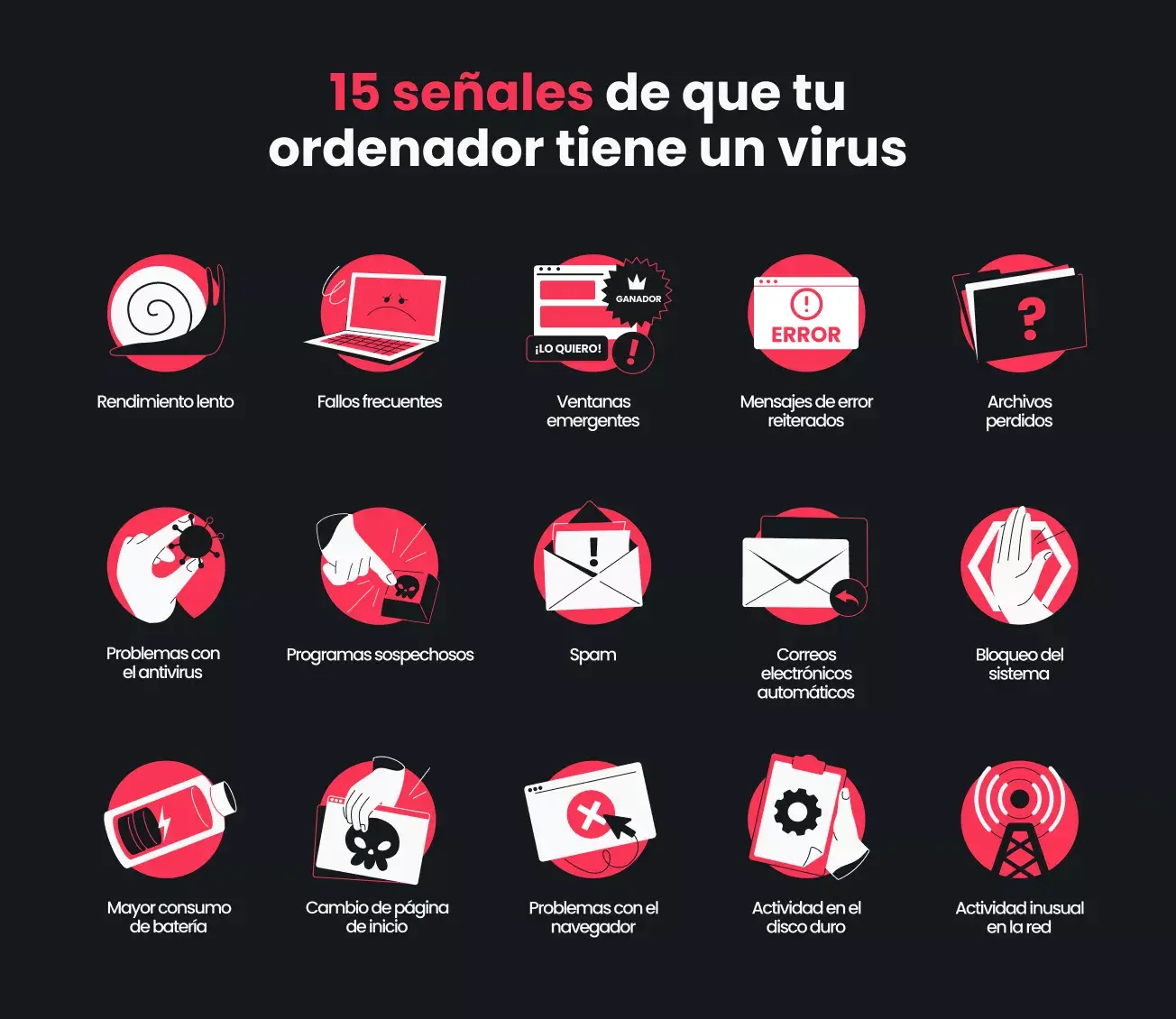
Table of Contents
- What is spyware and why is it so dangerous?
- How spyware gets installed on your computer or mobile device
- Types of spyware and what each one can do to you
- Spyware on Windows, Mac and mobile devices
- Recent examples of spyware on Android
- How to detect if you have spyware on your PC or mobile device
- How to remove spyware on an Android device step by step
- How to remove persistent spyware on a Windows PC
- Antispyware software: how it works and what options you have
- How to choose the best antispyware for you or your company
- Best practices to avoid falling for spyware again