- Classification: volatile memories (RAM) lose data without power and non-volatile memories (ROM, flash, SSD, HDD) retain information.
- RAM: working memory, fast and volatile; stores temporary programs and data for the CPU.
- ROM and flash memory: non-volatile, they store firmware and permanent files; flash allows electronic rewriting.
- Capacity and speed: higher memory speed improves performance; capacity is measured in bytes and limits storage.

Computer memory devices are the primary storage devices for data and information . They are divided into volatile and non-volatile memory, which have different characteristics. The most commonly used computer memory types are RAM (Random Access Memory), ROM (Read-Only Memory), and flash memory. Other types include hard disk drives, optical drives, tape drives, and solid-state drives (SSDs).
Computer memory: Classification and characteristics
Memories are vital devices for storing data in a computer.
They can be classified into two broad categories: ROM and RAM. ROM stands for Read Only Memory, which means that it does not lose information when the power is removed.
Unlike ROM, RAM (Random Access Memory) is volatile; this means that its entire contents are erased when the power is removed or interrupted by a reset or failure.
The most commonly used computer memories are RAM, ROM, flash memory, and hard disk drives.
RAM is volatile memory that temporarily stores data. Data stored in RAM will be lost when the computer is turned off or its power supply is interrupted. This type of memory is primarily used to store data that will be processed in a short period of time (such as during the current session). For this reason, it is also called "working" memory or "cache . "
ROM stands for Read Only Memory and is non-volatile, meaning it retains its contents even when power is removed. These devices contain an array of transistors on a single chip that can be programmed one or more bits at a time by passing an electrical current through them using special programming tools called fuses.
Memory types include volatile and non-volatile memory.
Memory is classified as volatile and non-volatile. Volatile memory loses its contents when power is disconnected, while non-volatile memory retains its contents even when power is disconnected. The two types of memory are RAM (Random Access) and ROM (Read-Only).
RAM is used as system memory in computers; its main function is to store the programs and data currently being used by a computer's central processing unit (CPU). ROM stores information permanently; it cannot be changed or deleted by users, but it can also only be read once it has been programmed with data during manufacturing or by another device, such as a flash drive.
Flash drives use flash memory chips containing an array of transistors arranged in rows connected by gates to form cells in which binary values are electronically stored based on the amount of current flowing through the gate of each transistor at a given time.
Volatile computer memories require a constant supply of power to maintain the data stored in them.
When you turn off your computer, this information is lost. Non-volatile memory does not lose its contents when you unplug or turn off the power; it retains its contents until another change is made to it (or it is erased). RAM stands for Random Access Memory and stores program instructions while they are being used by an application or operating system, but once you exit that application, everything stored in RAM is no longer available without first restarting your computer, meaning any settings you made are lost.
ROM stands for Read Only Memory; it's similar but has one key difference: since new information can't be written to ROM chips (like on hard drives), everything that's there has already been written at some point during manufacturing and can't be altered afterwards, so if something goes wrong with one of these chips, all hope may be lost. That is until you start digging deeper into how exactly these things work together inside each device before you make any attempts to fix anything yourself.
Non-volatile computer memories do not need to be connected to any power source to retain data.
Non-volatile memory is a type of memory that retains data when the power is not on. Non-volatile memory can be used to store data and programs even when the computer is turned off. It has many uses in computers, including:
- The BIOS chip, which stores information about the computer's hardware configuration and boot sequence.
- Hard drives, which store all your files and programs.
Non-volatile memory typically comes in two forms: flash (also known as EEPROM) or RAM.
Central processing unit
The CPU, or central processing unit , is a circuit board that performs all processing functions in a computer. It is responsible for executing instructions, maintaining tasks, and controlling other parts of the computer.
CPUs can consist of millions of transistors on a single chip or multiple chips working together as part of a system-on-chip (SoC). Size and complexity vary depending on whether it is a single or multi-core, whether it is low or high power, whether it is embedded or desktop, and so on, but whatever the form, they are still CPUs.
Computer memory: Term "memory"
The term "memory" refers to both the storage capacity and the speed of access to information stored in a system's main memory.
A computer's memory capacity is measured in bytes (8 bits). For example, a 1 megabyte (MB) chip can store 1024 kilobytes (KB), or 1 million bytes; 2MB chips could store 2048 KB; 4MB chips would hold 4096 KB; and so on, up to 128GB with 16 gigabytes per chip (16 x 8 = 128).
The actual amount of RAM you have installed in your computer will be less than these theoretical maximums because some of the space must be reserved for other purposes, such as operating system files and video display buffers.
Access speed is measured in nanoseconds—how quickly data can be moved from one place to another within a chip—which translates to the time it takes for your computer's processor or processors to retrieve data from main memory when it is needed by an application program running on them at a given point in its execution cycle.
Data read/write speed influences system performance.
The faster the memory, the better the overall system performance.
For example, if you have two computers with identical CPUs and other components but one has faster memory than the other, then it will perform better because it can process more instructions per second (IPS). This is especially true for games where high FPS (frames per second) are needed for smooth gameplay or 3D rendering applications that require fast frame rates to avoid flickering on the screen.
Binary information
In the simplest terms, computers store information in binary form using electronic circuits known as memory units (MUs) and buses. Binary code is a series of 1s and 0s that represent bits of data or characters.
A memory unit can be made up of transistors and capacitors that are connected by buses.
Types of computer modules
RAM (Random Access Memory) is a type of computer module that acts as temporary storage. The contents of RAM are lost when the power is removed or when you turn off your computer. All programs run in RAM; this includes your operating system and any software applications you are using at the time.
Data in RAM can be accessed more quickly than other types of memory because it doesn't have to be read from another location (such as a hard drive), but this means it's volatile: it disappears when you turn off your computer or lose power.
Conclusion: Computer memories: Classification and characteristics
Computer memories are the key components of a computer system, and store data in binary form using electronic circuits known as memory units (MUs) and buses. The term "memory" refers to both the storage capacity and the speed of access to information stored in a system's main memory. There are several types of computer modules that function as storage devices, all with different properties.
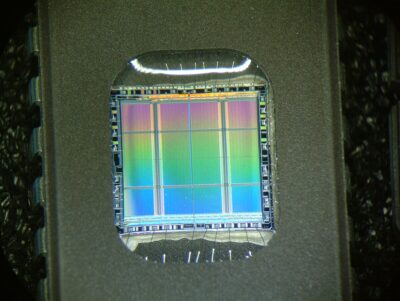
Table of Contents
- 1 Computer memory: Classification and characteristics
- 1.1 Memories are vital devices for storing data in a computer.
- 1.2 The most commonly used computer memories are RAM, ROM, flash memory, and hard disk drives.
- 1.3 Memory types include volatile and non-volatile memory.
- 1.4 Volatile computer memories require a constant supply of power to maintain the data stored in them.
- 1.5 Non-volatile computer memories do not need to be connected to any power source to retain data.
- 1.6 Central processing unit
- 1.7 Computer memory: Term "memory"
- 1.8 Data read/write speed influences system performance.
- 1.9 Binary information
- 1.10 Types of computer modules
- 1.11 Conclusion: Computer memories: Classification and characteristics