- Banesco's interbank QR mobile payment system allows you to pay and collect payments by scanning QR codes, supported by the mobile payment network between banks.
- To use it, you must be affiliated with PagoMóvil Banesco via BanescOnline and have your associated phone number updated.
- The service works from the BanescoMóvil app (including QR code), the BanescOnline website and also via SMS to 2846.
- Transactions are only processed if the beneficiary is affiliated with PagoMóvil and their bank has enabled interbank payments.

El Banesco interbank QR mobile payment It has become one of the most convenient and fastest ways to pay in stores and between individuals in Venezuela. If you already use the traditional PagoMóvil, this system will be very familiar, but with the added advantage of being able to scan QR codes to avoid errors when entering the recipient's information.
In the following lines you will find a A very complete and clearly explained guide “in plain English” about how PagoMóvil Banesco works (app, web and SMS), what you need to sign up, how to use the new PagoMóvil QR interbank modality, how to generate your own QR code to receive payments and what you should keep in mind so that transactions are not rejected.
What is Banesco's interbank QR mobile payment service?
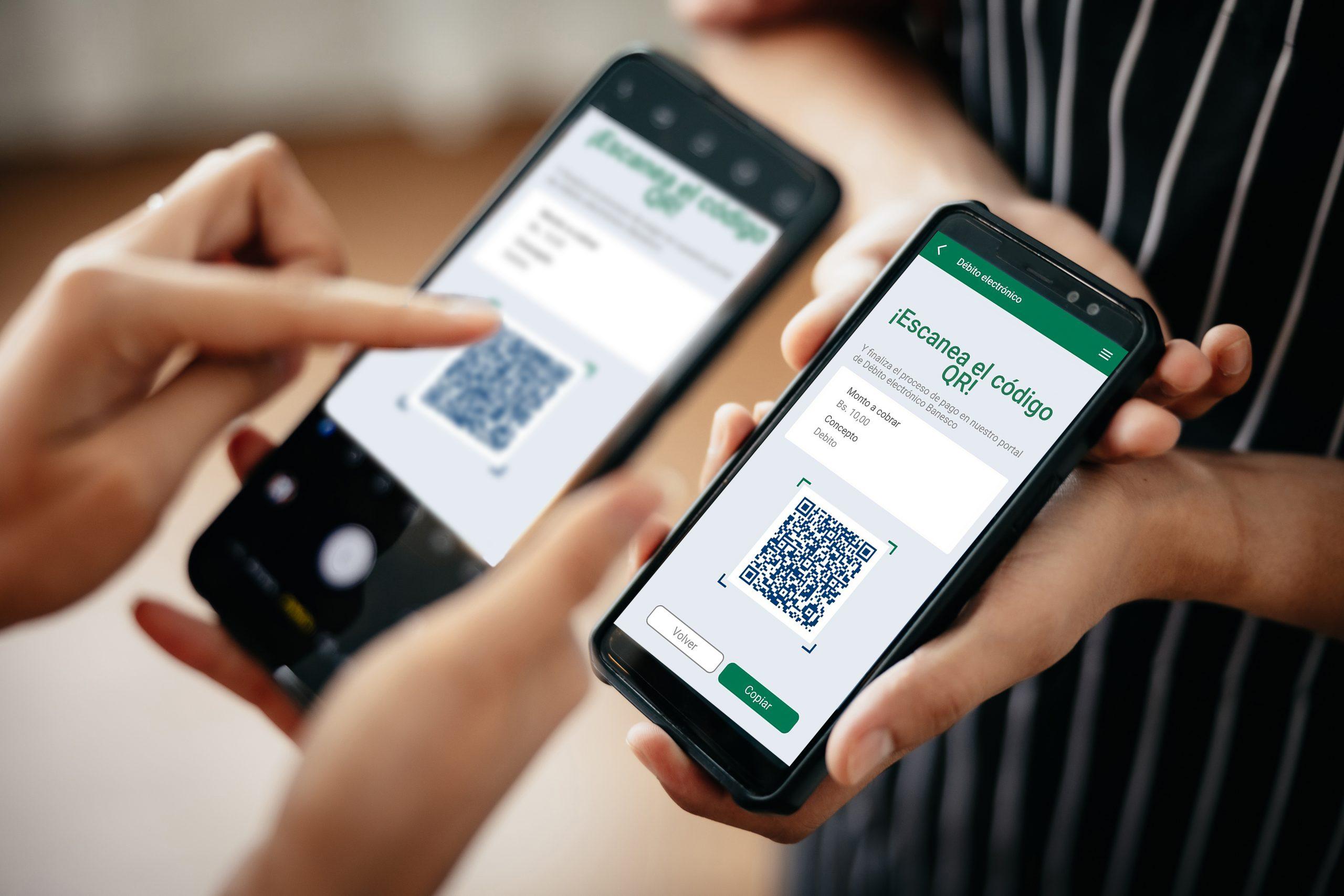
Service Banesco interbank QR mobile payment It's a feature included in the BanescoMóvil app that allows you to make payments between different banks using a QR code. Instead of manually entering the recipient's information, you simply point your phone's camera at the QR code of the business or person you want to pay, and the app automatically fills in the necessary fields.
This system relies on the existing infrastructure of Interbank Mobile PaymentThis system allows for instant transfers between different banks in Venezuela using the registered phone number, document type, and the beneficiary's national ID or tax identification number (RIF). The QR code is simply a more convenient and secure way to package all that information into a scannable image.
With this option, Banesco makes it easier for customers to Pay in seconds at establishments, small businesses or between individuals, without the need to dictate or write phone numbers or accounts, reducing errors and streamlining the payment experience on a daily basis.
In addition, Banesco's PagoMóvil QR is interbankThat is, it is not limited to movements between Banesco accounts, but allows sending money to clients of other banks that also work with the interbank PagoMóvil network of the Venezuelan financial system.
Requirements and membership to Banesco Mobile Payment
Before you can use the PagoMóvil QR interbankIt is essential to be enrolled in Banesco's PagoMóvil service. This enrollment is managed through BanescOnline and is the same for use via the mobile app, the website, and SMS messages.
The first step is to have Active username and password in BanescOnlineIf you don't already have them, you must register for Banesco's online banking, complete the username and password creation process, and ensure you can access the digital platform normally.
Once inside BanescOnline, you must locate the section of PagoMóvil service membershipThere, the system will ask you to select the account you wish to associate with PagoMóvil (for example, your main checking account) and will verify your personal and contact information.
It is essential that you mobile phone number is up to date in the system and make sure it's the same one you use to receive your Banesco Special Operations Key (COE). This key is necessary to authorize certain transactions, and if the number doesn't match or is outdated, you could have problems validating payments or registering correctly.
After completing the registration process on BanescOnline, your account will be enabled to operate with Banesco Mobile Payment You can send and receive mobile payments from the app, the website, and via SMS. From that moment on, you can start sending and receiving mobile payments, as well as taking advantage of the interbank QR code payment functionality.
Using Banesco Mobile Payment from the Banesco Mobile app
The most convenient way to use Banesco Mobile Payment This is done through the BanescoMóvil app, available for Android (Google Play) and iOS (App Store) devices. To do this, you must download the app from your smartphone's app store, install it, and log in with your BanescOnline credentials or according to your configured access method.
Once you're inside the application, you'll be able to access the option to MobilePayment and send money to other people or businesses. The app will typically ask for the recipient's information: ID or tax ID number, phone number registered with PagoMóvil, and the destination bank. After entering the amount and the reason for the transaction, you can confirm it.
Being integrated into the same platform, the PagoMóvil QR interbank It's managed from within the BanescoMóvil environment, so you don't need an additional app. Simply use the QR icon when you want to pay or share your own code to receive funds.
The main advantage of the app is that it allows you check your transaction historyQuickly check if a payment was successfully processed and manage your accounts more conveniently, all in one place. It's also much more practical than SMS messages, especially when making frequent payments or payments to multiple recipients.
Thanks to the complete integration of Banesco's digital banking, using PagoMóvil from the app combines the speed of instant transfers additional layers of security, such as passwords, internal validations and, in some cases, confirmation using special operating keys.
How the interbank QR mobile payment system works step by step
The operation of PagoMóvil QR interbank Within BanescoMóvil, it's quite intuitive. The idea is that, when you scan a QR code associated with a beneficiary, the application automatically fills in the details of the person or business that will receive the payment, so you only have to enter the amount and the transaction description.
To pay using a QR code, you must enter the BanescoMóvil app Go to the Mobile Payment section. There, in the section where you would normally enter the recipient's information, you'll see an icon with a QR code symbol. That's the shortcut to the QR code scanning and generation functions.
Tapping that icon will show you the option “Scan QR”Selecting this option will activate your phone's camera, prompting you to point it at the QR code of the business or the person receiving the payment. It's important that the code is in focus and that there is sufficient light for the reader to interpret it correctly.
Once the code has been recognized, The beneficiary's details will appear auto-filled. in the corresponding fields: document type, ID card or RIF, affiliated telephone number and destination bank. This prevents errors when writing long numbers and the whole process is expedited.
With the data already loaded, all you have to do is enter the exact amount to pay and the reason for the transaction (for example, “in-store purchase”, “service payment”, “debt payment”, etc.). Once you have verified that everything is correct, you can press the “Accept” button or the confirmation option shown by the app, and the payment will be processed as a traditional interbank Mobile Payment.
Generate and share your own QR code to receive payments
In addition to being used for payments in stores, the system of Banesco QR Mobile Payment It also allows customers to generate their own QR code to receive payments from others. This is especially useful for small businesses, freelancers, informal vendors, or any user who wants to easily receive payments via PagoMóvil without having to provide their information each time.
To create your code, you must enter the BanescoMóvil app, go to the PagoMóvil section and tap the QR icon in the beneficiary data areaInstead of scanning a code, the app will automatically display an option called "My QR code" or something similar.
The app will generate a Personalized QR code with your PagoMóvil bank detailsThis code contains the necessary information so that another person, by scanning it from their BanescoMóvil or their bank's application compatible with interbank QR codes, will already have your data loaded as the beneficiary, ready for them to only enter the amount and the concept.
That QR code can be used directly from your own mobile screen, displaying the image for the customer to scan. You also have the option to Download the QR code on your phone to print it, place it in your business, stick it on a counter or share it via instant messaging (for example, via WhatsApp, Telegram or email).
This way, your customers or contacts will only need point your banking app's camera at the code and complete the amount. You won't have to repeat your phone number, document type, and ID or tax identification number over and over, which reduces errors and greatly speeds up the payment process.
Using Banesco Mobile Payment from the web
If at any point you don't have your mobile phone handy or prefer to operate from a computer, Banesco also allows you to use PagoMóvil from the web application. through BanescOnline. The flow is similar to that of the app, although it does not include the part of scanning QR codes with the camera, since it is designed for a desktop environment.
After logging into BanescOnline with your usual username and password, you must locate the section of MobilePay within the platform's menuOnce there, you will find the "Send Payment" option or an equivalent name that will allow you to start a new transaction.
In this mode, you will have to manually enter the beneficiary's detailsYou will need to provide your identification type (V, E, or J), national ID or tax identification number, phone number registered with PagoMóvil, and the destination bank. Additionally, you must enter the transaction amount and the payment description or reason.
Just like in the app, payments processed from the website are made through the system interbank PagoMóvilTherefore, accreditation is usually immediate or very fast, provided the receiving bank has the service active and the beneficiary is correctly registered.
The web option is especially useful when you're already working from a computer, managing accounts or reviewing transactions, and you want Take advantage of the desktop environment for greater convenience by writing or better controlling the details of your operations.
How to use Banesco Mobile Payment via SMS
In addition to the app and website, Banesco also maintains the following: Mobile Payment service via SMS messages, a useful alternative if you don't have a data connection at a particular time or if your device doesn't support the app normally.
To use this option, you must send a text message to the short code. 2846 with a very specific structure. The SMS content must contain all the payment details separated by a space, following the order required by the system.
The elements that must be included in the message are the following: first 4 digits of the recipient's account (corresponding to the bank), beneficiary's cell phone number, client type (V for Venezuelan, E for foreigner or J for legal entity), beneficiary's ID number or RIF and amount to be paid.
It is very important that the amount is always expressed with two decimal places separated by a commaThe format is mandatory for the system to process the value correctly. For example, if you want to send three hundred bolivars, you must write “300,00” and not “300” or “300.00”.
The complete structure of a sample message would look something like this: 0134 04141234567 V 10123456 300,00In this case, “0134” would be the first four digits of the destination account, “04141234567” the beneficiary's phone number, “V” the type of document, “10123456” the ID number, and “300,00” the amount to transfer.
Conditions to ensure that Mobile Payment is not rejected
For your operations to Interbank Mobile Payment —whether by app, web, QR or SMS— it is essential that both you and the person or business receiving the payment meet certain basic requirements established by the financial system.
One of the key points is that the The beneficiary is enrolled in the PagoMóvil service at your preferred bank. If the receiving account is not registered in the mobile payment system, the transaction will be rejected, even if the details are entered correctly.
It is also necessary that the destination bank has enabled the interbank payment serviceSome banks may only offer PagoMóvil between accounts at the same institution or may have temporary restrictions. If the bank is not participating in the interbank network at that time, the payment will not be completed.
In the specific case of Banesco interbank QR mobile paymentThe QR code must contain valid data and be associated with a correctly registered account and phone number. If the code is outdated, misconfigured, or belongs to an ineligible account, errors or rejections will occur.
Finally, it's always a good idea to check that the ensure the beneficiary's information is written correctly When you manually enter information (ID number, tax ID, phone number, and bank). Although the QR system minimizes this risk, on the web or via SMS it remains the user's responsibility to verify that there are no incorrect digits.
Practical advantages of interbank QR mobile payments for users and businesses
The incorporation of the PagoMóvil QR interbank It represents an important step in the modernization of everyday payments in Venezuela, both for individual customers and for businesses and professionals who charge for their services.
From the user's point of view, the main advantage is the speed and simplicity when payingInstead of typing in a lot of data, you simply scan a code, check that the fields are correct, enter the amount, and confirm. In contexts such as supermarkets, pharmacies, small shops, or street vendors, this saves time and reduces queues.
For businesses, the use of customized QR codes allows centralize payments into a single account and minimize misunderstandings. There's no need to recite phone numbers aloud, which can sometimes cause confusion, noise, or errors. Both the cashier and the customer can see that the name displayed in the app matches the business name.
Furthermore, by relying on the system of Interbank Mobile PaymentThis allows customers from different banks to pay at the same establishment without the need for physical cards, expensive card readers, or additional equipment. The phone itself functions as both a payment point and a collection tool.
This type of solution, on the other hand, reinforces the Banesco's digital banking initiative, which continues to incorporate tools designed to improve the user experience, guaranteeing an adequate level of security and adapting to payment habits that are increasingly focused on mobile and immediate transactions.
The entire ecosystem of Banesco Mobile Payments —app, web, SMS and interbank QR code— This creates a set of flexible options. Each user can choose the channel that best suits their situation at any given time: from a phone with a data connection, from a computer, or even via a simple text message.
Thanks to this combination of channels, integration with digital banking, and the possibility of using QR codes to automate and expedite payments, Banesco offers a tool that solves very specific daily needs: paying quickly, with fewer errors, and without depending exclusively on physical cards or cash.
Table of Contents
- What is Banesco's interbank QR mobile payment service?
- Requirements and membership to Banesco Mobile Payment
- Using Banesco Mobile Payment from the Banesco Mobile app
- How the interbank QR mobile payment system works step by step
- Generate and share your own QR code to receive payments
- Using Banesco Mobile Payment from the web
- How to use Banesco Mobile Payment via SMS
- Conditions to ensure that Mobile Payment is not rejected
- Practical advantages of interbank QR mobile payments for users and businesses