- DDNS automates record updates so that a name always points to the current IP address.
- The difference with traditional DNS is the frequency and automation of changes, not the resolution.
- There are standardized DDNS (RFC 2136) and proprietary solutions based on APIs.
- It provides availability and operational savings, with risks that can be mitigated through security and good practices.
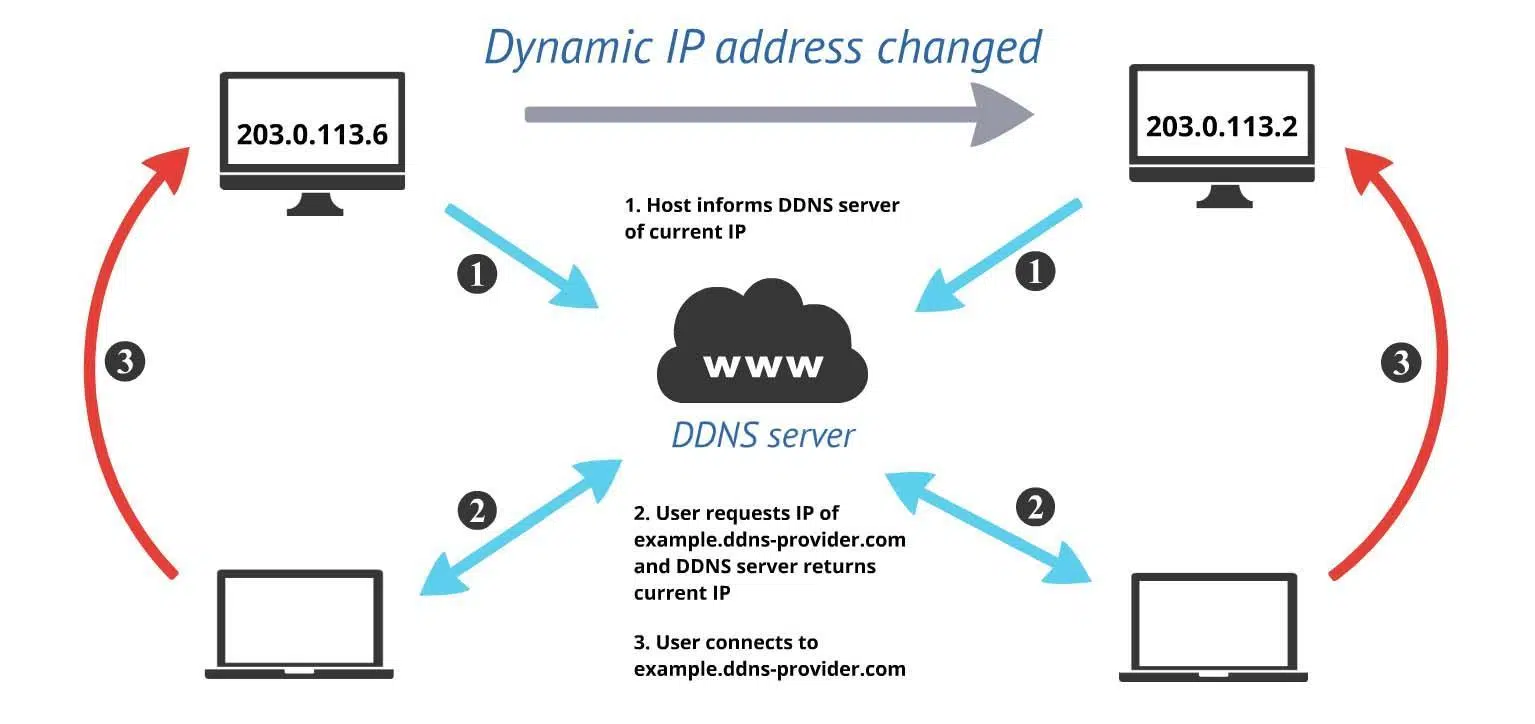
Everything on the internet is constantly changing, including IP addresses. When a computer's IP address changes, domain names can become outdated and cause access problems; this is where dynamic DNS comes in. With a good DDNS service, a hostname continues to point to the correct destination even when the IP address changes without warning.
If you manage servers, access your home network remotely, or publish services using dynamic IP addresses, you'll want to understand how this works. These systems automate DNS record updates , eliminating the need to manually check your IP address each day.
What is Dynamic DNS (DDNS)
Dynamic DNS, also called DDNS or DynDNS, is a service that keeps the relationship between a domain name and a changing IP address synchronized. In practice, it associates a domain or subdomain with an IP address and updates it when the IP changes . This way, even if your connection's IP address is renewed by DHCP, you can still reach your computer by always typing the same name.
It's important to understand that this isn't a feature that comes "by default" on your computer. It's an external service that you need to register and configure, either on your router, in a system agent, or in your infrastructure. The goal is clear: to allow you to locate and reach your device even if its public IP address has changed or you don't remember it.
Many users refer to it by the historical brand name "DynDNS," but the concept is broader and more standardized. In practice, you configure an easy-to-remember name (for example, my-server.example.net), and thanks to DDNS, that label will continue to resolve to your computer even if the IP address assigned by your internet service provider is periodically renewed.
Why IP addresses change
In the early days of the internet, IP addresses were more static, but the expansion of the network and the surge of connected devices complicated that strategy. To optimize resources, networks use DHCP to temporarily "lease" IP addresses . When a device connects, it receives an IP address for a lease period, and when it disconnects or the lease expires, that IP address can be reassigned to another device.
Furthermore, the IPv4 address space fell short due to the massive demand from servers, sensors, mobile devices, and all kinds of other devices. The arrival of IPv6 greatly expanded the number of available IP addresses, but in practice, for reasons of cost and efficiency, dynamic allocation remains the norm in many business and home networks.
This mechanism causes the IP address of a single device to change frequently and without a fixed pattern. If your service relies on a specific IP address, each change would cause the domain name to stop pointing correctly, resulting in outages and errors. To avoid this constant fluctuation of addresses, a system that synchronizes names and IPs in near real-time is essential.
How Dynamic DNS Helps in Practice
Developers and administrators identify endpoints (APIs, gateways, critical services) using hostnames in their code and configurations. When DNS records become outdated, clients attempt to resolve a name to an outdated IP address , resulting in access failure. DDNS ensures that the name you use to reach a service always resolves to the current value.
This saves you from manually checking your IP address every time you connect from outside your home or office. Instead of memorizing number sequences, you access your network using a stable domain name that automatically reconfigures itself . For anyone needing remote desktops, home VPNs, IP cameras, or a NAS server accessible from the internet, DDNS is a simple and practical solution.
DDNS vs DNS: how they differ
Both DNS and DDNS resolve hostnames to IP addresses, and from the client's perspective (your browser, an app, or a script), the process is virtually identical. The difference lies in how and how often the records are updated . In a traditional DNS, these changes are usually manual and sporadic (for example, when you migrate a server service). In DDNS, updates are frequent and automated.
Think of DDNS as an extension of classic DNS: it adds the ability to detect IP changes and refresh records without human intervention . This way, even if your domain is assigned a new IP address, the service will automatically update the A record (or AAAA for IPv6) to ensure everything stays the same.
Some providers periodically check if your IP address has changed (for example, at certain intervals, often in windows close to 24 hours or much less if the customer reports it earlier) and, when they detect a change, they immediately update the DNS response that delivers the name they have assigned you.
How a DDNS service works
The basic process is simple. First, you sign up with a DDNS provider and choose the name they will assign you (your own domain or a subdomain from the provider). Then, you configure an update agent : this can be your router (many have one built-in), a small service on your server or device, or a client on your network.
This agent communicates periodically with the DDNS provider, either at set intervals or when it detects a change in the public IP address, and sends the current address. The provider checks the credentials and, if everything is correct, modifies the corresponding DNS records so that the name points to the new IP address instantly or within seconds.
In corporate environments, it's sometimes integrated with DHCP so that when a device obtains a lease, the registry update is triggered . In other cases, the client contacts the external service directly using a secure API. The result is the same: the hostname doesn't change, but its resolution is kept up to date.
From the user's perspective, this means that if you try to connect to your home server at night, even if your ISP renewed your IP address in the afternoon, the DDNS name will still work. The "magic" lies in the fact that the DNS lookup always returns the current address , preventing you from having to constantly query or share new numbers.
Types of DDNS
There are several ways to implement DDNS, with both standardized and proprietary approaches. One of the best-known is described in RFC 2136, which defines how to extend DNS to allow dynamic record updates . It's commonly used in conjunction with DHCP servers in enterprise networks, so that leases and names are linked.
On the other hand, there are also proprietary implementations that use simple protocols like HTTP/HTTPS along with a pair of credentials to authenticate the client updating the record. In this model, an agent authenticates with the provider and communicates the current IP address so it can be applied to the associated domain record.
Key benefits
The main value of DDNS is that it reduces manual work and prevents errors caused by frequent IP changes. But its advantages go even further, especially when combined with other infrastructure components such as DHCP, firewalls, or cloud services.
- DHCP Support: It allows the use of dynamic leases without records becoming obsolete, eliminating conflicts between what DNS says and what the address server distributes.
- Service availability: You can publish systems and access them by name, without having to remember changing IP addresses, making secure remote access easier.
- Allowlists: It is more robust to authorize by name when the clients' IP addresses change, since DDNS keeps those names pointing to the current IP address.
- DNS Automation: You reduce error-prone tasks and save your team time by not having to manually edit records for every change.
- Cloud environments: Many cloud workloads change IP addresses if they don't set a permanent public IP address; DDNS helps ensure the name always resolves to the correct instance.
Furthermore, in terms of cost, it is usually more economical than contracting static IPs in all scenarios. By automating synchronization, downtime due to outdated records is minimized , and the administrator's daily operations are simplified.
DDNS Risks and Security
Like any useful technology, DDNS can also be exploited by malicious actors. If an attacker controls the update mechanism, they could redirect a service name to an IP address under their control and launch phishing or impersonation campaigns against users who trust that domain.
Another common tactic is to evade IP-based blocks. Many defenses maintain blacklists of addresses known to host malware or C2 attacks. If the adversary uses names that resolve via DDNS, they can quickly rotate IPs to bypass filters that only look at static addresses.
For this reason, it's advisable to protect the update channel and protocol: use HTTPS or secure channels, rotate credentials, limit who can update records, and monitor changes. Furthermore, the network's DNS security solutions should inspect and block malicious resolutions , thereby strengthening the security posture against DDNS abuse.
Market tools and support
There are security suites on the market that integrate threat intelligence to detect malicious domains and facilitate the work of the SOC. For example, threat detection platforms like Check Point Infinity SOC help identify campaigns that abuse DDNS and correlate indicators of compromise related to suspicious domains and resolutions.
Similarly, some firewalls for small and medium-sized businesses (SMBs) and security gateways, such as the Quantum Spark family and its cloud-based management console, include DDNS support to assign a stable name to the gateway . This ensures administrative access even if the external IP address changes over time, simplifying operations without sacrificing visibility or control.
Everyday use cases
At home, a classic example is remote access to a NAS, IP cameras, or a media server. With DDNS, you publish an easy-to-remember name that always "points to home ," and combine it with port forwarding rules or a secure tunnel to connect from outside. This way, you don't depend on knowing what IP address your ISP has assigned you today.
In small businesses, it's common to access an office without a static IP address: a VPN with the exposed endpoint using DDNS allows employees or technicians to connect by name without any issues . In development, many internal APIs in dynamic environments leverage DDNS when static addresses aren't assigned.
Good implementation practices
Choose a reliable provider that offers secure APIs, good availability, and competitive propagation times. It's preferable to use router-integrated clients or official agents , keep credentials secure, and enable MFA if available for administrator accounts.
Adjust the TTL of your records to a value consistent with how often your IP address changes. A TTL that's too high delays propagation after a change; a very low one increases traffic and resolution load without providing any benefit if your address doesn't change that often. Find the right balance through real-world testing.
Monitor update logs: every change should be recorded with the date and source. If your provider allows notifications, enable alerts for unexpected modifications . In corporate networks, restrict which devices can run the DDNS client using company policies.
Adding application-layer security (VPN, properly configured HTTPS, strong authentication) substantially reduces risks. And remember: while DDNS keeps the name up-to-date, it's no substitute for secure port configuration, certificates, and access controls on your exposed services.
For years, DDNS has solved a simple yet critical problem: keeping devices and services accessible despite changing IP addresses. Between its advantages—automation, DHCP compatibility, constant availability, and cloud support—and its risks—which are mitigated with best practices and tools— it has become a key component for anyone needing a stable name over a non-stable IP address.
