- Google Videos integrates Gemini AI for collaborative scriptwriting, storyboarding, and editing.
- Work-focused: templates, screen recording, and export to MP4/Drive.
- Indicative duration: up to 10 minutes; early betas limited to less than 3.
- Available in Workspace; requires an internet connection and has limited language support.
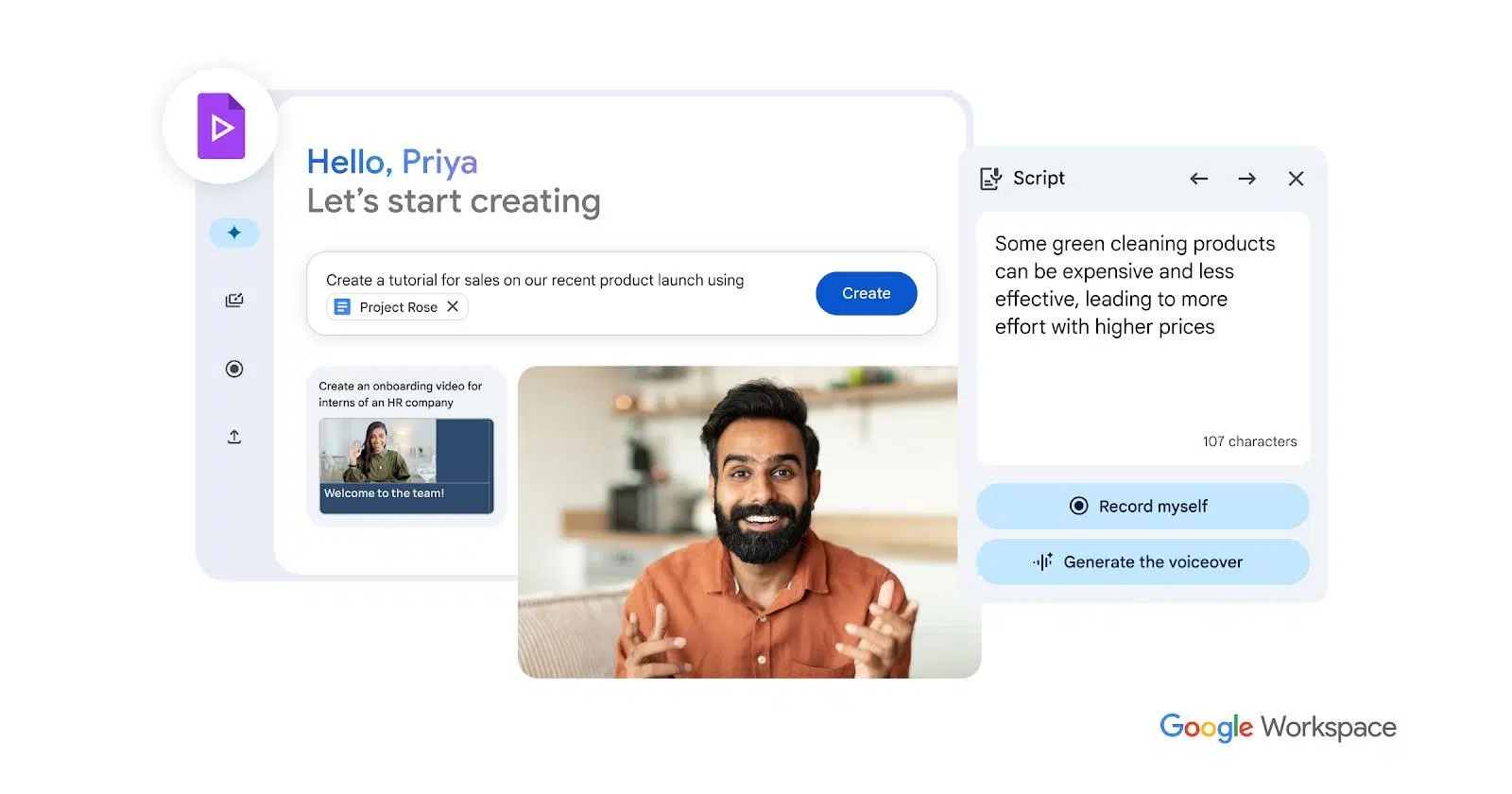
Video has become the common language of modern work, yet producing it remains slow and expensive for most teams. In many cases, the solution is to use AI-powered video creation tools . This is where Google Vids comes in, a Google initiative within Workspace that aims to allow anyone to plan, produce, and share useful video clips without installing anything or being a professional editor.
The company has doubled down on its artificial intelligence strategy after a turbulent 2023; Gemini is now the layer that powers its tools , and that includes this new application geared toward the workplace. Vids doesn't aim to compete with pure generative video models for mass creators like Sora; its focus is on being a productivity tool that sits alongside Docs, Sheets, and Slides to help explain, train, and sell more effectively.
Google, Google Workspace and their logos are trademarks of Google LLC; other names and brands mentioned belong to their respective owners.
What is Google Vids
Google Vids is a cloud-based video creation and editing application integrated into Google Workspace. Accessible through a web browser without additional software, it combines templates, step-by-step guides, and automatic recommendations to transform ideas into shareable videos.
According to the product description and specialized coverage, it relies on Gemini to assist with scriptwriting and storyboarding , suggesting scenes and visual resources based on a brief or source text. It's collaborative, similar to Google Docs, allowing multiple people to contribute changes and comments in real time.
There are nuances regarding its evolution: in initial tests with Workspace Labs users, it was mentioned that the clips were less than 3 minutes long and without integration with YouTube , while more recent content indicates that today it is possible to produce videos of up to 10 minutes and even insert fragments stored in Drive (of up to 30 minutes) within a scene to cut what is necessary.
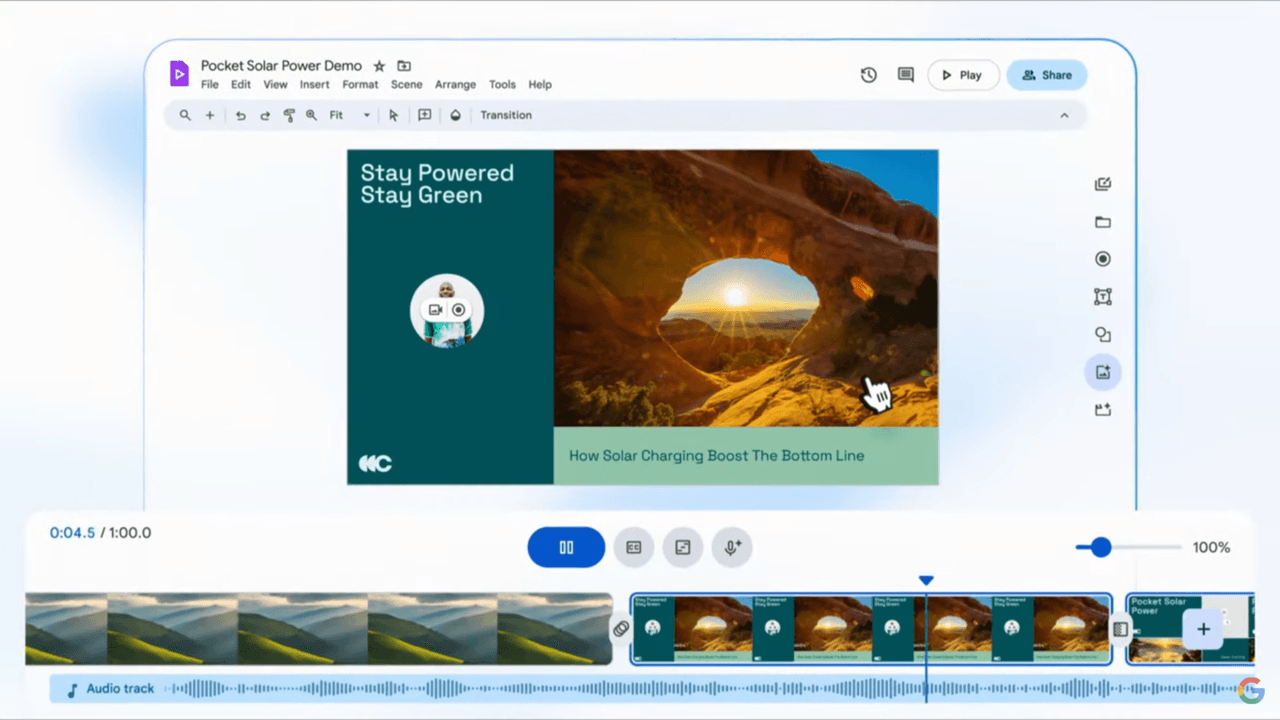
How it works: from script to final video
The typical workflow starts with a clear objective, for example, an onboarding piece, a product demonstration, or a project update; with the assistance of generative artificial intelligence , from there, Vids suggests a scene structure to avoid leaving important points out.
The assistant suggests an editable storyboard with visual styles and rhythms reminiscent of a 'super presentation' that can approach professional presentations , but with video sequences, transitions, and music. You can accept the suggestions or rearrange and adjust each block with complete freedom.
To populate your scenes, Vids lets you upload your own clips and images , choose stock footage, add photos, and select background music. It also includes a voiceover feature, either with predefined voices or with your own voice recorded directly from your browser.
In addition, the tool supports built-in screen recording, ideal for tutorials and software demos without needing external utilities. And if you need a longer video clip, you can insert a file from Drive and trim it to fit the specific scene.
Once the skeleton is assembled, it is possible to refine transitions, overlay text and graphics , adjust the music volume and add automatic subtitles to improve comprehension, all with a very gentle learning curve.
Key features that define it
- AI assistance throughout the entire workflow: from writing the script and proposing scenes to recommending visual resources and music that matches the tone.
- Templates and styles business-oriented (sales, training, internal communication), with variations in pace and composition that make it easy to get started quickly.
- Screen and camera recording directly in the browser, useful for explaining processes and showing products without additional tools.
- Real-time collaboration, comments and version control like in Docs/Slides, which streamlines team approvals and reviews.
- Subtitles and voiceover integrated; you can choose generated voices or add your own, and you can easily edit the text.
- Flexible export: Download in MP4, save directly to Drive, and easily publish to platforms, including the option to upload to YouTube.
It is worth noting that, in early demos, Google emphasized stock resources rather than generating audiovisual content from scratch; the differentiating value lies in assisted orchestration , rather than creating synthetic video in the style of generative motion picture models.
Duration, limits and availability
Regarding time limits, various sources cite two phases: an initial beta with videos under 3 minutes long, and a more recent phase supporting videos up to 10 minutes long. In both cases, the goal is to maintain a duration focused on capturing attention in work contexts.
If you need to incorporate longer materials, Vids allows you to insert videos of up to 30 minutes from Drive into a specific scene and trim them, so that the final project doesn't become excessively long or lose its rhythm.
Regarding languages, availability is not yet complete: it is indicated that, for now, it only works in English on many accounts, so it is advisable to check the language support in your organization before adopting the flow on a large scale.
It's also important to keep in mind that this is a cloud-based service; it doesn't have an offline mode , so working with a stable connection is essential for smooth editing and exporting.
Your role within Google Workspace
Google positions Vids as a core application within the Workspace suite, on par with Docs, Sheets, and Slides . In practice, it feels like an evolution of Slides toward audiovisual storytelling, with integrated scenes, transitions, and audio.
This 'corporate' orientation means it excels at clear and repeatable communication : welcome manuals, sales training, product explanations, client proposals, or project summaries. It's not as well-suited for film production or viral entertainment pieces.
Collaboration is its hallmark: multiple editors, live cursors, and contextual comments , which reduces back-and-forth email and speeds up consensus, just like with other Workspace files.
Recommended use cases
- Staff integration: Welcome messages, company culture, and key processes to help a new employee get off to a good start.
- Sales training: Clear sales scripts, with product demonstrations and common objections addressed with examples.
- Project Updates: Periodic summaries with metrics, milestones, and next steps to align stakeholders.
- Communication with suppliers: Quality instructions, visual specifications, and service expectations in an easy-to-consume format.
It is also useful for lightweight marketing and internal communication , where speed and consistency matter more than advanced post-production effects.
Advantages and disadvantages compared to traditional publishers
What he does very well
Its main strength is its ease of use . It requires no technical experience; AI and templates guide you so that the first cut is ready in minutes.
Integration with Workspace is another key point: access to Drive, Slides, Docs and Chat, centralized permissions and native collaboration in the browser.
Being 100% cloud-based , you don't have to worry about installing heavy programs or system compatibility issues; any computer with a modern browser can participate.
Finally, AI automation saves time on repetitive tasks such as suggesting structures, subtitling, or adjusting voiceovers, which speeds up delivery.
Its limits today
Compared to professional suites like Premiere or Final Cut, the advanced options are more limited ; it does not seek to replace post-production tools.
It depends on connectivity: there is no offline mode , so in environments with unreliable internet it can be an operational hindrance.
Language availability is not yet complete; in many cases it only works in English, which can complicate adoption in multilingual teams.
Related AI News in Workspace
The launch of Vids was accompanied by more AI-powered features in the ecosystem. In Google Chat and Google Meet, 'Take notes for me' and 'Translate for me' stand out: the former generates meeting notes without interrupting the conversation, and the latter detects and translates subtitles in real time.
In addition, Chat includes automatic message translation and conversation summaries. These capabilities are offered as a paid add-on for meetings and messaging at an approximate price of $10 per user/month, according to the announcement.
In Gmail, the 'Help me write' feature adds voice input for composing emails , turning snippets of ideas into complete messages with a single click. These improvements are aimed at reducing everyday friction.
Beyond AI, Sheets receives template tables to organize data , Docs adds tabs within the document itself to better structure information, and Chat expands its spaces to 500.000 members with interoperability with Slack and Microsoft Teams.
In terms of security, Google has indicated that AI helps block more spam in Gmail (shared figures suggest an additional 20%) and that it works with a protection add-on in Drive for $10 per user/month to classify and safeguard sensitive files with privacy-preserving models.
How to get started with Google Videos
To try Vids, you typically need a Google Workspace subscription with access to Gemini-powered features. In early stages, the rollout was done through Workspace Labs and staggered betas.
Once enabled, you can log in from your browser with your corporate account and create a new project using a template or your own script. The interface guides you through defining the objective, target audience, and duration.
Import assets from Drive or your computer, record your screen or camera if needed, and let AI suggest the order and narrative. Then, review with your team in real time and finalize the cut with adjustments to text, subtitles, and audio.
To share, download it in MP4 format , save it to Drive, or distribute it through your organization's usual channels. If you work with YouTube, you can upload it quickly, respecting your internal policies.
FAQ
Is it included in Google Workspace?
Vids is part of the Workspace ecosystem and, depending on the plan, may be available at no additional cost within the subscription, especially in editions with Gemini enabled.
Does it work offline?
No. It's a cloud-based tool; you need an internet connection to edit, collaborate, and export normally.
What languages is it available in?
The latest information indicates that its language availability is limited and it often only operates in English. You should check with your administrator.
Can I use my own videos and images?
Yes. You can upload your own material and combine it with stock resources , as well as insert pieces from Drive and crop them within a scene.
Does it allow real-time collaboration?
Yes. Similar to Docs or Slides, multiple users can simultaneously edit , comment on, and approve versions without leaving the browser.
How is it different from advanced editors?
Their approach focuses on simplicity and AI for productivity , not on replacing post-production suites. It's ideal for agile business projects, not for complex film workflows.
How do I export the result?
You can download it in MP4, save it to Drive and share it through your company's channels; you can also upload it to YouTube when it makes sense.
With its focus on work, a clear push for AI to reduce friction, and deep integration with Workspace, Google Vids is shaping up to be the video app that's been missing among Docs, Sheets, and Slides. If your teams need to explain ideas quickly and consistently, have reusable standard guides, and collaborate seamlessly, it's a perfect fit.
