- The DNS organizes domains into zones and subzones to delegate authority and distribute administration.
- Each zone is described in a zone file with its SOA, NS records, and various record types (A, MX, CNAME, TXT, etc.).
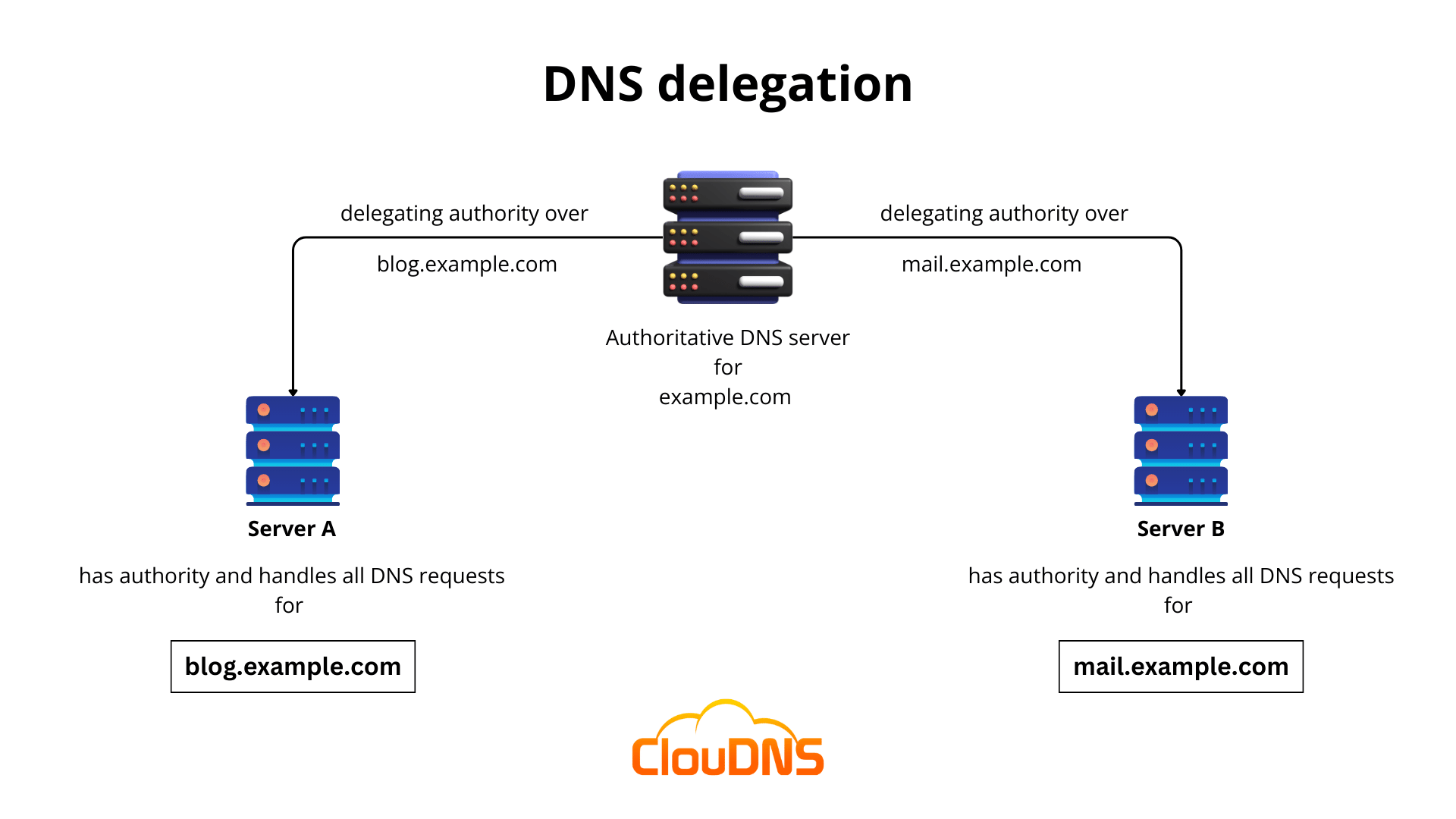
- Delegating subzones using NS records allows a subdomain to have its own name servers and management.
- Good planning of zones, TTL and security (DNSSEC, access controls) reduces errors and improves availability.
If you work with domains and hosting , or simply manage a website, sooner or later you'll come across terms like DNS zone, subzone, zone files, and records . They sound technical, but once you put them into practice, you'll see that it all makes perfect sense and that, with a few clear ideas, you can manage your own DNS without getting lost in the process.
In the following lines we will calmly examine what a DNS zone and a subzone are, how they fit into the hierarchy of the domain name system, what types of zones exist , how they are delegated, what the most common records are, what problems cause trouble and how to avoid them, all explained in plain Spanish, but without losing technical rigor.
Quick reminder: how DNS works on the inside
To understand what a DNS subzone is, you first need to understand the Domain Name System (DNS) itself . The DNS is a hierarchical and distributed system that translates human-readable names (like example.com) into IP addresses that computers can understand.
Many people compare the DNS to an "Internet phone book", although today the idea of a mobile phone contact list is more fitting : you search by name, and the system manages to find the number without you having to memorize it.
When you type a domain into your browser, a DNS query (lookup or resolution) is initiated . The user's device asks a "recursive resolver" (usually the DNS of your Internet provider or a public service like Google or Cloudflare), and that resolver queries different DNS servers until it finds the correct record.
The resolution follows a very clear hierarchical structure: first, the root servers are queried , which manage the DNS root zone and return which servers carry each top-level domain (TLD) such as .com, .es, .ovh, etc.
Next, the resolver queries the name server for the corresponding TLD (.com, .gov, .ovh, etc.) to find out which name servers are authoritative for the specific domain, for example, mydomain.com. Finally, those authoritative name servers for the domain respond with the specific DNS records: website IP address , mail server, subdomains, etc.
Domain hierarchy, FQDN, and tiered structure
This entire system is based on the fact that a domain is composed of blocks separated by periods , which are resolved from right to left. The fully qualified domain name, the famous FQDN (Fully Qualified Domain Name), includes all these levels and ends in a root period, although that final period is not normally displayed in the browser.
Thus, in a name like support.mydomain.ovh, the rightmost block is the TLD (.ovh) , to its left is the second-level domain (mydomain), and then come the subdomains (support, www, blog, etc.). The DNS resolves each block in reverse order: first the root, then the TLD, then the domain, then the subdomain.
Every internet connection typically has at least one primary and one secondary DNS server associated with it , which are obtained automatically via DHCP. The secondary server serves as a backup if the primary server fails, helping to keep websites and services accessible.
When receiving a query, the DNS server can behave in two ways: if it already knows the domain because it has it cached, it responds instantly using the stored information, limited by the TTL (Time To Live) parameter ; if it does not know it, it starts the entire query chain towards root, TLD and authoritative servers until it reaches the zone that contains the requested subdomain or domain.
What is a DNS zone and what is a DNS subzone?
Within that large tree of names, the DNS space is organized into DNS zones . A DNS zone is a part of the namespace that is managed by a specific entity (a company, a hosting provider, or an administrator).
In practice, a DNS zone is an administrative unit: it defines the extent of authority to create, modify, and delete records . It can encompass only the base domain (for example, ecohosting.cl) or also include one or more of its subdomains.
Imagine the domain ecohosting.cl with these subdomains: support.ecohosting.cl, clients.ecohosting.cl, and blog.ecohosting.cl. If support and clients are simple services linked to the main hosting, it's convenient to manage them in the same zone as ecohosting.cl . But if the blog is an independent project, developed by another team or with another provider, it makes perfect sense to give it its own DNS zone.
In that case, ecohosting.cl, soporte.ecohosting.cl, and clientes.ecohosting.cl would share a zone, while blog.ecohosting.cl would constitute a delegated DNS subzone , with its own name servers and zone file. This is where the concept of a "DNS subzone" comes in: a portion of the domain assigned to a different zone to delegate control.
DNS zones don't need to be physically separated on different servers; it's more of a logical separation to delegate authority . A single name server can have multiple zones, each with its own independent zone file.
Types of DNS zones: primary, secondary, forward, reverse, and stub
When you delve a little deeper into DNS administration, you'll see that not all zones are the same. There are different types of DNS zones , designed to meet different needs within the infrastructure.
The primary DNS zone is the main read/write copy of a zone. Its data is stored in a master file on a specific server, and any changes to the records must be made there. There can only be one master file per zone on a given server.
The secondary DNS zone is a read-only copy of the primary zone. It is kept synchronized with the master using full AXFR or incremental IXFR transfers. Its main function is to provide redundancy and availability : if the primary server fails, resolvers can continue querying the secondary servers listed in the NS records.
We also have the so-called forward lookup zone , which is used to translate domain names into IP addresses. It stores A records (for IPv4) and AAAA records (for IPv6), along with other types of records associated with the name.
On the other hand, there's the reverse lookup area , which works in reverse: it returns the domain name from an IP address using PTR records. It's very common for email services and security systems to check this reverse relationship to validate that an IP address actually corresponds to the domain it claims to be.
Finally, there is a special type called a stub zone , a reduced version of a zone that only contains essential records: NS to identify authoritative servers, A/AAAA to make those servers discoverable, and the SOA. This type of zone helps large networks maintain up-to-date lists of authoritative servers for delegated zones without needing to store all the records.
DNS zone files and key elements
All the information for a zone is stored in its DNS zone file , which is a plain text file on the name server. Each line represents a resource record, and the collection of all of them fully describes how that domain and its subdomains should be resolved.
Each zone file must begin with a Start of Authority (SOA) record . The SOA specifies the primary name server for the zone, the technical lead, serial numbers, and timestamps that regulate caching, transfers to secondary servers, and retries.
A critical parameter in all of this is the Time To Live (TTL) , which tells resolvers how long they can cache each record before querying it again. A high TTL reduces DNS traffic but makes changes take longer to propagate; a low TTL speeds up changes but increases the number of queries.
These zone files include different types of records: IP addresses, mail servers, text records for email security, subdomain aliases, etc. Each record uses a very specific DNS syntax , similar to small "instructions" that the server understands to know how to respond.
Most common types of DNS records in a zone or subzone
Within a DNS zone, you'll primarily work with a specific set of records. These are the most common DNS records you'll encounter when managing a zone or subzone.
The A record links a domain name or subdomain to an IPv4 address. For example, www.mydomain.com pointing to 203.0.113.10. It is essential for a website to load from a specific IP address.
The AAAA record serves the same purpose, but points to an IPv6 address. It's becoming increasingly common in modern environments, especially if your provider fully supports IPv6.
MX records indicate the mail servers responsible for receiving emails for the domain. They are usually accompanied by a numerical priority that indicates which server is used first and which are kept as backups.
CNAME records are used to create aliases: a name points to another name, not an IP address. For example, blog.mydomain.com could be a CNAME record for mydomainblog.externalhosting.com. They don't return an IP address directly, but rather redirect to another name that will have one.
NS records specify which name servers are authoritative for a zone or subzone. They are key to delegation: when you create a DNS subzone for a subdomain, you register NS records in the main zone that point to the authoritative servers for that subzone.
The aforementioned SOA record stores the authority data: master server, administrator email (specially formatted), zone serial number, and various refresh times, retries, expiration, and minimum TTL.
TXT records store arbitrary text strings associated with a domain. They are widely used for email security (SPF, DKIM, DMARC), domain verification with external services (Google, Microsoft, etc.), and various metadata.
SRV records indicate which host and port provide a specific service (e.g., VoIP, messaging, or certain internal services), while PTR records are used in reverse zones to map IP to domain name.
Less frequent but important DNS records
In addition to the classic ones, the DNS standard defines a good number of lesser-known records that are used in very specific contexts, often related to security or advanced services.
The AFSDB registry was designed for the Andrew Distributed File System (AFS) and helps locate AFS cells in network storage structures.
The APL register is experimental and is used to store lists of address ranges, something very unusual in common environments.
CAA records are becoming increasingly important: they allow domain owners to specify which certificate authorities (CAs) can issue certificates for that domain , strengthening the security of the TLS layer. Without a CAA, any CA could issue certificates for that domain.
The DNSKEY record stores public keys used by DNSSEC (Domain Name System Security Extensions), the set of extensions that adds cryptographic signatures to DNS records to prevent tampering.
The CDNSKEY record is basically a "daughter" copy of DNSKEY intended to be transferred to the parent zone, facilitating validation in DNSSEC strings.
The CERT registry stores public key certificates, while the DHCID registry stores information used by DHCP (the dynamic host configuration protocol) to coordinate assignments and avoid conflicts.
The DNAME record is similar to CNAME but at another level: it creates a complete domain alias, so that not only the pointed-to name but all its subdomains are redirected to another name tree.
The LOC record can store geographic information (latitude, longitude, altitude) associated with a domain, something that is sometimes used in geolocation services or internal documentation.
The NAPTR registry combined with SRV allows dynamically creating service URIs based on patterns, which is useful in certain voice over IP or messaging applications.
In the DNSSEC world, there are also NSEC records , which serve to cryptographically prove that a record does NOT exist, and RRSIG records , which store the digital signatures of record sets.
Finally, there are others such as the RP (responsible person) record , which points to the email of the domain owner, or the SSHFP record , which allows publishing SSH public key fingerprints to strengthen the security of remote connections.
DNSSEC, security and best practices in zone management
DNS zones and subzones are prime targets for attackers because altering even a few records can redirect web traffic, hijack emails, or impersonate services . That's why zone management security is so critical.
A first step is to protect your DNS panel credentials (whether it's cPanel, Plesk, a provider's own panel, or a panel like core-admin). It's advisable to use strong passwords, avoid sharing access, and enable two-factor authentication whenever possible.
Enabling DNSSEC adds an extra layer of protection: DNS records are digitally signed, and resolvers that validate DNSSEC can detect if someone tries to inject fake answers or manipulate records in transit.
It's also crucial to carefully review every record change to avoid configuration errors: an incorrect priority in MX , a misspelled IP in an A, a CNAME that gets stuck in a loop, or a missing period at the end of a name can render your website or email unusable.
It is advisable to get used to using DNS verification tools to validate changes: CMD (dig, nslookup), diagnostic panels from the provider itself, or online services for checking propagation and DNSSEC status.
Propagation of changes and TTL in zones and subzones
When you edit a DNS zone or subzone (for example, by changing the web server's IP address or modifying the MX records), the changes are applied immediately on the authoritative servers, but they are not instantly reflected worldwide.
The cause is caching : DNS resolvers store responses for the time specified by the record's TTL. Until that TTL expires, they will continue serving the old version, hence the well-known "DNS propagation."
This process can take anywhere from a few minutes to 24-48 hours in extreme scenarios, depending on the configured TTL values and how each ISP caches data . Therefore, for critical changes, it's advisable to temporarily lower the TTL a few days beforehand, wait for the new TTL values to propagate, and then make the major change.
During the rollout, some users may see the old website or email, while others are already being served by the new server. You can monitor this process with online tools that review your logs from multiple locations.
Use of subdomains, subzones, and redirects
Creating subdomains is a very flexible way to organize your project: you can have blog.mydomain.com, store.mydomain.com, support.mydomain.com and thus separate services, technologies or even providers.
For many subdomains, managing them in the same zone as the main domain will suffice, adding A, AAAA, or CNAME records as needed. However, when a subdomain becomes very complex or you want another team or provider to manage it, it may make sense to delegate it to a separate DNS subzone.
This delegation is done by creating NS records within the main zone pointing to the name servers of the subdomain. From that point on, all queries for that branch of the namespace are resolved in the subzone.
In addition to subdomains, it's also common to use HTTP redirects from one domain or subdomain to another, which are defined on the web server or through the registrar's redirect services. This isn't a DNS record as such (except in specific cases with specialized records), but rather an HTTP server response.
Control panels such as cPanel, Plesk, ISPConfig, or the panels provided by each hosting provider usually offer graphical wizards to create subdomains, edit zones, and configure redirects without having to directly touch the zone file.
Benefits of DNS zoning and subzoning
Dividing a large namespace into several DNS zones and subzones has clear advantages, especially as a project or organization grows.
On one hand there is decentralization : different units, departments or providers can manage their own pieces of the domain without stepping on each other.
It also improves performance and scalability : with smaller zone files, updates and transfers between primary and secondary servers are lighter, and the load is distributed among several name servers.
Subzone delegation also facilitates the distribution of traffic between different data centers or providers, which helps to balance loads, improve latency, and increase resilience against single-provider outages.
From an organizational point of view, it allows granular management : each team only controls the records that affect it, which reduces the risk of errors in external domains or services.
Delegating a DNS subzone step by step (conceptually)
Delegating a DNS subzone involves dividing a large zone into smaller zones and assigning each one to different authoritative servers , usually for specific subdomains.
Let's say you own the domain yourdomain.com and you want another team or provider to manage it.yourdomain.com. The first step is to create a set of NS records for it.yourdomain.com in the main zone, pointing to the names of the DNS servers that will handle that subzone.
If those servers are within the domain itself (for example, ns1.yourdomain.com), in the main zone you must also add A (or AAAA) records for those servers , so that they are resolvable and the resolvers can find them correctly.
From there, on the server designated for the subzone it.yourdomain.com, a new zone file is created with its own SOA, its NS and all the necessary records (A, MX, TXT, etc.) for that subdomain.
In this way, queries for www.yourdomain.com will continue to be resolved in the main zone, while those going to it.yourdomain.com or subdomains within that branch will go to the delegated subzone , which will now be the authority in that part of the tree.
Changes, monitoring, and typical problems in DNS zones
Every time you add, modify, or delete a record in the DNS zone or subzone, you are performing a zone change . Although these may seem like simple changes, an oversight can have serious consequences for the availability of the website, email, or critical services.
Some systems allow you to activate zone change notifications (ZCN) or similar mechanisms so that secondary servers or external services know that there have been updates and synchronize the new version.
A very common initial problem is propagation delays due to long TTLs. Users in different parts of the world may be seeing old and new versions simultaneously, which complicates diagnosis if you're not clear on what issue is affecting whom.
Another set of common failures involves configuration errors : wrong IPs, incorrect MX priorities, poorly constructed CNAMEs, names without a trailing period when they should have one, duplicate or conflicting records, etc.
To minimize risks, it's a good idea to use a controlled change methodology: document modifications, apply changes first in test environments when possible, and then verify with DNS diagnostic tools that everything responds as it should.
Difference between DNS zone, subzone and DNS server
It's easy to confuse the DNS zone with the DNS server itself or with the concept of a domain , but these are different things that should be mentally separated.
A DNS zone is the administrative scope that defines the extent of the authority of a specific zone file. It can encompass an entire domain and all its subdomains, or only a delegated portion, such as a specific subzone.
A DNS server is the machine (physical or virtual) or software that stores these zone files and responds to queries. Multiple zones and subzones belonging to different domains can coexist on the same server.
The domain is the name registered in a TLD (mydomain.com, mydomain.es, etc.). This domain can be implemented at the DNS level as a single zone or as several subzones, depending on how you want to distribute administration and load.
Separating zones by subdomains isn't mandatory, but it's a very useful practice as your infrastructure grows, because it allows for better delegation, scalability, and problem isolation . The key is always to clearly define which part of your name tree needs administrative or technical independence.
Once these concepts are understood and it's clear what a zone, a subzone, the role of zone files, and the different types of records are, managing DNS ceases to be a murky territory; with good zone and subzone planning, sensible use of TTL, and diagnostic tools at hand, it's much easier to keep domains, subdomains, and services running with stability, performance, and security.


Table of Contents
- 1 Quick reminder: how DNS works on the inside
- 2 Domain hierarchy, FQDN, and tiered structure
- 3 What is a DNS zone and what is a DNS subzone?
- 4 Types of DNS zones: primary, secondary, forward, reverse, and stub
- 5 DNS zone files and key elements
- 6 Most common types of DNS records in a zone or subzone
- 7 Less frequent but important DNS records
- 8 DNSSEC, security and best practices in zone management
- 9 Propagation of changes and TTL in zones and subzones
- 10 Use of subdomains, subzones, and redirects
- 11 Benefits of DNS zoning and subzoning
- 12 Delegating a DNS subzone step by step (conceptually)
- 13 Changes, monitoring, and typical problems in DNS zones
- 14 Difference between DNS zone, subzone and DNS server