- Atlas focuses on automating complex processes with its agent mode, acting as an assistant that performs multi-step tasks for you.
- Comet prioritizes fast and in-depth research, offering answers based on multiple sources with great speed and transparency.
- Atlas offers greater privacy control and is linked to a ChatGPT Plus subscription, while Comet opts for a more accessible freemium model.
- The choice between Atlas and Comet depends on the workflow: automation and control versus exploration, research, and speed in decision-making.
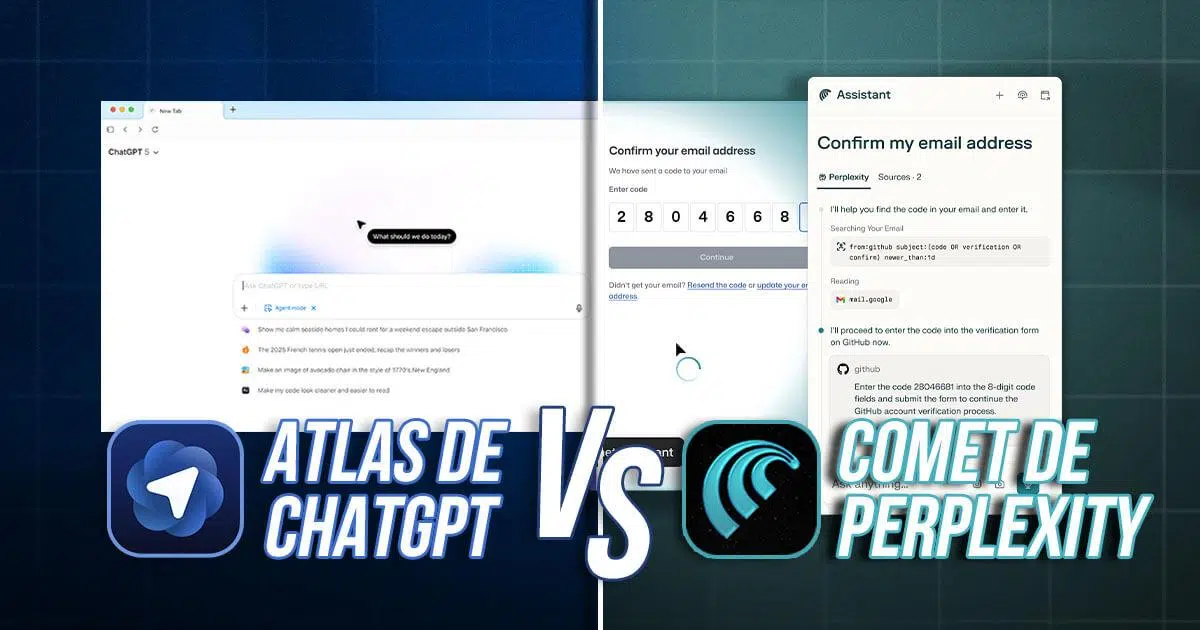
Since Google Chrome emerged as the king of fast and lightweight browsers, the game has completely changed . Speed is no longer the only criterion: now we look for browsers capable of thinking, anticipating, and, in many cases, doing things for us. The rise of artificial intelligence has transformed the browser into something far more ambitious than a simple window to the internet.
In this new landscape, two names stand out: Atlas (from OpenAI) and Comet (from Perplexity) . Both are AI-powered browsers that aim to help you stop "opening Google to search" and start interacting with the web. However, while they pursue similar goals, they do so with very different approaches: one is obsessed with automating complex tasks, while the other focuses on researching and providing you with reliable information at lightning speed.

Both Atlas and Comet are based on Chromium, the same engine that powers Chrome, Edge, and Brave . This means good compatibility with almost all modern websites and access to Chrome extensions, which is key if you already rely on certain add-ons daily. But the real difference lies not in the technical foundation, but in the philosophy behind their design.
Atlas was born from the ChatGPT ecosystem and leverages the power of OpenAI models . Each tab can become a space for conversation with AI, which analyzes what you see, understands the context, and suggests actions. Its "Agent mode" is the heart of the invention: a mode in which you delegate multi-step tasks as if you were explaining them to a human assistant, from planning a trip to reviewing business dashboards.
Comet, created by Perplexity, focuses more on the role of a constant research co-pilot . You don't need to activate a special mode for the AI to start helping you: it's always present, ready to summarize pages, link sources, create branches of ideas, and navigate multiple websites simultaneously while you simply ask questions or make requests.
The common thread is that both want you to stop thinking about "searching" and start posing complex questions or goals directly to the browser . The promise is that the browser will act, investigate, compare, and, if necessary, take action without forcing you to spend half an hour jumping from tab to tab.
Ultimately, what's at stake is the end of the passive, traditional browser . Atlas and Comet are positioning themselves as candidates to replace Chrome not only in terms of features, but also by changing our relationship with the internet: from neutral tools to intelligent agents that make decisions alongside us.
When tested in real-world scenarios, Atlas and Comet clearly demonstrate their strengths . They are not designed for the same purpose, even though they may appear similar on the surface. Understanding this difference is key to making the right choice.
Atlas excels when the task involves several interconnected steps and a degree of complexity . Its approach is that of a productivity assistant that can, for example, compare flight prices, book accommodation, organize the data in a spreadsheet, and draft an email to send the itinerary. All within the browser itself and with a single flow of instructions.
This agent mode allows Atlas to act almost like a digital employee following a procedure : gathering information from various websites, processing it, and returning the result in your requested format, from a report to a draft contract. Its built-in memory helps it remember your style preferences, your usual tools, or the type of summary you typically need.
Comet, on the other hand, shines when the important thing is to research, compare, and quickly understand a topic . Its design is geared towards answering complex questions by drawing from multiple sources, organizing links, summaries, and comparisons without requiring too many clicks. It's ideal for exploring trends, analyzing content from many tabs at once, or extracting key ideas from long articles, videos, or reports.
While Atlas focuses on “doing things for you,” Comet focuses on “finding and clarifying things for you .” If your daily work demands more automated execution, Atlas frees up your time; if you rely on research and making informed decisions, Comet is a breeze.
Productivity in practice: who performs best depending on the type of task
In practical tests with everyday tasks, a clear pattern emerges between the two browsers . It's not so much a question of which is "better" in the abstract, but rather what kind of process you need to solve.
Atlas is usually more reliable when the process requires continuity, intermediate decisions, and several well-defined steps . For example, for preparing periodic reports, organizing customer information, assembling a document from various internal sources, or executing repetitive workflows (customer service, data collection, template generation, etc.).
Its built-in memory allows Atlas to learn your instructions, your communication style, and the structure of frequently used documents . This means you need to provide less detail when giving it commands, because it already "knows" how you like to work. In return, it tends to require more confirmations and is somewhat slower than other AI browsers.
Comet is especially powerful when speed is key to obtaining reliable information . It's designed to explore the internet in depth, identify relevant sources, summarize large blocks of content, detect patterns, and show you at a glance what you need to make a decision.
For tasks like applying automatic coupons, locating a specific segment within a video, or analyzing products on marketplaces, Comet tends to perform more smoothly . It responds quickly, doesn't constantly ask for permission, and feels like a copilot clearing the way while you focus on deciding what to do with the information.
Speed, accuracy and user experience
If we look at response speed and how polished the interface feels, the differences are also noticeable . Each browser prioritizes a different aspect of the user experience.
Comet tends to provide very fast answers for complex searches and exploration tasks . Being research-oriented, it's optimized to query multiple sources, filter them, and return a comprehensive summary in seconds. Its results are usually accompanied by links and references so you can verify the source of the information.
Atlas, on the other hand, focuses on a more refined experience and a very clean design that's integrated with the ChatGPT environment . The tabs become dialogue spaces where the AI guides you, and "Agent mode" lets you see step-by-step what it's doing for you. However, this also means more clicks, the occasional additional confirmation, and sometimes a feeling of slower performance.
In advanced automation (searching for properties, preparing personalized emails, or chaining actions across multiple platforms), testing shows that Comet tends to operate with greater autonomy . It requires less supervision during the process, while Atlas is more conservative and asks for your approval more frequently before executing certain sensitive actions.
One drawback of Atlas is its limited ability to refresh pages or run in the background without much user intervention . It's clearly designed to keep you in control at all times, which is a plus for privacy, but it reduces its agility for those seeking maximum automation.
Costs, accessibility, and limitations of each option
Another key factor when choosing between Atlas and Comet is how they are accessed and how much they actually cost . Here, OpenAI and Perplexity's strategies diverge considerably.
Comet has become more accessible with a freemium model, making it very attractive for beginners . Starting in October 2025, the basic version became completely free for all users, allowing access to most of its features without paying a cent. However, it still maintains certain limits on queries and offers expanded capabilities for those who subscribe to paid plans.
This approach makes Comet a very attractive option for students, freelancers, researchers, or anyone who wants to try AI-powered navigation without breaking the bank . Furthermore, it works on both macOS and Windows, making it easy to use across multiple computers.
Atlas, on the other hand, requires an active ChatGPT Plus subscription to truly access its full potential . The complete "Agent mode" is restricted to paid members, which clearly raises the barrier to entry. Furthermore, at launch it is limited to macOS, with a Windows version still in development.
In practice, this means that the average user is likely to try Comet before Atlas . Atlas will primarily target individuals and companies already involved in the OpenAI ecosystem who clearly see the return on investment of automating advanced processes with its AI.
Privacy, security and data control
When we talk about browsers that have AI built right into their core, privacy ceases to be a secondary detail . Everything you do, visit, or read can be useful context for the model, so it's crucial to understand how that information is handled.
Atlas benefits from the OpenAI brand, which has placed particular emphasis on offering clear data management options . By default, it doesn't use your browsing history to train its models, and it gives you the ability to delete specific memories or decide what is saved and what isn't within the browser itself.
This approach is a great fit for corporate users, teams handling sensitive information, or professionals concerned with regulatory compliance . Knowing that the browser won't feed your internal data into the central model provides significant peace of mind, especially in business environments.
Comet, for its part, has undergone external audits that have detected vulnerabilities such as potential prompt injections or unwanted actions executed by the AI . Although no serious incidents have been reported so far, this history makes some users and companies think twice before using it for sensitive processes.
Despite everything, Comet remains very attractive to the average user thanks to its free model and greater transparency compared to classic browsers like Chrome . As long as its potential weaknesses don't translate into real problems, many accept this risk in exchange for the convenience and power of its integrated AI.
Availability and compatibility in daily use
Beyond what they promise on paper, the devices on which you can use these browsers also matter a lot . If you work with multiple systems, this can be a deciding factor.
Atlas is currently only officially available for macOS . OpenAI has announced that it is working on a Windows version, but it is not yet widely adopted. For teams using multiple operating systems, this could be a significant obstacle.
Comet takes a step forward in this regard, as it can be used on both Mac and Windows . This makes it a more convenient option for mixed environments or for people who switch between a laptop and a desktop computer with different operating systems.
However, neither of them yet has a fully mature mobile version . For now, their true potential is most apparent on desktop, where we can best take advantage of multitasking, multiple tabs, and advanced AI features.
In all cases, since it's based on Chromium, compatibility with modern extensions and websites is virtually guaranteed . If you're coming from Chrome, the transition won't be traumatic: your browsing habits will remain the same, but with an AI layer on top that changes everything.
Impact on education, work, and digital skills
The arrival of browsers like Atlas and Comet not only affects how we search, but also how we learn and work . They are reshaping the digital skills we need to be truly productive.
In education, integrating AI-powered browsers can be a tremendous opportunity to teach advanced search, critical thinking, and information management . Students can learn to formulate good questions, compare sources, and understand how AI helps them, but also where it can go wrong.
Centers that adopt tools like Atlas or Comet in their training programs can strengthen their position in educational innovation . They offer much more dynamic learning experiences, in which students become accustomed to interacting with an assistant who contextualizes content, explains concepts, and proposes tasks tailored to their level.
In the professional world, these browsers open the door to a new form of productivity . Automating repetitive tasks, accessing contextual information without wasting time jumping from tab to tab, and making decisions with well-organized data are very tangible advantages in almost any sector.
Those who develop skills in working with AI-powered browsers sooner will be better prepared for environments where assisted navigation will be the norm . Knowing what to ask the agent, how to validate its feedback, and how to integrate it into your workflows will be as important as mastering a search engine or a spreadsheet is today.
The big question isn't whether Atlas or Comet are "good," but which one fits better with your daily routines . Both have a lot of potential, but they feel radically different depending on what you do in front of your computer each day.
If your priority is automating tasks, saving time, and delegating work, Atlas is usually the best option . It fits very well in scenarios such as customer service, recurring report creation, customer tracking, or generating standard documents from data that changes little.
When you need AI to handle a complete workflow from start to finish, Atlas has the advantage . Its combination of memory, customizable instructions, and granular control over each step allows you to build a custom "digital butler" that, over time, operates almost without you having to explain things to it from scratch.
If you enjoy researching, analyzing scattered information, and comparing alternatives before making a decision, Comet often makes all the difference . It's ideal for validating suppliers, studying trends, reviewing technical documentation, comparing products, or getting up to speed on a complex topic in just a few minutes.
Comet organizes the data, provides context, and shows you links and references so you can delve deeper when needed . It doesn't try to do the executive work for you, but rather presents everything on a plate so you can make quick and confident decisions.
It's also worth considering your privacy risk tolerance and your technological infrastructure . If you handle highly sensitive information and work on a Mac, Atlas offers more robust data control and a highly integrated experience with the OpenAI ecosystem. If you value flexibility, zero upfront costs, and availability on both Mac and Windows, Comet becomes very appealing.
In reality, they are not mutually exclusive tools: many users can benefit from using both depending on the type of task . Atlas for long processes and deep automation; Comet for researching and clarifying doubts at high speed before taking action.
The battle between Atlas and Comet isn't just about features, but about how we want to interact with the internet and with artificial intelligence itself . Some people will prefer a navigator that asks for permission, details every step, and prioritizes control; others will feel more comfortable with a copilot that acts unobtrusively, summarizes the important points, and removes friction from the journey. In either case, the navigator ceases to be a simple window and becomes an intelligent intermediary between us and the vast amount of information that surrounds us.