- GNOME 50 exclusively adopts Wayland, stabilizes VRR, and improves HiDPI and multi-GPU support.
- Mutter 50 introduces a modern color pipeline, improved HDR management, and NVIDIA-specific corrections.
- Remote desktop is accelerated with Vulkan and VA-API, adding headless sessions and Kerberos support.
- Key applications such as Files, Settings and the Orca reader are being revamped for improved performance, usability and accessibility.

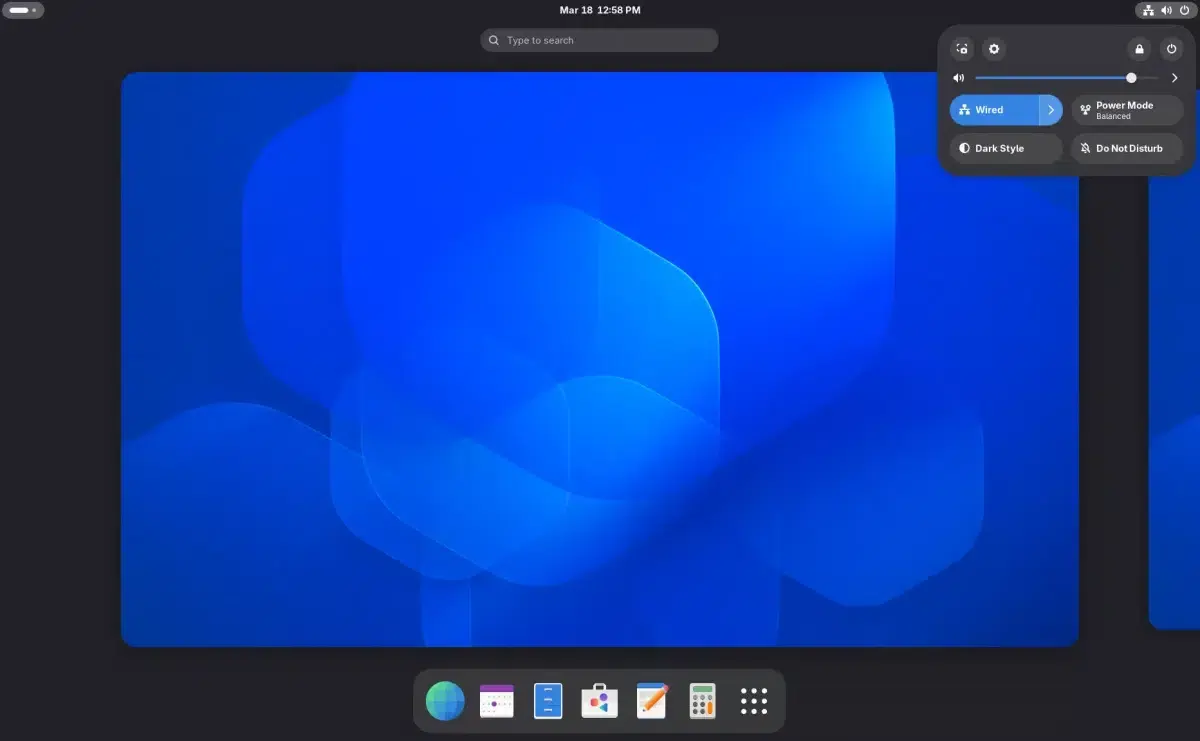
The Linux desktop ecosystem takes a significant leap forward with the arrival of GNOME 50, codenamed "Tokyo ." This isn't just a visual refresh; it's a version that thoroughly refines graphical behavior, color management, remote desktop functionality, and accessibility, making it clear that the project's future lies with Wayland and ever-increasing integration with systemd and tools like Newelle, the AI assistant.
For those who use Linux daily, both at home and in professional environments, this version marks a turning point compared to GNOME 49 : GNOME 50 definitively abandons X11 , stabilizes VRR (variable refresh rate) support, improves scaling on high-resolution displays, and revamps key applications such as Files (Nautilus) and Settings. All of this is achieved while maintaining the philosophy of simplicity and paying attention to aspects such as performance, energy consumption, and the user experience on sensitive hardware like NVIDIA GPUs.
Revamped graphics core: Stable VRR, Wayland by default, and goodbye to X11
One of the most profound changes in GNOME 50 is that the desktop is now entirely Wayland-based , eliminating support for X11-based sessions in key components like Mutter and GNOME Shell. This move is not merely symbolic: it signifies embracing a more modern graphics architecture, designed from the ground up to improve security, reduce latency, and take better advantage of current hardware.
In this context, Mutter 50, the compositor that forms the graphical heart of the environment, activates Variable Refresh Rate (VRR) as a stable and default feature . Until now, VRR was an experimental option, but with this version it is natively integrated, adjusting the monitor's refresh rate to the frames generated at any given moment. This results in smoother animations, reduced screen tearing, and a particularly enjoyable experience in graphically demanding video games and applications.
The implementation of VRR in the Mutter 50 comes with dedicated support for a low-latency cursor when using this feature, which is key to maintaining the immediate responsiveness of the pointer even when the screen refresh rate changes dynamically. This combination aims to prevent annoying stuttering or desynchronization when moving the mouse, especially in gaming scenarios or when using the GPU intensively.
Abandoning X11 also simplifies the path to further optimizing the Wayland experience: multi-monitor management is improved , dedicated GPU detection and selection are refined, and the system is given a more solid foundation to continue adding advanced features for compositing, frame synchronization, and fixing specific driver issues.
Alongside these improvements, GNOME 50 maintains its commitment to a smoother and more modern experience, with softer animations and internal optimizations in Mutter that reduce unnecessary work for the compositor. The goal is to offer a visually appealing environment without compromising performance, something especially noticeable when managing many windows or virtual desktops.
Fractional scaling, HiDPI, and NVIDIA-specific enhancements
Another key pillar of this version is the arrival of fractional scaling fully integrated into Wayland sessions . Until now, those who needed to adjust the interface size on high-resolution screens (above 1080p) were forced to resort to workarounds, tools like Dconf, or experimental options. With GNOME 50, fractional scaling is now a standard feature of the desktop.
This scaling allows you to configure intermediate aspect ratios like 125% or 150% instead of jumping directly from 100% to 200%, which is very useful on 2K or 4K monitors where a full scaling can make everything too small or too large. The result is a more visually comfortable interface without sacrificing definition or sharpness in the fonts and on-screen elements.
Furthermore, the environment takes the opportunity to refine HiDPI support and improve visual consistency in multi-monitor setups , even when mixing different resolutions and pixel densities. This allows users to combine, for example, a 4K monitor with a Full HD monitor without the experience becoming a headache in terms of sizes and scaling.
GNOME 50 also caters to NVIDIA users, a traditionally sensitive area in the Linux world. Mutter incorporates specific patches to reduce stuttering and improve frame synchronization with the manufacturer's proprietary driver, aiming to deliver smoother transitions both on the desktop and in graphics-intensive applications.
Complementing these improvements, the compositor adds explicit synchronization to certain rendering paths , which is especially relevant for NVIDIA graphics cards to prevent timing mismatches between the GPU and the display. On paper, all of this should translate into a more stable and fluid GNOME session on machines with NVIDIA cards, particularly when combining VRR, multiple displays, and demanding applications.
Advanced color management and improved HDR handling
Color management, an increasingly critical aspect in professional and content creation environments, also receives special attention. Mutter 50 incorporates version 2 of Wayland's color management protocol , laying the foundation for more accurate and consistent color representation across applications.
In addition, a more modern color pipeline is being introduced that allows screen sharing while preserving HDR metadata. This means that when streaming or recording high dynamic range content, colors don't lose vibrancy or appear washed out, something that was quite common when using capture or live streaming tools on Wayland.
The new color pipeline relies on specific corrections within the Settings app , which receives multiple improvements for monitor calibration. This gives users who work with photography, video, or graphic design finer control over color profiles and display settings.
These technical improvements are not limited to a professional audience: any user benefits from more faithful reproduction of movies, games and HDR content, with smoother gradients and more suitable contrast when the hardware supports these capabilities.
In parallel, the adoption of this modern pipeline puts GNOME in a better position to integrate with future evolutions of Wayland and graphics libraries, thus facilitating the adoption of new standards without having to redo half the desktop every time the color or HDR landscape changes.
Hardware-accelerated remote desktop and headless sessions
GNOME 50 also refines a key aspect for work environments and system administration: remote desktop receives a significant performance boost . The project integrates a new hardware acceleration system supported by Vulkan and VA-API, allowing for much more efficient encoding and decoding of the video signal.
Thanks to this support, remote sessions benefit from less lag, a smoother graphics experience, and lower power consumption , especially on systems where the GPU can handle a significant portion of the video processing. This is particularly useful in scenarios involving remote work, technical support, or access to servers with a graphical environment.
In addition, the ability to use remote sessions via the systemd gnome-headless-session service is enabled , making it easy to set up a GNOME desktop without a physical monitor connected ( GNOME MCP server guide ). This capability is very useful for servers or remote machines managed only over the network, but where a full graphical session is still desirable.
Remote desktop support also adds compatibility with HiDPI displays and Kerberos authentication , allowing for better integration into corporate networks and environments with centralized permission management. Thus, GNOME positions itself as a viable option not only for home use but also for organizations requiring robust access control.
All of this is further enhanced by the aforementioned explicit synchronization and the NVIDIA-focused fixes, which also impact these remote sessions. Overall, remote connections become more stable , with fewer graphical artifacts and a much closer sense of interaction to being physically present at the computer.
Files (Nautilus) faster, lighter and more comfortable to use
Within the core suite of applications, the file manager—now known as Files, though many still call it Nautilus—receives a significant number of improvements. For starters, extensive work has been done to speed up the loading of icons and thumbnails , something that is especially noticeable when opening folders full of photos or videos.
These optimizations are accompanied by a reduction in memory usage and greater adoption of Blueprint, the markup language GNOME uses to define its interfaces. This internal change makes it easier to keep the code cleaner and more consistent, paving the way for future visual and behavioral improvements.
Another important new feature is the use of the Glycin library to decapsulate and decode images in a high-performance, isolated environment . This improves security (by isolating potentially problematic processes) and speeds up the generation of thumbnails and previews, preventing the file manager from crashing when encountering large or uncommon image files.
In terms of user experience, the batch renaming tool has been refined to be more intuitive and visual , similar to Linux renaming guides . The text fragments being replaced are now clearly highlighted, making it easy to see at a glance whether the applied pattern matches what was intended to be changed.
A new dialog box for managing subtitles has also been introduced in grid view , making it easier to organize video collections where subtitle files accompany the movies or series. The descriptions of operations in the sidebar have been shortened to make the interface cleaner and easier to read, reducing visual clutter without losing relevant information.
Configuration: clearer sound, more accurate color, and better-handled everyday settings
The Settings app, the desktop's true command center, incorporates numerous tweaks that are noticeable in everyday use. One of the most visible new features is that the sound section clearly differentiates between playback and capture devices , separating speakers, headphones, and audio outputs from microphones or other input sources.
This redesign helps avoid common confusions, such as not knowing which device is active for video calls or which output is actually being used for music playback. The interface prioritizes clarity without overwhelming users with too many options, maintaining GNOME's minimalist style while gaining in transparency.
In the Date and Time section, the option to select the first day of the week has been added . While this may seem minor, it's very practical for adapting the calendar to the customs of each user or region. Small details like this make a big difference in the daily use of the platform.
The color management module receives multiple corrections that improve screen calibration , reinforcing the work already mentioned at the Mutter level. This provides the user with a consistent channel between the windowing system and the configuration tools for reliable color reproduction.
Along with these adjustments, modem information and handling have been updated, accessibility options have been refined, and improvements to keyboard and screen configurations continue to be incorporated. All of this is combined with new parental controls that allow users to limit system access for children, reinforcing security in family or educational environments.
Additional applications: Gradia, Constrict, and a more polished ecosystem
Beyond the essential tools, GNOME 50 also relies on a set of applications that, while they may be considered secondary, add value to the desktop ecosystem . A prime example is Gradia, a utility designed to refine and annotate screenshots before sharing them.
Gradia lets you apply gradient backgrounds, shadows, and custom fills , giving your screenshots a more professional look without needing complex image editors. This is very useful for those preparing documentation, guides, or social media content who want to go beyond a simple raw screenshot.
Another interesting application is Constrict, which focuses on video compression. Its approach is simple yet powerful: the user specifies the desired file size , and the tool automatically calculates the appropriate resolution, frame rate, and audio quality to achieve that goal, eliminating the need to blindly experiment with different bitrates.
With this approach, Constrict greatly reduces the time wasted performing successive tests to make a video fit within a specific size limit (for sending by email, uploading to a particular platform, etc.). The application integrates seamlessly into the GNOME environment, following its design and usability guidelines.
The sum of these utilities reinforces the idea that GNOME 50 not only brings changes to the heart of the desktop , but also takes care of the tools that surround the user on a daily basis, from screenshots to multimedia file management.
Enhanced accessibility: Orca, Braille and new options in Wayland
Accessibility has historically been a weak point for Wayland, and GNOME 50 attempts to correct course with a range of improvements focused on the Orca screen reader . In this version, the application debuts a completely redesigned preferences window, cleaner and more consistent with the rest of the environment's programs.
This new settings panel introduces a global configuration for Orca , eliminating the need to repeat settings for each application individually. This allows visually impaired users to set their preferred voice, speed, or behavior once and have it applied across the entire desktop, saving time and preventing inconsistencies.
Orca also adds automatic language switching , expands the browsing mode to cover all document content, and includes an improved fixed mode that activates automatically in Electron-based applications. These improvements make it easier to navigate complex interfaces or feature-heavy web pages.
Braille support has been enhanced, and mouse tracking has been introduced in Wayland sessions , allowing Orca to track the position and elements over which the pointer hovers. Additionally, a new "reduced movement" option has been added to the Settings app, designed for those who experience motion sickness or discomfort with excessive animations.
With all these changes, GNOME 50 aims to make it clear that the commitment to Wayland cannot come at the expense of accessibility . The goal is for the desktop to remain usable by as many people as possible, regardless of their abilities, by taking full advantage of the modern features of the windowing system.
GNOME 50 Distributions, Testing, and Availability
GNOME 50 is released as a stable desktop environment, but its actual arrival in each distribution depends on the schedule and policies of each project . Rolling release distributions like Arch Linux or openSUSE Tumbleweed are usually among the first to adopt new versions, while other distributions prefer to wait a little longer to ensure stability.
In the Fedora ecosystem, GNOME 50 is shaping up to be the main desktop environment for Fedora 44 , while in the Ubuntu world it is expected to be the base desktop for the upcoming Ubuntu 26.04 LTS, naturally with the customizations that Canonical typically applies to its session. In both cases, the idea that Wayland is now the standard is reinforced.
Although the stable version is already available, many users have had the opportunity to try GNOME 50 in its Release Candidate (RC) phase beforehand. This can be done using specific ISO images provided by the GNOME project itself, or through development branches such as Fedora Rawhide or Arch Linux testing channels.
In any case, it's recommended that those who want to experiment with the new features but don't want to risk their system's stability opt to install it in a virtual machine or a test partition . This way, they can calmly evaluate the new desktop's functionality, its performance with their own hardware, and its compatibility with critical applications.
With the complete removal of X11 in GNOME 50, the message is clear: the future of the GNOME desktop is built on Wayland and systemd , with a strong emphasis on VRR, fractional scaling, robust GPU support, high-performance remote desktop, and constantly improving accessibility. Users who make the switch will find a more modern and polished environment, designed for both Windows users and Linux veterans who want to get the most out of their current hardware.
