- Configure styles, tones, and memory to tailor ChatGPT's behavior without compromising its veracity.
- Activate custom instructions and use V, L, and R roles to control extension, language, and focus.
- Apply prompt techniques: clear context, structure, reliable sources, quotes, and up-to-date data.
- Protect your privacy: limit sensitive data, verify critical information, and adjust usage controls.
Conversational AI isn't limited to a single name. While ChatGPT has been the go-to platform for millions since its launch, there are top-tier alternatives like Google Gemini, Grok, Meta AI, Perplexity, and DeepSeek that are also worth exploring. In any case, if you plan to use ChatGPT daily, it's worth fine-tuning its behavior to respond in the way you need and with a style that best suits you or your brand.
Starting with a blank AI can be reminiscent of cold calling: without context or instructions, the results are more generic. Fortunately, ChatGPT lets you customize the tone, format, and depth of responses, as well as save key preferences (nickname, occupation, or style traits). In this guide, you'll find out how to activate and optimize custom instructions, prompt tricks to improve quality, privacy tips, and advanced settings ready to be customized.
Customize ChatGPT step by step: styles, tones, and memory
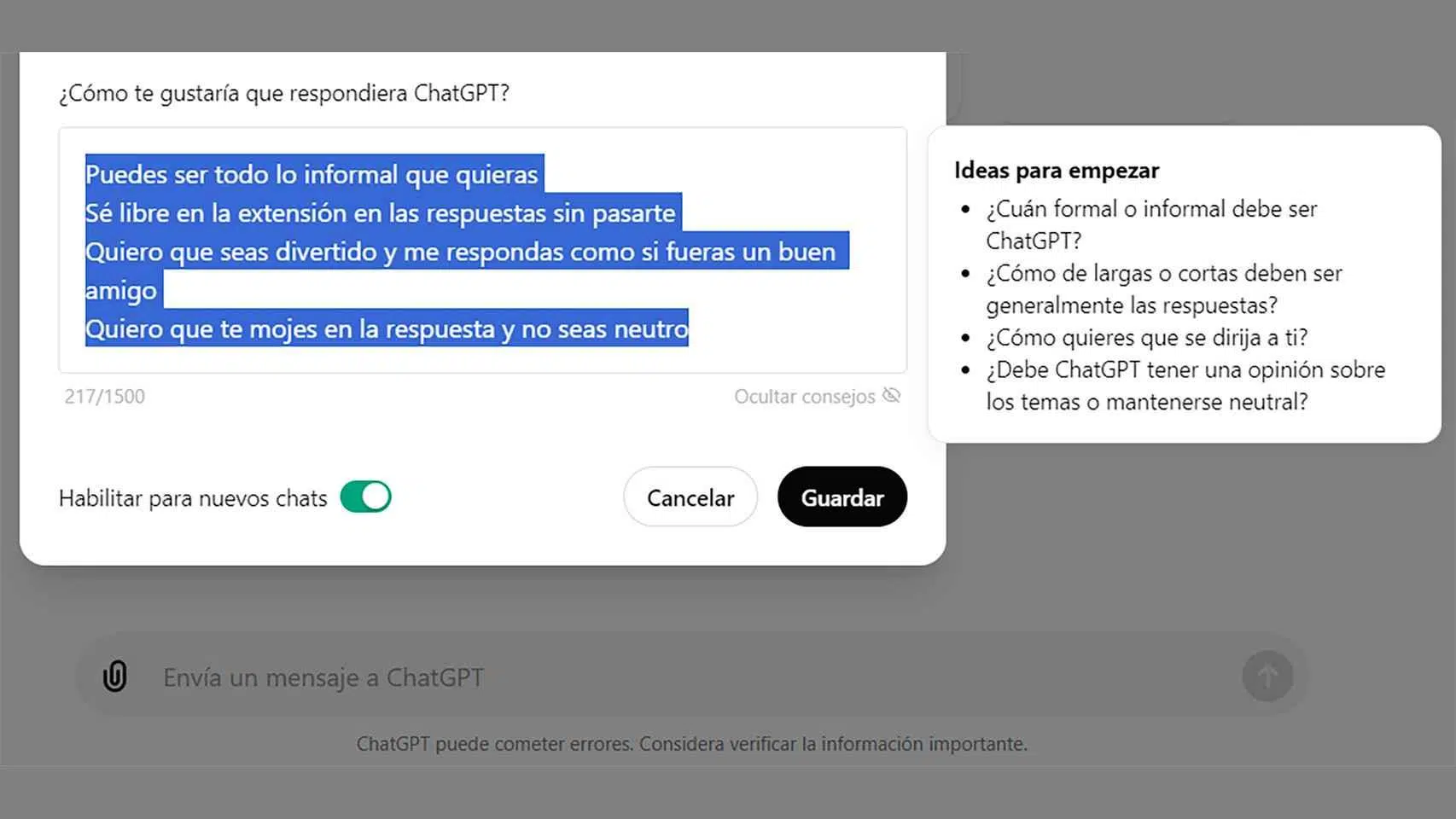
It all starts in the service's dashboard. On the web version, tap your account icon (bottom left) and select "Customize GPT" in the settings. From there, you can tell the model your name, occupation, and what you expect from the communication. This information helps the model use vocabulary more relevant to your professional context and avoid unnecessary digressions on topics you're familiar with.
In the personality section, ChatGPT offers basic styles: Default (the default cheerful tone), Cynical (more sarcastic), Robot (direct and straightforward), Attentive (warm and collaborative), and Geek (detail-oriented). You can also add finer traits such as talkative, imaginative, sincere, encouraging, pragmatic, straightforward, corporate, or empathetic , either by choosing suggested labels or writing your own description of your ideal style.
The "Anything else I should know about you?" section lets you include habits, interests, likes, and dislikes. Use it wisely: while it can improve the personalization of responses, it's best not to include sensitive information . Unlike other systems such as Gemini, ChatGPT keeps copies of conversations at the service level, even if you delete the local history; therefore, it's advisable to limit personal data and focus on work preferences and style.
Regarding availability and scope: customization options via instructions are available in both the free and paid plans . It's crucial to understand that this customization adjusts how ChatGPT responds (tone, format, structure), but it doesn't change the veracity of the model's knowledge base ; that is, it doesn't make the AI a different source, it only guides how it expresses what it knows or is looking for.
One last very useful setting is memory: the option to view saved memories allows ChatGPT to remember preferences and context from previous chats. If you prefer to avoid accumulated biases between conversations or keep your chats "blank," you can turn this switch off so that each session starts from scratch.
Personalized instructions: web and mobile activation and how to get the most out of them
Custom instructions allow you to set your preferences once, so the model takes them into account in every response. On the web: open your profile, go to "Custom Instructions," and fill in the fields, paying attention to "How you want ChatGPT to respond." On iOS and Android, the process is similar: side menu , username at the bottom, and access to the same section to fill in guidelines.
To make them truly effective, think of three pillars. First, specify the desired behavior: for example, breaking down complex problems into steps , asking clarifying questions when the statement is ambiguous, offering multiple solutions, citing reliable sources with links if available, and maintaining a professional style unless otherwise indicated. If you create content, include references to SEO, text organization, and tone, and request that unnecessary disclaimers not be repeated.
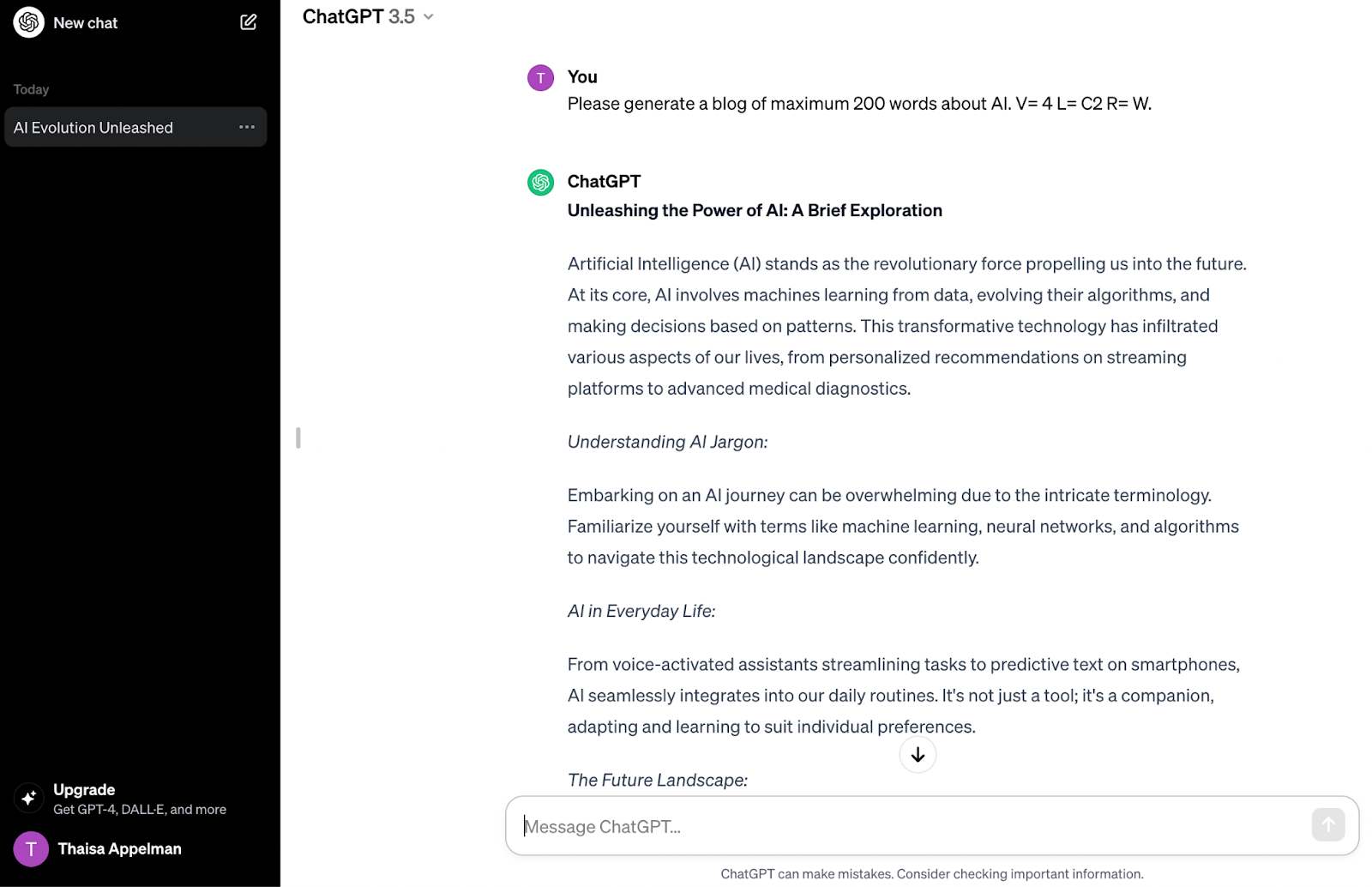
Second, define the scope and language level. A practical tip is to set a verbosity scale V=0–5 (0, minimal; 5, exhaustive) and a language proficiency level L=A1–C2 . This way, you can request V=3 and L=B2 for clear and moderately detailed explanations, or V=5 and L=C2 for in-depth analyses in expert language. If you forget to specify this in a query, the system can infer it from the subject, but it's best to set it at the beginning of each critical request.
Third, use roles to shift focus without rewriting everything. Include a role parameter R=… in your instructions and define various scenarios. For example: P=Coding (tips and code examples), W=Writing (factual text, tone, and style), A=Analysis (simplify and contribute ideas), L=Legal (legal terms and concepts), G=Generalist (objective overviews), and C=Content Creator (ideas, keywords, and timelines for 18–25 years). This allows you to request “IA, V=4, L=C1, R=W” for a well-structured article, or switch to “R=P” when you need technical guidance.
There are limits to keep in mind: the "How do you want me to respond?" box has an approximate character limit of 1.500 , so it's best to prioritize essential rules and use roles, V, and L to fine-tune them for each situation. Developing these rules takes time (testing, debugging, and improving), but the investment pays off in terms of consistency and time saved in daily operations.
Integrations and data: Personalized instructions also enhance the experience with connected tools and apps (for example, by remembering your location for location-based services, preventing duplicate data). If you're concerned about privacy, you can disable "Chat History and Training" in Settings > Data Controls to prevent your conversations from being used to improve the model. In any case, avoid sharing sensitive or private information in both instructions and chats.
Prompt techniques that make a difference
Forget the search engine chip. ChatGPT processes natural language , not random strings of keywords. Instead of typing "climate change definition studies," phrases like "Explain what climate change is based on peer-reviewed research" generate more complete entries with citations.
Specify what you want. The clearer you are, the better. “Write a professional email in English to apply for a job, highlighting skills X and Y” produces a more useful output than simply asking for “an email to find a job .” Add context and explain your purpose.
Include specific details. In text and images, every nuance counts: target audience, length, format, examples , style, keywords, dates, and exact versions or templates. AI optimizes what you give it; if you fall short, it will tend to fill in with generic guesses.
Request the structure. If you need pros and cons, a comparison table, or bullet points, state it explicitly. A summary in bullet points, divided into advantages and disadvantages, and adding a brief recommendation saves iterations and improves the clarity of the result.
Adapt the level of explanation. If something sounds like jargon, ask for " explain it to me as if I were 10 years old " or adjust your instructions to L=B1/B2. This changes the terminology, simplifies examples, and speeds up comprehension.
Clearly define the source of the information. Asking "what is inflation" is not the same as asking "define it using academic literature and macroeconomics textbooks with citations." Guiding AI toward reliable sources reduces ambiguity.
Mention organizations and sources. “According to the WHO ,” “with data from AEMET ,” or “following publications from Harvard” is more precise than a generic query. This guides the AI toward specific references in your domain.
Require citations. If you ask for "references" or "citations to relevant studies," the model will tend to provide better documentation. Check the links afterward, because AI can mix sources and dates if the topic is very new.
Request recent data. When time is a factor, ask for up-to-date information, for example, "best rock albums of 2024 " or "last 5 years." The model can consult the web, but doesn't always do so by default, and specifying dates gives it clear instructions.
Verify what matters. All AIs can be misleading. Confirm critical information with multiple reliable sources before acting, especially in health, legal, or financial matters . Adding "indicates confidence level and potential limitations" to the prompt also helps identify weaknesses.
Templates and assistants: accelerate without losing control
Creating good custom instructions takes time: research, testing, debugging, and fine-tuning. That's why many users turn to pre-designed templates that serve as shortcuts for blogs, SEO, tutorials, or essays, with the ability to choose tone and language level on the fly.
Some platforms also incorporate "coworkers" or specialized digital assistants (an evolution of personalized GPTs) for brainstorming, content planning, or campaigns. The key is that you can adapt your brand voice and maintain control of your data, ideally within privacy frameworks like GDPR.
Advanced behavior settings: a preset to turn it into an advisor
If you want ChatGPT to behave like a true multidisciplinary consultant , you can create a compact and powerful configuration within "Customize GPT." For inspiration, these blocks have proven to be very effective when combined:
- Interdisciplinary perspective: integrate references from management, psychology, economics, design, marketing and engineering, with citations of authors/studies where applicable.
- Self appraisalAfter generating the response, review its logic against existing frameworks and polish it if it detects contradictions or gaps.
- Proactive clarityIf the request is ambiguous, ask for details before making an assumption.
- real examples: incorporate anecdotes or cases of "what went well/what went wrong" to ground recommendations.
- Human tone: natural language, without corporate jargon unless required.
- Academic bridge: include study results translated into practical actions.
- Hypothetical scenarios: "what if..." analysis to compare paths.
- Logical controls: point out weak assumptions and propose alternatives.
- Executive Summary: close with bullet points to highlight key ideas.
- Debate mode: pros and cons of each route before recommending.
- Statement of objectives: follow the thread of goals and limits discussed.
- Empathy: modulate your tone if you detect stress or frustration.
- Depth on demand: offer a short version or a long analysis as requested.
- Recognized frameworks: RICE, OKR, Double Diamond, etc., when relevant.
- Detection of gaps: warn of data gaps or risky hypotheses.
- Narrative: explain complex concepts like a story when appropriate.
- Cross-cutting areas: marketing, finance, leadership, operations.
- Topic Tracking: to revisit recurring issues in future interactions.
- Consistent terminology: maintain stable definitions unless otherwise indicated.
- Continuous improvement: refine with your feedback to evolve the style.
You can combine this preset with your V (verbosity), L (language level), and R (role) dials . For example, V=4, L=C2, R=W when you want well-structured, technical writing; or V=3, L=B2, R=C for lighter content aimed at 18–25 year olds, incorporating keywords and an editorial plan upon request.
Applications in business and customer service
Personalization is especially valuable in customer use cases: it helps align tone and message with the brand, match technical level with the contact's knowledge, and automate responses without losing the human touch . The combination of customized instructions, roles, and verbosity scales allows you to adapt to sales, support, training, or marketing with a single system.
| Capacity | How to improve your results |
|---|---|
| tone and style | Natural messages aligned with the brand voice. |
| Technical level | Explanations for beginners or experts without redoing the prompt. |
| Verbosity | Fine control of the extent: summary or full report. |
| roles | Responses focused by context: legal, programming, writing, etc. |
If you work with connected equipment or tools, customized instructions enhance the effectiveness of third-party plugins and services (e.g., logistics or booking apps), because the context is established beforehand and you reduce friction in each query.
Privacy and good practices
The million-dollar question: Is it safe to add personal data to instructions? It's best not to include sensitive or private information. OpenAI may use conversations to improve its models, although you can disable this option in the data controls. Keep your preferences within the realm of style and work to minimize risks.
In your daily work, get into the habit of verifying critical content and requesting that AI provide sources and limitations . Do this especially when the query depends on recent information: AI can mix versions or fall short if it isn't explicitly required to update.
Brief FAQ
Is customization available without paying?
Yes. Custom instructions work in both the free version and paid plans.
Does it affect the accuracy of the answers?
No. It changes the tone, structure, and style , but it does not alter the accuracy of the underlying information.
How do I activate it on web and mobile?
Go to your profile > " Custom Instructions " and fill in the fields. On iOS/Android, you can access this in the app menu.
Can I prevent my training history from being used?
Yes. Go to Settings > Data controls and turn off "Chat and training history".
Are there any alternatives to speed up the setup process?
You can use specialized assistants that bring tone and format presets, keeping you in control of your data.
If you take away just one key idea, let it be this: customizing ChatGPT isn't about forcing it to say what you want, but about teaching it to respond the way you need it to . Adjusting styles, defining roles, requiring structure, limiting sources, and rigorously verifying each output makes it more useful and reliable. With a few well-written rules, the assistant transforms from a friendly generalist into a valuable work partner that saves time and reduces errors.