- What is an IP address, differences between public and private IPs, and how IPv4 and IPv6 are structured.
- Simple ways to find out your public IP address and what it's useful for in home and professional networks.
- Differences between dynamic and static IP, relationship with the router, MAC and service configuration.
- The impact of your IP address on geolocation, privacy, security, and how to protect your connection.

If you've ever wondered "how to find my public IP address," it's probably because you were trying to configure a router, open ports for an online game, set up a VPN, or were simply curious. Although it might seem very technical, your IP address is as commonplace as your postal address or phone number: it's there, it's used all the time, and it reveals more about you than you might think.
In everyday life, your internet connection works without you having to think about IP addresses, routers, or complicated protocols. But when you delve into topics like remote access, IP cameras, home servers, or teleworking services , understanding what your public IP address is, how it differs from your private IP address, and how to check it goes from being a luxury to being practically essential. Let's look at everything calmly and clearly.
What is IP and what does it mean exactly?
When we talk about IP, we're referring to the Internet Protocol , which is the set of rules that ensures data travels across networks in the form of small packets. This protocol defines how devices are numbered, how packets are routed from point A to point B, and how it's ensured that the information reaches its correct destination.
Within this protocol, every device connected to a network that uses IP is assigned a unique identifier called an IP address . This address is simply a number, but a very well-structured one, which allows routers and other network equipment to know where each data packet should go, just as a letter reaches a specific house thanks to the postal address written on the envelope.
The IP address belongs to the network layer of the TCP/IP model, which is the set of protocols on which virtually the entire internet and most local networks are based . This layer is responsible for carrying data from one network to another, beyond the cable or Wi-Fi you're using, deciding the route that packets take to reach their destination.
To make it a bit more concrete, you can imagine that the IP protocol is the road and traffic signal system of the internet, and that the IP address is the license plate of each vehicle traveling on those roads . Without that license plate, it would be impossible to know who's who and where the data needs to go.
Public IP address vs private IP address: clear differences

In any home or office with an internet connection, you'll find at least two types of IP addresses: public IPs and private IPs . Although they share a similar format, their function and scope are very different.
Your public IP address is the number that identifies your network to the outside world, that is, to the internet. This IP address is usually assigned to your router or gateway device, and it's the one that servers, websites, and online services see when you connect. It's a globally unique address: no two different networks can use the same public IP address simultaneously on the internet.
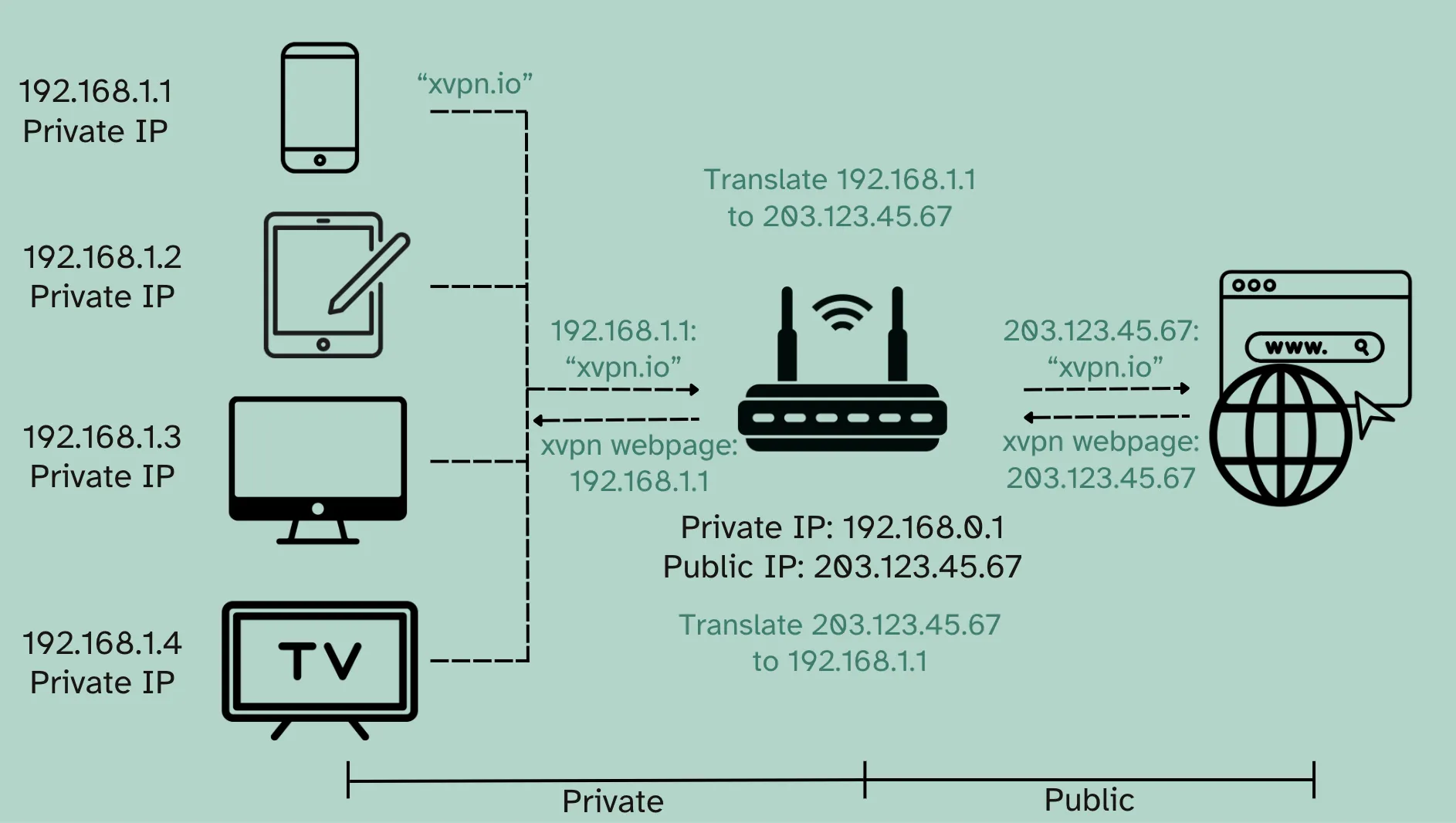
A private IP address , on the other hand, only exists within your local network. It's the address assigned to your computer, mobile phone, Smart TV, printer, or any other device that connects to the router via cable or Wi-Fi. These addresses are not visible from the outside; they only make sense within your home, office, or company's internal network.
To make everything work, the router acts as an intermediary: it connects to your internet provider with a public IP address and, at the same time, distributes private IP addresses to the internal devices. When one of those devices accesses a website, the router translates that traffic using a technique called NAT so that from the outside, only the same public IP address is seen for all the devices.
An important detail is that many home networks use very typical private IP ranges, such as 192.168.0.x or 192.168.1.x. For example, you might have a private IP address of 192.168.0.15 for your computer, while your public IP address, the one that the internet sees, might be something like 237.82.125.15. In practical terms, your public IP address would be like the entrance and street of your building, and your private IP address would be like the floor and apartment number of your specific home.
How are IPv4 and IPv6 addresses structured?
Today, two main versions of the IP protocol coexist: IPv4 and IPv6 . Both serve the same purpose (identifying devices on the network), but their form and capabilities are very different.
IPv4 addresses are the most well-known and widespread. They are written as four blocks of numbers separated by periods, for example: 237.82.125.15. Each block is called an octet and can take values from 0 to 255. In total, an IPv4 address has 32 bits, which translates to approximately 4.294 billion possible addresses (2^32). Currently, this address space is insufficient for the number of connected devices.
In the context of IPv4, we talk about both public and private IP addresses . An IP address like 192.168.0.15 would be private and would only be used within a local network, while something like 178.255.231.254 would be public and would represent a connection visible on the Internet, usually that of your router.
To solve the address shortage, the most modern version of the protocol, called IPv6 , was defined . In IPv6, addresses are 128 bits long and are written as eight groups of numbers and letters in hexadecimal separated by colons, for example: 2001:db8:85a3:0:0:8a2e:370:7334. The number of possible addresses is enormous (2^128), so much so that it would allow assigning a unique IP address to each device without needing to resort to the current public/private separation.
One interesting difference is that, while IPv4 uses only numbers and periods, IPv6 combines numbers, letters (A through F), and colons . This might make them seem more complicated at first, but in reality, the way they work for the average user is transparent: most operating systems handle everything without you having to do anything.
Today, the internet operates in a sort of hybrid mode: many services still use IPv4, but more and more providers and websites are also activating IPv6 to ensure future growth . You might be using both at home without even realizing it.
How to easily find my public IP address
The most direct way to find out your public IP address is to let an external service "see" it and display it to you. When you connect to a website, that page can read the address from which your request originates, and that's how many "what's my IP" websites work.
On these services, as soon as you log in, you'll see something like " Your public IP is: 172.68.134.68 " or "This is the public IP address you are connecting from… 178.255.231.254". The website is simply displaying the IP it receives in variables like REMOTE_ADDR or, in some cases, by consulting additional headers added by certain proxies or intermediate services.
This data is usually accompanied by additional technical information such as the USER_AGENT (the browser and operating system you use), the HTTP_REFERER header (which page you came from) or intermediate addresses such as HTTP_X_FORWARDED_FOR, which are used when there are proxies or load balancers involved.
Another, slightly more technical option is to check your router's settings. In the administration panel , usually in the WAN or Internet status section, you'll find the IP address assigned to you by your internet service provider . On some routers, you'll clearly see something like "Public IP," while on others it might appear as "WAN IP Address."
In some cases, when accessing the interface of certain routers or travel devices (such as a portable Opal router with WireGuard), you might see the default gateway instead of the actual IP address assigned by your ISP . This can be confusing, especially if your provider assures you that you have a public IP address but you only see an IP address that appears to be internal. In these cases, checking with an external "whatismyIP" website helps confirm which address the internet is actually seeing.
What is the purpose of knowing my public IP address?
You might think that your public IP address is a minor technical detail, but it's actually crucial in many situations. Knowing it allows you to diagnose connection problems, configure services, and improve your network security.
One of the most common uses is configuring services hosted on your own network : game servers, FTP servers, home websites, security cameras, home automation systems, or remote desktop access. For someone outside your network to connect, they will need to know your public IP address and, usually, a specific port.
It's also very useful when you want to connect to your home or office from outside using a VPN. In that scenario, your router or VPN server acts as a gateway, and you connect from another location using the public IP address provided by your internet service provider (or a dynamic domain name that points to that IP address).
In more technical environments, knowing your public IP helps to locate network problems: whether a remote service has blocked your IP, whether an external firewall is filtering traffic, or whether your provider is using CGNAT techniques (translating several internal connections to the same shared public IP).
Furthermore, from a security standpoint, your public IP address is one of the pieces of information that many online services use to detect suspicious behavior, restrict access, or apply geographical filters . For example, a platform might block addresses from certain countries or restrict multiple connections from the same IP address.
Dynamic IP vs Static IP: What Really Changes
In most home internet connections, the public IP address assigned by your provider isn't always the same. This is called a dynamic IP address , and it means that the ISP's DHCP server changes the address according to its needs: when the router is restarted, after a certain period of inactivity, or simply due to its own internal network management.
A static IP address , on the other hand, is a fixed address that doesn't change over time. It's usually contracted as an additional service (typically for an extra fee) and is intended for businesses or users who need their connection to always have the same entry point, for example, to host services accessible from anywhere without relying on intermediary systems.
Internet providers don't have enough public IP addresses to assign one to every device on the planet, or even to every line permanently. That's why they use dynamic IPs and rotate those addresses among customers as they connect. Many routers are turned off at night or outside of business hours , freeing up the IP address so it can be assigned to another user when they reconnect.
If your public IP address is dynamic, tools like dynamic DNS services can help: they associate a domain name (for example, mydomain.dyndns.org) with your current IP address, automatically updating that record when the address changes.
This constant changing of IP addresses often surprises some users when they see their public IP address change every time they restart their router or every few days. This is normal for residential connections and is part of the model used by ISPs to make better use of the IP address ranges assigned to them by ICANN , the organization that manages public IP address blocks worldwide.
Difference between IP address and MAC address
Another concept that often comes up when talking about networks is the MAC address . Although it's sometimes confused with the IP address, they actually do different things and belong to different layers of the network model. Understanding them helps avoid mixing up terms.
The MAC (Media Access Control) address is a 48-bit identifier printed on the network card of each device. It is unique to each physical interface: if your computer has both Wi-Fi and an Ethernet card, it will have two different MAC addresses, one for each interface . You could say that the MAC address is the "serial number" of the network card at the local network level.
While IP addresses can be changed, reassigned, or manually configured, MAC addresses are, in principle, factory-set and independent of the IP protocol. Although there are advanced ways to "clone" or modify the MAC address on some devices, their function remains purely for identification within the local network (link layer) , not for global routing like IP addresses.
It's important to note that IP and MAC addresses are not directly linked: you can connect to different networks and your IP address will change depending on the range assigned by each router, while your MAC address will remain constant for that specific network card. The router uses mechanisms like ARP to associate which local IP address corresponds to which MAC address within the internal network.
Therefore, although the MAC address plays a role in how devices communicate within a specific network, it does not determine the assignment of a public IP address or how it changes . The fact that your IP address changes when you reconnect or switch networks is unrelated to your MAC address, which remains unchanged regardless of where you connect from.
Relationship between my IP address and my geographical location
Your public IP address isn't just used to route data packets; it also reveals a fair amount of approximate information about your location. From that IP address, various services can deduce details such as your city, country, region, or even an approximate postal code , depending on the geolocation databases they use.
The websites you visit go a step further: by combining your IP address with cookies, trackers, browser information, and other metadata, they can build a very detailed profile of your habits. This allows them to know which sites you visit, what topics interest you, what you download, and which services you interact with, enabling them to show you personalized advertising or sell this data to third parties.
Meanwhile, your Internet Service Provider ( ISP ) has even more information about you. After all, you're their customer: they know your name, physical address, payment methods, billing history, and even some financial details. By associating this with your internet usage, they can see which domains you visit, how much data you consume, and what times you're online.
In some countries, such as the UK and Australia, laws require ISPs to keep records of their users' activity for a certain period and to provide that data to various government agencies without a specific court order . This makes IP addresses a key element for tracking and monitoring internet browsing.
If you don't use encryption (for example, on websites without HTTPS), your internet service provider could see every single page you visit within a domain. Even with HTTPS, although the content is encrypted, they can still see which domains you connect to, so they still have a fairly comprehensive view of your online activity through your IP address and associated connections.
Privacy and security: what they can do with your IP address and how to protect it
Knowing only your public IP address doesn't allow third parties to directly access your computer and read your files, but it does give them some useful clues. From that IP address, they can deduce your approximate location and identify your internet service provider , and even launch targeted attacks against your connection or devices if they find misconfigured services or unprotected open ports.
Therefore, even though it's not as sensitive as a password, your IP address isn't something you should just broadcast publicly. Network administrators, online platforms, and potential attackers can use it to block you, restrict your access, test for vulnerabilities, or launch distributed denial-of-service ( DDoS ) attacks against your connection.
If you want to minimize the exposure of your IP address, one of the most common tools is a VPN (virtual private network) . When you connect to the internet through a VPN, your traffic first passes through an intermediary server that lends it its own public IP address, so websites see that address and not your real one.
Another option is using proxies or anonymity networks like Tor, which encapsulate your traffic through several intermediate nodes to hide its origin. Each of these solutions has its advantages and disadvantages in terms of speed, privacy, and ease of use, but they all share the idea of hiding your real IP address behind another.
Beyond IP address security, it's crucial to complement these measures with good security practices: use a firewall on your router and devices, keep your software updated, avoid downloading files from dubious sources, and be wary of suspicious links that could lead to malware or phishing attacks. Your IP address is just one piece of the security puzzle, but it's important not to neglect it.
Understanding what your public IP address is, how it differs from your private IP address, why it sometimes changes, and how it relates to your location and privacy gives you much greater control over your connection. Knowing these concepts allows you to make better use of your network, configure advanced services, and protect yourself against unnecessary risks , without needing to be a networking expert to make informed decisions about how you connect to the internet.

Table of Contents
- 1 What is IP and what does it mean exactly?
- 2 Public IP address vs private IP address: clear differences
- 3 How are IPv4 and IPv6 addresses structured?
- 4 How to easily find my public IP address
- 5 What is the purpose of knowing my public IP address?
- 6 Dynamic IP vs Static IP: What Really Changes
- 7 Difference between IP address and MAC address
- 8 Relationship between my IP address and my geographical location
- 9 Privacy and security: what they can do with your IP address and how to protect it