- The VRM converts the 12V from the power supply into a clean and stable voltage adapted to the CPU and other components.
- The quality and actual number of VRM phases directly influence stability and overclocking potential.
- A poorly cooled VRM causes throttling, frequency drops, and even damage to the CPU and motherboard.
- Choosing a good motherboard, monitoring temperatures, and adjusting voltages carefully are key to a stable system.
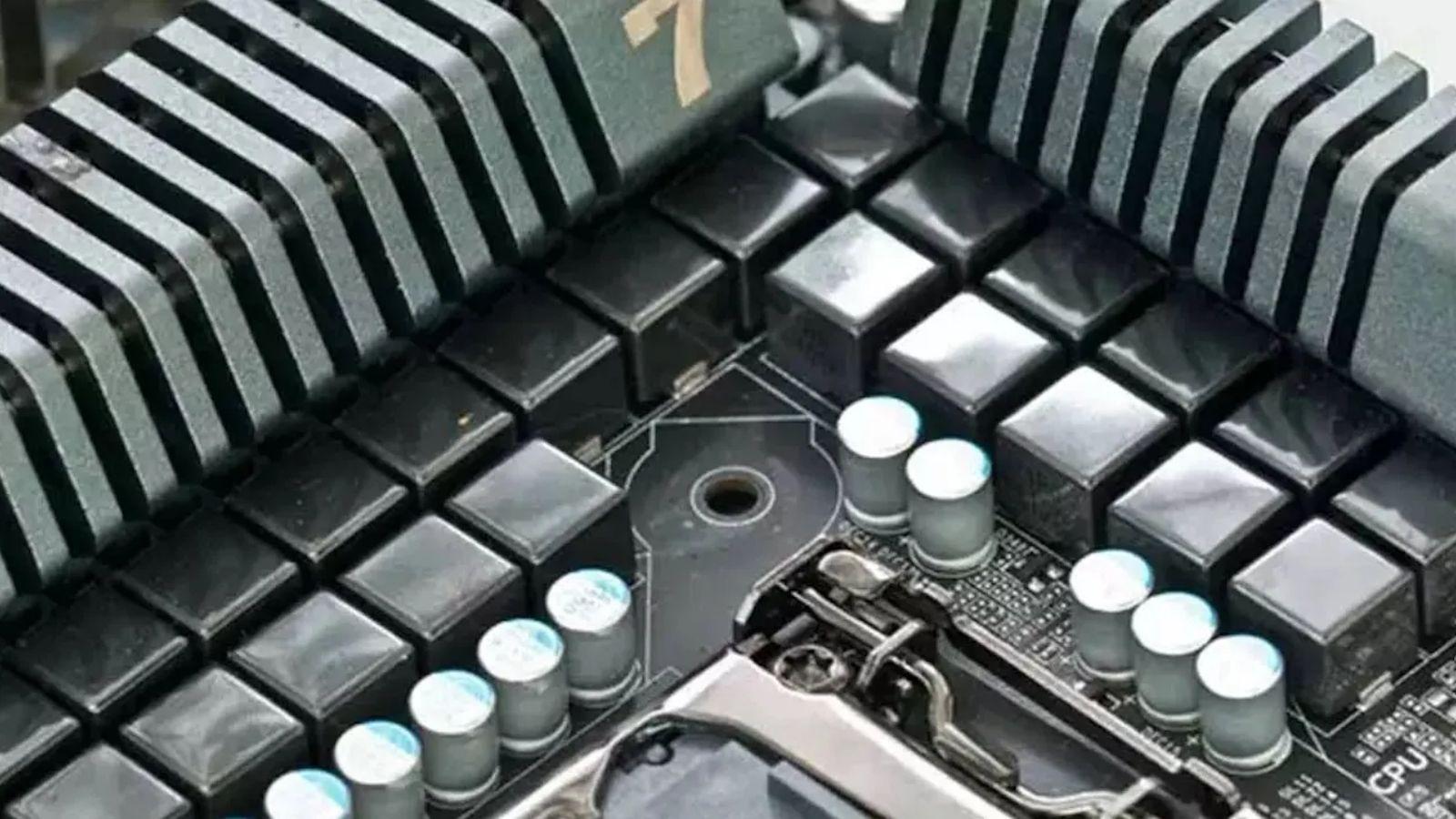
When we build a new PC or upgrade components, we usually focus on the case, the graphics card, or the processor, but there's a whole system of electrical engineering hidden in the motherboard that often goes completely unnoticed. One of the key elements of this "magic" is the VRM (Voltage Regulator Module), responsible for ensuring that the CPU and other components receive exactly the power they need.
If you're interested in overclocking and system stability , understanding what the VRM does, how it's designed, and what problems it can cause is fundamental. A good power phase design can make the difference between a rock-solid system and one that crashes, experiences sudden frequency drops, or even ends up damaging expensive components.
What is a VRM and why is it so important?
A VRM (Voltage Regulator Module) is essentially a regulation circuit that transforms the power from the supply into a clean and stable voltage adapted to the needs of the CPU, GPU, RAM, and other components on the motherboard. It's not just a simple cable: it's a step-down converter that reduces the voltage from the 12V supply to around 1,1-1,3V for modern processors.
The motherboard is probably the most complex component in terms of circuitry , because it houses everything necessary for the system to function together: CPU, graphics card, DDR4/DDR5 memory , storage, ports and expansion slots, network, etc. Each of these elements requires a specific amount of current and a very precise voltage, and that's where the different power phases come into play, including those of the VRM dedicated to the processor.
Inside the CPU's VRM, we find three key components: MOSFETs, inductors (chokes), and capacitors , coordinated by a control integrated circuit, typically a PWM controller. They work together to convert voltage, filter electrical noise, and deliver the cleanest possible signal, which is critical for stability when the processor is under heavy load or overclocked.
A deficiency in these power supply phases can cause a clear loss of performance, instability, and, in the worst case, permanent damage to the component they power . Insufficient power supply prevents the CPU from performing at its intended level; excessive voltage or poorly controlled spikes can drastically shorten its lifespan or even burn it out.
Although we usually think of VRMs only in desktop PCs, these types of regulator modules are present in practically any electronic device : laptops, smartphones, tablets, Smart TVs, consoles… Always with the same mission: to offer optimal working voltage and current and prevent spikes that could damage the internal circuits.
Power supply phases on the motherboard and VRM types
A modern motherboard doesn't have a single VRM, but rather several power phase systems dedicated to different components . In addition to the main VRM for the CPU, there are usually specific phases for RAM, SATA ports, PCIe slots, and M.2 connectors, among others. However, when discussing overclocking, the main focus is typically on the phases that power the processor.
A single-phase VRM is the simplest model: a single phase handles all power conversion and delivery . This is suitable for low power consumption, but falls short for modern high-performance CPUs, especially under sustained load or at increased frequencies. Therefore, current motherboards almost always use multi-phase VRMs.
In a multi-phase VRM, each phase delivers only a fraction of the total power required, alternating in a staggered fashion to continuously power the processor . Each phase generates a square-wave burst of energy, and the sum of all these bursts, properly phase-shifted, produces a much smoother and more stable signal.
This work distribution allows for heat dissipation and reduces electrical stress on each VRM component. Furthermore, it improves efficiency, reduces voltage ripple, and provides more consistent power delivery, which is especially valuable when the processor is approaching its maximum power consumption.
Manufacturers often advertise their motherboards using formulas like "8 + 3" or "6 + 2," where the first number indicates the power phases for the CPU and the second the power phases for other subsystems (memory, chipset, etc.). When you see very high numbers, such as 12 + 1, 18 + 1, or more, it's common for phase doublers to be used to multiply the apparent number of phases without actually doubling all the physical components.
These phase splitters allow for better load distribution than if there were fewer purely physical phases, but they are not equivalent to having completely independent phases . The improvement exists, although it is not at the level of a design with all physical phases, and yet their manufacturing cost is lower. Hence, they are frequently used as a marketing tool.
Phase marketing and how to interpret it
The number of phases in a VRM has become a marketing argument that is often used somewhat confusingly . Seeing a motherboard advertised as having "18+2 phases" might sound impressive, but it doesn't always mean that all those phases are real, nor that the quality of the components is up to par.
In many cases, doublers are used to inflate the visible figure , splitting one real phase across two output channels that are advertised as two independent phases. Technically, this achieves better heat distribution and some smoothing of the power delivery, but the PWM controller still manages fewer physical phases than the product specifications suggest.
This type of practice doesn't necessarily mean the board is bad, but it's important not to be swayed solely by the total number of phases . Just as important, or even more so, than the quantity is the quality of the MOSFETs, chokes, and especially the capacitors, as well as the size and efficiency of the heatsinks mounted on the VRM.
Another detail to consider is that the separation between the power phases allocated to the CPU and those reserved for other components also affects performance under load. A motherboard with many phases for the CPU but very few for the RAM or the SoC may exhibit limitations in those other areas if you're going to put a lot of strain on the system as a whole.
The problem for the average user is that detailed information about the VRM design is often scarce or unclear in the official specifications. Therefore, it's often necessary to resort to independent analyses, teardowns, and stress tests performed by third parties to truly understand the capabilities of a particular motherboard's VRM.
Relationship between VRM, performance, and overclocking
The purpose of the VRM is to ensure clean, predictable, and efficient power delivery . When working with a mid-range CPU at stock frequencies, even a relatively basic VRM is usually sufficient. The problem arises when you decide to overclock or use processors with very high power consumption.
As the CPU frequency (and often the voltage) increases, power consumption skyrockets, putting a much greater strain on the VRM . If the MOSFETs are low-end, the chokes are inadequate, or the capacitors don't handle heat well, the typical result is voltage drops under load (excessive Vdroop), micro-crashes, blue screens, or sudden restarts.
For stable overclocking, it's worth looking for motherboards with high-quality capacitors, often advertised as "105°C Japanese capacitors," "solid-state capacitors," or similar . In the case of chokes, it's common to see designations like SFC (Super Ferrite Chokes) or "premium alloy chokes," which indicate better performance at high currents and temperatures.
MOSFETs generate the most heat within the VRM, so it's essential that they have good aluminum heatsinks with sufficient surface area and, ideally, direct airflow from the case. In heavy overclocking scenarios, a VRM without adequate cooling can reach dangerous temperatures and cause thermal throttling.
This isn't just a problem for extreme enthusiasts. Very powerful CPUs like the AMD Threadripper family or high-power Intel models can push a weak VRM to its limits even when running at stock frequencies. In these cases, choosing the wrong motherboard can mean having a processor crippled by the power supply itself.
Practical cases: throttling and frequency reductions
A very characteristic symptom of a VRM being pushed to its limits is that, under stress, the CPU frequency begins to drop aggressively within seconds, even though the processor temperatures appear reasonable. In other words, the processor seems to be running cool, but performance suddenly drops.
Imagine a CPU like a delidding 8700K, running at 5 GHz and 1,35 V, with maximum temperatures of around 75 °C in tests like AIDA64 or RealBench. Everything seems stable… until, after 10–20 seconds, the clock suddenly drops to near-minimum values (for example, 3,4 GHz) . If you lower the overclock to 4,8 GHz and 1,295 V, with even lower temperatures (60–62 °C), the frequency holds a little longer but eventually plummets to 4 GHz or less.
In a scenario like this, it's easy to assume the problem lies with the processor, but in reality, the most likely culprit is overheating of the VRM . Modern motherboards incorporate protections that, when they detect that the power supply phases are overheating, force a reduction in frequency or voltage to alleviate the load and prevent damage.
In these builds, the fan configuration and airflow within the case also play a significant role . For example, if you have a large radiator (like the Kraken x62) mounted to draw air in through the front and exhaust it through the rear and top, the VRM area may end up in an airflow "shadow," lacking direct airflow to cool the power phase heatsink.
One possible solution in these cases is to remove decorative covers or plastic shields surrounding the VRM heatsink and add a small fan directed straight at that area, so that cool air blows onto the MOSFETs. Sometimes, something as simple as changing the orientation of the fans or temporarily opening certain case panels produces a noticeable improvement.
If, even with good ventilation, you continue to observe sudden drops in frequency within a few seconds, it is advisable to specifically monitor the VRM temperature (when the motherboard allows it) and check the power and current limits that have been configured in the BIOS, because there may be overly restrictive or safety settings that come into play.
Stability testing and temperature monitoring
To ensure your overclock is truly stable, simply booting up the system and playing around for a while isn't enough; it's essential to use stress and monitoring tools that allow you to see how voltage, temperatures, and frequencies behave over time.
There are several applications for checking processor stability without the software automatically raising the voltage above what you've set in the BIOS. Some well-known programs allow you to manually set the Vcore and simply load the CPU to 100%, respecting that value. This is ideal when you want to stress the processor without exceeding what you consider a safe voltage.
It's important to understand that not all stress tests behave the same way with voltage . Some utilities, depending on the automatic settings or load mode, can allow the motherboard to apply a small offset, which some users find undesirable. If you want to fine-tune the CPU's health, it's advisable to carefully review the options of each tool.
In parallel, you'll need to use good monitoring software capable of displaying real-time temperatures for the CPU, GPU, VRM, memory, chipset, and other available sensors . Many of these applications even allow you to overlay the information on the screen while you're playing games or running benchmarks, making it easy to detect the exact moment the temperature spikes or the frequency drops.
For graphics cards, there are demanding benchmarks, such as certain GPU-intensive tests, that can be used to check stability and temperature. However, it's also important to verify whether the test itself modifies the card's voltage . Some stress tests can push frequencies and voltages to the limits allowed by the GPU's BIOS, something to keep in mind if you're particularly concerned about its longevity.
How to choose a good VRM for your PC
When it comes time to buy or upgrade a motherboard, the VRM design should be one of the most important criteria , especially if you have a powerful processor or moderate to high overclocking in mind. It's not just about looking at the number of phases, but about evaluating the entire system. You can also consult a guide to improve the performance of your new PC.
Key factors to consider include your budget, the CPU model and generation, your overclocking goals, the cooling system you plan to install, and your personal preferences (e.g., motherboard size, aesthetics, extras, etc.). A high-end CPU with a high TDP will require a VRM with more headroom than a basic processor that will likely see minimal overclocking.
Ideally, the VRM should have a sufficient number of real phases and high-quality components , capable of handling the CPU's maximum expected power consumption without issue. Furthermore, it should offer good efficiency (low heat generation) and outstanding voltage delivery stability, with very low ripple and a fast response to load changes.
The integrated cooling solution is also key: large, dense aluminum heatsinks, securely mounted and well-positioned within the case's airflow, make all the difference. Some models even include heatpipes or contact plates optimized to better distribute heat across the entire surface of the VRM.
Finally, it is worth noting the protection and control systems implemented by the board : configurable current and power limits, protection against overvoltage, undervoltage and overheating, as well as the ability to monitor the temperatures of the VRM and other critical sensors from software.
Common VRM failures and their consequences
Like any other PC component, VRMs can fail for several reasons : insufficient design for the actual load, low-quality components, poor ventilation, aggressive voltage adjustments, or simply wear and tear over time and exposure to high temperatures.
One of the most dangerous problems is that the VRM fails to supply the correct power to the CPU . If the power delivery is insufficient, the system begins to exhibit instability: freezes, random errors, crashes during games or demanding applications, restarts… and performance clearly below expectations, because the CPU never manages to maintain its intended frequencies.
At the opposite extreme, a VRM that, by design or due to a control failure, delivers more voltage than it should can cause very serious damage . Although modern CPUs generally integrate microcode and mechanisms to request only the voltage they need, there are cases where, if the VRM does not respect the limits or if the power configuration itself is too permissive, the risk of degradation or burning out the chip increases significantly.
A recent example is that of some processor generations where certain microcode and BIOS configurations caused a higher voltage than recommended to be requested , generating instability and even damage to both the CPU and the motherboard. This demonstrates how delicate the balance is between the processor firmware, the VRM controller, and the motherboard configuration.
The most common problem, however, is the VRM's susceptibility to heat . Transforming the 12V from the power supply to a much lower voltage, while moving large amounts of current, naturally generates very high temperatures. If the motherboard doesn't have good heat dissipation, the area around the power phases can reach such high temperatures that thermal protections activate or the degradation of internal components accelerates.
When the VRM enters what is known as thermal throttling , the system drastically reduces the power sent to the CPU to protect itself. From the user's perspective, this manifests as seemingly inexplicable performance drops in the middle of a demanding task or during a stress test, even though the CPU itself doesn't appear to be particularly hot.
The problem is that ignoring these symptoms and continuing to push the system to its limits can permanently damage the VRM, the processor itself , or other associated components. Therefore, when planning overclocking or long-term intensive use, it's crucial to ensure proper ventilation, use reasonable voltage settings, and thoroughly investigate the power supply system's performance if anything seems off.
Ultimately, understanding what the VRM does, how it's designed on your motherboard, and its limitations is key to getting the most out of a processor without compromising hardware stability or safety. Investing in a good motherboard, carefully adjusting overclocking parameters, and monitoring temperatures not only improves performance but can also save you from headaches and a significant amount of money on premature replacements.
