- DDR5 offers more bandwidth, greater capacity per module, and better energy efficiency than DDR4, although with slightly higher latencies in the first generations.
- In real-world games and applications, the improvements of DDR5 over DDR4 typically range between 3% and 10%, most noticeable in demanding scenarios and low resolutions.
- DDR4 and DDR5 are not compatible at the motherboard level, so upgrading requires changing the CPU and motherboard as well.
- For new equipment and high-level professional or gaming environments, DDR5 is now the most recommended option, while DDR4 remains valid for existing equipment and moderate uses.
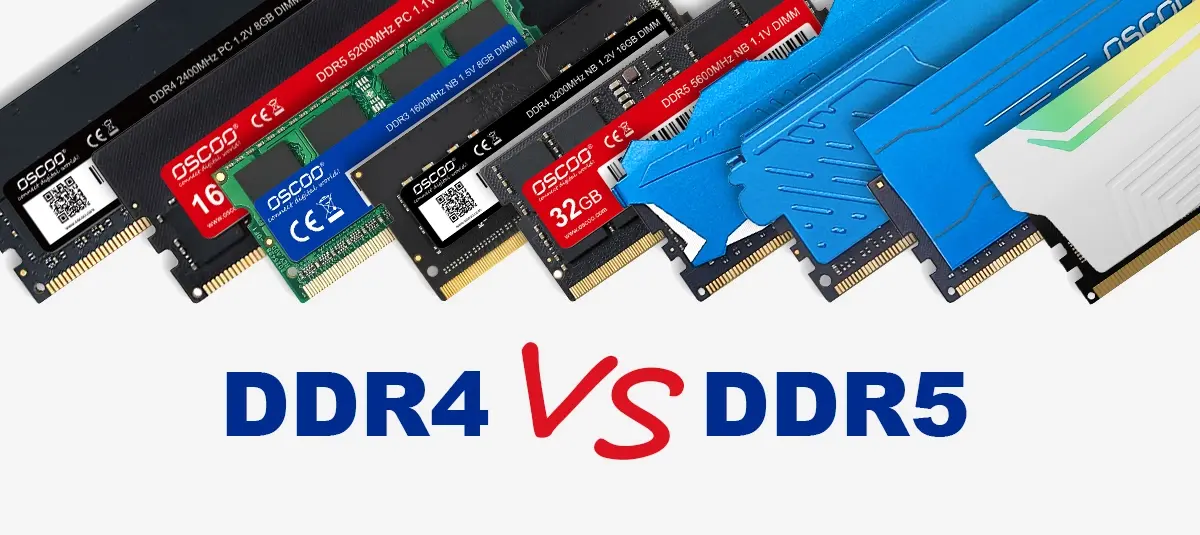
If you're thinking about building or upgrading your PC, sooner or later the question arises: should I stick with DDR4 or upgrade to DDR5? Everyone wants a smooth, fast system that will last for years, but when you look at specifications, frequencies, and voltages, it's easy to get confused. Plus, there's all sorts of conflicting information online: some say DDR5 is essential, while others claim you won't even notice the difference.
The reality is somewhat more nuanced: DDR5 is clearly superior to DDR4 on paper , but the real impact depends heavily on what you do with your computer: office work, competitive gaming, video editing, servers, virtualization, etc. In this guide, we'll review in detail, with practical examples, what changes between DDR4 and DDR5, how they perform in games and applications, what happens with prices and compatibility, and in what cases it's truly worth upgrading.
What is DDR memory and how did we get to DDR4 and DDR5?
DDR RAM might sound like engineering jargon, but it's actually quite simple: it's the working memory where the PC temporarily stores data from running programs so it can access them much faster than if they were on the hard drive. DDR stands for Double Data Rate SDRAM, meaning memory capable of transferring data twice per clock cycle.
Before the current DDR technology, there was a whole evolution: SRAM, various types of DRAM, and first-generation SDRAM . Each step forward aimed for the same thing: more speed, less power consumption, and greater capacity. With the arrival of the new millennium, DDR SDRAM became established, and since then we have been moving up the ladder with DDR2, DDR3, DDR4, and now DDR5.
Each generation has seen improvements in three key areas: effective frequency (MT/s), voltage, and density per module . For example, DDR2 lowered the voltage compared to the original DDR to 1,8V and increased the number of pins and frequency; DDR3 made another speed leap (around 800 MHz effective) while reducing power consumption to 1,5V; and DDR4 doubled frequencies again to a base frequency of 1600 MHz with only 1,2V and 288 pins.
The fifth generation, DDR5, takes all that progress and builds upon it, offering greater bandwidth, higher capacity per module, slightly lower power consumption, and a different internal architecture that enables features like two subchannels per DIMM. All of this makes it particularly appealing for next-generation gaming systems, demanding workstations, and modern servers.
It's important not to confuse traditional DDR with GDDR, which is the memory used in graphics cards. GDDR5, GDDR6, etc., are GPU-specific memories with a different architecture and purpose (very high bandwidth for textures, buffers, etc.). They cannot be directly interchanged with or compared to system RAM, even though they share part of the name.
Key technical differences between DDR4 and DDR5

Although they may look similar on the outside, DDR4 and DDR5 are quite different internally . Both use 288-pin DIMM modules, but the notch position and electrical standard don't match, preventing them from being mixed on the same motherboard.
In terms of raw speed, DDR4 typically ranges from 1600 to 3600 MT/s (with 2666-3200 MT/s being very common in consumer systems and 3600 MT/s in well-tuned gaming configurations). DDR5 starts much higher: base kits begin at around 4800 MT/s , and the JEDEC specification allows for frequencies that can reach and exceed 8400 MT/s with high-performance modules.
This increase translates directly into greater bandwidth. A typical DDR4-3200 module offers around 25,6-28,8 GB/s , while a DDR5-4800 module reaches approximately 38,4 GB/s , and the fastest variants easily double the practical limit of DDR4, achieving speeds in the 67 GB/s range and beyond.
Power consumption also improves, although the change is more subtle: DDR4 typically operates at 1,2V , while DDR5 drops to 1,1V . The key difference isn't so much the tenth of a volt less, but rather how that voltage is managed: DDR5 integrates the power controller (PMIC) into the module itself , instead of delegating it entirely to the motherboard, allowing for more precise and efficient regulation.
Another major change is architectural: DDR4 uses a single 64-bit channel per module , while DDR5 divides each DIMM into two 32-bit subchannels . This facilitates more parallel data access, improves bus utilization, and helps maintain bandwidth even with many small operations spread out.
There's also a significant leap in capacity. DDR4 has comfortably reached up to 32 GB per module in consumer use (more in specialized environments), while DDR5 is designed to scale to 64 and 128 GB per module in the near future. For servers and workstations, this is pure gold, because it allows machines with hundreds of gigabytes or even exceeding half a terabyte on a single board.
DDR4: the standard established for a decade

DDR4 was launched in 2014 and became the reference memory for almost ten years . It arrived with clear improvements over DDR3: higher frequency, lower voltage, and greater capacities per module, which led to its rapid standardization in home PCs, laptops, and servers.
Even when DDR5 officially appeared in 2020, DDR4 remained the logical choice for most users for quite some time. The reasons? The usual ones: lower prices, an abundance of motherboards and kits, and performance that, for the average user, was already more than sufficient for gaming, office work, and moderate professional tasks.
In practice, a typical, well-tuned DDR4-3200 or DDR4-3600 configuration offers an excellent balance between cost and performance . Latencies are relatively low, the standard is fully mature (stable XMP profiles, polished compatibility), and the supporting hardware is highly refined.
These days, if you have a computer with DDR4 RAM in good condition, there's no real urgency to upgrade just for the RAM . For most general uses—creating documents, browsing with many tabs open, playing multimedia, or playing older games—DDR4 still performs admirably.
Specific advantages of DDR5 over DDR4
On paper, DDR5 wins hands down: higher frequency, more bandwidth, more capacity, and lower power consumption . But beyond the technical specifications, several details make all the difference when the right conditions are met.
The first difference is memory bandwidth: in synthetic tests comparing, for example, DDR4-3200 versus DDR5-6400 , read and write speeds almost double in favor of DDR5. It's not uncommon to see figures close to 80 GB/s for read and write with fast DDR5 kits, while DDR4 configurations hover around 50-55 GB/s.
However, it's not all perfect. The first generations of DDR5 arrived with slightly higher latencies in nanoseconds than their equivalent DDR4 counterparts. If you only look at the CAS latencies (CL), these numbers seem much higher, but since the frequency also increases, the actual difference in time can be just a few nanoseconds. In real-world use, outside of benchmarks, it's very difficult to notice this small increase in latency.
Another interesting improvement is the module's design itself. Thanks to the integrated PMIC, DDR5 manages voltage more efficiently , which not only improves power consumption but also enhances stability when overclocking. Furthermore, the new XMP 3.0 profiles allow for more flexible and even editable memory profiles , a very appealing feature for enthusiasts.
It's also important to remember that DDR5 includes on-die error correction mechanisms (on-die ECC) designed to maintain data integrity within the module itself, something previously reserved almost exclusively for server ECC modules. While not exactly the same as full platform ECC, it does add stability, especially under heavy loads.
Real-world performance: benchmarks, multitasking, and professional software
Synthetic benchmarks give us an idea of the potential, but the question everyone asks is: is there a noticeable difference in day-to-day use between DDR4 and DDR5? The answer depends heavily on the type of software and the other components.
In pure bandwidth tests, such as those from AIDA64 or similar benchmarks, DDR5 clearly outperforms other processors in read and write speeds . However, when we look at productivity or content creation tests, the difference becomes more modest. For example, in suites like Cinebench R23, when comparing the same processor with DDR4 and DDR5, the score might increase by a few hundred points, which translates to improvements of only 1-3%.
In real-world applications like Adobe Premiere, there are scenarios where DDR5 offers a slight advantage, around 3% faster rendering or export times. However, in other cases, such as Photoshop or other editing tools, the differences are less pronounced, and some specific tests may even favor DDR4 , likely due to a combination of latency and software optimizations.
In intensive multitasking, with many applications open, virtual machines, or containers, DDR5 does start to show more strength. The combination of greater bandwidth and higher potential capacity per module helps to better handle these scenarios with high simultaneous loads, although again, if we're talking about normal office work, the experience with DDR4 is already sufficiently smooth.
For more specialized workloads, such as large databases, massive virtualization, or scientific computing, the story changes. In multi-tenant server and web hosting environments , where many sites or services share the same hardware, the extra bandwidth and energy efficiency of DDR5 allow for consolidating more workloads onto fewer machines, reducing power consumption and improving response times.
DDR4 vs DDR5 in gaming: FPS and gamer experience
If you're interested in building a gaming PC, the comparison between DDR4 and DDR5 takes on a special significance: it's not just about benchmarks, but also about FPS and stability . The results here are somewhat mixed, but with a clear trend.
In practical tests with modern processors (such as Intel Alder Lake with a Core i9-12900K) and powerful graphics cards like Radeon RX 6900 XT, virtually identical systems were compared except for the memory: 32 GB DDR4-3600 CL17 versus 32 GB DDR5-5600 CL36 on equivalent motherboards (one DDR4 and one DDR5).
In games where the CPU plays a significant role (strategy, complex simulators, physics-heavy open worlds), DDR5 typically performs better. For example, in titles like Star Wars Jedi: Survivor, Shadow of the Tomb Raider, and The Last of Us Part I , average frame rate increases of around 4% have been observed at 1080p, and up to 10% at the lowest frame rates (the minimum FPS values that define true smoothness).
When we increase the resolution to 1440p or 4K, the load shifts more to the GPU , so the difference between DDR4 and DDR5 narrows, although DDR5 still maintains a slight overall advantage. In these scenarios, gaining a few extra FPS can be welcome, but it rarely justifies a platform upgrade on its own.
In highly optimized competitive shooters like Valorant, CS:GO, or The Division 2 , things change: the difference between DDR4 and DDR5 is minimal, and in some tests, DDR4 even achieves slightly better results. These games are so polished and CPU-friendly that the impact of RAM is almost entirely overshadowed by other factors.
Tests were also conducted on titles such as The Riftbreaker, Flight Simulator 2020, and Battlefield 2042 at 1080p, 2K, and 4K resolutions. In general, DDR5 consistently offered some FPS improvement over DDR4 , most noticeably at 1080p and more modestly at 4K. In Riftbreaker, for example, FPS jumps from 164 to 180 at 1080p were observed, with more modest improvements at higher resolutions.
The clear takeaway is that, currently, DDR5 is the best option for a high-end, future-proof gaming PC , especially if you're interested in demanding new games or competitions where every FPS counts. But if you already have a good system with fast, well-configured DDR4, upgrading to DDR5 just to gain a few FPS (and potentially changing the motherboard and CPU) isn't always worth it.
Prices, availability and market timing
When DDR5 first hit the consumer market, the situation wasn't exactly rosy: skyrocketing prices, limited availability, and very few compatible motherboards . For the first few months, it was almost a niche option, reserved for enthusiasts willing to pay the premium to try the latest technology.
Over time, the landscape has changed considerably. Intel and AMD's adoption of DDR5 in their latest platforms has led to a surge in mass production and a steady drop in memory prices. Today, a 32GB DDR5-6000 kit can be found for only slightly more than a DDR4-3200 kit of the same capacity, and in some cases, DDR5 is even cheaper than DDR4 within the same range.
Furthermore, major memory chip manufacturers have been reducing DDR4 production to focus on DDR5, leading to occasional price increases and shortages of certain DDR4 models . This makes DDR5 not only the most modern option but also the most logical choice for new systems in the medium term.
In professional and server environments, the situation is even clearer. The higher density, lower power consumption per bit, and bandwidth of DDR5 facilitate server consolidation and reduce energy costs . A single rack can house fewer physical machines and serve more users or websites, which, in the long run, offsets the higher initial investment.
In short: if you're building a PC from scratch today, opting for DDR5 is usually a more sensible investment for the coming years , especially considering that DDR6 isn't expected for the general public for at least several platform generations.
DDR4 and DDR5 compatibility: motherboards and limitations
One point that often causes confusion is physical compatibility. Although DDR4 and DDR5 both have 288 pins on their DIMM modules , they are not interchangeable. Each memory type is associated with a different standard, and the connector's notches are in different positions.
This means you can't install a DDR5 module on a motherboard designed for DDR4 , or vice versa. Not even by force: it physically won't fit, and even if it did, the processor's memory controller and the motherboard's electrical circuitry aren't designed for that type of signal.
Furthermore, the way each generation manages voltage and channels is also different. DDR4 relies more on motherboard regulation and offers a single 64-bit channel per module, while DDR5 separates power management within the DIMM itself and introduces two 32-bit subchannels. Combining both types of RAM in the same system is neither possible nor practical.
Upgrading from DDR4 to DDR5 therefore requires changing at least the motherboard and processor to a DDR5-compatible platform. Many modern Intel and AMD chips now only support DDR5, while the first hybrid generations (such as Alder Lake) offered motherboard versions that supported one or the other type of memory, but never both simultaneously.
If you're considering an upgrade, it's essential to carefully check the CPU socket, chipset, and the motherboard manufacturer's official specifications. Simply looking at the number of pins on the module isn't enough ; you need to ensure the entire system is compatible with your chosen RAM generation.
DDR3, DDR4 and DDR5 in servers and web hosting
In the world of hosting and production servers, memory isn't just considered in terms of speed, but also stability, scalability, and energy efficiency . Here, the comparison extends to DDR3, DDR4, and DDR5, because many legacy systems are still in use.
DDR3, which appeared around 2007, offered frequencies between 800 and 2133 MHz and consumed 1,5 V, serving for years as the basis for many budget servers. DDR4 significantly improved upon these figures, increasing bandwidth, lowering the voltage to 1,2 V, and allowing modules of up to 64 GB in many environments.
With DDR5 we take another leap forward: bandwidth starting at 4800 MHz with room for much greater growth, a power consumption of 1,1 V, and modules up to 128 GB for enterprise environments. This not only means more speed, but also greater density per server, allowing for significantly more memory to be concentrated in fewer physical machines.
For hosting providers, this translates into several clear advantages: better performance in shared hosting and VPS , where many customers share resources; the ability to handle more simultaneous database queries, caches, and web applications; and a reduction in energy costs thanks to a better performance-per-watt ratio.
Reliability is also improved, thanks to the error correction features built into DDR5 , which reduce the possibility of subtle memory failures. In services where uptime is critical, such as online stores, SaaS, or large content platforms, having more robust memory means fewer outages and a more stable service.
In this context, the recommendation is usually: DDR4 is still valid for basic hosting and standard VPS , but for high-performance dedicated servers, private clouds and very demanding deployments, DDR5 is becoming clearly preferable, especially if you are planning several years ahead.
What to choose today: user profiles and recommended scenarios
The big question is: who should switch to DDR5 now, and who can stick with DDR4 without worry? There's no single right answer, but there are some pretty clear profiles.
If you already have a PC with DDR4 RAM in good condition, a recent processor, and you use it for browsing, office work, some light editing, and moderate gaming, you don't need to upgrade to DDR5 immediately . The performance improvement probably won't justify the cost of replacing the CPU, motherboard, and RAM.
However, if you're building a new system from scratch and your budget allows it, the sensible thing to do today is to look directly at DDR5. Kits are becoming increasingly affordable , the platform is mature, and you'll ensure your machine will meet the requirements of the coming years, both for gaming and professional software.
For demanding gamers, especially those playing newer, CPU-intensive titles or competing in e-sports with high refresh rates, DDR5 offers that little extra FPS and stability at minimum settings that, while not revolutionary, can make a difference in competitive scenarios . In these cases, prioritizing the new generation makes sense, particularly if you're already investing in a high-end graphics card and CPU.
If you work with 4K video editing, 3D modeling, heavy rendering, AI, big data, or professional workloads like virtualization across multiple machines, DDR5 is becoming practically a strategic investment. The capacity per module and the additional bandwidth allow you to grow without having to upgrade your platform as often, and the energy savings are significant when your system is running at full capacity for extended periods.
It's also important to consider future availability. As DDR5 becomes the industry standard, finding new DDR4 modules of certain capacities and ranges will become increasingly difficult and expensive . If you're buying a motherboard today, choosing a DDR5-ready model will make upgrades much easier in a few years.
Looking at the whole picture, the balance is clearly starting to tip towards DDR5 for new systems, while DDR4 remains a more than respectable option for those who already have a solid platform and don't need to squeeze every last bit of performance out of advanced games or extreme professional workloads.