- APK files are Android app installation packages and allow you to install applications outside of Google Play.
- Since Android 8, permissions to install APKs are granted per application, which provides more control and security.
- Installing APKs carries malware risks, so only use trusted sources and perform prior checks.
- Specific tools make it easy to manage APK, XAPK and split APK, as well as revoke permissions and clean up leftover files.
If you use an Android phone, you'd normally always use Google Play to download your apps, but Android is much more flexible than it seems; check out the best Android tricks. You can also install applications using APK files downloaded from other sources.This opens the door to trying out new features ahead of time, accessing apps that are not available in your country, or installing software on mobile phones without Google services.
That freedom comes with a catch: Android blocks the installation of apps from unknown sources by default to prevent malware and Trojans.Therefore, if you want to install APKs on your smartphone or tablet, you need to understand what an APK is, how the permissions system works depending on the Android version, and what risks you take to avoid ending up with a phone full of malware.
What exactly is an APK file?
An APK file is, simply put, the standard installation package of any Android applicationIts acronym stands for Android Application Package and it does a bit the same job as an EXE in Windows or a PKG/DMG in macOS: it contains all the necessary elements for the system to install and run an app on your device.
Within an APK, data is compressed the graphic resources, the code, the libraries, and the application manifestIn other words, everything needed for that app to function correctly when Android installs it. From the user's perspective, all you see is an .apk file that, when tapped, launches the system installer.
Many alternative repositories and stores work precisely with these packages. Websites like APKMirror, APKPure, Uptodown, developer forums, or even GitHub offer original or trial APKs This allows you to install or share apps outside of Google Play. Some manufacturer app stores, such as the Amazon Appstore or Galaxy Store, also handle APKs internally, although this detail is hidden from the user.
Over time, Google has changed its distribution system. Android App Bundles (AABs) are now mostly used in the Play StoreThis format "splits" the app and allows for the generation of APKs adapted to each mobile device (language, architecture, resolution, etc.). Ultimately, what is installed on your phone is still an APK or a set of split APKs, but packaged more efficiently.
In addition to the "classic" APKs, formats such as the split APK and XAPK filesSplit APKs are multiple APK files that, together, make up the complete application (for example, a base APK plus others for language, CPU, screen size). XAPKs, widely used by tools like Uptodown's APK Installer, bundle the base APK, the split APKs, and any OBB data (large files containing extra content like videos or audio) into a single file.
Why you might be interested in installing APKs on Android
Installing apps from Google Play is the most convenient, but Using APKs makes a lot of sense in more cases than you might think.It's not just for advanced users or "tinkerers".
One of the main reasons is access. Some apps are not available in your country, have been removed from Google Play, or are blocked on your company mobile device.If the developer offers the APK on their website (as ExpressVPN, TrueConf, or Protectstar do), or if there is a reliable repository, you can continue installing them manually.
It is also very common to use APKs in development. During the testing and development phases of an Android app, developers distribute versions in APK format. to testers, clients, or internal teams to try them out before publishing them in official stores. In these cases, manual installation is practically the norm.
Another common use is to take advantage of newer or more specific versions. Repositories like APKMirror often publish updates before they reach everyone through the Play StoreIf you don't want to wait for the phased rollout, installing the APK might be the quick way.
On devices without Google services or with restricted access to stores (for example, some corporate mobiles or terminals without Google Play Services or AppGallery), Installing via APK is often the only way to add new applicationsMany security software manufacturers, such as Protectstar or ExpressVPN, offer their APKs directly for these scenarios.
Real risks of installing applications via APK
All of this sounds great, but let's be clear: Most malware infections on Android come precisely through APKs downloaded from suspicious sitesThe protection offered by Google Play (automatic analysis, security filters, reviews) disappears as soon as you leave its ecosystem.
When you get an APK from an unknown website, It's difficult to know if that file has been modified to add spyware, Trojans, or aggressive advertising.This is especially dangerous when it comes to "cracked" paid apps, modified versions of popular games, or tools that promise things that are too good to be true.
As a general rule, It is only recommended to install APKs from sources you control and consider reliable.: official developer websites, reputable repositories and, in the professional context, packages supplied by trusted technical or development teams.
Even in those cases, it's a good idea to add an extra layer of security. Services like VirusTotal allow you to upload an APK file and analyze it with multiple antivirus engines before installing it.If any of them detect malicious code, the sensible thing to do is delete the file without hesitation, and if you have any doubts, consult [a support team/instructions/etc.]. How to tell if your mobile phone has been hacked.
Companies specializing in development, such as ABAMobile, recommend using APKs only in specific test scenarios and always knowing exactly the origin of the fileDownloading APKs from random websites because "it's free" almost always ends up being a bad deal in terms of security and privacy.
How APK installation works depending on your Android version
The way to grant permission to install applications from unknown sources has changed quite a bit over the years. Starting with Android 8 (Oreo), the global "Unknown sources" setting disappeared and was replaced by per-app permissions.which provides considerably more control.
Before Android 8, the process was much simpler but also riskier. You activated a single checkbox and from then on any app could start installing an APKwithout restrictions. If any malware managed to run, it had a much easier time sneaking something extra into your system.
Currently, with Android 8 and later versions, Permission to install APKs is granted individually to the app that initiates the installation process.If you download a file using Chrome, you need to allow Chrome to install apps. If you use a file explorer, you'll need to authorize that explorer, and so on for each app you want to use to open APK files.
The advantage is that You only need to grant that permission once per application.From that moment on, Android will remember your decision, although you can always go back and withdraw the permission if you no longer need it or prefer to close doors.
According to the manufacturer (Samsung with One UI, Xiaomi with MIUI, etc.), Menus can change their name or locationBut the concept is exactly the same on all modern Android devices: you choose which apps can act as external package installers.
Steps to install an APK on Android 8 or higher
In recent versions of Android, the flow is usually very similar regardless of whether you use Chrome, a file manager, or a messaging client. The important thing is that the first time you will have to grant that application permission to install software from unknown sources..
In practice, the standard process is this: You download the APK file with the app you want, tap on it, and Android will show you a security warning indicating that the installation is blocked.From that alert window there is usually a shortcut to Settings to change the configuration.
When you enter that menu, you'll see an option like "Allow from this source" or "Allow application installation". By activating that switch for the app in question (for example, Chrome or your file explorer), you are giving it free rein to install APKs on your device.Once accepted, go back and tap the file again to launch the installer.
Manufacturers like Samsung or companies like ExpressVPN describe a very similar process, only with slightly different menu paths. On many mobile phones, this can be accessed from Settings > Applications > Special access > Install unknown applicationswhere you will see a list of apps (browsers, file managers, email clients, etc.) and you can activate "Download from this source" for the one you need.
Once the APK is installed, the app will appear in your app drawer like any other. There's no need to repeat the entire process each time: as long as you keep the permission enabled for that source, future installations from the same application will be much more straightforward., without any warnings except for the typical Android installation dialogs.
It is recommended, however, that after using a specific source (for example, the browser to install the APK of a VPN or TrueConf) Uncheck the "Download from this source" box again if you don't plan to continue installing APKs frequently.This reduces the attack surface in case something goes wrong.
Install APK on Android 7 and earlier versions
If your phone still runs on Android 7 or an earlier version, The mechanism for allowing installation from unknown sources is global and considerably simpler., although less secure from a fine control point of view.
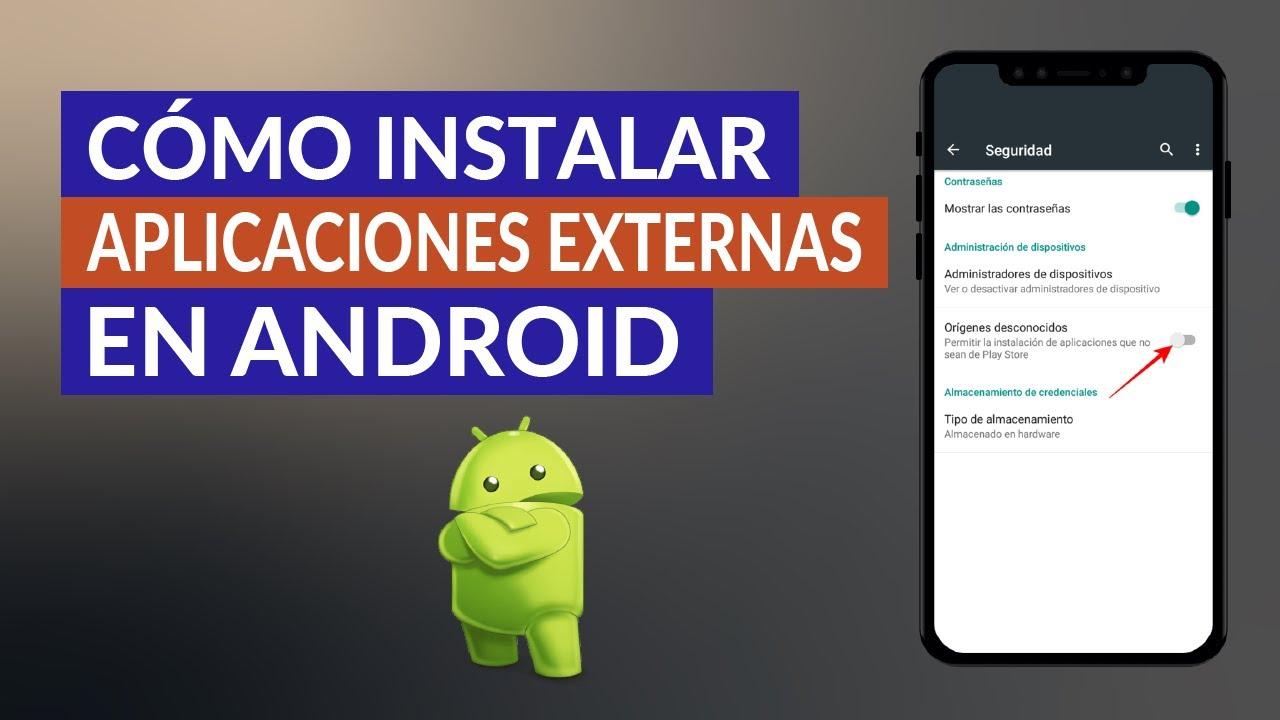
In these systems you must go to Go to Device Settings and look for the Security sectionInside, you'll find an option called "Unknown sources" or "Unknown origins," which enables the installation of apps that don't come from Google Play.
By activating that option, Android will show you a warning indicating that you are increasing the risk of installing malicious softwareFrom that point on, any application capable of opening an APK file can launch the installer. If you accept, the box will be checked.
From there, it's enough to Open the APK file from your file explorer (File Manager, Explorer, etc.) or from the browser in which you downloaded it.The system will immediately display the installation screen with the app name, the permissions it requests, and the Install button.
In these older versions, if you see a message like "Installation is blocked", You will usually also see a shortcut button to SettingsFrom there you can enable "Unknown sources" as described above, accept the warning and return to open the APK again.
Since it is a main switch, It is highly advisable to disable "Unknown sources" again when you finish installing the app you needed.This prevents malicious applications from exploiting that global permission to sneak other packages onto your system without your knowledge.
Where to get APKs in a reasonably safe way
When searching for APK files, you have to be selective. Ideally, the application developer should offer the file directly on their official website.as TrueConf does with its video conferencing app, ExpressVPN with its VPN client for Android, or Protectstar with its Anti Spy, Antivirus AI, and iShredder security solutions.
In these cases, you usually receive a a direct download link and, sometimes, an activation code to unlock premium featuresSince these are official servers, the probability of the file being manipulated is very low, provided you use the correct website and not imitations.
Another common source is well-known and reputable third-party repositories, such as APKMirror, APKPure, or UptodownThese platforms typically verify the cryptographic signatures of APKs to ensure they match the original versions on Google Play and, in many cases, indicate the exact version.
You can also obtain APKs from cloud services (Google Drive, Dropbox, etc.), uploading the file from your computer and then downloading it to your mobile deviceIt's a very convenient way to move packages between devices, especially in testing environments or when you want to share your own app with someone else.
At the local level, Some applications, such as Google Files or backup tools, allow you to extract the APK of already installed apps and share it with other devices.This is useful when you want to send a specific version to someone who doesn't have access to the Play Store or when you want to create a private copy of your apps.
Managers and tools for handling APK, XAPK and split APK
It's not always as simple as just touching a single file. With modern formats, Many applications are distributed as split APK sets or as XAPK packages that include additional dataTherefore, a tool that understands that structure is needed.
One of the most popular uses for this is APK Installer by Uptodown, a free manager designed to install Android applications in any format. that the default Android package installer does not natively recognize.
This tool is capable of Scan the internal storage and SD card for all present APK and XAPK files, show you how many there are, indicate which ones are already installed, and allow batch installations with a single step.
In addition, it has a integrated file explorer for browsing device foldersCreate backups of installed apps and package them into a single XAPK file that includes both the base APK and the split APKs and, if available, the necessary OBB data.
Thus, Installing private copies of complex applications is reduced to selecting a single file and starting the installation.without having to worry about specific folder paths, loose data files, or rare formats.
Other apps, such as advanced file explorers, also offer features like multi-installation, bulk deletion of stored APKs you no longer need, or sending files to nearby devices using the same network. All of this helps to maintain some order when you download and test many apps outside of traditional app stores..
Good security practices when using APKs
Installing APKs doesn't have to be a reckless activity as long as you follow some basic guidelines. The first and most important thing is to be wary of any file that comes from a source you don't know or that doesn't have a minimal reputationIf someone sends you an APK via message saying "install this, it's awesome," the reasonable thing to do is simply delete it.
Whenever you have doubts, Upload the file to an online analysis tool like VirusTotal before transferring it to your mobile device.This check gives you a very quick overview of whether multiple security engines agree that the file is suspicious or if it appears clean.
On the other hand, it is advisable limit as much as possible the number of applications with permission to install unknown softwareIf you only use Chrome or a specific file manager to download APKs, it doesn't make sense to give that power to messaging clients, email apps, or any tool you barely use.
Once you have installed an external app and verified that it works correctly, Consider whether you need to maintain or revoke the installation permission for the application that acted as the source.From Settings > Applications > Special access > Install unknown apps (the path may vary slightly) you can uncheck the box for any app whenever you want.
Finally, it's always a good idea to occasionally check the APKs stored in your mobile phone's memory. It's common to accumulate files from old installations, betas, or tests that no longer make sense.Tools like APK Installer or other explorers allow you to locate these files and delete them in batches to recover space and reduce clutter.
This entire APK installation ecosystem, with its advantages, risks, and nuances depending on the system version, This makes Android a very flexible platform that, when used properly, allows you to go far beyond what the official store offers.As long as you keep a cool head, control where each file comes from, and review the permissions you grant at every moment.

Table of Contents
- What exactly is an APK file?
- Why you might be interested in installing APKs on Android
- Real risks of installing applications via APK
- How APK installation works depending on your Android version
- Steps to install an APK on Android 8 or higher
- Install APK on Android 7 and earlier versions
- Where to get APKs in a reasonably safe way
- Managers and tools for handling APK, XAPK and split APK
- Good security practices when using APKs