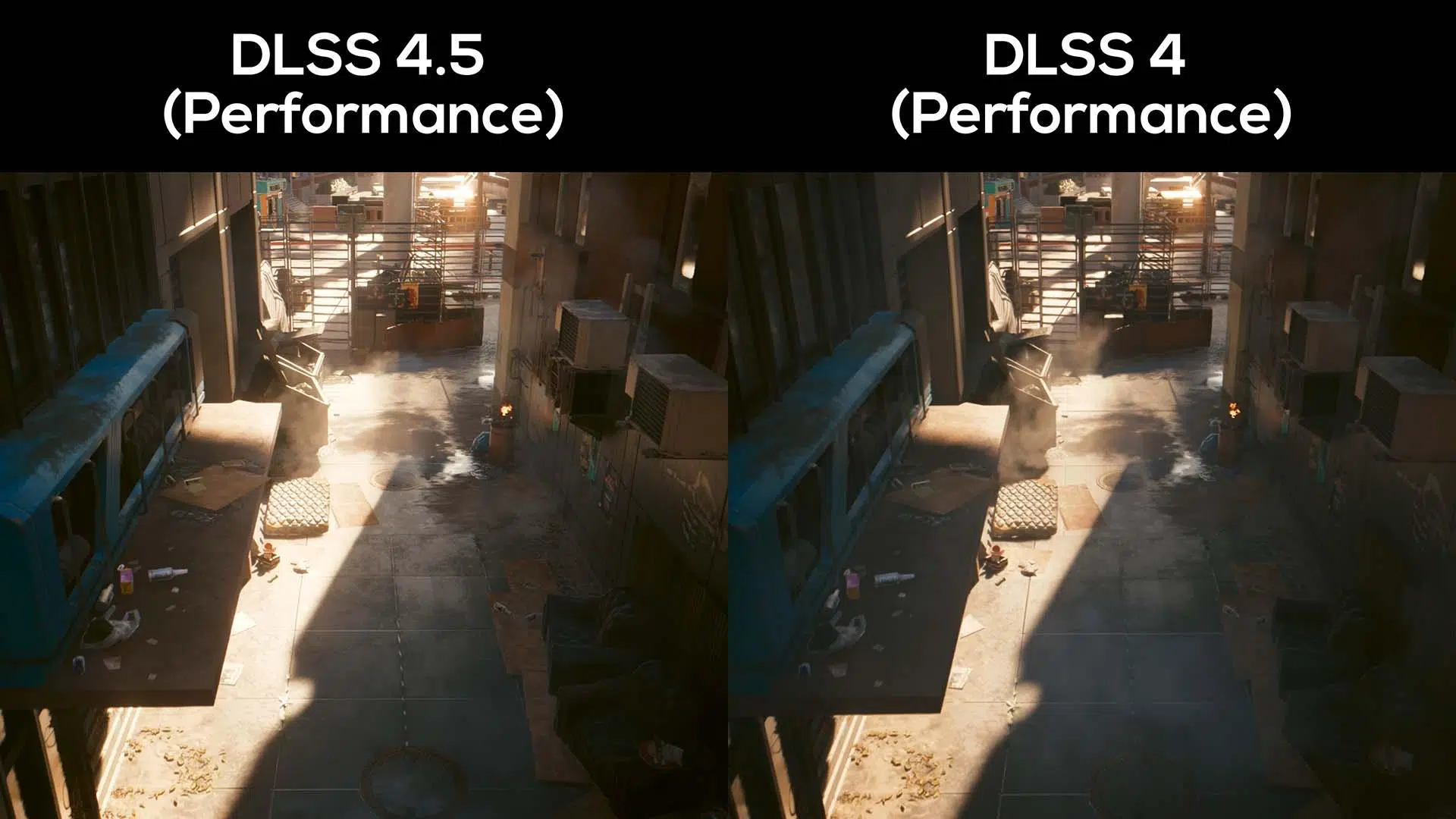
- DLSS 4.5 introduces a second-generation transformer that significantly improves image quality, especially in Performance and Ultra Performance modes.
- On RTX 40 and 50, the FPS loss when switching from DLSS 4 to 4.5 is usually moderate (4–7%), while on RTX 20 and 30 it can exceed 12–15%.
- Dynamic multi-frame generation allows up to x6 invented frames on RTX 50, targeting 4K and 240 Hz with full Path Tracing.
- DLSS 4.5 is highly recommended on RTX 40/50, but on RTX 20/30 it is often worthwhile to continue using DLSS 4 to avoid significant performance drops.
If there's one word that sums up what NVIDIA is doing with its latest graphics technologies, it's artificial intelligence . At CES 2026, the company practically skipped showcasing new consumer hardware, instead doubling down on its software and, specifically, its image reconstruction techniques. Whether you like them or not, what's clear is that AI upscaling is here to stay and is now a central part of how we play on PC, especially if you're aiming for 4K, high refresh rates, and ray tracing.
Within this movement, the brand-new GeForce RTX 50 series has become the face of DLSS 4.5 , the latest iteration of the renowned Deep Learning Super Sampling technology that replaces DLSS 4. It's not just the 50 series that benefits; there are also improvements affecting previous GPUs, although not all the new features are distributed equally. NVIDIA's promise with DLSS 4.5 is ambitious: games with full Path Tracing at 4K resolution and up to 240 Hz , supported by more complex AI models and new frame generation features.
What is DLSS and how did we get to DLSS 4.5?
DLSS was born with the first GeForce RTX cards with a very specific mission: to allow gamers to enjoy higher FPS without sacrificing image quality and, incidentally, to make real-time ray tracing viable. The idea was simple on paper: render at a lower resolution and use AI to reconstruct the final image to simulate a higher-quality native output.
The early versions weren't exactly perfect; the original DLSS offered a blurrier image than native rendering, although you did gain performance. With DLSS 2, things changed completely: upscaling began to look as good as, or better than, native resolution in many cases, and since then NVIDIA has continued to refine the algorithm, AI models, and quality modes.
DLSS 4 represented another significant leap forward by combining Super Resolution, frame generation, and ray reconstruction . With this, the GPU no longer had to draw every frame; some were generated by AI to boost smoothness, maintaining a very high level of detail without performance degradation. This approach directly addressed the classic dilemma of balancing top-tier graphics, smoothness, and latency.
DLSS 4.5 is more than just a minor parameter update. NVIDIA presents it as a profound overhaul of the technology's core , particularly in two areas: super resolution and multiframe generation. The ray reconstruction block remains unchanged from DLSS 4, but the rest has undergone a significant redesign aimed at improving image quality without sacrificing FPS… at least on the latest GPUs.
Key new features of DLSS 4.5 compared to DLSS 4
The first major pillar of DLSS 4.5 is the new Super Resolution, based on a second-generation transformer . Until now, DLSS 4 used an already highly refined AI model, but in this version NVIDIA has greatly expanded the training: more data, more problematic cases, more computing power, and smarter pixel sampling to target the areas where these systems typically struggle the most.
In practice, this transformer is more complex and computationally demanding, but this is where the new architectures come into play. The RTX 40 and 50 series can leverage FP8 precision in the Tensor Cores , doubling inference performance and offsetting the extra cost of the model. The result NVIDIA promises is more accurate reconstruction, even in very complex scenes, with a modest performance penalty on recent graphics cards.
Visually, DLSS 4.5 aims to improve sharpness, antialiasing, and temporal stability . Significant work has been done to reduce ghosting (those blurry trails behind moving objects), stabilize edges, and minimize artifacts in complex elements like water, fine vegetation, and particle effects. Demos and comparisons show smoother contours and less noise in shadows, especially in games using Unreal Engine 5 and ray tracing.
The second pillar is dynamic multi-frame generation . DLSS 4 was already capable of creating up to three artificial frames for every real frame drawn by the GPU, making very demanding games feel surprisingly smooth. DLSS 4.5 takes this idea a step further: now compatible cards can generate up to four, five, or even six invented frames for every one rendered , allowing frame rates of 190 to 240 FPS in compatible titles.
What's interesting is that this system is dynamic and adapts to the monitor's refresh rate . The technology attempts to maximize FPS without compromising the panel's performance, which is crucial if you want to get the most out of 240Hz or higher monitors with full 4K Path Tracing. It's essentially taking the concept of smoothness to the extreme without sacrificing elite image quality.
Real impact on image: quality, ghosting, and artifacts
Beyond the theory, what truly matters is how all this looks in real-world games. In titles like Black Myth: Wukong , NVIDIA showcases DLSS 4 versus DLSS 4.5 Super Resolution to illustrate the differences. According to the company itself, the leap in quality is noticeable in all modes, but it's especially significant in the Performance and Ultra Performance profiles , where the image is based on fewer actual pixels and the reconstruction process is more aggressive.
The company claims that DLSS 4.5's Performance mode can achieve a level of perceived quality comparable to, or even surpass, native resolution —something that sounded like science fiction just a couple of years ago. Ultra Performance mode, historically considered a last resort for squeezing out extra FPS at the expense of image quality, is now a truly usable option for 4K gaming while maintaining good sharpness.
In complex scenes, such as those in The Elder Scrolls IV: Oblivion Remastered , the old DLSS 4 model exhibited noticeable ghosting during fast movements or in areas with a lot of data that was difficult to interpolate. With DLSS 4.5 Super Resolution, these fast-moving objects remain cleaner and more defined, with a drastic reduction in trails and shadows . It's not perfect or miraculous, but it is a very visible improvement over the most criticized problems.
Other improvements noted by independent analyses include better water rendering , reduced shadow noise, and greater stability of distant vegetation, which flickers less when the camera moves. The AI is more adept at identifying temporal patterns, so subtle elements no longer "dance" as much from frame to frame, a problem that was quite noticeable in previous versions.
It's not all good news. Some testers point out that, in certain games, vegetation at long distances now appears somewhat blurrier , sacrificing definition for stability. Furthermore, ray-traced reflections that rely heavily on the game's own denoiser remain a weak point: DLSS 4.5 doesn't manage to correct all the flaws in this area, and therefore you won't always notice a dramatic improvement in complex reflections.
Performance: DLSS 4 vs DLSS 4.5 on RTX 20, 30, 40 and 50
The biggest controversy surrounding DLSS 4.5 stems not so much from image quality as from the performance trade-off , which isn't the same for all graphics cards. Outlets like Hardware Unboxed and ComputerBase have published detailed comparisons, and the pattern is quite clear: the more modern the GPU, the smaller the FPS loss when switching from DLSS 4 to DLSS 4.5.
The picture changes considerably when we look at the RTX 20 (Turing) and RTX 30 (Ampere) series . These generations don't take advantage of FP8 acceleration, so the new AI model comes at an extra cost that's much more noticeable in practice. Tests with cards like the RTX 3090 and RTX 2080 Ti show an average frame rate loss of around 12% , with occasional drops of 15-16% in some titles—something that's no longer so easy to ignore if you're struggling with low FPS.
In extreme scenarios, such as Hardware Unboxed's Rainbow Six Siege X test at 1440p with DLSS in Quality mode, even more striking drops have been observed. An RTX 5070 and an RTX 4070 Super, for example, go from around 235-227 FPS with DLSS 4 to around 194-186 FPS with DLSS 4.5 . The RTX 3090 and 2080 Ti suffer even more, dropping from 211 to 148 FPS and from 141 to 91 FPS respectively, representing reductions of around 42-54%, although it should be noted that this case is particularly aggressive.
In other games, such as Marvel Rivals or Avatar , the performance is more moderate: on RTX 40/50 series cards, the loss is around 9-10%, while on RTX 30 series it's about 18-20%, and on RTX 20 series it can reach 22%. Again, the pattern is the same: the older the GPU, the higher the cost of using the new super-resolution model.
ComputerBase's measurements are somewhat more favorable, especially at 4K resolution. With cards like the RTX 5070 Ti and RTX 4080 Super, the difference between DLSS 4 and 4.5 in Quality is typically between 4% and 7% , with the highest value cited being in Kingdom Come: Deliverance 2. On the RTX 3090 and 2080 Ti, however, the average is around 12%, with highs of 16%, in line with what other sources have reported.
User experiences and real-world use in games
Beyond benchmark results, it's worth looking at what gamers are saying about testing DLSS 4.5 on their own systems. A clear example is a user with a 16GB RTX 4070 Ti Super , playing at 4K resolution and overclocked, who tested DLSS 4 and 4.5 in First Berserker: Khazan with the graphics settings maxed out.
With DLSS 4 and DLAA enabled (the antialiasing mode that renders at native resolution and uses AI only to smooth edges and improve quality), this player was getting between 70 and 90 FPS. Switching to DLSS 4.5 while keeping DLAA and the other settings, the FPS plummeted to around 48-53, a very noticeable drop that raised the question: is the combination of DLSS 4.5 with DLAA poorly designed, or is the new version optimized for other modes?
After reading the documentation and testing different profiles, the user concluded that DLSS 4.5 isn't really designed for use with DLAA , but rather with modes like Performance or Ultra Performance. By switching from the DLAA preset to a quality setting (DLSS on Quality, upscaling from a lower resolution), he recovered virtually all the lost FPS and even gained a few extra frames, maintaining image quality very similar to native/DLAA.
In practice, this leads to a fairly logical recommendation: if you want to get the most out of DLSS 4.5 and you don't have a very high-end GPU like an RTX 5090 , perhaps the wisest thing to do is forget about using it with DLAA and opt for an upscaling mode (Quality, Balanced or Performance), which is where the new AI model shines brightest and justifies the extra cost.
These experiences align with benchmark results: DLSS 4.5 is more detrimental in scenarios where you were already pushing the limits or where the game puts heavy demands on the GPU, even at native resolution. In cooperative or competitive titles where a slight visual downgrade isn't a problem, switching to a Performance preset with DLSS 4.5 can be an excellent option; in demanding single-player adventures, the choice is more nuanced.
DLSS 4.5 Compatibility, Configuration and Availability
NVIDIA has emphasized that DLSS 4.5 isn't arriving alongside a new generation of graphics cards, but rather as a software update that leverages the existing ecosystem. All the new features are integrated into the GeForce RTX 50 series , which benefit most from the new version, but many of the functions can also be forced on previous-generation GPUs via the NVIDIA App.
At the time of its announcement, the company stated that over 250 games were already compatible with DLSS 4.0 , and that many major 2026 releases, such as Resident Evil Requiem and Pragmata , would also include support for the latest DLSS versions. The option to enable the new Super Resolution in DLSS 4.5 is already available in over 400 titles within the official application, provided your GPU supports it.
However, there are important nuances: the dynamic x6 frame rate generation , which allows for the aforementioned 240Hz with Path Tracing in 4K, is exclusive to the RTX 50 series and will be rolled out gradually throughout the spring. In other words, you'll be able to benefit from the best Super Resolution on the RTX 20/30/40 series, but the more aggressive multi-frame generation mode is reserved for the new generation.
An interesting detail is that NVIDIA gives users very fine control over the AI model used. From the app itself, you can choose between the first-generation and second-generation Transformer, allowing you to prioritize performance or quality depending on the game and your GPU. This flexibility is especially useful for those with an RTX 20 or 30 series card who want to avoid the worst cases of FPS drops.
In terms of memory, analyses indicate that VRAM consumption is virtually identical between DLSS 4 and DLSS 4.5, so the major change lies in the load on the Tensor Cores and the model's inference time. If VRAM is your usual limitation, don't expect miracles in this regard with the new version.
NVIDIA, its ecosystem, and the role of DLSS 4.5
To better understand why NVIDIA is pushing DLSS 4.5 so hard, it's helpful to look at the context. The company has held a market share of nearly 90% in the dedicated GPU segment for years, far ahead of AMD, despite the Radeon RX 9000 series enjoying some popularity. Even though the RTX 50 series hasn't sold as well as expected and the RTX 40 series has been criticized for its price, NVIDIA's advantage in software and ecosystem remains enormous.
The major turning point came with the first RTX 20 series in 2018 , which debuted Tensor Cores and real-time ray tracing with acceptable performance. This paved the way for DLSS and the entire family of AI-based technologies with which NVIDIA has built a competitive edge that is difficult for its rivals to overcome. Meanwhile, AMD has focused its efforts on powerful AI hardware, but has failed to close the gap in terms of integrated gaming solutions.
DLSS 4.5 fits into this strategy as another step in refining its AI stack . It's not a revolution on the scale of the jump from DLSS 1 to DLSS 2, but rather a fine-tuning that improves precisely the areas that received the most criticism: ghosting, temporal stability, image quality in aggressive modes, and the viability of Ultra Performance for 4K.
At the same time, NVIDIA is complementing these improvements with other ecosystem components, such as the new G-SYNC Pulsar displays designed for esports. These are 27-inch monitors with 1440p resolution and a 360Hz refresh rate, offering motion clarity that the brand equates to over 1000Hz effective thanks to VRR and G-Sync Ambient Adaptive, which adjusts brightness and color based on ambient light. The goal is clear: to offer the ultimate display for competitive gaming that perfectly complements frame generation and upscaling technologies.
Alongside this, the company has also showcased other developments such as its improved AI game assistant , new LTX-2 4K video generation capabilities, and native clients for platforms like Linux and Fire TV, reinforcing the idea that the battle is no longer just about raw FPS, but about the entire software environment surrounding the player.
Looking at the whole picture, DLSS 4.5 is emerging as another key piece in NVIDIA's overall commitment to artificial intelligence in games. For those with an RTX 40 or 50 series card , the combination of improved visual quality and a moderate performance impact makes it a very appealing upgrade. For RTX 20 and 30 series users , however, the general recommendation is to evaluate each case individually and, in many titles, stick with DLSS 4, which offers a more favorable balance between FPS and quality.
All of this leaves a curious scenario: a technology that clearly improves the image, makes the most aggressive upscaling modes more playable, and reinforces NVIDIA's advantage in AI, but at the same time requires the player to decide to what extent they are willing to sacrifice performance depending on the generation of their graphics card and the type of game they are playing.
