- Linux and Android share a kernel but differ completely in the upper layers, which breaks direct application compatibility.
- Android is optimized for mobile phones and TVs, while Linux offers more control, security, and customization on PCs, tablets, and professional devices.
- Tablets and Linux-based devices gain in privacy and flexibility, but Android still leads in the number of applications and polished touch experience.
- The choice between Linux and Android depends on the use: development, servers and control versus mobile ecosystem, apps and ease of use.
If you're considering a budget device like the Mangmi AirX or an affordable tablet, it's understandable to hesitate between sticking with the stock Android system or installing a Linux distribution . This is especially true when you realize that the cheap Android is barely adequate for emulating the Switch, playing PC games, or even some demanding titles from the Play Store. At that point, the logical question arises: what are the advantages of staying with Android versus installing Linux... or vice versa?
This also happens in other environments: IPTV/OTT televisions, set-top boxes, business tablets, workstations, or even your everyday laptop. Many manufacturers have used systems based on the classic Linux kernel for years to build custom interfaces , while others are betting heavily on Android TV and its derivatives. And behind all of this, the same question always lingers: if both are based on Linux, why do they behave so differently, why aren't apps compatible, and which system is better suited to different uses?
Is Android Linux or not? Clarifying concepts
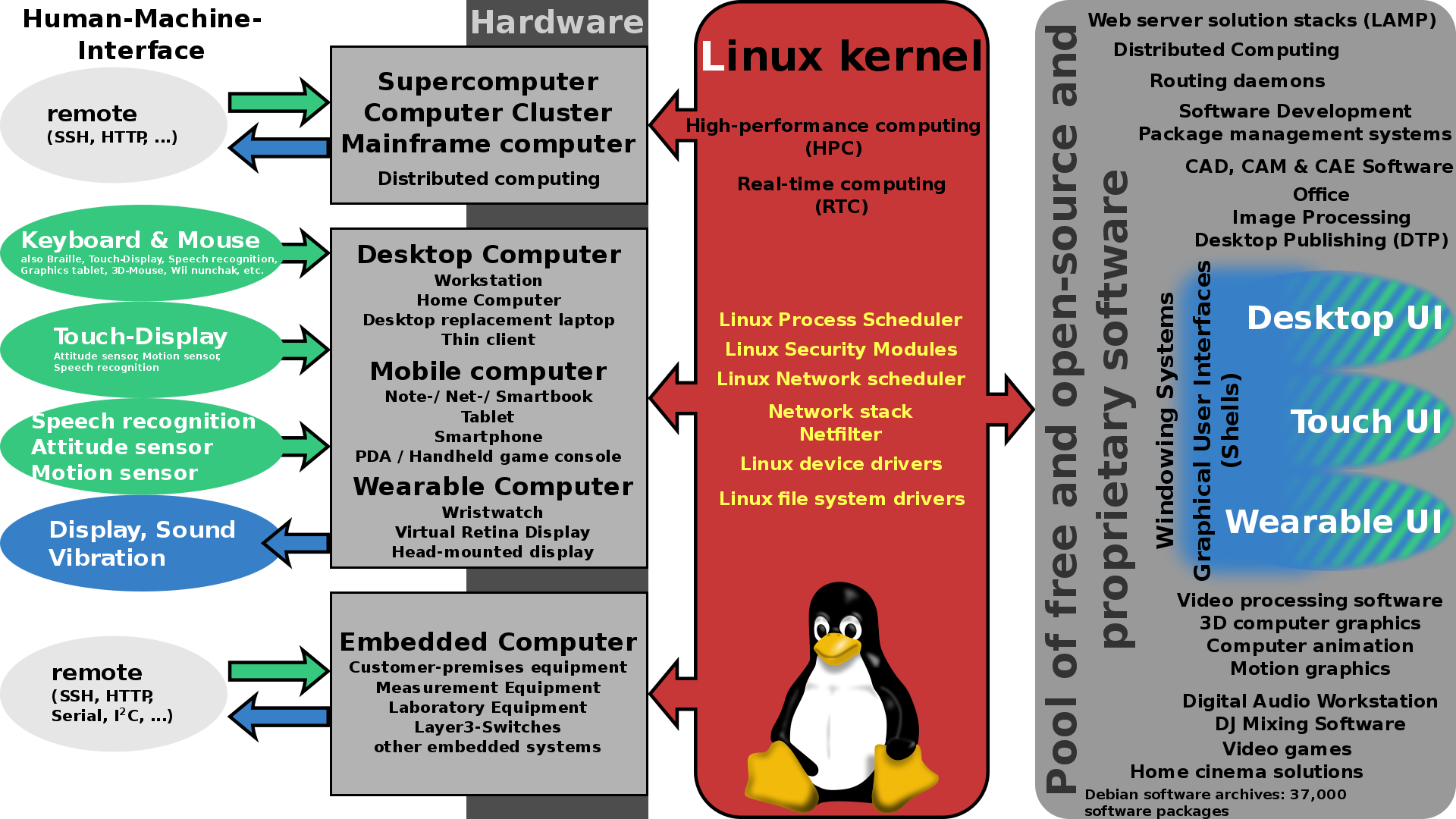
The first thing to understand is that when we talk about Linux on the desktop or on servers, we usually mean GNU/Linux , although in everyday language almost everyone just calls it "Linux." Technically, the system is made up of two main parts: the Linux kernel, which manages hardware, memory, processes, and low-level security, and on top of that, a huge set of tools and libraries, many of them from the GNU project (bash, basic utilities, C libraries, etc.).
Android, for its part, is also based on the same Linux kernel, but everything on top of the kernel is radically different . On a desktop Ubuntu, Debian, or Fedora, you find the GNU libc, graphics servers like X11 or Wayland, desktop environments like GNOME, KDE, and XFCE, and package managers like APT or YUM. Android replaces all of this with its own stack: Bionic (its own lightweight libc), the ART virtual machine/runtime, the SurfaceFlinger graphics compositor, and its own boot system and services (Android init, not systemd).
This leads to the paradox that, although Android relies on the Linux kernel, it cannot be lumped together with traditional desktop or server GNU/Linux distributions. They share a foundation, but the structure built upon it is completely different in terms of architecture, tools, and execution model.
From a more academic perspective, many people debate whether Android qualifies as a "Linux distribution ." If we stick to Wikipedia-style definitions, a Linux distribution is a set of software based on the Linux kernel that packages utilities and programs aimed at a specific group of users. Under that description, Android would fit: it uses the kernel and offers specific software layers for those who use mobile phones, tablets, televisions, or connected cars.
How Android is built on the inside
To understand why Android has certain advantages over a "pure" Linux on mobile devices (and also its drawbacks), it's worth quickly reviewing the main layers of the Android architecture , from bottom to top:
At its core is the Linux kernel adapted by Google . It does what you'd expect: it manages memory, processes, power, device drivers, networking, and basic security mechanisms like SELinux. But it also includes Android-specific modifications such as wakelocks (for precise battery management), Binder (its own IPC system), Ashmem (optimized shared memory), Logger, and the old Low Memory Killer.
Just above this is the HAL (Hardware Abstraction Layer) , a set of interfaces that translates the requests from the upper layers into a language that the kernel drivers understand. This allows different manufacturers to use a wide variety of chips, and yet Android can still communicate with them using a relatively stable set of APIs.
At a higher level, we have the native libraries (OpenGL ES, WebKit, codecs, etc.) and the ART runtime . The latter is key: Android apps are compiled to .dex bytecode, and ART is responsible for running them, compiling parts at installation or runtime, and optimizing performance based on the device.
Next comes the application framework , which provides developers with all the high-level APIs: activity management, services, content providers, notifications, permissions system, etc. When a programmer uses Java/Kotlin to write an app, they are actually relying on this framework, not directly on the kernel.
Finally, the visible layer consists of system applications and user apps , each isolated in its own sandbox for security. This includes Dialer, Messages, Settings, Camera, plus everything you install from Google Play or alternative repositories.
This modular architecture makes Android incredibly scalable: it runs on everything from low-end phones to 4K TVs , car monitors, set-top boxes, and smartwatches. But it also completely breaks with the way classic GNU/Linux distributions work, where there's no ART-like runtime or framework API.
Why Android apps don't run on Linux (and vice versa)
Although Android and a distribution like Ubuntu share a kernel, their applications speak different languages . Android apps are generated in .dex format and run on ART, using platform-specific libraries (Bionic, Android graphics libraries, etc.). In contrast, typical Linux software is compiled as ELF binaries that rely on standard libraries like glibc and use graphics servers like X11 or Wayland.
This means that an Android app has no idea how to draw windows in a GNOME or KDE environment , how to integrate with PulseAudio or PipeWire, or how to manage permissions or devices in the same way it would on a mobile device. And vice versa: a desktop program created for Debian or Fedora doesn't know how to communicate with the Android framework or ART, so it can't be installed directly on your phone.
There are attempts at "bridging" Android, such as Waydroid, Anbox, or Shashlik , which essentially contain an Android system within Linux (usually in a container or isolated machine). This allows you to run Android apps on a desktop distribution, but you're actually running a small embedded Android system; it's not native support.
Conversely, some mobile Linux distributions and tablets (for example, certain projects based on Ubuntu Touch or similar) have attempted to offer layers for running Android apps, with mixed results. Without this compatibility layer, there is no direct way to merge both worlds , regardless of the many common roots they share at the kernel level.
Technical relationship between the Android kernel and the "main" Linux kernel
Over the years, the kernel used by Android has had something of a double life compared to the standard Linux kernel (the one used in servers and desktops). For a long time, there was a fairly deep fork , with specific patches that Google maintained separately for things like Binder, wakelocks, and Ashmem, and which were not integrated into the main branch.
This caused several practical problems: code fragmentation, difficulty in keeping security patches synchronized, and above all, headaches for hardware manufacturers who had to adapt their drivers to slightly different kernel versions.
In recent years, Google and the Linux community have worked to bridge their differences. Initiatives such as the Android Common Kernel (ACK) have emerged , aiming to align Android versions with standard Linux LTS (long-term support) kernels, and the Generic Kernel Image (GKI) , which seeks to further modularize specific Android components into loadable modules.
The result is that today Android and the rest of the Linux ecosystem share far more code, security patches, and performance improvements than before. Furthermore, Google collaborates much more actively with the Linux Foundation, sending changes upstream instead of keeping them separate. This makes Android a little less isolated and strengthens its long-term technical foundation.
Advantages of using Linux as a base for Android
The choice of Linux as the kernel for Android was no accident. Google benefited from a very mature kernel, with years of experience in servers and embedded systems. That decision provided four key advantages that remain valid today :
First, there's the proven stability of the Linux kernel . We're talking about a kernel that has been in production for decades, powering 100% of the world's supercomputers and a large part of the internet infrastructure. It's an environment where crashes and reboots are rarely tolerated, so the code is very finely tuned.
Secondly, hardware compatibility . Linux already supported a huge number of architectures, chipsets, network controllers, GPUs, etc. When you start building a system that has to run on millions of different mobile devices, starting from that foundation greatly accelerates development and avoids reinventing the wheel.
Third, security and isolation mechanisms . Linux has incorporated namespaces, granular permission control, SELinux, and other mechanisms for years that strengthen isolation between processes and users. Android builds on this and adds its own layer of per-app permissions and sandboxing.
Finally, the Linux kernel's open-source license (GPLv2) allows manufacturers and developers to study, modify, and adapt the code to their needs. They are legally obligated to release any kernel changes they distribute, but they can keep the upper layer (the framework, apps, services, etc.) closed, which is precisely what many Android manufacturers have done.
Advantages of Linux over Android on personal and business devices
However, Android as a massive mobile system is one thing, and quite another is asking what advantages there are to using a "classic" Linux distro versus Android on certain devices: work tablets, repurposed PCs, IPTV set-top boxes, miniPCs, or even your main laptop for programming and gaming.
The first major advantage of Linux is its zero cost and freedom of use . A GNU/Linux distribution is not only free to download, but the license (GPL and similar) allows you to install it on as many computers as you want, modify it, or redistribute it. In contrast, Android on commercial devices is usually very tied to the manufacturer, with custom interfaces, locked bootloaders, and limited updates.
In enterprise environments, this means you can deploy hundreds of Linux machines without spending a single euro on licenses , whereas with other systems, costs skyrocket. Furthermore, the vast majority of productivity and server tools for Linux are also open source.
Another key advantage is security and stability at both the desktop and server levels . Linux inherits a multi-user design with strict separation of privileges, a highly granular file permissions system, and the ability to further strengthen security with SELinux or AppArmor. In practice, malware specifically targeting desktop Linux is in the minority compared to that which affects Android and, especially, Windows.
Linux systems, whether on servers or well-configured desktops, can run for weeks or months without reboots , with updates that rarely require shutting down the machine, except for kernel changes. This stability is something Android doesn't always offer, especially on low-end devices or those with heavily customized manufacturer interfaces.
From a performance standpoint, desktop Linux can get much better use out of modest or older hardware . With a lightweight distribution (Xubuntu, Lubuntu, Linux Mint XFCE, antiX, etc.), it's perfectly feasible to revive laptops with 2 or 4 GB of RAM that struggle with Android or other operating systems. Memory consumption after boot is very low, leaving more resources for your programs.
In terms of customization, Linux is in a league of its own. You can choose your desktop environment (GNOME, KDE, XFCE, MATE…) , window manager, theme, keyboard shortcuts, background services… practically everything. Android allows some degree of customization (launchers, icons, widgets), but always within the limits set by Google and the device manufacturer.
In many IPTV/OTT projects, providers have opted for custom Linux solutions to maintain complete control over the user experience , optimize performance, and avoid heavy reliance on Google. Android TV offers a powerful and standardized ecosystem, but it also means relinquishing more control over updates, certifications, and integrated services.
Advantages and disadvantages of Linux tablets versus Android tablets
When you narrow the discussion down to the specifics of a tablet, things become much more nuanced. A Linux tablet can be very appealing if you're looking for flexibility, privacy, and a near-desktop environment , while Android shines thanks to its extensive app catalog and polished content consumption experience.
Among the main advantages of a Linux tablet is the extreme customization of the work environment . You can set up a traditional desktop with windows, multiple virtual desktops, system panels to your liking, and the exact applications you need, whether for development, remote administration, technical documentation, or office tasks.
This has a direct impact on businesses: it's possible to create highly specific system images using only the necessary corporate tools, integrated with internal systems, VPNs, and advanced logging and monitoring systems. The control gained over workflow is difficult to replicate with a closed Android tablet tied to Google Play.
However, this same freedom leads to a significant drawback: the lack or limited maturity of certain popular apps . The Android ecosystem, with its official store and alternatives, has applications for practically everything. On Linux, although there are quality alternatives (email clients, office suites, browsers, text editors, etc.), sometimes the specific app your company uses or the polished integration with certain cloud services is missing.
In environments where you work extensively with services like AWS or Azure , compatibility typically comes from the web (browser) side or command-line tools, which Linux handles very well. But if you rely on proprietary mobile apps optimized only for Android or iOS, a Linux tablet might fall short.
From a cybersecurity perspective, Linux tablets have a strong advantage: highly refined configurations, thorough audits, and no manufacturer bloatware . The open nature of the system allows security teams (such as those offered by any specialized consulting firm) to review and harden the configuration, from secure boot to network layers.
Looking to the future, one very interesting point emerges: Linux is fertile ground for artificial intelligence agents and advanced automation . The ease of integrating scripts, backend services, and AI tools means that, for enterprise use, a well-configured Linux tablet can become a powerful automation hub.
General strengths and weaknesses of Linux on the desktop
Beyond the direct comparison with Android, it's important to have a clear overall picture of the advantages and disadvantages of Linux as a desktop system , because that also influences your decision about which system to use on your main work or study device.
On the positive side, in addition to zero cost, security, and performance, the system's privacy and transparency stand out . Major Linux distributions don't include invasive telemetry by default, and if any do collect usage data, it's usually optional and documented. Being open source, any developer can review exactly what the system does.
Another major advantage is the centralized package manager . In Linux, you install and update software from cryptographically signed repositories, which greatly reduces the risks of downloading random executables from dubious websites. This is one of the reasons why, generally, you don't need a resident antivirus like you do in Windows.
It's also worth noting that Linux completely dominates the world of servers and the cloud . If you work or want to work in systems administration, DevOps, containers, databases, or web development, being proficient with Linux isn't optional: it's an essential skill that will open doors for you professionally.
On the downside, the most obvious drawback is the imperfect compatibility with certain commercial software . Suites like Adobe Creative Cloud, AutoCAD, and many ERPs and vertical business tools don't have a Linux version. In some cases, there are very good alternatives (GIMP, Inkscape, Kdenlive, Blender, LibreOffice), but they don't always fully cover the same professional workflows.
Another drawback is the learning curve when you need to go beyond the basics . For browsing, writing documents, or watching videos, a Linux distribution like Mint is as simple as any other system. But as soon as you need to troubleshoot driver issues, configure a server, or install software from outside the repository, the terminal becomes part of your daily routine, and that can intimidate users without technical experience.
At the hardware level, although there have been many improvements, there can still be headaches with drivers for some Wi-Fi cards, certain USB peripherals, or NVIDIA GPUs . AMD and Intel have embraced the open-source ecosystem more readily, while NVIDIA still experiences friction between free and proprietary drivers.
Regarding games, the situation is curious: thanks to Proton and Valve's investment, a large part of the Steam catalog runs on Linux with very good results , but there are still titles with complex anti-cheat systems or DRM that don't run smoothly or simply won't launch. For the casual gamer, Linux is becoming increasingly viable; for those who want to play the latest AAA title with complete confidence on day one, Windows still has the advantage.
When is Linux worth it and when is Android worth it, depending on usage?
Given all this, the real decision almost always comes down to what you need to do with your specific device . There's no single answer, but there are some fairly clear patterns.
Linux is a great choice when your priorities are software development, system administration, standard office work, web browsing, multimedia, and complete control of your environment . If you have an old PC or laptop, installing a lightweight Linux distribution is often the easiest way to breathe new life into it without spending any money.
In devices like set-top boxes, IPTV, or OTT services, many manufacturers still prefer custom Linux solutions to ensure highly stable performance, a fully customized interface, and internally controlled update cycles . Android TV, on the other hand, is ideal when you want to leverage the entire ecosystem of Google apps and services and offer a more familiar experience to the end user.
Android truly shines in contexts where you need a vast catalog of mobile apps, seamless integration with Google Play Services, and a refined touch experience right out of the box . Phones, consumer tablets, smart TVs, and living room media players all fit this model perfectly.
If we look at a cheap, low-end device like the much-maligned Mangmi AirX, its power limitations are just as noticeable on Android as they would be on a heavyweight Linux desktop. The difference is that, in many cases, Linux allows you to choose lightweight environments and minimal services to get the most out of that limited hardware , while on Android you're tied to the manufacturer's interface, with its pre-installed apps and customization layer.
Ease of support and community are also important factors to consider . Major Linux distributions have wikis, forums, and extensive, though somewhat scattered, documentation. Android has huge forums, but actual update support largely depends on the manufacturer. With Linux, you can keep your system up-to-date for years without changing machines; with Android, it's common for devices to stop receiving official patches after a certain period.
Looking at the big picture, it's clear that Linux and Android aren't exactly in the same league, but they do overlap in certain devices (tablets, media boxes, mini PCs) where you can choose one or the other. The key is to weigh up whether the freedom, customization, and control offered by Linux are more important to you , or the convenience, app ecosystem, and polished mobile integration of Android . Making that decision with all this information in mind, it's hard to go too wrong.