- Docker Swarm allows you to create clusters of nodes to orchestrate containerized services with high availability and integrated load balancing.
- The concepts of node, manager, worker, service, task, and overlay networks are the basis for understanding how Swarm manages and distributes containers.
- Commands like docker swarm init, docker service create, or docker service scale make it easy to deploy, scale, and update applications.
- Swarm fits very well in small and medium-sized projects, integrating with cloud services, DevOps practices, AI and business intelligence.
Managing dozens or hundreds of containers spread across multiple machines can become a real headache if you just rely on bare-bones Docker. When you start talking about high availability, automatic scaling, or downtime-free deployments, you need more than just individual containers: you need container orchestration . And that's where Docker Swarm comes in, Docker's native solution for coordinating containers across a cluster.
If you're coming from using Docker Compose on a single machine and find it insufficient for real-world environments, Swarm is the next logical step. It allows you to set up a cluster of nodes, distribute services across them, load balance, replace crashed containers, and ultimately transform a multitude of servers into a single, coherent, production-ready platform, without having to jump straight to Kubernetes if you find it too cumbersome or complex.
What is Docker Swarm and why does it matter in container orchestration?
Docker Swarm is the clustering and orchestration engine built directly into Docker. It's not an external tool, but rather a mode of operation of the Docker Engine itself that allows you to group multiple machines (physical or virtual) into a logical cluster, called a swarm, on which you deploy services instead of isolated containers.
The beauty of Swarm is that it abstracts the entire set of nodes and lets you work as if you had a single "super server." You define services, their number of replicas, exposed ports, and restrictions, and Swarm decides where to run each container (task), how to redistribute them if a node fails, and how to balance traffic among them.
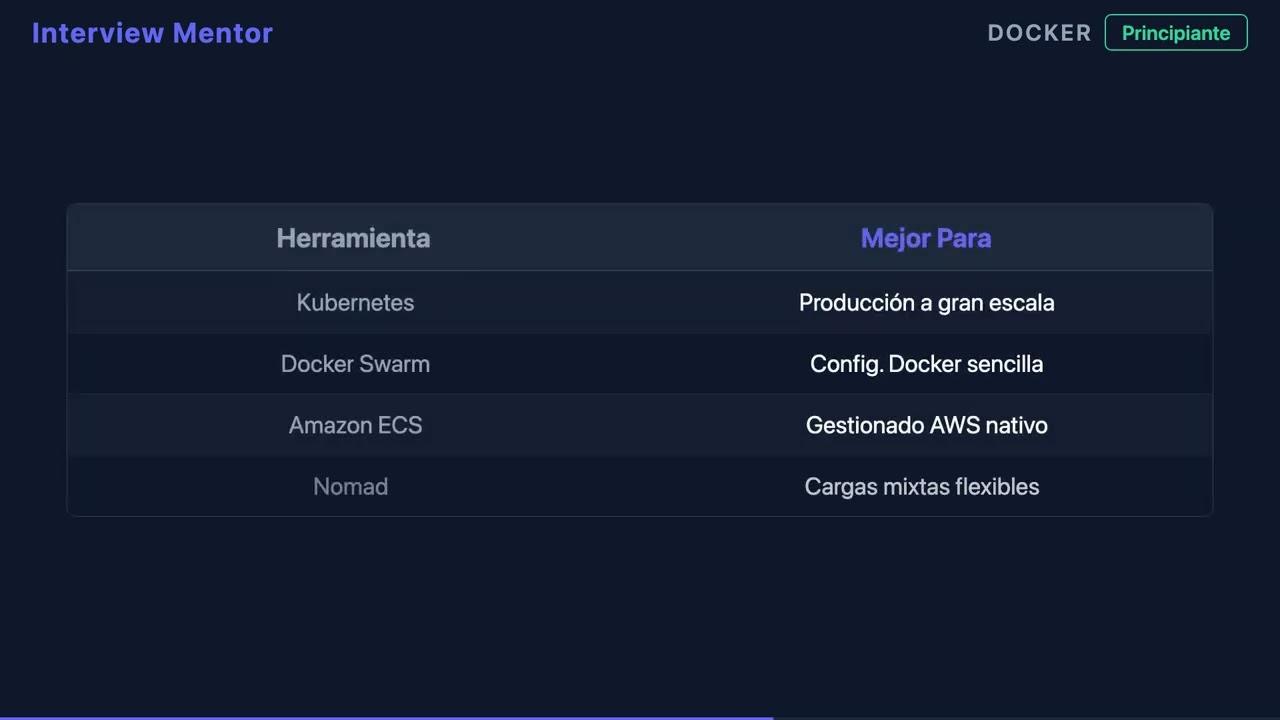
In terms of container orchestration , Docker Swarm covers the typical needs of many DevOps teams: easy horizontal scaling, basic high availability, internal load balancing, layered networks between nodes, and controlled deployments, making it suitable for microservices architectures . It is especially interesting for small and medium-sized projects, or for organizations very familiar with the Docker ecosystem that don't require the full complexity of Kubernetes.
Swarm is well-suited to scenarios where simplicity is key : labs, staging environments, on-premises clusters within an SME, or even cloud production when you don't want to manage a complex platform. Furthermore, it integrates seamlessly with CI/CD pipelines and DevOps practices that already use Docker for application packaging.
Key concepts in Docker Swarm: nodes, services, and networks
Before you start typing commands like crazy , it's essential to understand how Swarm refers to each piece of the puzzle. These are the concepts you'll see constantly in the CLI and the documentation.
A node is any machine that is part of the swarm; it can be a physical server, a VM in the cloud, or even your laptop in a test environment. Each node runs Docker Engine and registers with the cluster using a specific role.
Manager Node : This is the brain of the cluster. It is responsible for maintaining the desired state, scheduling tasks, and orchestrating operations. There can be multiple managers to ensure high availability of the control plane, but one of them acts as the leader and coordinates the rest.
Worker Nodes : These are the "workers" of the swarm. They don't make orchestration decisions; they simply execute the tasks (containers) assigned to them by the manager. This allows computing capacity to scale by adding more workers as needed.
A service is the unit of deployment in Swarm. It defines the container image to use, the number of replicas, ports, environment variables, configurations, secrets, and other options. Unlike running a single container with `docker run`, `docker service create` describes a service that Swarm maintains in the desired state.
A task is a concrete instance of a container associated with a service and assigned to a node. If you request a service with 3 replicas, Swarm creates 3 tasks. If a task fails, the manager creates another one to maintain the number of replicas.
Overlay Network : This is a type of distributed virtual network that allows containers located on different nodes to communicate as if they were on the same local network. Swarm relies on these overlay networks to connect services, apply load balancing between replicas, and isolate applications from each other.
First steps: initializing and testing a Docker Swarm cluster
Setting up a basic swarm is surprisingly straightforward if you already have Docker installed on your machines. You don't need any extra software: just enable swarm mode and join nodes to the cluster.
Step 1: Create the first manager . On the machine you want to use as the initial manager node, run:
docker swarm init –advertise-addr
The `--advertise-addr` parameter specifies the IP address that other nodes will use to view this manager. After running the command, Docker will automatically display a token and a command ready for other nodes to join the swarm as workers.
Step 2: Join worker nodes to the cluster . On each machine that will act as a worker, run something similar to:
docker swarm join –token :2377
The join token and the manager's IP address are output from the `docker swarm init` command. Port 2377 is used by default for control communication. From that point on, the node will appear as part of the swarm and will be ready to receive tasks.
Checking the cluster status is as simple as going to a manager (it doesn't work on an isolated worker) and running:
docker node ls
This command shows you all the nodes in the swarm , their ID, hostname, role (manager or worker), and current status. From here, you can detect if any node is down, in drain mode, or experiencing connection problems.
Deploying services in Docker Swarm: from the first nginx to production
Once you have the cluster up and running , the interesting part begins: deploying services. Instead of launching individual containers with `docker run`, you define services that Swarm maintains and rebalances automatically.
Creating a simple service like an Nginx web server accessible from outside the cluster is done with a command like this:
docker service create –name my-nginx -p 80:80 nginx
This starts a service called my-nginx that exposes port 80 of the container to port 80 of the cluster nodes. Swarm handles publishing the service and load balancing incoming requests across the different replicas as you scale them.
Listing deployed services helps you keep track of what's running in the swarm:
docker service ls
Here you see the service name, its mode, and the number of replicas in the current/desired format. For example, if you show 3/5, it means it's still in the process of creating tasks to reach that desired state.
Checking the details and status of tasks for a specific service allows you to identify on which node each instance is running:
docker service ps my-nginx
The output displays the tasks, the assigned node , the status (Running, Preparing, Shutdown, etc.), the image used, and the running time. This is essential for debugging deployment or load balancing issues.
Lifecycle management: scaling, upgrading, and deleting services
One of the great advantages of orchestration is the ability to scale and update services without having to go server by server. Swarm makes this quite easy from the command line.
Scaling a service in Docker Swarm means specifying how many replicas of a service you want in total. For example, if you created my-nginx with a single replica and want to increase it to three:
docker service scale my-nginx=3
Swarm handles scheduling new tasks on available nodes, respecting worker resources and state. If you need even more capacity later, you can upgrade to five replicas with:
docker service scale my-nginx=5
Updating a service's image is another key point, especially in production. Instead of manually stopping and deleting containers, you can perform a controlled update:
docker service update –image nginx:latest my-nginx
This command instructs Swarm to progressively migrate existing tasks to the new image, following the defined update strategy (by default, rolling update). This minimizes the impact on end users.
Removing a service when you no longer need it is also done at the swarm level, not at the individual container level:
docker service rm my-nginx
This stops and removes all associated tasks from Swarm , freeing up resources on the nodes. It's a clean way to decommission components that no longer make sense within your architecture.
Guided practice: setting up your own cluster and deploying a service
To reinforce concepts, nothing beats a small exercise that you can replicate in a laboratory environment, with local virtual machines or cheap cloud instances.
Exercise 1: Configure a Docker Swarm cluster . The idea is to have at least three nodes: one as the manager and two as workers. On the manager, enable the swarm with:
docker swarm init –advertise-addr
Next, copy the join command shown in the output and run it on each worker:
docker swarm join –token :2377
Check that everything went well with:
docker node ls
You'll see the manager in Leader status and the workers as Active. If any appear as Down, check connectivity, firewall, and Docker version.
Exercise 2: Deploy and scale a service . With the cluster ready, create an nginx service accessible via HTTP:
docker service create –name my-nginx -p 80:80 nginx
Check its existence with :
docker service ls
Scale the service to three replicas using:
docker service scale my-nginx=3
Check where the tasks have been deployed with:
docker service ps my-nginx
As a basic solution to the exercise , you should see the three tasks distributed among different nodes (if there are sufficient resources), and when making HTTP requests to port 80 of the cluster, Swarm will route the traffic to the different replicas according to its internal load balancer.
Advantages of Docker Swarm over manual container management
Using Swarm instead of launching individual containers offers a number of benefits that become apparent from the moment you need more than just a simple testing environment.
Simple deployment integrated into the Docker CLI : you don't have to learn a completely new tool; the service and cluster management commands are very similar to what you already do with docker run, docker ps, or docker images.
Built-in load balancing : When you expose a service with `-p`, Swarm advertises the port on the necessary nodes and distributes the traffic among the available replicas. You don't need to add a basic external load balancer like Traefik to distribute requests, which simplifies the initial architecture.
High availability and fault tolerance : If a container crashes or a worker node fails, Swarm detects the loss of tasks and attempts to recreate them on other nodes to maintain the number of replicas. This prevents many service outages due to isolated failures.
Centralized management of the desired state : you declare how many replicas you want, which image to use, which ports to open, and which restrictions to apply, and the cluster takes care of converging to that state. Future changes (updates, scaling, node draining) are also managed from this control plane.
When does it make sense to use Docker Swarm in your projects
Not all situations require Kubernetes or souped-up microservices . Docker Swarm fits very well in a number of use cases where a balance between simplicity and orchestration capabilities is desired.
Small and medium-sized production clusters : If you manage a few business applications, APIs, or internal services and your infrastructure isn't massive, Swarm offers what you need without forcing you to learn a huge ecosystem.
Teams heavily integrated with Docker who want to make the leap to orchestration without getting bogged down by the Kubernetes learning curve. Since Swarm is part of the Docker Engine itself, the transition is usually smoother and faster.
Cloud environments and distributed architectures where you want to continue using managed services from major providers (databases, message queues, storage, etc.) while your applications run in containers orchestrated with Swarm. It's a sensible way to combine simplicity with cloud capabilities.
DevOps and automation use cases where you need pipelines that build images, upload them to a registry, and automatically deploy them to a cluster. Swarm integrates well with CI/CD tools and facilitates fast continuous delivery cycles.
When you need extreme control, a massive ecosystem, or complex integrations, Kubernetes might make more sense. But for many real-world projects, Swarm provides the necessary orchestration with less operational friction.
Practical guides and DevOps approach: from the fundamentals to advanced deployments
If you've felt lost amidst scattered tutorials, strange production errors, and disjointed documentation about Docker Swarm, you're not alone. Many development and operations teams find themselves overwhelmed when moving from individual containers to an orchestrated platform.
A comprehensive DevOps guide focused on Swarm is typically organized into several key blocks. First, it establishes the fundamentals of Docker: image creation, container management and optimization , registry usage, and best packaging practices. This solid foundation is essential to prevent orchestration from becoming a nightmare later on.
Next, we delve deeper into networking and persistence : Docker network types (bridge, host, overlay, macvlan), volume management and data persistence, as well as deploying multi-container applications with Docker Compose. This gives you a clear model of what your stack should look like before deploying it to a distributed swarm.
The next level focuses on implementing Swarm services , covering everything from cluster initialization to advanced features like secrets, configurations, and stacks. Here you work with declarative service definitions, encrypted credentials, and shared configurations across containers.
Another essential area is load balancing, logging, and observability : learning how to properly expose services, review logs, identify bottlenecks, and apply troubleshooting techniques to maintain high availability on a daily basis. For monitoring and diagnosing systems, an advanced monitoring guide covering metrics and alerts will be very useful.
Finally, everything is integrated into DevOps pipelines with practical programming exercises: from automated image builds to continuous deployment across the cluster, ensuring that every code change reliably and repeatably makes its way to production.
Beyond the basics: Docker networks and next steps with Swarm
Once you've mastered starting up the cluster and the first services , the next level up is usually to thoroughly understand how your containers communicate with each other and with the outside world.
Docker bridge and host networks govern much of the communication on a single machine, while overlay networks are key to connecting containers across different nodes in a swarm. Understanding their differences, when to use each, and how they interact with external firewalls and load balancers is essential to avoid surprises in production.
Networks like macvlan allow you to assign "real" IP addresses from the physical network to containers, which can be very useful in specific environments where you need services to behave like independent hosts at the network level, but it also adds complexity and additional configuration requirements.
A “deep dive” into Docker networks will help you better align your Swarm service design with the network topology of your organization or cloud provider, clearly defining which services are internal, which are exposed to the outside, and how to segment traffic between environments (development, testing, production).
Another interesting area of development in Swarm is its deeper use of secrets and configs to manage credentials, certificates, and configuration files without directly embedding them in the image or using plain environment variables. This increases security and makes environment management much more organized.
Custom development, cloud, and business intelligence services built around Docker Swarm
Container orchestration is not isolated from the rest of the IT ecosystem . Development companies specializing in custom applications and custom software often rely on container platforms like Swarm to deliver more robust and scalable solutions.
Integrating Swarm with AWS and Azure cloud services enables the deployment of flexible clusters
and leverage managed cloud components (databases, message queues, object storage), while maintaining direct control over the container execution layer.
In parallel, artificial intelligence and AI for businesses fit very well into an orchestrated environment with containers: AI models, inference microservices, and AI agents can run as Swarm services that scale according to the load, preventing a single machine from becoming a bottleneck.
In the realm of business intelligence and Power BI , having a backend deployed on Docker Swarm makes it easier to robustly extract data from APIs, ETL services, and processing pipelines. Orchestration ensures that these services are always available to feed dashboards and analytics.
Cybersecurity is also gaining importance in this context : a well-configured cluster, with TLS communications, controlled image updates, vulnerability scanning, and centralized secrets management, reduces risks compared to chaotic deployments of independent containers. Furthermore, hardening practices and access control enhance the overall protection of the environment.
Ultimately, combining custom development, cloud services, AI, and BI on an orchestration platform like Docker Swarm allows you to build modern, scalable, and resilient solutions without increasing technical complexity or operating costs.
Mastering Docker Swarm as a container orchestration tool puts you in a very powerful position within the DevOps world: you go from struggling with scattered containers and fragile deployments to working with a coherent, scalable, and secure cluster, capable of supporting everything from simple web applications to distributed architectures with cloud services, artificial intelligence, automation, and integrated business intelligence solutions.

Table of Contents
- 1 What is Docker Swarm and why does it matter in container orchestration?
- 2 Key concepts in Docker Swarm: nodes, services, and networks
- 3 First steps: initializing and testing a Docker Swarm cluster
- 4 Deploying services in Docker Swarm: from the first nginx to production
- 5 Lifecycle management: scaling, upgrading, and deleting services
- 6 Guided practice: setting up your own cluster and deploying a service
- 7 Advantages of Docker Swarm over manual container management
- 8 When does it make sense to use Docker Swarm in your projects
- 9 Practical guides and DevOps approach: from the fundamentals to advanced deployments
- 10 Beyond the basics: Docker networks and next steps with Swarm
- 11 Custom development, cloud, and business intelligence services built around Docker Swarm