- iOS 26.4 incorporates new emoji, security improvements, and visual changes with Liquid Glass.
- Playlist Playground on Apple Music and RCS encryption with Android are the big features in testing.
- iOS 26 enhances iPhone customization, adaptive battery, and real-time translation.
- Public betas allow you to try almost all the new features, with some regional limitations.
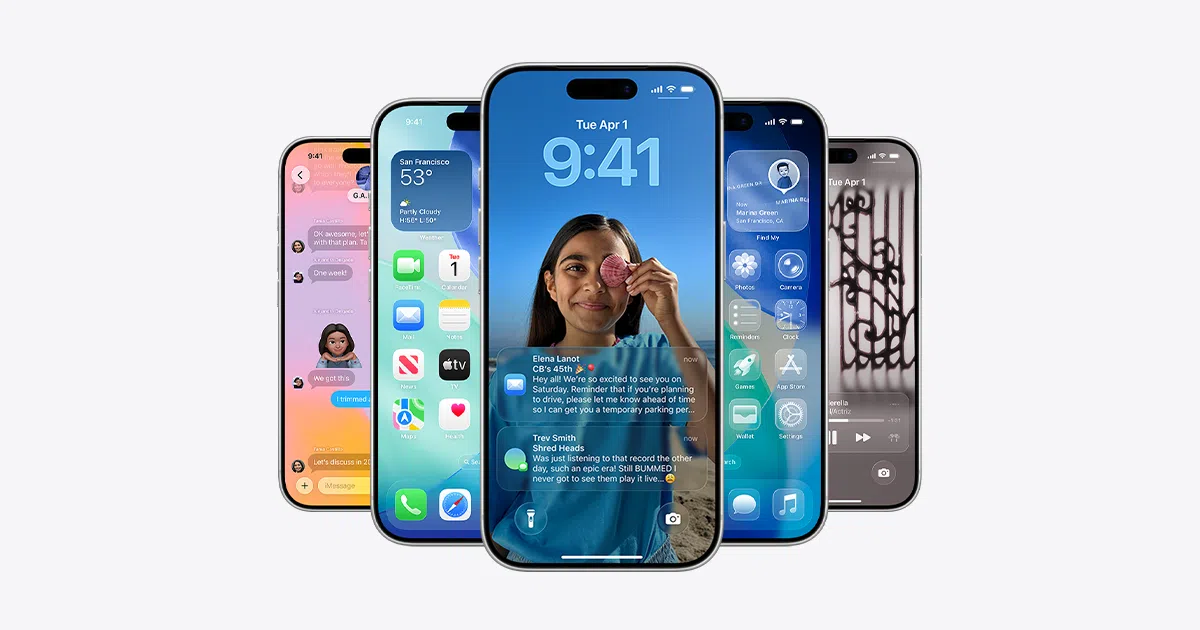
If you've heard about iOS 26 and the 26.4 update but aren't quite sure what it actually brings, don't worry: there are plenty of changes, some very noticeable and others more subtle but equally important. From new artificial intelligence features to improvements in security, battery life, and design, this version is packed with details worth exploring.
In the latest iOS 26.4 betas, Apple has been refining the system and adding key features such as new emoji, AI-powered playlist creation in Apple Music, RCS encryption with Android , and a host of tweaks to apps like Photos, Podcasts, and the Home Screen itself. Below, we'll review, point by point, everything we know so far and how you can take advantage of it on your iPhone.
iOS 26.4 Calendar and Beta Status
Apple is finalizing iOS 26.4, currently in developer beta 3 , released just one week after beta 2. The company plans to release the stable version between the end of March and the beginning of April, so the window of opportunity to finalize pending features is becoming increasingly tight.
So far, each beta has introduced relevant changes: the first one showed hints of the new emoji and Playlist Playground in Apple Music; the second one showed end-to-end encryption for RCS messages between iPhone and Android ; and in the third one the new emoji have finally been activated, although they are not yet shown in their final form.
It's worth remembering that, although many of these new features are already available in the betas, Apple may delay or limit some functions to certain countries, iPhone models, or even later versions of the operating system. Not everything that appears in a beta is guaranteed to be in the immediate final version.
New emoji in iOS 26.4: present, but still incomplete
One of the major omissions from the first two iOS 26.4 betas was the latest Unicode emoji, something that has been partially corrected in beta 3: the icons are now integrated into the system, but for the moment they appear as question marks . This means that the code is there, but Apple hasn't yet finalized the visual design of each one.
These new characters include icons like the trombone, treasure chest, orca, landslide, and Bigfoot , along with other minor symbols. They are exactly the same emoji that were announced last year and which, following tradition, Apple usually releases in the ".4" versions of iOS, taking advantage of the fact that these are spring updates with a number of changes.
The fact that they already appear in beta 3, even if only as question marks, is a pretty clear sign that their final version is very close . The reasonable bet is that in beta 4 (or even through a minor update before the public release) Apple will finalize the designs and they can be used normally in messaging apps, social media, and more.
Playlist Playground: Apple Music playlists powered by AI still blocked in the US
Another major new feature in iOS 26.4 is Playlist Playground, an Apple Music function that lets you create playlists using artificial intelligence . The idea is that you can describe the type of music you want (ambience, style, time of day, mood, etc.) and the system will automatically generate a playlist based on those criteria.
The problem is that, after three consecutive betas, Playlist Playground is still only available in the United States . This geographical limitation is starting to worry many users, because it's not just Europe: the feature is also absent from key Apple markets like the UK and Australia, where many new features are traditionally tested before their global rollout.
The reasons for this regional restriction are unclear. Several possibilities are being considered: music rights agreements with record labels in different regions , technical limitations of the servers that manage AI-powered recommendations, or even issues with the quality of results in other languages that are not yet up to par with American English.
In any case, Apple still has room to expand to more regions before the final release of iOS 26.4, and could technically activate Playlist Playground for more countries overnight from its servers . If this doesn't happen before the public release, the feature will likely debut officially as a US-exclusive for at least a few months.
Everything included in iOS 26.4 up to beta 3
Beyond emojis and Apple Music, iOS 26.4 arrives with a fairly extensive set of changes spread across various system apps and settings sections, forming part of the new features for phones and apps . Some are visual improvements, others focus on security, and still others on new entertainment and productivity features.
In addition to Playlist Playground for creating AI-powered playlists , Apple Music is receiving a noticeable redesign of its album and playlist screens, which now feature nearly full-screen album art, reinforcing the prominence of the artwork—something we analyzed in our iOS software review . A new section called "Concerts Near You" has also been added, designed to help you discover performances and musical events in your area.
The Podcasts app is getting a head start by introducing native video support for episodes , with the option to download content for offline viewing or stream it with automatic quality adjustment based on the connection. This brings it closer to platforms like YouTube or Spotify, which already combine audio and video in many shows.
On the messaging front, iOS 26.4 begins testing end-to-end encryption for RCS messages between iPhones and Android devices . Until now, iMessage already protected conversations between iPhone users, and Google did the same between Android phones, but mixed communications using RCS lacked this additional layer of security.
On the side of general device security, Apple activates by default enhanced protection against iPhone theft , designed to make it more difficult for whoever steals or finds your phone to change critical settings, access passwords, or disable tracking features without additional verification.
A new ambient music widget has also been introduced for the home and lock screens , designed to provide easy access to relaxing sounds or background music. The Personal Hotspot section is now more informative, displaying data usage reports broken down by each device connected to the iPhone—very useful if you frequently use your phone as a hotspot.
In the Health app, iOS 26.4 introduces new sleep tracking metrics, including average bedtime , which helps identify patterns and improve sleep routines. The wallpaper gallery is also redesigned with a look reminiscent of the App Store: categories, clearer navigation, and on-demand downloads to save space. This same organizational system is also applied to Apple Watch faces.
iOS 26: Visual changes and customization of the iPhone
With the arrival of iOS 26 for all compatible iPhones, one of the most striking changes is the redesign of the overall interface with the new Liquid Glass design language, which completely alters the system's appearance . Such a drastic change in the iPhone's visual style hasn't been seen since iOS 7.
This new approach not only affects backgrounds, transparencies, and menus, but also brings additional designs for home screen icons and widgets . Now, by pressing and holding on an empty area of the screen until the icons start to move and then tapping "Edit" in the upper right corner, the "Customize" option appears, where you can change the visual style of the icons.
Apple offers four different modes: the classic look with colorful icons, a dark mode with a black background under each icon , a translucent mode that makes apps look more ethereal, and a tinted mode, in which you choose the dominant hue to homogenize the desktop colors.
The default mode remains the most balanced and recognizable; the new translucent and tinted modes have an interesting effect, but by unifying so many tones, they can make it somewhat more difficult to locate apps at a glance . Ultimately, it comes down to personal preference: some prioritize aesthetics, while others prefer to identify apps instantly by their original colors.
More freedom on the lock screen
The lock screen also takes center stage in iOS 26 thanks to new customization options that go beyond the usual wallpapers. By pressing and holding the lock screen, you can directly access the editing menu and, from there, tap on "Customize" to adjust various elements.
The most noticeable change is that you can now stretch the clock to take up more screen space . This option is limited to the first of the available fonts; the other three maintain a more standard size. You can adjust the text length and font thickness, and the system will automatically reposition notifications so they don't obscure the time.
Additionally, the option to use spatial photos on the lock screen has been introduced , provided the image contains the necessary information to create the effect (it works especially well with photos of people and pets). Within the customization options, you'll see a hexagonal icon: tapping it visually separates the main subject from the background to produce a sense of depth that is perceived when moving the iPhone, creating a kind of subtle 3D effect.
New Photos app: more order and less chaos
With iOS 18, Apple introduced a new Photos app which, although powerful, proved too confusing and unintuitive for many users . Organizing collections, memories, and albums didn't quite work, and finding specific images was more difficult than expected.
In iOS 26, Apple restructured Photos to make it much more logical. The app is now organized into two main tabs: the Library, where all photos are displayed chronologically , and a Collections section that groups different types of content. Within this second section, you'll find classic albums, pinned collections, starred photos, memories, and other automatic groups.
The key is that if you scroll to the bottom of the screen within Collections, you'll find an option called "Reorder." From there, you can decide which sections you want to see at the top and in what order, prioritizing, for example, your manually created albums over memories automatically generated by the system.
For now, Apple doesn't allow you to completely hide any of these blocks, but you can expand or collapse them by tapping the corresponding arrow, thus reducing visual clutter and shortening the scroll required to find what you're looking for. With these changes, finding a specific album is no longer a minor ordeal among automatic suggestions.
Visual Search and Apple Intelligence in iOS 26
Within the Apple Intelligence umbrella, one of the most popular features in iOS 26 is the system's integrated visual search . To use it, simply take a screenshot and, in the preview that appears, select the specific visual search icon in the bottom right corner, or draw a circle around the element you want to identify, similar to Google's "Circle to Search."
After a few seconds, the iPhone will display a page with results related to the content you've highlighted in the image . For example, if you take a screenshot of a mobile phone that appears in an article and highlight it, the system can locate similar models on secondhand websites or online stores, as has already been seen with results that link to sites like Wallapop.
Another interesting possibility is that you can send a query to ChatGPT directly from this interface , so the response takes into account the context of what's on the screen. This greatly expands the possibilities: from asking for explanations about graphics or technical texts to identifying unusual objects or translating billboards in other languages.
Siri call filter for unknown numbers
Among the standout features of iOS 26 is a fairly aggressive Siri-based call filtering system for unknown numbers , designed to drastically reduce spam calls. You can activate it from Settings > Phone, where you'll find the specific filtering options.
When enabled, all calls from unsaved numbers are routed to Siri, who answers on your behalf and asks the caller to explain the reason for their call . Meanwhile, you'll see a real-time transcript of what the person is saying on your screen, and you can decide whether to answer, ignore, or hang up.
There's even a more radical mode where the iPhone doesn't even ring when an unknown number calls . It's an effective solution against spam, but it has an obvious risk: you could also miss legitimate calls from doctors, couriers, workplaces, or other important contacts you haven't yet saved.
That's why many users choose not to activate the most extreme mode and stick with just the transcription filter, which already helps a lot in separating relevant calls from those that are not, while still seeing alerts when they may be of some importance.
Real-time translation in conversations and messages
Another significant improvement in iOS 26 is real-time translation through the Translate app and the Messages app itself. From Translate, you can initiate a conversation by selecting the languages of each person you're speaking to and tapping the microphone . The iPhone captures what you say and immediately displays the translation on screen, and can also play it back aloud.
This system is especially useful when speaking face-to-face with someone who doesn't speak your language, as the interface is designed to position itself between you and facilitate a fluid dialogue with alternating speaking turns . There's no need to type: simply tap the microphone when each person is about to speak.
Translation is also integrated into Messages. If you receive a message in another language, you can tap and hold the message bubble and select "Translate conversation" to automatically translate all subsequent messages in that thread. This makes chatting with someone in another language much more natural, without constantly copying and pasting into another app.
Adaptive battery mode to maximize battery life
In terms of energy, iOS 26 incorporates an adaptive battery mode in addition to the classic low power mode . While the latter aggressively reduces certain features (background updates, brightness, visual effects, etc.), adaptive mode aims to balance performance and battery life based on your actual usage patterns.
The idea is that the system will analyze how you use your iPhone throughout the day and dynamically adjust screen brightness, the frequency of certain background tasks , and other details that affect battery consumption. All of this will happen without you having to manually turn anything on and off each time.
Apple has acknowledged that, immediately after installing a major update like iOS 26, battery life can be temporarily affected by reindexing processes and internal adjustments. That's why this adaptive mode is especially important: it helps smooth out that initial period and keep the phone running smoothly throughout the day.
iOS 26.4 Beta 2: RCS encryption and other minor changes
The second beta of iOS 26.4 introduced one of the most striking technical innovations of the release cycle: end-to-end encryption for RCS messages between iPhones and Android devices . This is the first time this system has been seen in action, although it is still in the testing phase.
When encryption is enabled, RCS messages between devices display a padlock icon within the conversation , indicating that the content is protected during transmission. Until now, iMessage already offered this security between iPhones, and Google's Messages app did the same between Android phones, but cross-device communication lagged behind.
However, the rollout is limited: the iPhone must have the iOS 26.4 beta installed, and the Android phone needs the latest compatible version of Google Messages . Furthermore, Apple has clarified that this encryption will not be activated globally in version 26.4 itself; its official release will come later this year.
Visually, this second beta also adjusts the behavior of Liquid Glass in the "Edit" menu on the home screen . The effect is now more transparent and refined, allowing the background behind it to show through better. It's a subtle change, but it demonstrates that Apple continues to refine the new graphic style iteration after iteration.
The Games app moves its search bar from the bottom to the top of the screen for easier use, aligning it with the design pattern of other system apps . The App Store and Apple Music change the "Apple Account" text in the account section: it's now left-aligned and adopts the rainbow logo already seen in Settings.
In Accessibility, a new option called "Reduce Highlight Effects" appears under "Display & Text Size ," useful for people sensitive to certain visual effects or who prefer smoother animations. When updating iOS, it's now possible to tap on the update name to immediately see the exact build number, which is very handy for developers and advanced users.
Finally, if you have betas enabled on your device but don't install any for four months, Apple automatically returns you to the public channel . This is a hygiene measure designed to prevent anyone from unintentionally getting stuck in an abandoned beta channel without receiving stable updates.
How to install the iOS 26.4 betas right now
If you develop apps or simply want to try out new features before anyone else, you can install the iOS 26.4 betas relatively easily. Registered developers have direct access from developer.apple.com, where they can download the necessary profiles or activate the betas from their system settings.
If you're not a developer, there's also an official option: the iOS 26.4 public beta usually arrives a few hours or days after the developer beta. To access it, you must register with your Apple ID at beta.apple.com and, once the process is complete , go to Settings > General > Software Update on your iPhone, enable beta updates, and select the iOS 26.4 public beta from the list.
Even so, it's wise to be cautious. Since these are beta versions of software, they may include bugs, unexpected crashes, increased battery drain, or incompatibilities with certain apps that are critical for your daily use. It's recommended to install them on a secondary device or, at the very least, make a full backup to iCloud or a computer before updating, in case you need to revert.
If you develop apps or simply want to try new features before anyone else, you can follow our key iOS software tips and, if you choose, download profiles from developer.apple.com or enable the public beta in Settings.
With all these changes, iOS 26 and iOS 26.4 point to a new generation of software heavily focused on personalization, artificial intelligence, and security, while continuing to refine the new Liquid Glass design and adding small quality-of-life improvements to almost every aspect of the system. If you take advantage of its new features—from Siri's call filter to Adaptive Battery mode and the Photos reorganization—your iPhone can feel much more comfortable and tailored to your everyday usage.
