- Apple Intelligence integrates personal AI into iPhone, iPad, Mac, Apple Watch, and Vision Pro, combining local and Apple's own cloud models.
- It offers writing tools, real-time translation, visual intelligence, advanced photo editing, Genmoji and Image Playground, plus a much more contextual Siri.
- Privacy is ensured with on-device processing and Private Cloud Compute, where data is not stored and server code can be audited.
- It is only available on recent devices with A17 Pro or M1 chips and above, requires modern versions of iOS, iPadOS and macOS, and its rollout of languages and regions is progressive.
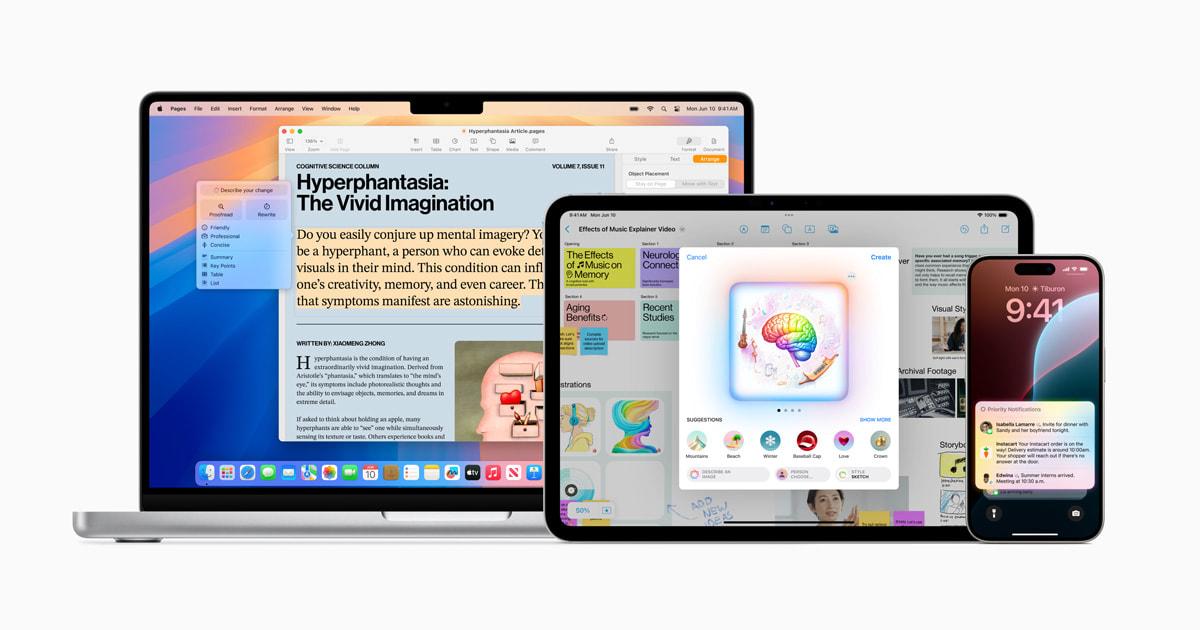
Apple Intelligence is Apple's big bet on artificial intelligence , a layer of "personal intelligence" that lives inside the iPhone, iPad, Mac, Apple Watch and Apple Vision Pro to help you write better, understand what's on the screen, create images, prioritize notifications or translate conversations in real time, all with a very clear focus on privacy.
This technology is deeply integrated into iOS, iPadOS, macOS, watchOS, and visionOS, combining models that run directly on the device with others that operate on Apple's own servers. The key promise is twofold: greater everyday usability and very tight control over your data , moving away from typical AI that sends everything to the cloud without much explanation.
What is Apple Intelligence and how does it differ from other AI?
Apple Intelligence is the "personal intelligence system" designed by Apple to allow your iPhone, iPad, and Mac to understand language, images, and personal context, and to act as a true co-pilot in your apps. Instead of being a standalone app, it's integrated throughout the system and is noticeable in Siri, Mail, Photos, Messages, Notes, and many other areas.
Unlike traditional generative AI models that process almost everything in the cloud, Apple opts to run most of its AI directly on the device itself . This means that much of what you ask of the AI is handled on the A17 Pro, M1 chip, or later, without your data ever leaving your iPhone, iPad, or Mac.
When more power is needed, Private Cloud Compute comes into play . In these cases, the device sends only what's necessary to servers with Apple chips, where larger models designed for complex requests, such as certain types of content generation or very demanding queries, are running.
The key is that Apple assures users that your information is not stored on those servers, nor is it used to train models , and that the code running there is publicly available for independent experts to audit. In other words, the company wants you to be able to verify that the system does exactly what it promises and nothing more.
Furthermore, Apple Intelligence was created as an independent system, although it allows connection with third-party models, starting with ChatGPT . However, this always requires explicit consent and clear notifications when your data will leave the Apple environment.
Privacy, Private Cloud Computing and Data Security
Privacy is at the heart of Apple Intelligence , with a near- zero-trust approach . Apple insists that AI can be very powerful without turning your data into the product, and that's why it designed the architecture starting with local processing.
Most functions are handled on the device itself: text summaries, rewriting, some Siri enhancements, some photo analysis, and notification management . All of this happens within your device's chip, so neither Apple nor third parties can see that content.
For operations requiring more processing power, the system uses Private Cloud Compute . These servers use Apple chips and highly controlled versions of the operating system. An iPhone, iPad, or Mac only connects to a server if the software has been publicly registered for inspection by third parties, and communication is end-to-end encrypted.
Apple states that data sent to its Private Cloud Computing is used only to fulfill your request and is not stored. Furthermore, the company publishes the code running on these servers, allowing researchers to verify that there are no backdoors or hidden storage.
The optional ChatGPT integration comes with safeguards: Apple hides your IP address, and OpenAI doesn't save queries when you log in without an account . If you choose to link your own ChatGPT account, OpenAI's data policies apply, but you'll always be notified before sending anything.
This whole approach seeks something very specific: that Apple Intelligence has access to your personal context (emails, events, notes, photos, etc.) without turning that information into a privacy risk , a delicate balance that will be key for users to truly trust AI.
Key features of Apple Intelligence in everyday life
Apple Intelligence is not just “background magic ,” but a large set of concrete tools that change the way you write, search, edit photos, or manage your notifications.
One of the cornerstones is the Writing Tools , present throughout virtually the entire system: Mail, Messages, Notes, Pages, and many third-party apps. You can ask the AI to rewrite text with a different tone (more formal, shorter, or more informal), check grammar and style, or summarize it in a paragraph, table, or list.
The rewriting feature offers different versions of your text tailored to the context and audience . The proofreading tool highlights grammar and vocabulary errors with suggestions you can accept or refine. And the summaries transform long texts into digestible content in seconds—perfect for dense emails, class notes, or internal documents.
In the realm of communications, AI also helps to better organize your emails and notifications . In the Mail app, the Priority Messages section places urgent emails, such as invitations or boarding passes for the same day, at the top, while the rest are accompanied by summaries directly in your inbox.
For notifications, Apple Intelligence introduces summaries of alert groups and a new focus mode called Reduce Distractions , which filters notifications and only shows those that seem truly important, such as alerts from your children's school or emergency messages.
Real-time translation and live translation
One of the most striking features of Apple Intelligence is real-time translation , designed so that you can communicate with people who speak other languages without too much trouble.
In the Messages app, AI can automatically translate messages as you type . You see the original text and the translation right below it before sending, and the other person receives the message in their own language, making the conversation much smoother.
In FaceTime, translation appears as live captions over the video call , showing what the other person is saying in your language. This is especially useful in work meetings, online classes, or calls with family members who live abroad.
In Phone app calls, the experience is even more interesting: what the other person says is transcribed and translated on your screen , while your voice is converted into translated audio for them. This way, each person can speak in their own language and understand each other without needing external apps.
These translation capabilities rely on local processing whenever possible, so that conversations maintain a very high level of privacy and do not continuously depend on external servers.
Visual intelligence, camera control, and contextual search
Visual intelligence is another pillar of Apple Intelligence . It's a set of features that allow it to understand what you see with the camera or what appears on the screen, and act accordingly.
On compatible iPhones, Camera Control lets you point at a sign, restaurant menu, monument, or product and get additional information: translate the text, add an event to your calendar, identify the location, or access third-party tools to search for the item online.
You can also use visual intelligence from a screenshot . Instead of simply saving it, an interface appears where you can hover over an object or text and request things like "translate," "search on Google," "create an event," or "ask ChatGPT."
AI is capable of recognizing plants, animals, points of interest and relevant content on screen , all from the device itself when possible, and resorting to the private cloud when larger models are needed.
In addition, Apple Intelligence is integrated into photo viewing to offer a much more flexible natural language search . You can ask for “photos of Laura skateboarding in a graphic tee” or “videos of my parents’ birthday party” and the system will find exactly what you’re looking for.
Photo editing, Smart Memories, Genmoji, and Image Playground
The Photos app is one of the biggest beneficiaries of Apple Intelligence . The new Clean Up tool lets you remove unwanted people and objects from the background of an image without distorting the main subject.
The Memories feature goes far beyond classic automatic photo albums. Now you can write a description of the story you want to see (“weekend in the snow with friends,” for example) and the AI selects the best photos and videos, organizes them into thematic chapters, and creates a video with its own narrative.
Apple Intelligence also suggests songs from Apple Music that match the type of memory , and all the processing of your photos and videos is done privately, without uploading your photo library to external servers to train models.
On the more creative front, Apple introduces Genmoji , a way to generate custom emojis from a simple description. You can request an emoji of "face with cucumber slices over its eyes" or one based on a friend's photo, and the AI will create several versions to choose from.
On the other hand, Image Playground is the image creation tool. It's integrated into apps like Messages, Notes, Keynote, Freeform, and Pages, and is also available as a standalone app. It lets you choose themes, styles (Animation, Illustration, or Sketch), locations, props, and people from your photo library to create images in seconds.
With Apple Pencil comes the Image Wand , which transforms quick sketches into more elaborate illustrations. Simply circle the drawing, and Apple Intelligence generates an image based on the context of the note or document.
Siri revamped: more context, more natural, and with a writing mode
Siri has been rebuilt from the ground up on Apple Intelligence . It now understands natural language better, tolerates mistakes when speaking, and maintains context across multiple requests, making it much closer to a real conversation.
Visually, Siri debuts a new design that illuminates the edge of the screen when active, leaving the content unobstructed. On Mac, it can be pinned anywhere on the desktop, and on iPhone or iPad, it's possible to effortlessly switch between voice and text.
The new typing mode lets you ask Siri for things using the keyboard when you don't want to speak . Simply double-tap the bottom of the screen to bring up a text field and type your request.
Thanks to personal context, Siri understands what's on your screen and what's in your apps . For example, if someone sends you an address via Messages and you say "save this address to their contact," it knows exactly which one you mean. Or you can ask "send my mom the photos from Saturday's barbecue," and the AI interprets which photos they are and which contact should send them.
Furthermore, Siri becomes a user guide for the entire Apple ecosystem . It can answer thousands of questions about how to activate features, configure settings, or use apps, from "how to record the screen" to "how to share the Wi-Fi password."
Integration with ChatGPT within Apple Intelligence
Although Apple Intelligence works on its own, it also integrates ChatGPT to support complex or very open-ended queries, both in Siri and in the Writing Tools and Image Playground.
If you ask Siri a question that requires more general knowledge, such as analyzing photos, documents, or creative recipes , the assistant will suggest sending the query to ChatGPT. It always asks for your permission first and clearly indicates that the response comes from that model. If you want to optimize requests to these models, you can use tips for creating prompts.
In the Writing Tools, the Compose option can draw on ChatGPT's content generation capabilities to create long texts, ideas, or drafts, and also take advantage of its image engine to accompany the content with illustrations.
In Visual Intelligence and Image Playground, the integration allows for the generation of different image styles or the asking of more complex questions about what appears on the screen . Even so, the user retains control at all times to activate or deactivate the use of ChatGPT from Settings.
Access to ChatGPT comes with GPT-4o and is available for free without creating an account . If you already have a subscription, you can link your account to take advantage of paid features directly from the experiences integrated into Apple Intelligence.
Compatible devices, requirements, languages, and availability
Apple Intelligence doesn't come to all devices, only the most recent ones , because it requires modern chips (A17 Pro, M1 or later) and enough memory to run the AI models locally.
On iPhone, compatibility includes the iPhone 15 Pro and 15 Pro Max, and the iPhone 16 family (16, 16 Plus, 16 Pro, 16 Pro Max, and even variants like the 16e in some models). Compatibility is maintained in later generations such as the iPhone 17 and 18, always based on modern chips.
On iPad, Apple Intelligence works on models with an M1 chip or later and on the iPad mini with the A17 Pro , running iPadOS 18.1, 26, or later versions depending on the rollout phase. On Mac, a Mac with an M1 chip or later is required , running macOS Sequoia 15.1, macOS 26, or later.
Apple Vision Pro also benefits from Apple Intelligence with features such as Genmoji, Image Playground, Graphics Wand, Writing Tools, Smart Reply, summaries, improvements in Photos and focus modes , as long as it runs visionOS 2.4 or later.
On Apple Watch, some capabilities such as Workout Buddy, notification summaries, or real-time translation in Messages are available on Apple Watch Series 6 and later, all Apple Watch Ultra and Apple Watch SE 2 and later, paired with a compatible iPhone nearby, running watchOS 11 or later.
In addition to the hardware, there are software and configuration requirements: iOS 18.1 or 26, iPadOS 18.1 or 26, macOS Sequoia 15.1 or 26, visionOS 2.4 or 26, and watchOS 11 or 26, depending on the feature. A minimum of free storage (in many cases, around 7 GB) is also required to download the models to the device.
Siri and the device's language must be the same and among the supported languages. Apple Intelligence has been rolled out first in English (US) and then to English versions for other countries, later incorporating German, Chinese (Simplified and Traditional), Korean, Danish, Spanish, French, Italian, Japanese, Dutch, Norwegian, Portuguese, Swedish, Turkish, and Vietnamese, among others.
In the specific case of Spain and other European countries, Apple Intelligence initially arrived in English and later in Spanish in beta version, associated with updates such as iOS 18.4, iPadOS 18.4 and macOS Sequoia 15.4 or higher, with a progressive rollout throughout 2025 and 2026.
How to enable, configure, or disable Apple Intelligence
To use Apple Intelligence you have to meet three basic conditions : have a compatible device, have the necessary system version and have enough free space for the models.
On an iPhone, the process involves updating to the latest version of iOS (18.x or 26.x) . Then, go to Settings > “Apple Intelligence & Siri” and turn on the Apple Intelligence switch or tap “Enable Apple Intelligence,” depending on your version and whether you've already set it up.
After enabling the feature, the system will begin downloading Apple Intelligence models in the background . Download times may vary, so it's best to keep your device connected to Wi-Fi and plugged into a power source for a faster and more stable download.
In some countries or at certain stages of the rollout, Apple has used activation queues . When you request access, you're placed in a queue and receive a notification when Apple Intelligence is ready for download and use. From that point on, the features begin to appear in your apps.
On iPad and Mac, the approach is similar: update to iPadOS or a compatible macOS, enable Apple Intelligence in Settings or System Preferences , and let the models download. On Apple Watch and Apple Vision Pro, the features are enabled after updating and pairing with a compatible iPhone, iPad, or Mac.
If you change the Siri or system language to an unsupported one, Apple Intelligence may become unavailable until the new language is downloaded and supported. And if you disable Apple Intelligence in Settings, any templates installed on your device will be removed.
Apple continues to expand features and improve Siri in phases , adding new capabilities in each major update (iOS 26, iPadOS 26, macOS Tahoe 26 and later), such as real-time translation with AirPods, new smart actions in Shortcuts, workout improvements in Workout Buddy, or advanced visual features with Camera Control on the iPhone 16.
Apple Intelligence has become a key component of the Apple ecosystem, blending generative AI, personal context, and an aggressive approach to privacy . While the rest of the industry is massively investing in pure cloud computing, Apple has chosen the more demanding path: processing as much as possible on the device and only using the cloud under its own rules, with independent auditing. If it manages to maintain this balance between usability, security, and transparency, this “personal intelligence” could make a real difference in how we use the iPhone, iPad, and Mac for years to come.