- The modem connects your network to the Internet provider, while the router routes traffic between your LAN and external networks.
- The switch creates and organizes the local network using MAC addresses, unlike the hub which replicates traffic to all ports.
- The router usually integrates switch, firewall, NAT and DHCP functions, becoming the core of the home or small office network.
- Choosing and combining the right modem, router, and switch improves the performance, security, and scalability of any network.

When you set up a network at home or in the office, you suddenly start hearing terms like modem, router, switch, and even hub . They all look like similar devices, full of Ethernet ports and little lights, but their roles within the network are very different. Understanding these differences helps you choose the right equipment and avoid bottlenecks or security problems.
Throughout this article, we'll take a detailed look at what each of these devices does and how they differ , using everyday examples and simplifying the technical jargon. You'll see when your ISP's router is sufficient, when adding a switch might make sense, the role of the modem in all of this, and why the old hub has practically been relegated to very specific uses.

What is a modem and what role does it play in the network
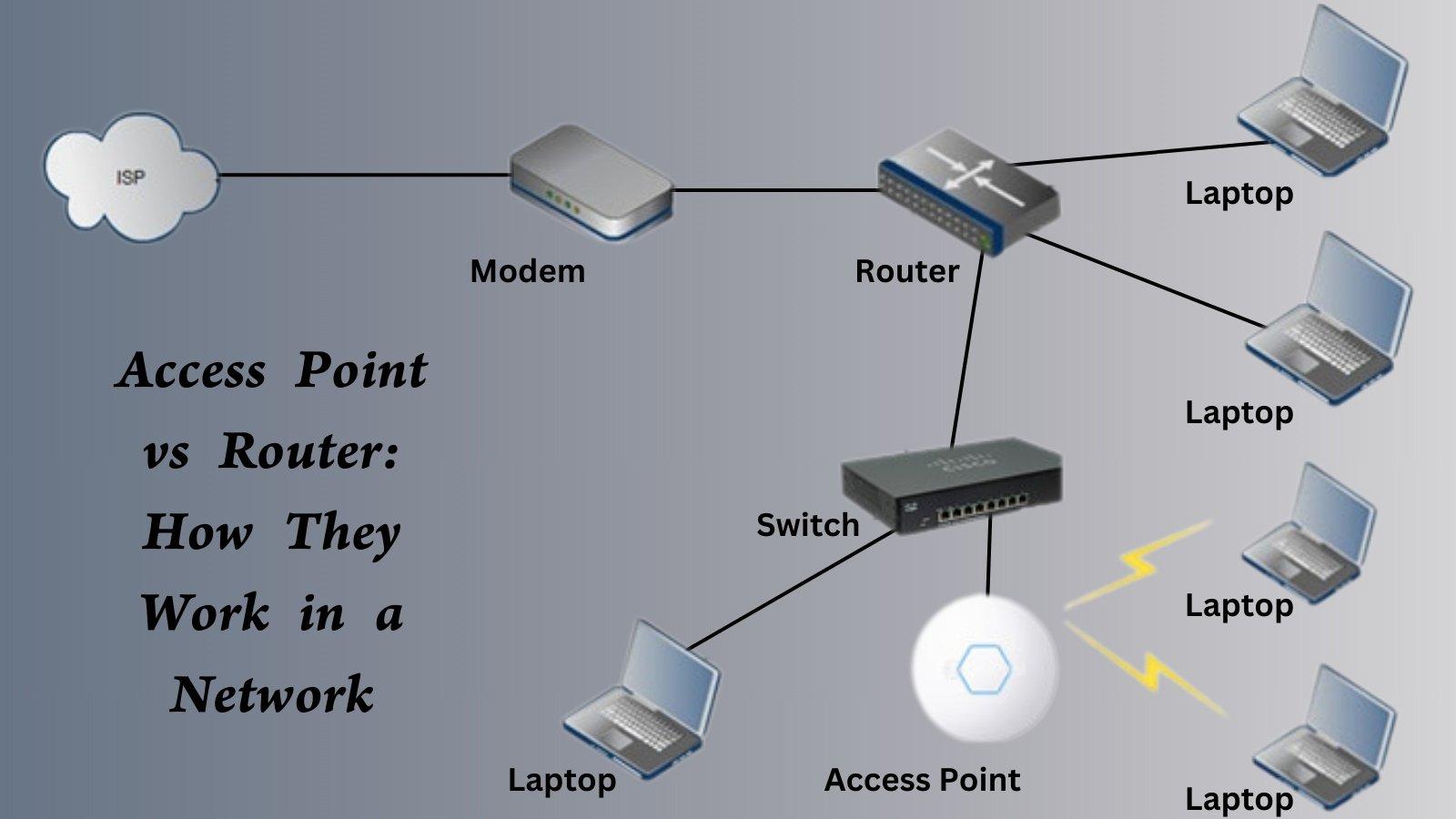
The modem is the device that connects your network to your internet service provider's infrastructure . Traditionally, it modulated and demodulated the signal (hence its name), and although the technology has changed (ADSL, cable, fiber), its basic function remains the same: to speak the same "language" as your ISP's network.
In most homes, the modem is provided directly by the internet service provider . Often it's integrated into the router they install, but in other cases it's a separate device that connects to the router via an Ethernet or coaxial port.
Depending on the model, the modem can assign IP addresses to connected devices , acting as a very basic router, or simply provide a single IP address to the main router. In simple setups, game consoles, computers, or mobile devices can connect directly to the modem (especially when the ISP provides a hybrid modem-router).
An important detail is that, since the equipment is managed by the provider, configuration options are usually very limited . In many cases, you won't be able to change much beyond the Wi-Fi password or a few basic settings, and there are advanced settings that the operator blocks for support or security reasons.
What is a router and what is it really used for?

The router is the brain of your home or small office network, responsible for forwarding data packets between different networks . It typically connects your local area network (LAN) to an external network: your internet service provider's network or any other remote network via the WAN port.
Its key function is to decide the best route for each data packet to reach its destination . To do this, it uses a routing protocol and routing tables, which allow it to determine which interface to use for each packet based on the destination IP address. While this sounds very technical, in practice it's what makes it possible for you to open a website, play online games, or access your company's VPN.
At the OSI model level, a router works primarily at the network layer (layer 3) , but modern routers integrate functions that also touch the physical and data link layers, especially since they usually include several Ethernet ports and WiFi connectivity.
In a typical home setup, the router ensures all your devices can connect to the internet, not just the local network . Mobile phones, televisions, computers, game consoles, and IP cameras obtain an internal IP address from the router and access the internet through a single shared external connection.
In addition to routing, these devices include extra features such as NAT, a DHCP server, a basic DNS server, and a firewall . NAT allows many internal devices to share a single public IP address, DHCP automatically assigns IP addresses within the local network, and the hardware-based firewall filters traffic to protect against external attacks such as intrusion attempts or certain types of DDoS attacks.
In more advanced networks, the router can use adaptive or static routing . Adaptive routing updates its routing tables based on network conditions (link failures, congestion, etc.), while static routing follows routes manually defined by the network administrator.
What is a switch and how does it work?
The switch is responsible for building and organizing the local network by connecting multiple devices . Unlike a router, it doesn't handle communication with other networks (like the internet), but rather ensures that machines within the same LAN can communicate quickly and efficiently.
A switch primarily operates at Layer 2 of the OSI model , although many modern models can also operate at Layer 3 to offer advanced features (these are called Layer 3 switches). Its function is to receive frames, analyze them, and forward them only to the port corresponding to the destination device.
To achieve this, a switch uses the MAC addresses of connected devices . As it receives traffic, it learns which MAC address is on each port and builds a table mapping this relationship. When a frame arrives destined for a specific MAC address, it knows exactly which port to send it through, without interfering with other devices.
Thanks to this behavior, data packets sent by the source computer are not replicated to all computers on the network , but instead reach only the correct device. This reduces unnecessary traffic, avoids collisions, and allows multiple devices to communicate with each other simultaneously much more efficiently than with older technologies like hubs.
In short, we could say that the switch creates a dedicated communication channel between sender and receiver for each transmission, optimizing bandwidth usage and improving network stability, especially when a large number of devices are connected.
The old hub: what it is and why it's hardly used
Before switches became more affordable, the typical device for setting up a simple network was the hub ( network concentrator ), a very basic piece of equipment that acts as a central connection point . Its operation is incredibly simple: everything it receives through one port is replicated and sent through all the others, without distinguishing between recipients.
When a computer connected to a hub sends data, the hub copies that information and sends it to all the computers on the network . It cannot direct the data to a single recipient; in fact, it doesn't even know which computer is the intended recipient. It is the end computers that determine whether the traffic is meant for them or discard it.
This way of working has some clear disadvantages. On the one hand, bandwidth consumption is much higher because every bit you want to send to a device ends up circulating through all the hub's ports. On the other hand, while a transmission is taking place, the other devices must wait for it to finish before they can send data, which creates bottlenecks as soon as the network becomes even slightly overloaded.
Despite everything, hubs have had their uses, especially for network analysis and traffic monitoring . Since they relay everything to everyone, it's very easy to connect a diagnostic tool and see what's circulating on the network, detect errors, or study the behavior of certain devices.
With the arrival of affordable switches, the hub has become practically obsolete in modern networks, as it offers less performance, less efficiency and zero intelligence compared to the advantages that a switch provides for the same scenario.
Differences between a switch and a router
The first fundamental difference is the primary function of each device within the network . The switch is responsible for interconnecting devices within the same local network, while the router connects different networks to each other (for example, your LAN to the Internet or to another remote LAN).
Secondly, we must look at the layer of the OSI model at which they operate . The switch operates primarily at the data link layer (layer 2) and, in some advanced models, also at layer 3, while the router operates at the network layer (layer 3) and, by integrating physical ports and additional functions, also touches the physical and data link layers.
Another key distinction lies in how they make decisions about data transmission . The switch uses MAC addresses to determine which port to forward each frame through, creating logical circuits between sender and receiver. The router, on the other hand, relies on IP addresses and its routing tables to decide which path each packet should take to reach another network.
The type of traffic each device handles also differs. A switch focuses on internal traffic within a local network , connecting computers, printers, and servers so they can share resources. A router, on the other hand, manages traffic between different networks, communicates with other routers, and chooses the most efficient route for data to reach external networks.
Finally, there are important differences in terms of security and added features . Switches, except for managed models with advanced options, have a fairly neutral role: they are limited to switching frames within the LAN. Routers, on the other hand, usually integrate firewalls, NAT, packet filtering, traffic priority control, and other mechanisms that protect the network and optimize the connection to the outside world.
Differences between router and switch in terms of connection possibilities
If you look at a typical home router, you'll see that it includes several Ethernet LAN ports. This means that, in addition to routing, it can also act as a small integrated switch , allowing you to connect multiple wired devices without needing any additional equipment.
A switch, on the other hand, is primarily used to expand the number of available ports on a router or modem . In other words, when the router's LAN ports are insufficient, you connect a switch to one of them and gain an extra set of ports to plug in more computers, network printers, IP cameras, etc.
While switches are limited to the local network, routers have the ability to create both local networks and establish communication with external networks . They are responsible for enabling your private network to communicate with the internet, and can also interconnect multiple internal subnets if your environment requires it.
In homes and small offices, the typical setup consists of a single router acting as a gateway and, if needed, one or more switches to expand the LAN's capacity. The router remains the central point of access to the internet , while the switches distribute connections among the different workstations.
In larger enterprise environments, the design may be more complex, with multiple access switches, distribution switches, and one or more routers connecting all of that to other sites or to the vendor network, but the logic of functions remains the same: switches switch within the network; routers route between networks.
Router with integrated modem, standalone router and double NAT
Many of the devices installed by your internet provider are actually hybrid devices that combine a modem and router in a single unit . In other words, they communicate with the ISP's network and simultaneously create and manage your local network using Wi-Fi and Ethernet ports.
Other setups use a "pure" modem connected to a separate, third-party router. In this case, the modem is only responsible for translating the ISP's network signal and providing a connection to the router, which manages internal IPs, firewall, Wi-Fi, etc. This option usually offers more configuration flexibility and better performance.
When two routers are connected in a cascade without proper configuration, it can create what's known as double NAT . This means each router is performing NAT independently, creating two layers of IP address translation, one on top of the other. This can cause problems with open ports, online games, or services that require incoming connections.
Some cable routers also include an internet access point (cable modem router) function , further unifying the equipment: they manage the connection with the provider, distribute internal IPs, act as a switch, and provide Wi-Fi, all in one. They are practical, but sometimes limit the advanced user who wants fine-tuned network control.
In any case, the important thing to understand is that the modem deals with the ISP's network and the physical access layer , while the router handles how data moves between your network and the rest of the world. Choosing a good router or properly configuring the one you have can make a significant difference in stability, security, and performance.
Differences between hub, switch and router
If we place a hub, switch, and router side by side, we see that, although they may share similar connectors, their functions within the network are quite different . The first two focus on local networks, while the third connects different networks together and offers many more control options.
The hub is the simplest of all: it receives frames and forwards them through all ports indiscriminately . It doesn't understand MAC or IP addresses; it simply replicates what it receives. This makes it easy to use but inefficient, generating a lot of unnecessary traffic and limiting performance when multiple devices are communicating.
The switch is the "smart sibling": it learns the MAC address on each port and only sends frames to the correct destination . Thanks to this basic intelligence, it reduces broadcast traffic, improves bandwidth utilization, and allows multiple conversations to occur in parallel within the network.
The router takes things a step further: it performs similar functions to a switch within the LAN (because it usually integrates one) and, in addition, it routes packets to other networks, especially the internet. It adds security features, IP management, traffic prioritization, and other tools that make it the key component of the network.
Regarding the type of data they handle, hubs and switches work with Layer 2 frames , while routers manage Layer 3 IP packets. Hubs send these frames to all connected devices, switches only to the intended device, and routers redirect them between different networks depending on the destination IP address.
Typical usage scenarios for modems, routers, switches, and hubs
In typical home networks, the router (usually with an integrated modem) is the key component, allowing you to work on a local network and access the internet without any hassle . Your internet provider installs and configures it, and aside from changing the Wi-Fi password, you don't need to do much else.
Switches are becoming increasingly important in medium-sized networks and offices with many workstations . They are used to connect a large number of PCs, printers, IP phones, and other devices to servers or the main router. In these environments, the switch's efficiency and its ability to handle simultaneous traffic are crucial.
Routers are used at all scales: from your home router to backbone routers that interconnect large provider-level networks . In wireless networks, they are also responsible for linking Wi-Fi access points to the rest of the infrastructure and to the internet connection.
Hubs, although less common these days, can still be found in very small networks, older industrial environments, or laboratories where capturing and analyzing all traffic easily is desirable. Even so, in most cases they have been replaced by switches, which offer much better performance for a similar price.
When choosing which device you need, it's important to consider the size of your network, your performance requirements, and the features you want . For a simple home network, a good router (usually the one provided by your internet service provider) may be sufficient. If you want more ports or more control, adding a managed switch or a standalone router can be a very good move.
In short, understanding how the modem, router, switch, and the now almost historical hub divide the work allows you to set up more stable, secure, and easily expandable networks , avoid problematic configurations like double NAT, and get more out of the connection you're paying for from your internet provider.
Table of Contents
- 1 What is a modem and what role does it play in the network
- 2 What is a router and what is it really used for?
- 3 What is a switch and how does it work?
- 4 The old hub: what it is and why it's hardly used
- 5 Differences between a switch and a router
- 6 Differences between router and switch in terms of connection possibilities
- 7 Router with integrated modem, standalone router and double NAT
- 8 Differences between hub, switch and router
- 9 Typical usage scenarios for modems, routers, switches, and hubs