- Geekbench 6 measures real CPU and GPU performance with tests based on everyday use and comparable across multiple platforms.
- The new workloads include background blurring, social media filters, advanced navigation, and tasks related to AI and augmented reality.
- Geekbench AI 1.0 focuses on artificial intelligence performance, measuring speed and accuracy with different types of data and accelerators.
- Geekbench and Geekbench AI results are published in Geekbench Browser, making it easy to compare devices and configurations.
If you like to push your phone, PC, or laptop to the limit, you've probably heard of Geekbench as a benchmark for measuring performance . But in recent years, the tool has grown tremendously: it's no longer just an app for checking scores; now it's also delving into artificial intelligence with Geekbench AI.
In the following lines you will find all the key information about Geekbench 6 and Geekbench AI : what they measure exactly, how their tests work, what platforms they support, what their scores mean, and why they have become benchmarks of reference for both curious users and developers and manufacturers.
What is Geekbench and what is it really used for?
Geekbench is a cross-platform benchmark suite designed to evaluate the performance of a wide variety of devices: from Android and iPhone smartphones to computers running Windows, macOS, or Linux. Its goal is not simply to give you a random number, but to provide a score that accurately reflects how your hardware performs in everyday tasks.
Unlike other tests that focus solely on synthetic calculations, Geekbench uses workloads inspired by real-world use : web browsing, image editing, social media filters, text processing, AI models, and more. This allows it to ensure that the results you obtain closely reflect what you would experience using the device.
One of its greatest strengths is that it was built from the ground up with cross-platform comparisons in mind . This means you can compare an iPhone, an Android device, a Windows laptop, or a Mac side-by-side and get a useful benchmark of which performs best under similar conditions.
All of this makes it a very useful benchmark for users who want to know if their mobile phone is still performing well, as well as for developers, engineers, and manufacturers who need objective data to adjust their products, choose components, or justify improvements between generations.
What is a benchmark and why is Geekbench so popular?
Before delving into Geekbench 6 and Geekbench AI, it's important to understand exactly what a benchmark is. A benchmark is a reference test that evaluates and compares the performance of hardware or software under controlled conditions.
In practice, these tests execute specific tasks (real or simulated) to see how a system responds under certain workloads . In the case of computers and mobile devices, they are used to measure CPU power, GPU performance, memory speed, energy efficiency, or the ability to handle complex tasks.
For example, a computer manufacturer might use a benchmark to compare processors in tasks like video editing or 3D modeling . If one chip finishes the job significantly faster than another, it makes more sense for a computer geared towards content creators.
Geekbench has become especially popular because it offers a cross-platform approach geared towards everyday situations . It doesn't just measure specifications on paper, but rather how that hardware translates into real-world performance when opening apps, applying filters, processing text, or working with machine learning models.
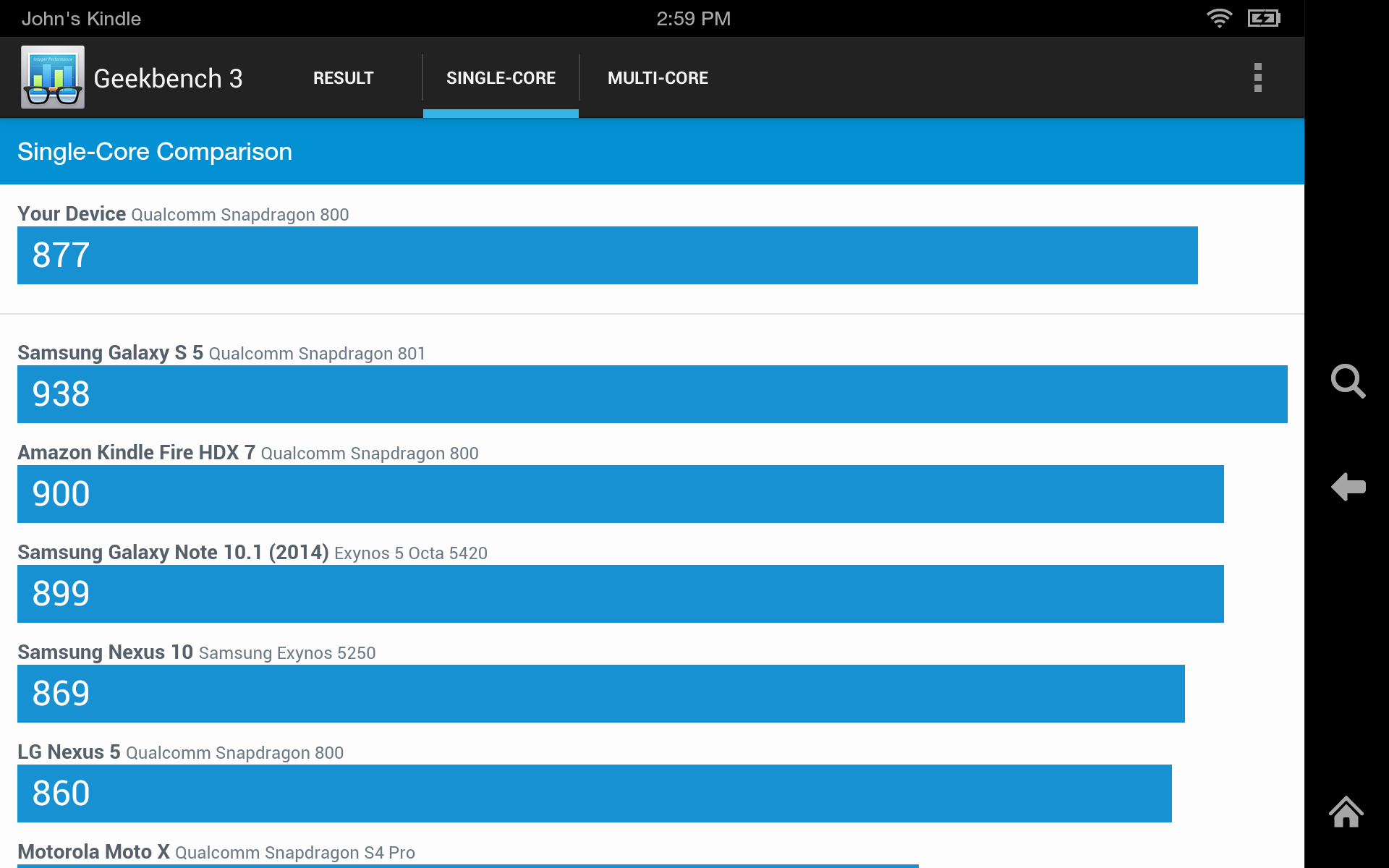
In addition, the tool automatically uploads the results to Geekbench Browser, an online repository where you can compare your score with thousands of devices . This makes it very easy to see how your mobile phone or PC stacks up against the latest market innovations.
Geekbench 6: the evolution of the CPU and GPU benchmark
Geekbench 6 is the latest and most comprehensive version of Geekbench's classic benchmark , designed to measure CPU and GPU performance. It arrives as the direct successor to Geekbench 5, released about three years ago, a period during which PC and smartphone hardware has advanced by leaps and bounds.
This version is available for free for personal use on Windows, macOS, Linux, Android, and iOS . The process is the same: you run the app, choose the test (CPU or GPU), press a button, and wait for it to finish to get your scores.
The developer, Primate Labs, has adapted the test suite to better suit modern hardware, which now includes very powerful multi-core CPUs and hybrid architectures with large and small cores, in both mobile and desktop computers.
Geekbench 6's interface remains very simple, designed so that anyone can measure performance with just a click . On Android, it has also been updated with the Material Design language, including dynamic themes and a themed icon if the system allows it.
New workloads and real-world tests in Geekbench 6
One of the biggest improvements in Geekbench 6 is its new workloads that mimic modern tasks . Instead of focusing on synthetic exercises like endlessly calculating decimal places of pi, it now focuses more on what we do every day on our phones or computers.
The new CPU and GPU tests include tasks such as blurring backgrounds in video calls , something very common in videoconferencing tools, or applying filters and image adjustments intended for publication on social networks.
Automatic removal of unwanted objects from photographs has also been incorporated , a feature that is becoming increasingly common in camera and editing apps, in addition to object detection and labeling tests using machine learning models, reflecting the growing importance of AI in daily use.
Another test block focuses on the analysis, processing, and conversion of text within development and scripting workflows, simulating how a device can handle scripts, process code, or transform documents into different formats.
Geekbench 6 also increases the size and complexity of its input data: it now uses higher resolution photographs, larger maps in navigation tests, as well as longer and more complex documents for web navigation, PDF and HTML5.
Single-core, multi-core CPUs and hybrid architectures
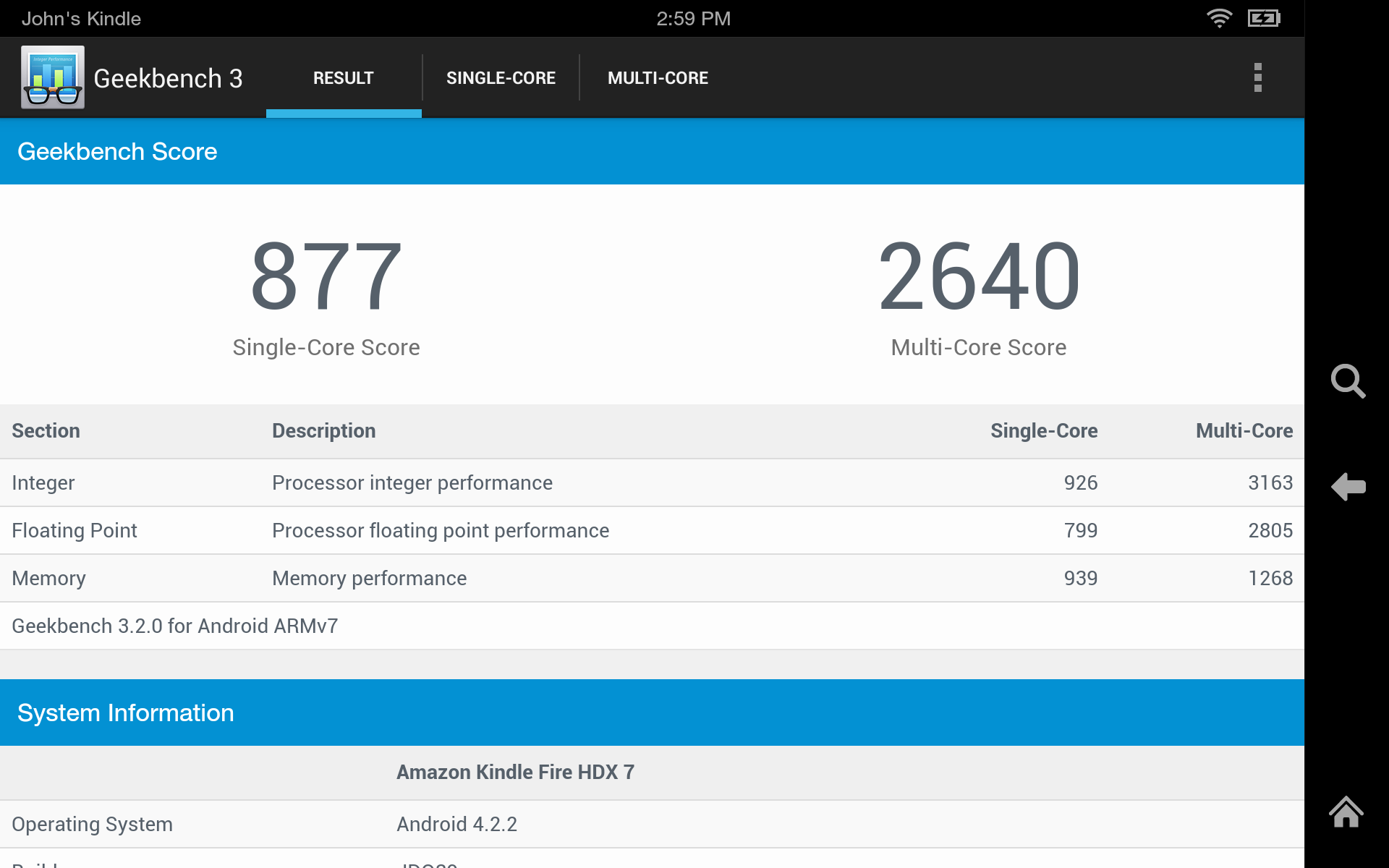
Regarding the CPU, Geekbench 6 continues to focus on two main scores: single-core performance and multi-core performance . These two figures help you better understand how your processor performs in different scenarios.
The single-core score reflects how the device responds to tasks that depend on a single thread of execution , such as many system actions, apps with low parallelization, or certain user interface operations.
The multi-core score, meanwhile, focuses on tasks that utilize multiple cores simultaneously , such as video rendering, compressing large files, or processing large batches of data. This section has been thoroughly revised in Geekbench 6.
The benchmark introduces a new multi-core scoring scale that better measures how well the cores share the workload in more realistic scenarios. This is especially important for CPUs with hybrid architectures (large and small cores), such as those found in many current mobile phones or modern Intel and Apple processors.
Thanks to this change, Geekbench 6's multi-core scores should be more accurate and comparable between devices with very different designs , which is key if you really want to know how a CPU performs outside the lab.
GPU Compute Benchmark: Graphics and Computing Tests
In addition to CPU tests, Geekbench 6 includes a GPU benchmark designed to measure your device's graphics and computing potential . It's not limited to gaming; it also covers image and video processing, as well as machine learning tasks.
The GPU test supports various standard APIs, such as OpenCL, Metal, and Vulkan , thus covering the Apple, Windows, and Android ecosystems, as well as hardware support on Linux . This ensures comparable results even across platforms with different APIs.
One of the new features in this version is stronger support for machine learning-related workloads on the GPU , which are increasingly used to accelerate AI tasks on both mobile devices and computers.
Furthermore, Geekbench 6 aims for greater uniformity in how GPU performance is measured across different systems. The idea is that changing platforms won't artificially alter the scores, but rather reflect the true power of the hardware.
All of this makes the GPU benchmark useful if you're interested in knowing how prepared your device is for gaming, video editing, or AI applications that push the graphics to the limit.
Geekbench 6 compatibility and system requirements
Geekbench 6 aims for broad compatibility, allowing you to test virtually any modern device . Here are the supported platforms and some minimum requirements:
In the PC world, Geekbench 6 is available for Windows 10 64-bit (or later), macOS 11 or later, and Linux distributions such as Ubuntu 18.04 LTS 64-bit and later . In all cases, the download is from the official Geekbench website.
On mobile phones and tablets, the app has versions for Android 10 or higher and iOS 15 or higher . Simply install it from the corresponding app store, run the test, and wait for the results.
The free version of Geekbench 6 is fully functional for personal use, but requires an active internet connection to upload results to the Geekbench browser. If you need to run tests offline or unlock advanced features, there is a paid "Pro" version.
This Pro edition offers additional features for professional environments, labs, and developers , such as more automation options and continuous offline execution. Its standard price is around several tens of dollars, although it may vary with special promotions.
Geekbench on mobile devices: measure your smartphone or tablet
In the mobile sector, Geekbench 6 has become almost a de facto standard for comparing the performance of smartphones and tablets . Countless reviews, analyses, and comparisons use its score to position each device within the market.
The app lets you quickly test CPU performance and, in many cases, GPU performance, displaying single-core, multi-core, and graphics computing scores . Then, it uploads the results to the Geekbench browser so you can share or compare them.
Geekbench aims to make its mobile tests reflect everyday tasks: loading sample web pages, rendering PDFs, applying filters to photos, and processing HDR images . The idea is that the numbers you see on screen should correspond to real-world performance.
In addition, Geekbench 6 has added specific tests related to artificial intelligence, augmented reality and machine learning , fields in which high-end mobile phones have been pushing very hard in recent years.
Finally, the Android interface has been modernized to better integrate with the system: Material You theme, dynamic colors, and support for themed icons on the home screen, so that it visually fits in with the rest of the device.
Geekbench AI: the bet on measuring artificial intelligence
Beyond the classic benchmark, Primate Labs has launched Geekbench AI, a tool specifically designed to measure performance in artificial intelligence and machine learning tasks . This suite is an evolution of Geekbench ML, now called Geekbench AI 1.0.
Geekbench AI aims to go beyond general CPU and GPU benchmarks, focusing on typical AI and deep learning workloads . This is crucial because more and more devices include dedicated AI accelerators, NPUs, or inference engines, such as those integrated into Samsung processors.
Geekbench AI is available for desktop operating systems like Windows, Linux, and macOS , as well as for Android and Apple mobile devices. This allows you to evaluate how AI performs on a mobile device, laptop, or thin server.
The tool has been designed with both developers who optimize models and applications in mind , as well as advanced users and technology enthusiasts who want to understand the limits of their hardware in these types of tasks.
In the current context, where AI is integrated into cameras, voice assistants, photo and video editing, translation and a thousand other things, having a dedicated AI benchmark has become practically essential to fully evaluate a device.
How Geekbench AI works and what exactly it measures
Geekbench AI organizes its tests into several categories to offer a multidimensional view of AI performance . It doesn't just measure how many operations per second the device can perform, but also assesses accuracy.
The tool is based on three main types of tests depending on the data type: single precision (32 bits), medium precision, and quantized data . Each of these variants reflects different approaches to running AI models.
On the one hand, more precise tests tend to yield more accurate results in the models , but they require more computing resources. On the other hand, using quantized data and smaller data types can increase performance and reduce consumption, although at the cost of some precision.
Geekbench AI generates various scores that show how the device performs with each type of precision , helping to evaluate the balance between speed and accuracy. Developers can use this information to decide which level of quantization makes sense for their app.
In addition, the workloads cover typical AI uses, such as object detection and classification, image processing, or data analysis , replicating scenarios that a real model might encounter in commercial applications.
Performance and precision: why going faster isn't enough
One of the key aspects of Geekbench AI is that performance isn't measured solely by speed, but also by model accuracy . A device can process a model extremely quickly but produce virtually useless results.
The developer himself gives a very graphic example: imagine a model for detecting hot dogs in images . It might run at top speed, but if it's only correct in 0,2% of cases where there's actually a hot dog, it's not very useful.
That's why Geekbench AI incorporates precision measurements into its results, helping you understand the advantages and disadvantages of using smaller data types or quantified models. The idea is to avoid sacrificing unnecessary accuracy to gain a few milliseconds.
By integrating both performance and accuracy, the tool offers a more accurate picture of a device's actual efficiency in AI, which is very useful for estimating the behavior of real-world applications.
This approach also allows developers to compare different hardware designs and configurations , evaluating which combination of chip, accelerator, and data type best suits their needs.
Geekbench AI compatibility with frameworks and accelerators
To adapt to the current AI ecosystem, Geekbench AI offers support for several widely used inference frameworks and runtimes in the industry . This allows you to take advantage of specific accelerators and optimized libraries.
On Windows, Geekbench AI supports OpenVINO, ONNX, and Qualcomm QNN , allowing you to test both classic CPUs and specialized solutions and Qualcomm hardware in certain configurations.
On Linux, support primarily includes OpenVINO , Intel's platform for accelerating vision and AI workloads on its processors and accelerators.
On Android, Geekbench AI relies on vendor-specific TensorFlow Lite delegates , including Samsung ENN, ArmNN, and Qualcomm QNN. This allows it to fully utilize NPUs, GPUs, and other accelerators present in many current mobile SoCs.
The developers of Geekbench AI have also indicated that the tool will add more datasets and tests in future versions, expanding the range of scenarios covered and keeping up with trends in AI.
Publishing results and Geekbench Browser for AI
As with classic Geekbench 6, Geekbench AI results are uploaded to the Geekbench browser , where they can be viewed, compared, and shared with the community.
Geekbench Browser highlights the devices with the highest AI performance in the Geekbench AI section, while the most recent results are organized in another specific section, making it easier to locate the latest tests.
This online database becomes a very useful tool for comparing different mobile phones, laptops or platforms with regard to AI, something that many commercial technical specifications still do not reflect well.
For developers, having these results publicly available allows them to validate the behavior of their models in different environments and make much more accurate recommendations for minimum or ideal hardware.
From the enthusiast user's perspective, it's a very direct way to know what league their device is in compared to the competition when it comes to artificial intelligence tasks.
Free versions, personal use, and Pro edition
Both Geekbench 6 and Geekbench AI offer a free version for personal use , which allows you to run the main tests at no cost on most supported platforms.
This mode is more than sufficient if you are looking to know the performance of your device, compare it with others and have a reference for future purchases or upgrades, as long as you do not have advanced automation needs.
For professional environments, laboratories, companies, or developers who need to run offline tests, integrate them into workflows, or access all features , there is a paid "Pro" version that unlocks additional features.
At certain launch times or promotions, this Pro edition has been offered at a reduced price compared to its usual cost , although the exact amount may vary over time and with marketing campaigns.
In any case, the combination of a powerful free version and an advanced Pro edition makes Geekbench accessible to users of all levels , from the curious person who wants to compare their mobile phone with a friend's to the engineer who needs precise data to make technical decisions.
Test duration and test design philosophy
An important aspect of Geekbench's design, especially in Geekbench AI, is the minimal duration of workloads . The tests are designed to run quickly, but without sacrificing rigor.
In general, a complete Geekbench run can take anywhere from a few seconds to a couple of minutes , depending on the power of the device and the types of tests being run.
In the case of Geekbench AI, workloads run for at least a full second to ensure the device reaches its maximum performance level . This helps the results better reflect the explosive behavior typical of many real-world AI use cases.
This philosophy attempts to balance two things: on the one hand, that the tests are quick and accessible enough for anyone to run them without laziness ; on the other hand, that the data collected is of sufficient quality to be useful in serious comparisons.
The result is benchmarks that you can run almost anytime, without needing to leave the device busy for hours, but with robust and relatively stable scores if run under similar conditions.
Everything about Geekbench, from the classic benchmark to Geekbench AI, is designed to offer a simple yet rigorous way to understand how a device performs in everyday tasks : everyday applications, image editing, browsing, basic editing, gaming, and now also artificial intelligence and machine learning workloads. Thanks to its cross-platform approach, its tests based on real-world scenarios, and the publication of results in the Geekbench Browser, it has established itself as one of the favorite tools for comparing mobile phones, computers, and platforms of all kinds, for both users and professionals.
