- Prioritize authorized resellers with secure payments and clear policies to obtain genuine Windows 11 Pro keys.
- Check compatibility (TPM 2.0, UEFI/Secure Boot), download the official ISO and activate it with your 25-character key.
- Choose the right license (OEM, Retail, Volume or Refurbished) and consider support, warranty and verified reviews.

Let me explain, in clear and straightforward language, How to acquire a genuine Windows 11 Pro licenseYou'll learn where to buy it safely and how to install and activate it correctly. Plus, you'll see how it differs from the Home edition, what your PC requirements are, and how to save money legally without falling for dubious offers.
Why Windows 11 Pro is worth it and how much it officially costs
At a professional level and also for demanding users, Windows 11 Pro integrates security and productivity tools that make the difference: BitLocker to encrypt your dataRemote desktop, group policy management, domain joining, and Azure Active Directory support, among others. All of this is complemented by a modern, fluid interface designed for improved workflow.
As for the price, the Pro edition costs [price missing] in the official Microsoft store. € 259,00 in digital format. It's the market benchmark, although there are ways to save money completely legally and safely by using authorized distributors who sell original keys at more competitive prices.
Choosing a genuine license isn't just a matter of principle: it guarantees updates via Windows UpdateSystem stability and compliance with the terms of use. This helps you avoid activation problems, lockouts, or failures caused by using invalid keys or altered versions.
That added reliability translates into real savings in the medium and long termA stable system that updates itself and doesn't let you down when you need it most is worth its weight in gold.
Where to buy a secure key and how to identify reliable stores
The easiest and quickest way is to go to European distributors with certifications that sell genuine software, offer digital delivery, and provide support in Spanish. Specialized firms like Mr Key Shop stand out for their experience (over 18 years) and for offering licenses for Windows 11, Microsoft Office, antivirus software, professional software, and operating systems with Satisfaction guaranteed or your money back.
In these stores, the entire process is online: you shop in minutes and receive the key and instructions by emailSince it's a digital delivery, there are no physical shipments, the environmental impact is less, and you get your license almost instantly.
A good indicator of trustworthiness is finding traceable and secure payments. You'll see options like PayPal (with payment in 3 installments)Stripe for cards, Klarna, Apple Pay, Google Pay, or Amazon Pay. In addition, the coverage of Trusted Shops guarantee up to €2.500 It is a plus that confirms the seriousness of the business.
Another plus is a solid catalog: from Windows 11 and Office 2024 up to Windows Server, Autodesk licenses (including AutoCAD 2026), antivirus, VPN, and professional utilities. Typically, with each purchase you'll receive step by step guides to download, install and activate, something key if you don't have much experience.
License types: OEM, Retail, Volume and Legal Refurbished
Before buying, it's important to understand the different types of keys. OEM licenses They are tied to a single computer and are generally not transferable. If you plan to keep that PC for years, they might be a good value.
In contrast, Retail licenses They allow transfer to another computer (always one at a time). They are more flexible, although they tend to be more expensive. For those who frequently upgrade their hardware or manage multiple computers, this portability is very useful.
There are also the volume licensesThese are designed for organizations. Be careful, because the secondary market sometimes sees questionable resales. That's why it's vital that the store clearly details the origin and terms of use of the keys it sells.
And there is an interesting figure: the legally refurbished license, sourced from Authorized Refurbishment Programs (MAR). It is a perpetual license, perfectly valid for a refurbished device, with Genuine activation and full updates No fees. This type of key is ideal when you're looking to equip a refurbished PC with a full warranty.
In the European Union, the resale of software is possible if the requirements of the 2009 / 24 / CE DirectiveThat said, make sure the seller is transparent about the type of license and its origin, so that it's clear that activation and use comply with the law.
How to recognize a store that won't let you down
There are several simple criteria that will save you from unpleasant situations. First, demand legal transparencyThey should specify whether the product type is OEM, Retail, Volume, or Refurbished, and explain what each option entails. If they don't explain, be suspicious.
Second, value the verified opinionsReview platforms with real verification (and not anonymous screenshots) are a very good sign. The more reliable and detailed reviews, the better.
Third, support that actually responds. working email and a phone Having someone who speaks Spanish can be a lifesaver. Some stores even offer additional technical support, such as reinstallation with file backups or SSD upgrade and internal cleaning of the equipment; some stores publish their number (for example, 915996504) and a contact form to answer questions without obligation.
Bedroom, clear refund policyIf the key doesn't activate or there's a problem, you need a transparent and quick procedure to resolve it. This, combined with secure payment methods and an HTTPS domain, gives you a complete picture of reliability.
Windows 11 Pro requirements and how to check compatibility
Windows 11 Pro requires a relatively recent hardware base, with a particular focus on security. Key requirements include: TPM 2.0 (or equivalents such as Intel PTT or AMD fTPM) and the firmware UEFI with Secure Boot Enabled. This ensures verified startups and system protection.
The official minimums include: 64 GHz 1-bit CPU with 2 cores4 GB of RAM, 64 GB of storage, DirectX 12 compatible graphics card with WDDM 2.0 driver, HD (720p) display larger than 9 inches with 8 bits per channel and Internet connection for configuration and updates.
To check your computer, Microsoft offers the tool PC Integrity Checkwhich tells you in seconds if you meet the requirements. If you don't pass the test, there are unofficial methods to bypass some restrictions, but they are not recommended. reasons for stability and security.
If you still have doubts, many reputable stores offer free advice: they help you assess compatibility, data migration, and the specifics of business networks, so that the upgrade to Windows 11 Pro is smooth. as smooth as possible.
Download Windows 11 Pro: Official ISO or Upgrade Assistant
You have two main paths. One is to download the official ISO image You can perform a clean installation from the Microsoft website using a bootable USB drive (you can create it with the Media Creation Tool or Rufus). This is ideal for new computers or if you want to start from scratch.
The other is Upgrade from Windows 10 Pro activated using the Windows 11 Setup Wizard. The process is guided, it keeps your files and apps, and if your Windows 10 license is valid, you won't have to pay for the upgrade within that same edition.
When creating the bootable media, you connect the USB drive, enter BIOS/UEFI, and set it as primary boot deviceFrom there, the installer guides you through: language, partitions, file copying, and the first few restarts until it gets you to the desktop.
If you prefer official direct links, the Microsoft download section centralizes everything you need to download Windows 11, media creation tools, and installation guidesIt is the safest source to avoid mixing ISOs of dubious origin.
Step-by-step installation on a new or formatted PC
Turn on the computer with the USB connected and enter the BIOS / UEFI using the corresponding key (F2, F12, or Delete are common). Check two key points: that Secure Boot is enabled and that the main boot device is your USB drive or DVD with the ISO.
Save the changes (usually with F10) and restart. The Windows 11 Pro installer will load automatically, and you can choose between a quick or custom installation. If you're performing a clean installation, the custom option allows you to manage partitions for a more organized setup. clean formatting.
During the initial steps, the system will copy files, apply updates, and restart several times. It's normal for this to take a while, so let it finish without forcing shutdowns. Finally, you'll complete the basic setup (region, keyboard, network) and it will ask you for the microsoft account.
If you're in a professional environment, you can join the device to your organization later, or if you prefer, set up a local user first and complete the corporate integration then with your security policies.
Activate Windows 11 Pro with a product key
During installation, Windows may ask you to product keyIf you already have it handy, enter it and it will be validated to associate the license with your device. If not, choose the "I don't have a product key" option and continue: you can activate it later without any problem.
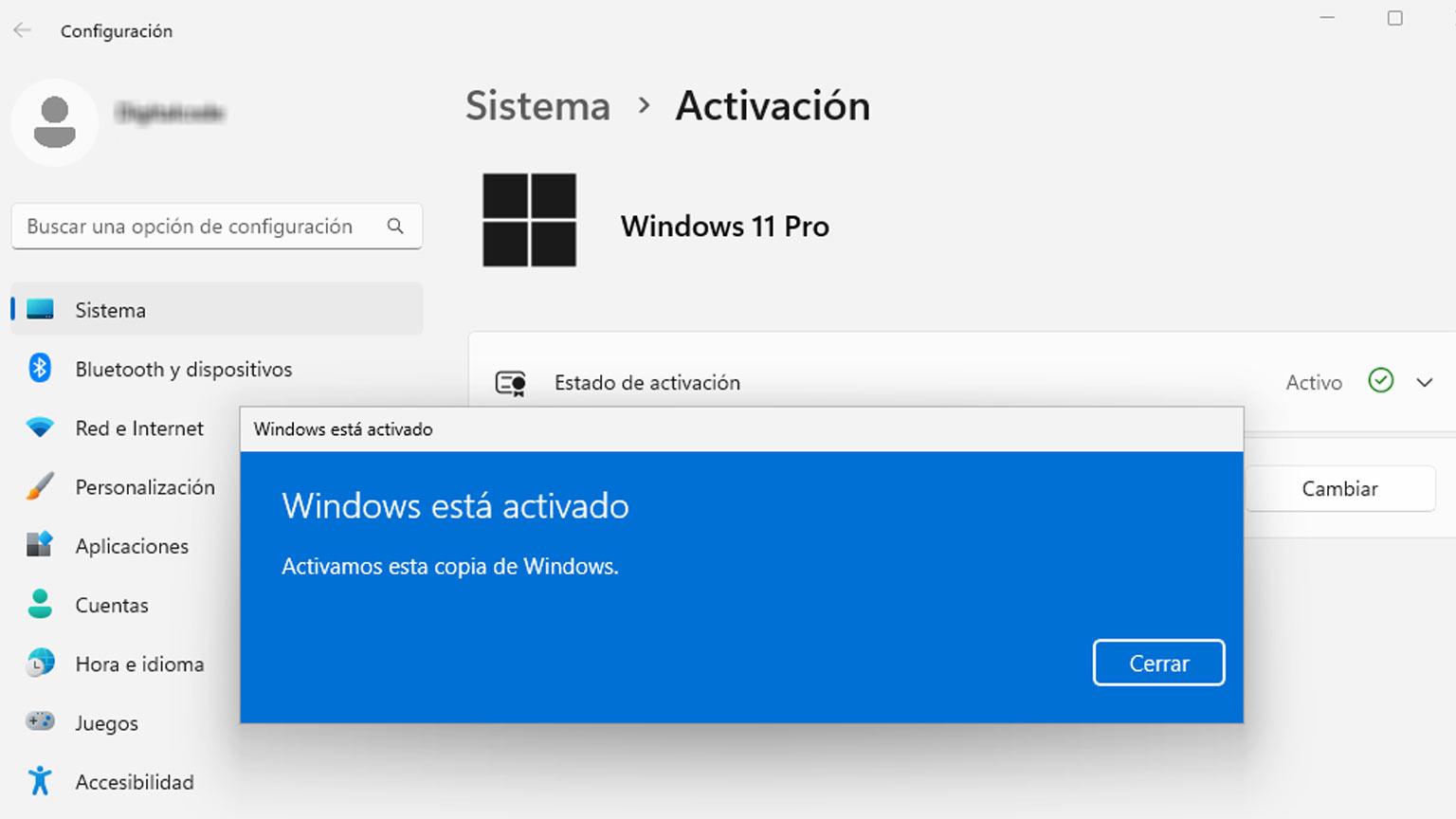
To activate later, go to Settings (Win + I) > System > ActivationIn "Activation status", click "Change product key" and paste your 25-character code. After a few moments, you will see the message "Windows is activated" and it will be activated. linked to your account.
Activation is not a minor procedure: it unlocks customizations and ensures access to official updates and certifies that your system complies with the law, which is essential especially in auditable professional environments.
If you get an error, confirm there's no confusion between editions (Home vs. Pro), check your internet connection, and contact the seller's support. Reputable stores usually include activation assistance and replacement if the key has actual issues.
Upgrade from Windows 11 Home to Pro without reinstalling
If your computer has Windows 11 Home, you can upgrade to Pro without formatting or losing data. It's not a free upgrade: you need buy a Windows 11 Pro key Valid. The process, however, is very simple.
Go to Start > Settings > System > Activation and press Change product keyEnter the new Pro code, validate, and wait for the system to complete the conversion. Sometimes it will ask you to restart; when you return, you'll see the Pro edition activated.
Before doing so, it is advisable to carry out a Backup Just in case. Although the procedure preserves applications, files, and settings, it's better to be safe than sorry.
This method saves time and headaches because it doesn't require a clean install or reinstallation of your programs. You'll have it up and running in minutes. all Pro features ready to work.
Windows 11 Home vs Pro: Differences that matter
Both editions are stable and smooth for everyday use, but Pro adds what many professionals need: BitLocker for disk encryption, Remote Desktop (RDP), Group Policy administration, domain joining, and Azure AD, in addition to advanced security features.
For productivity, Windows 11 brings improvements such as snap layouts to organize windows, Focus mode to reduce distractions, virtual desktops, and a more natural integration with Microsoft Teams, something especially useful in hybrid work.
If you work in IT or development, Pro adds Hyper-V for virtualization and remote management capabilities with tools like Windows Autopilot or Microsoft Endpoint Manager. It's the edition designed to grow with you and your business.
The Home edition, meanwhile, more than adequately covers home and personal use. It's a great base for browsing, entertainment, and light office tasks, but if you want policy control, robust encryption, and management at scalethe balance tips towards Pro.
What do serious digital licenses include and how are they delivered?
Usually, after payment, you will receive the Activation keyInstallation instructions and official download links are provided. In most cases, delivery is very fast (sometimes in less than 2 hours), although depending on the time it can last up to 24 hours.
The package usually includes a License valid for a single device, a unique 25-character key, the right to security and feature updates for the lifetime of the product, and basic technical support (from the vendor and/or Microsoft).
Some stores also offer free support If you have installation or activation problems, and additional support under service to reinstall the system, copy your personal files or upgrade storage to SSD with computer setup.
Another practical detail: many licenses work perfectly with clean installations downloaded from the Microsoft official siteAvoid using ISO images of unknown origin to prevent introducing noise into an activation that should be immediate.
How to save money without risking legality
We start from the official price of €259,00, but there are legal offers on the market from authorized distributors and specialized e-commerce sites that prices adjusted thanks to economies of scale, distribution agreements and licenses intended for specific environments (such as OEM or refurbished).
The key is to separate the wheat from the chaff. Be wary of ridiculously low prices On marketplaces of dubious reputation, you might find keys that deactivate after a few days or sellers who don't clarify the type of license. Without transparency, support, and a return policy, what seems cheap can end up being very expensive.
On the contrary, opt for stores with verified opinionsSecure payment methods, a money-back guarantee, and the European trust seal. This combination lets you pay less than in the Microsoft Store without compromising legality or peace of mind.
If you want to stay up to date with new products, in Spain the Microsoft Store allows you to subscribe to newsletters with offers and new releases. It's a way to hunt for official discounts or to learn about important product changes.
Quick tips before buying, installing and activating
First, confirm hardware: check TPM 2.0 and Secure Boot in UEFI. Second, plan ahead: back up and write down your software licenses in case you reinstall from scratch. Third, always download from official sources to avoid manipulated ISOs.
Fourth, if you're upgrading from Windows 10 Pro, make sure it's activated with valid key so that the Installation Assistant doesn't give you any trouble. Fifth, keep your Windows 11 Pro key safe and link the activation to your Microsoft account to make future reinstalls easier.
And sixth, if you buy from a specialist store, read the small letter: license type, delivery times, included support, returns and additional coverage (e.g., guarantees such as Trusted Shops or similar).
This will give you a smooth purchase and installation process, allowing you to take advantage of Windows 11 Pro from day one with the assurance that everything is legal and safe.
Anyone looking to upgrade to Windows 11 Pro without headaches needs two things: a genuine license and a clear plan for installing, activating, and maintaining the system. With authorized resellers (secure payments like PayPal, Stripe, Klarna, Apple Pay, Google Pay, or Amazon Pay), digital delivery via emailWith Spanish-language support and European-recognized warranties, you can save money compared to the official price while still having the peace of mind of owning genuine software. If you also meet the requirements (TPM 2.0, UEFI with Secure Boot), download the ISO from Microsoft, and follow the activation steps, you'll enjoy BitLocker, RDP, GPO, Azure AD integration, and all the productivity enhancements of Windows 11 Pro without any issues.
Table of Contents
- Why Windows 11 Pro is worth it and how much it officially costs
- Where to buy a secure key and how to identify reliable stores
- License types: OEM, Retail, Volume and Legal Refurbished
- How to recognize a store that won't let you down
- Windows 11 Pro requirements and how to check compatibility
- Download Windows 11 Pro: Official ISO or Upgrade Assistant
- Step-by-step installation on a new or formatted PC
- Activate Windows 11 Pro with a product key
- Upgrade from Windows 11 Home to Pro without reinstalling
- Windows 11 Home vs Pro: Differences that matter
- What do serious digital licenses include and how are they delivered?
- How to save money without risking legality
- Quick tips before buying, installing and activating