- NVMe drastically reduces latency and increases performance compared to SATA and SAS thanks to its parallel PCIe architecture.
- Combining NVMe with advanced caching and RAID strategies optimizes high-traffic databases, hosting, and applications.
- Collaborative caching schemes like Co-Active improve response time, throughput, and durability of NAND memory.
- Proper selection of hardware, drivers, and continuous monitoring is essential to get the most out of NVMe.

The combination of NVMe drives and intelligent caching systems has become a cornerstone of performance in modern servers, database platforms, and professional hosting solutions. A good processor or plenty of RAM is no longer enough: the bottleneck is often in storage and how input/output (I/O) operations are managed at the controller and cache levels.
When NVMe, optimized controllers, RAID schemes, and advanced caching policies are properly integrated , it's possible to drastically reduce latency, significantly increase read/write speeds, and support very intensive workloads without system crashes. This applies to WordPress websites with thousands of simultaneous visits, as well as mission-critical databases, big data environments, and virtual machines in high-performance data centers.
What is NVMe and why does it make such a difference?
NVMe (Non-Volatile Memory Express) is a protocol designed from the ground up for flash-based solid-state drives, leaving behind the historical limitations of SATA or SAS, which were inherited from the world of mechanical hard drives. Instead of communicating via buses designed for HDDs, NVMe relies on PCI Express, which opens the door to significantly higher bandwidth and much lower access latency.
One of NVMe's key features is its highly parallel architecture : instead of handling a single, limited command queue, it allows working with multiple I/O queues and thousands of commands per queue. This is a perfect fit for workloads that generate many simultaneous requests, such as relational databases, complex web applications, or high-volume e-commerce sites.
Compared to SATA SSDs, NVMe drives can offer several times the performance in sequential read and write operations, but where they truly shine is in random operations and reduced latency. This combination is what makes a CMS like WordPress, Joomla, or Drupal feel "lightweight" even under traffic spikes, and allows MySQL or MariaDB queries to be resolved in less time.
Another important aspect of NVMe is its energy efficiency and processing capacity . By making better use of the PCIe bus and reducing the extra work of protocol translation, NVMe drives typically consume less power per useful I/O operation, generating less heat and extending the system's lifespan, especially in very dense racks in data centers.
In the context of databases, this improvement in speed and latency is critical : if the database engine can access data faster and record writes with less delay, application response times are reduced, maintenance windows are shortened, and heavier loads can be supported without immediately scaling to much more expensive hardware.
Advantages of NVMe over SATA and SAS in hosting and databases
When we compare NVMe with traditional storage technologies like SATA or SAS , the difference isn't just a "little bit more speed": we're talking about profound changes in the way the system communicates with storage.
The use of PCIe allows NVMe SSDs to achieve significantly higher transfer rates for both reading and writing, resulting in much higher throughput for sequential operations. But beyond the theoretical figures, what's truly interesting is the reduction in latency and the ability to process many requests concurrently.
NVMe's reduced latency is key for workloads with intensive random access , such as very large tables with complex indexes, OLTP systems, or applications that perform thousands of small operations per second. By shortening the round-trip time for each request, the operating system and databases can queue more work within the same time frame.
Furthermore, NVMe supports greater aggregate processing capacity , allowing it to scale more easily when adding more drives or working with multiple command queues. In shared hosting, VPS, or dedicated server environments, this translates to more clients or more containers per node without significantly impacting performance.
The energy efficiency of NVMe SSDs is also a strong point . Although they may sometimes seem to run hotter due to their high performance density, the energy cost per useful operation is usually lower than in SATA or SAS solutions. For a data center, this translates to lower electricity costs and fewer cooling issues under the same workload.
Hardware and driver selection to take advantage of NVMe
To truly exploit the potential of NVMe, it is not enough to simply plug a drive into any motherboard : the processor-motherboard-controllers-operating system assembly must be aligned and compatible with the standard.
Regarding the processor, most modern CPUs already support NVMe without problems , but it is advisable to check the manufacturer's specifications, especially on server platforms or in multi-socket configurations where the distribution of PCIe lines can affect the effective performance of the drives.
The motherboard is a critical component because it defines how many PCIe lanes are available , at what speed they operate (PCIe 3.0, 4.0, 5.0), and how many M.2 slots or NVMe card slots can be used simultaneously without bandwidth throttling. It's also important that the firmware (UEFI/BIOS) and chipset natively support NVMe.
When more NVMe drives are needed than the motherboard directly supports , expansion cards are used to add multiple NVMe SSDs across one or more PCIe lanes. In PowerEdge servers or similar platforms, it's common to find dedicated backplanes designed for high-performance NVMe drives.
RAM also plays a key role in overall performance . While NVMe reduces storage access times, if the system runs short on main memory, swapping bottlenecks , inefficient disk caches, and increased strain on the I/O subsystem will occur. Having enough RAM for databases, index caching, and handling I/O buffers is just as important as choosing good SSDs.
RAID configurations with NVMe drives and their impact
Using RAID on NVMe is a common strategy for balancing performance, redundancy, and capacity , especially in enterprise databases and mission-critical services. The choice of RAID level directly influences how the advantages of NVMe are leveraged.
RAID 0 is the most aggressive option in terms of performance : it distributes data in stripes across multiple drives, allowing for parallel reads and writes at very high speeds. Combined with NVMe, it achieves spectacular throughput figures, but with no fault tolerance; if one drive fails, the entire array is lost.
Other RAID levels, such as RAID 1, RAID 5, or RAID 10, introduce redundancy at the cost of some performance or raw capacity. In database environments requiring high availability, RAID 10 is often a balanced solution: it offers good read speeds and better resilience than RAID 0, although the cost in terms of drives is higher.
The RAID configuration itself impacts write amplification . In NVMe, this factor is relevant to the durability of NAND flash memory: certain RAID levels generate additional writes that, if not properly managed, can shorten the lifespan of the drives. Therefore, it is generally advisable to combine RAID with well-designed caching and write-off policies.
In addition to traditional RAID managed by the operating system or dedicated controllers , server vendors (for example, in ranges such as PowerEdge) integrate specific firmware and tools to optimize NVMe behavior under different RAID arrays, allowing fine adjustments according to the type of load (intensive read, mixed, OLTP, etc.).
Cache and NVMe: allies to reduce latency and server load
Caching is the natural complement to NVMe in any modern infrastructure . Although NVMe already offers very low latency, the idea of serving data from an even faster layer (main memory, object cache, browser cache) multiplies the beneficial effect on performance.
At the web server level, page and dynamic content caching —such as LiteSpeed Cache, Varnish, or advanced NGINX configurations—allows complete pages or HTML snippets to be returned without having to go through PHP, the script interpreter, or the database engine on every request. This drastically reduces CPU and I/O load.
Object caching, using technologies like Redis or Memcached , stores the results of frequently requested queries or critical data structures in RAM, preventing repeated reads from storage. Combined with NVMe, this results in a highly agile backend capable of handling surges in traffic without database queries becoming a bottleneck.
Browser caching, on the other hand, operates on the client side : static files (images, stylesheets, JavaScript) are stored locally on the user's device, reducing the number of requests to the server and the volume of data transferred. This not only lightens the workload of the NVMe server but also shortens perceived load times.
The combination of NVMe and a well-tuned cache can reduce website or application load times by over 50% compared to architectures based on HDDs or even SATA SSDs. Lower latency, more operations per second, and reduced resource consumption also translate into a better user experience and a tangible SEO advantage.
Advanced caching strategies for NVMe databases
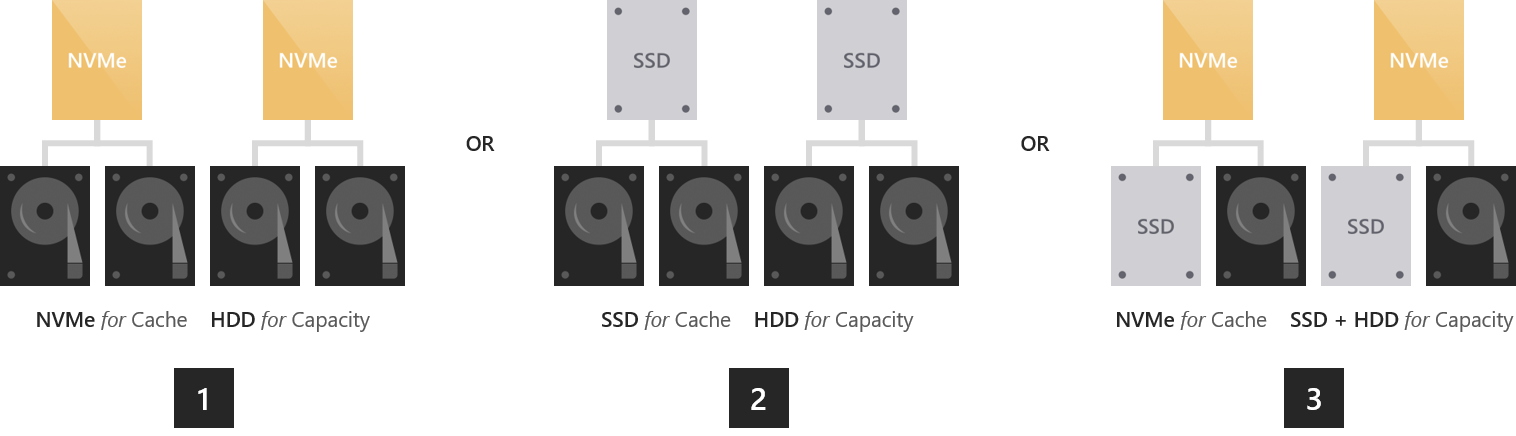
In the realm of databases, caching strategies extend beyond simply storing web pages . Techniques such as read-ahead caching, write-back caching, and even hybrid storage hierarchies combining NVMe SSDs and traditional HDDs are being explored.
The read-ahead cache focuses on keeping frequently accessed data in memory , thus minimizing the number of direct accesses to the storage device. The database engine, or an intermediate layer, detects frequent access patterns and preloads potentially necessary data blocks.
Write-delay caching, on the other hand, temporarily stores writes in a fast area (such as RAM or a portion of the SSD) and writes them to permanent storage at more favorable times. This smooths out I/O spikes, reduces apparent latency for the application, and allows writes to be grouped for greater efficiency.
In some scenarios, a hybrid NVMe + HDD strategy is designed : the most frequently accessed or "hot" data is stored on NVMe drives, while historical or infrequently used data remains on conventional hard drives. This architecture optimizes costs while maintaining very high performance in the critical part of the dataset.
The key is to clearly define the policies that govern which data is stored at which tier and when it is promoted or demoted between tiers. A poor configuration can result in important data ending up in the slowest tier or the system spending all its time moving information between tiers, negating the benefits of NVMe.
Co-Active: A collaborative cache management scheme for NVMe
Researchers from several Chinese and American institutions have proposed a cache scheme called Co-Active , specifically designed to bridge the gap between the potential speed of NAND flash memory and the actual capacity of cache mechanisms in high-performance NVMe SSDs.
The underlying problem is that, although NAND memory is very fast, the management of the intermediate cache (where I/O requests are handled) can become the new bottleneck, especially in scenarios of intense bursts of read and write operations that must be resolved practically in real time.
Co-Active is designed as a collaborative additive write-back cache management scheme , adapted to both I/O access patterns and the usage state of the various flash chips. Instead of relying on passive policies like GCaR or LCR, the system proactively manages the cached data.
When one of the flash chips is idle , the "cold" and "dirty" data residing in the cache is flushed to that idle chip, freeing up space for new writes in the more active areas. To reduce the time cost of data replacement, priority is given to evicting "clean" data midway through the cache entry replacement process.
Furthermore, Co-Active establishes a maximum write-deferred threshold based on the I/O burst level of each workload, preventing redundant writes from being unnecessarily discharged into the flash memory. This improves NAND endurance by reducing write amplification and associated wear.
Performance results of the Co-Active approach on NVMe SSDs
The authors of Co-Active have compared their cache management scheme with several of the most popular algorithms on the market (LRU, CFLRU, GCaR, LCR and simulators such as MQSim), focusing on high data consumption scenarios where NVMe SSDs are subjected to intensive loads.
According to their tests, Co-Active reduces the average response time of I/O operations by up to 83,89% in the best-case scenario, with an average improvement of approximately 32,7% compared to the other schemes evaluated. This represents a very significant leap for latency-sensitive applications.
In terms of overall performance, the collaborative scheme reports increases of up to 76,4% , with an average of 42,3%, indicating that it not only gains in individual response time, but also in sustained throughput in real workloads.
Another key aspect is the improved write amplification rate , which increases (i.e., the negative effect is reduced) to 60,5%, with an average of around 5,4%. Lower write amplification means less wear on the NAND chips and, therefore, a potentially longer lifespan for NVMe drives.
Taken together, these results position Co-Active as a very interesting proposition for future generations of NVMe SSD controllers and firmware focused on data-intensive workloads, such as large databases, massive data analysis, or artificial intelligence applications.
Using NVMe as an HDD cache in Windows: practical limitations
A common question is whether an NVMe drive can be used as a cache for a large hard drive using technologies such as Windows Storage Spaces, with the idea of maintaining very high speeds consistently when copying or moving data.
In a test setup with a 1 TB NVMe SSD and a 1 TB 2,5" HDD , a combined storage space can be created. When copying large files (for example, around 80 GB) from another NVMe SSD in the system to this combined space, typical behavior is observed: initially, the copy starts at around 2 GB/s (the speed of the NVMe SSD), but soon drops to around 140 MB/s, which is essentially the maximum speed of the mechanical hard drive.
This performance drop isn't a configuration issue, but rather a limitation of the Storage Spaces design itself and how it manages data across different types of disks. While in certain scenarios the SSD can be used as a faster part of the pool, the system ends up persistently writing to the HDD, inevitably impacting its performance.
Adjusting the settings can improve the experience somewhat —for example, by choosing a more suitable resilience or data distribution type—but it doesn't magically transform the HDD into a device that maintains NVMe speeds during long copies. The cache can only buffer writes up to a certain point before the mechanical drive reaches its limit.
If the goal is to maximize the advantages of NVMe as a true cache against HDD , it is often more effective to use dedicated block or file caching solutions, or automated tiering technologies, rather than relying exclusively on Storage Spaces, which are not intended as an aggressive caching system in the strict sense.
NVMe compatibility with operating systems and database engines
The good news is that NVMe is widely supported by major operating systems and server platforms. Modern Linux distributions , current versions of Windows, and macOS all include native drivers to work with NVMe devices without requiring additional software in most cases.
In the field of databases, engines like MySQL, MariaDB, Oracle Database, and SQL Server work perfectly on NVMe drives, provided the operating system recognizes them correctly. The optimal configuration may vary, but basic compatibility is usually not an issue.
In enterprise environments, server manufacturers (for example, the PowerEdge family across multiple models in the R, T, C, XE, and XR series) often publish lists of certified hardware and supported operating system combinations, including Red Hat Enterprise Linux 7, 8, and 9, among others. This ensures that drivers, firmware, and management utilities are aligned.
It's always advisable to review the database vendor's and server manufacturer's recommendations regarding partition alignment, block sizes, I/O queue configuration, and disk scheduler options. Small adjustments can make a noticeable difference in latency and sustained throughput.
When using advanced features such as multiple NVMe command queues , not all operating systems and drivers support them equally. Checking the documentation and, if possible, performing performance tests before deploying to production helps avoid unpleasant surprises.
How to reduce latency with NVMe controllers and queues
One of the most critical performance factors for NVMe is command queue management . A well-tuned and up-to-date driver can significantly reduce the latency experienced by applications.
Using updated, manufacturer-specific NVMe drivers , when available, generally yields better results than relying on older, generic drivers. These drivers typically incorporate optimizations to better handle I/O bursts, take advantage of multiple queues, and reduce CPU overhead.
The queue depth and number of concurrent queues directly affect the system's ability to process operations in parallel. A queue that is too short can underutilize the unit, while an excessively long queue can increase latency instead of reducing it. Finding the right balance requires testing under actual or approximate workloads.
NVMe allows the use of multiple command queues, which is ideal for systems with multiple threads of execution (for example, multithreaded applications or databases with many workers). Each thread can send requests to its own queue, reducing contention and improving scalability on servers with many CPUs or cores.
The combination of best practices at the driver, firmware, and queue configuration level results in shorter response times for reads and writes, which, for the end user, means more responsive applications and much shorter loading times, especially under heavy load.
Continuous monitoring and optimization of NVMe environments
To keep an NVMe environment at its optimal point, it is not enough to configure it correctly once : it is essential to constantly monitor the performance and status of the drives to detect bottlenecks and degradations before they affect the business.
Monitoring tools should be able to record key metrics such as read and write speed, average and maximum latency, CPU and RAM usage, queue depth, IOPS, and, in the case of SSDs, health parameters such as write cycles consumed or temperature.
This information allows you to adjust configuration parameters such as the cache strategy, queue depth, I/O scheduler, or even data distribution across different storage units and tiers. Periodic load testing allows you to verify whether the applied changes actually result in improvements.
It is also advisable to perform comparative benchmarks when new firmware or driver versions are introduced , as updates sometimes bring both optimizations and changes in behavior that can benefit some workloads and harm others.
In critical database or hosting scenarios with strict SLA requirements , having alarms based on latency thresholds, I/O errors, or NVMe drive degradation is essential to react before outages or perceived slowness occur for users.
Today, NVMe and advanced caching techniques form the core of high-performance platforms , enabling businesses, developers, and hosting providers to offer faster, more stable, and scalable services. From high-demand websites to large databases or analytics-intensive environments, investing in a well-designed architecture around NVMe, optimized controllers, collaborative caching schemes like Co-Active, and robust monitoring makes a clear difference compared to more traditional infrastructures.

Table of Contents
- 1 What is NVMe and why does it make such a difference?
- 2 Advantages of NVMe over SATA and SAS in hosting and databases
- 3 Hardware and driver selection to take advantage of NVMe
- 4 RAID configurations with NVMe drives and their impact
- 5 Cache and NVMe: allies to reduce latency and server load
- 6 Advanced caching strategies for NVMe databases
- 7 Co-Active: A collaborative cache management scheme for NVMe
- 8 Performance results of the Co-Active approach on NVMe SSDs
- 9 Using NVMe as an HDD cache in Windows: practical limitations
- 10 NVMe compatibility with operating systems and database engines
- 11 How to reduce latency with NVMe controllers and queues
- 12 Continuous monitoring and optimization of NVMe environments