- Network traffic analysis allows you to observe packets and flows to improve performance, security, and troubleshooting.
- Wireshark is the key tool for inspecting packets in detail, while NTA and NetFlow focus on the global view by flows.
- The use of Machine Learning drives NTA towards NDR and XDR, automating the detection of and response to complex threats.
- Mastering these techniques opens up career opportunities in systems administration, networks, and both defensive and offensive cybersecurity.
In any business, at home, or even in a small makeshift office, everything we do online results in network traffic . Emails, video calls, online games, cloud backups, or IP cameras constantly streaming video—all of that data moving between devices. Understanding what's happening on those cables (or on that high-speed Wi-Fi network ) is no longer just for network geeks: it's key to preventing attacks, improving performance, and troubleshooting without wasting hours trying to fix things.
Network traffic analysis has become a central component of modern cybersecurity, as well as day-to-day system administration. From basic tools like Wireshark to advanced NTA, NDR, and XDR solutions , we now have a vast array of ways to see what's happening within a network. The key is knowing what we want to see, why, and with which tool, to move beyond simply looking at packets for the sake of it and use that data to make informed decisions: identifying bottlenecks, determining who is consuming bandwidth, or detecting any unauthorized access.
What is a network and what do we call network traffic?
Before discussing analysis, it's helpful to clarify some concepts. A computer network is simply a set of interconnected devices that share information and resources : desktop computers, laptops, mobile phones, tablets, servers, routers, switches, WiFi access points, IP cameras, network printers, etc.
All these devices communicate using different types of connections: wired Ethernet links, Wi-Fi wireless networks, or mobile connections via 4G/5G. For them to understand each other, they must follow common rules, the well-known network protocols (IP, TCP, UDP, HTTP, DNS and their security , etc.), which define how information is structured, how it is sent, how it is received, and how its arrival is validated.
At the heart of it all is the internet, the global network that has changed how we work, consume content, and connect with each other . But this same growth has also dramatically increased the number and cost of cyberattacks. Every intrusion attempt, every data breach, and every piece of malware that infiltrates a system leaves a trace in network traffic, which is why analyzing it is so critical.
When we talk about network traffic, we're referring to the amount of data circulating on a network at any given time . It doesn't travel as one huge block, but rather divided into smaller units called packets . Each packet carries useful information (the actual content) and metadata: source, destination, protocol, ports, flags, etc., which allows the receiver to know how to reassemble the complete information.
This traffic is typically described in terms of two main directions: north-south traffic , which travels back and forth between clients and servers or between the data center and the outside world, and east-west traffic , which moves within the data center itself or between servers. Both types are relevant for both performance and security, but east-west traffic is particularly attractive to an attacker because it's what they use to move laterally once they've gained an advantage.

What is network traffic analysis and what is it used for?
Network traffic analysis is essentially the process of observing, collecting, and examining the data flowing through a network to understand its behavior, detect problems, and uncover potential threats. It's like standing in an elevated guard post monitoring a digital highway: you don't just see if there are cars, but who's speeding, driving the wrong way, or stopping where they shouldn't.
This analysis can be done at a very detailed level, looking at each package individually , or at a more aggregated level, reviewing communication flows (who talks to whom, for how long, and with what volume). Depending on the tool, the approach, and the objective, the focus may be more on performance, security, or regulatory compliance.
Among its main objectives, several clear functions stand out. On the one hand, threat detection : intrusions, malware that communicates with its command and control server, phishing attempts that trigger unusual connections, unauthorized access to internal services, etc. Almost any moderately serious attack leaves traces in the traffic, and that's where analysis comes into play.
On the other hand, there's performance optimization . When an application consumes all the bandwidth, when a WAN link becomes saturated at certain times, or when a service is slow for no apparent reason, analyzing traffic allows you to see usage patterns and take action: reconfigure QoS, balance loads, move services, segment networks, etc.
It is also key for regulatory compliance and auditing . Regulations such as the GDPR, or specific sectoral frameworks, require proof that personal data is protected and that access is controlled. Traffic logs and analytics reports help demonstrate who has accessed what, when, and from where.
Finally, it's an indispensable troubleshooting tool . When a page fails to load, a printer disappears from the network, or an application stops responding, examining the network traffic reveals the exact point where the communication breaks down: whether the DNS isn't resolving, the server isn't responding, the firewall is blocking the connection, or packets are being lost along the way.
Flows, packets, and data types that are analyzed
When data crosses the network, it doesn't travel as one giant file all at once. It's broken down into smaller data packets , each with its own header and payload, and the network routes them along the best available path. Each packet can take different paths, passing through the default gateway when necessary, and upon arrival at its destination, it's reassembled to reconstruct the original content.
Professional traffic analysis tools primarily work with two main types of information. On the one hand, there is flow data , such as NetFlow, sFlow, J-Flow, or IPFIX, which provides a high-level summary of who is communicating with whom, for how long, using which protocol, and with what volume of traffic. It is less detailed than raw packet data, but much more scalable and very useful for identifying patterns and anomalies.
On the other hand, there are packet captures , which contain the traffic as it travels across the network, bit by bit. This information is invaluable for forensic analysis, fine-tuning, and troubleshooting complex problems , although it requires more storage space, more analysis time, and more technical expertise to properly interpret everything that is seen.
Network Traffic Analytics (NTA) solutions typically combine both sources: they use flows for continuous, high-level visibility, and captures to investigate specific incidents or delve deeper into suspicious behavior. Behavioral analysis algorithms, rules, signatures, and increasingly, machine learning techniques are then applied to this data.
Wireshark: the essential packet analyzer
In the world of traffic analysis, one name always comes up: Wireshark . It's a network protocol analyzer, or packet sniffer, that allows you to capture in real time all the packets passing through a network interface (whether wired or wireless) and break them down layer by layer, according to the OSI model.
Wireshark is a free and open-source project available for Windows, macOS, and various Linux distributions. The fact that anyone can review its code makes it a highly audited, reliable, and widely accepted tool in both business and academic environments. Today, it is considered almost a de facto standard for protocol analysis.
When you first turn it on and start capturing, the interface can be a little intimidating: a long list of lines with packets, IP addresses, ports, and protocols parading by nonstop. But once you understand the basic structure and learn how to use the filters, it becomes a very powerful magnifying glass for seeing what's really happening on a network.
Each packet displayed by Wireshark includes data such as the source and destination IP addresses, MAC address, protocol used, payload content (if unencrypted), and response times . Additionally, it highlights traffic types and potential problems in different colors: standard TCP packets in one color, DNS queries or UDP traffic in another, and red or black lines for errors, retransmissions, or warnings.
One of its greatest advantages is its powerful filtering system, allowing you to focus only on what interests you . For example, you can display only the traffic associated with a specific IP address (ip.addr == XXXX), keep only HTTP traffic, filter by a specific port, or search for specific patterns in header fields. Without filters, the captured data is just noise; with filters, it becomes invaluable information.
How Wireshark can help you in your daily life
Although Wireshark is an advanced tool widely used in businesses, a home user or junior technician can also benefit from it if they know what to look for. You don't need to be a network engineer to use it for very specific problems.
For example, if your online games suffer from network latency or disconnections even though speed tests say everything is fine, with Wireshark you can see if packets are being lost, if there are too many retransmissions, if responses are arriving late, or if some other service is saturating the connection while you play.
Another very interesting use is for monitoring your privacy and the behavior of your IoT devices . There are more and more gadgets in our homes (mobile phones, smart TVs, cameras, voice assistants, "smart" plugs) that are constantly connecting to the internet. By capturing traffic, you can check which servers they connect to, how often, and whether they're sending clear data. If you see a camera constantly communicating with a suspicious IP address in another country, something's fishy.
If you have specific technical problems with particular services —a printer that doesn't appear, a website that doesn't respond, or an internal service that crashes—Wireshark allows you to see if the request leaves your computer, if it reaches the destination, if there are DNS errors, or if a firewall is blocking communication.
It's also a very useful tool for analyzing lag in applications that use UDP , such as many games or streaming services. By observing the traffic, you can detect out-of-order packets, packet loss, or excessive response times without necessarily indicating a bandwidth problem: it could be due to Wi-Fi interference , signal issues, or saturation at one of the operator's nodes.
Finally, in home networks or small offices, it's perfect for auditing what devices and router settings are doing : seeing which host generates the most traffic, which applications are using the most bandwidth, how a new camera is behaving, or checking if a mobile phone is sending data every few seconds to an external server.
Wireshark and its role in cybersecurity and ethical hacking
In cybersecurity, Wireshark is virtually ubiquitous. Defensive teams use it for monitoring, incident investigation, and configuration validation , while offensive teams (pentesters, Red Teams) use it for reconnaissance and controlled exploitation.
From a defensive standpoint, it allows for the detection of anomalous behavior such as port scans, repetitive connections to unusual ports, traffic to malicious domains, or typical command and control (C2) patterns. Complementing this with a honeypot in network security can help corroborate and gather evidence of malicious activity.
It's also used to verify that all sensitive traffic is encrypted . If, when capturing data, you see usernames and passwords traveling in plain text, HTTP sessions without TLS, or unprotected administrative services, you know you have a serious problem. The same applies to older protocol versions (for example, obsolete TLS) that remain active for no reason.
In the hands of an ethical hacker, Wireshark becomes an incredibly powerful reconnaissance tool. It allows for environmental fingerprinting : identifying operating systems, active services, software versions, and basic network topology simply by observing network traffic. On poorly configured, open, or unencrypted networks, it can even capture credentials, session tokens, and highly sensitive data.
In advanced training environments, many offensive security master's programs and courses teach Wireshark with a completely practical approach : how to observe exploit traffic, how to see privilege escalation in packets, how to identify data exfiltration, or how to confirm whether a payload has been successfully executed on the target system.
NTA, Machine Learning and the evolution towards NDR and XDR
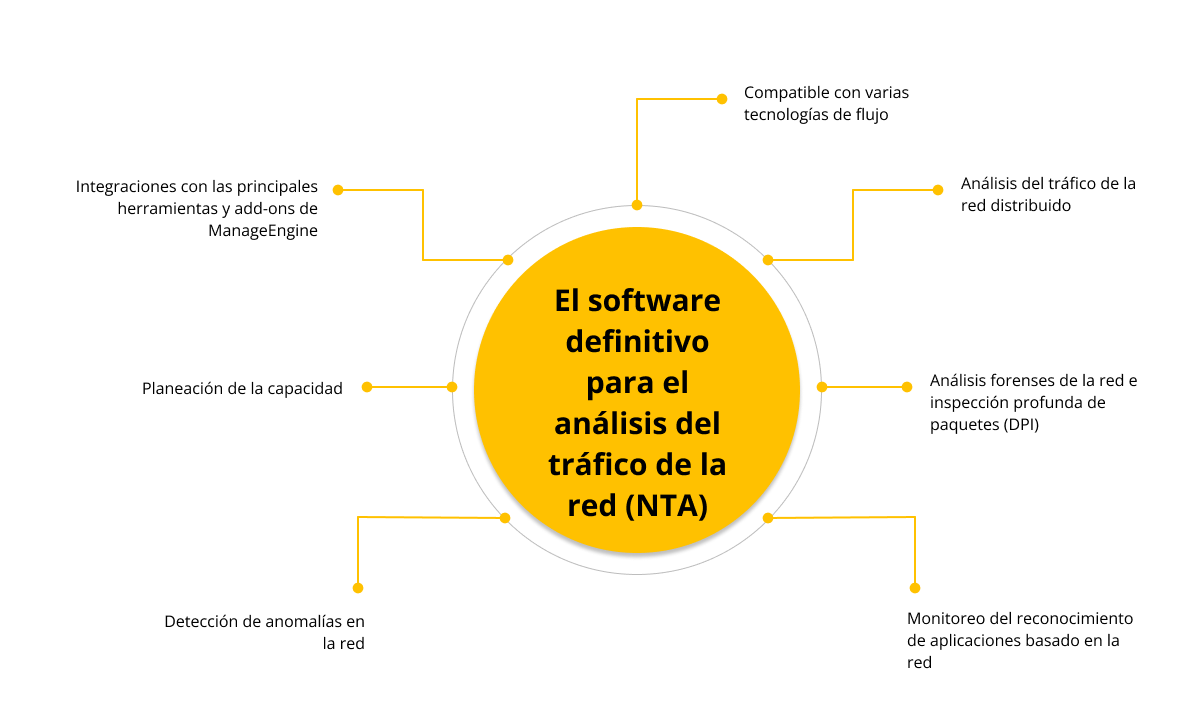
When we talk about traffic analysis at the enterprise level, the key concept is Network Traffic Analytics (NTA) . It's not a specific tool, but rather an approach: analyzing network traffic continuously and automatically to improve visibility, identify threats, and facilitate incident response.
Traditionally, many monitoring solutions relied on static rules of the type "if X happens, do Y" . This worked for certain scenarios, but it has enormous limitations: the rules have to be kept manually, they become obsolete quickly, they generate false positives, and they don't adapt well to new behaviors or changes in the organization's processes.
This is where machine learning comes in . Applied to NTA, it allows the system to learn the "normal" behavior of the network and detect deviations without needing a specific, predefined rule for each case. These models can automatically classify, correlate, and score threats , freeing analysts from many repetitive tasks.
A typical example: static rules might flag a sudden increase in traffic to an unknown domain as suspicious. But a machine learning system can learn that this spike is due to the company starting to use a new cloud service and is therefore not an attack, but a normal evolution of the business . This type of discernment reduces false positives and prevents the SOC from wasting time on irrelevant alerts.
Of course, machine learning isn't magic. It needs good training data, human oversight, and constant reviews . If it's fed with biased or incomplete data, it can reinforce errors instead of correcting them. Furthermore, attackers' evasion techniques also evolve, so models must be updated and retrained frequently.
The natural evolution of NTA has led to Network Detection and Response (NDR) . While NTA focuses on observing and understanding traffic, NDR adds the ability to respond: isolating a host, blocking communication, generating automatic playbooks, and so on. Increasingly, solutions are integrating this logic to act in near real-time upon detecting a threat , without waiting for human intervention in each case.
The next step is Extended Detection and Response (XDR) , which goes beyond the network and combines data from multiple sources: endpoints, networks, cloud environments, applications, identities, and more. By cross-referencing all this information on a unified platform, XDR provides a comprehensive view of the digital infrastructure and enables the detection and response to complex threats that would not be apparent by looking at only one part of the puzzle.
NTA in practice: what data it collects and what benefits it provides
In a modern corporate network, the infrastructure is a mosaic of on-premises environments, public cloud, private cloud, mobile devices, IoT, and remote work , and, in many deployments, solutions like a mesh VPN to secure and optimize distributed access. Manually monitoring and protecting all of this is impractical, but all these elements share a common point: the network through which they communicate.
NTA solutions leverage this common point to monitor traffic for anomalies . They collect flow data from routers and switches, selective packet captures, usage statistics, behavioral metrics, and, in many cases, additional inputs such as threat intelligence lists or information from other security systems.
With this information, a good NTA solution improves network visibility , something increasingly difficult in hybrid environments. Knowing which devices are connected, which applications are being used, how traffic moves between segments, and which connections cross logical boundaries is fundamental for detecting risks and adjusting security policies.
Another key advantage is early threat detection . Many phases of an attack (initial access, lateral movement, data exfiltration, communication with C2) are reflected in traffic: unusual accesses, anomalous volumes, and strange connection patterns. NTA can uncover these behaviors before the damage becomes more extensive.
Furthermore, NTA simplifies troubleshooting performance issues . When a system crashes or runs extremely slowly, having detailed traffic logs helps pinpoint whether the problem lies with the network, the server, a misconfiguration, or an attack that is saturating resources.
We mustn't forget their use in supporting investigations . By storing traffic histories, NTA solutions allow us to go back in time to review what happened before, during, and after an incident. This adds valuable context for understanding how an attacker operated and what measures to take to prevent it from happening again.
Based on the identified threats, NTA can extract indicators of compromise (IoCs) such as IPs, domains, hashes, or specific patterns, which are then shared with other systems to block similar attacks. It also helps verify compliance with internal policies (for example, ensuring that certain services are only used by specific segments) and external regulations, demonstrating that access to sensitive data is monitored and relevant activities are logged.
Traffic analysis tools: from NetFlow Analyzer to integrated solutions
In addition to Wireshark and NTA/NDR/XDR platforms, there are specialized tools like NetFlow Analyzer that focus on analyzing flow data generated by routers and switches. These applications receive, store, and process NetFlow, sFlow, J-Flow, IPFIX, and similar flows to show who is consuming bandwidth, when, and with which applications.
NetFlow Analyzer, for example, allows you to monitor traffic per interface with a granularity of up to one minute , visualize peaks in interactive graphs, differentiate incoming and outgoing traffic (speed, volume, number of packets, percentage of use) and generate custom reports for specific time periods.
These reports are very useful at the operational level and also for presenting clear data to management : which WAN links are insufficient, which offices consume the most resources, how traffic grows month by month, or which applications are taking the lion's share. They can be exported in formats such as CSV or PDF for archiving or sharing.
Installation is usually quite straightforward: the software is deployed on a Windows or Linux server , the console is accessed via a web browser, flow exports are configured on routers and switches, and usage graphs start being generated within minutes. From there, panels, widgets, and views can be customized to show only what is most relevant to each team.
The main dashboard makes it easy to identify the main traffic sources : which interfaces, applications, users, ports, or protocols are consuming the most bandwidth. It also offers monthly trend reports, in-depth conversation analysis (who is talking to whom, for how long, and at what volume), and modules designed to detect suspicious behavior or potential threats (malformed TCP traffic, unusual source-destination flows, atypical TOS values, etc.).
Career opportunities and training in network traffic analysis
If this whole world of packets, flows, NTA, and Wireshark has piqued your interest, you're looking at a highly valued skill for systems and cybersecurity professionals . It's not just a technical curiosity; it's an integral part of the work for roles like systems administrator, network specialist, or security analyst.
In qualifications such as the Higher Level Vocational Training Certificate in Networked Computer Systems Administration (ASIR) , network traffic analysis is a key component of the curriculum. Students learn about local area network administration, secure service configuration, incident diagnosis, and the use of professional tools such as Wireshark, Nagios, PRTG, and flow monitoring and analysis platforms.
More advanced training programs, such as master's degrees in offensive security, go a step further and teach how to use these tools from the perspective of an ethical attacker : discreet reconnaissance, exploitation of poorly protected services, payload verification, detection of exfiltration channels, etc. It's about learning to think like an attacker in order to better defend networks.
With these skills, you can pursue roles such as systems administrator, advanced support technician, network specialist, SOC analyst, or cybersecurity consultant . From there, you can advance to more specialized positions in defense, incident response, or even Red Team.
Mastering network traffic analysis, whether with simple tools like Wireshark or integrated NTA/NDR solutions, gives you unparalleled visibility into what's really happening within your infrastructure . This data allows you to make better-informed decisions, anticipate performance issues, detect attacks in their early stages, and provide evidence of what happened when something goes wrong, transforming your network into a continuous source of useful information rather than just a conduit for data.

Table of Contents
- 1 What is a network and what do we call network traffic?
- 2 What is network traffic analysis and what is it used for?
- 3 Flows, packets, and data types that are analyzed
- 4 Wireshark: the essential packet analyzer
- 5 How Wireshark can help you in your daily life
- 6 Wireshark and its role in cybersecurity and ethical hacking
- 7 NTA, Machine Learning and the evolution towards NDR and XDR
- 8 NTA in practice: what data it collects and what benefits it provides
- 9 Traffic analysis tools: from NetFlow Analyzer to integrated solutions
- 10 Career opportunities and training in network traffic analysis