- A static IP address remains fixed over time and is ideal for servers, remote access, and business services that require stability and reliable DNS resolution.
- Dynamic IP addresses change periodically via DHCP; this is the usual option for home connections and offers ease of management and lower cost.
- The choice between static or dynamic IP depends on the use: hosting services and intensive teleworking favors static IP, while standard home use is better suited to dynamic IP.
- It is possible to combine a dynamic IP address from the ISP with a static or dedicated IP VPN to gain internet stability without sacrificing privacy.

If you've made it this far, it's because you want to be absolutely clear about the difference between a static IP and a dynamic IP , when each one is right for you, how to find out which one you're using right now, and what impact it has on your security, your privacy, and how you connect to the internet.
In the following lines we will calmly break down everything you need to know: what exactly an IP address is, how public IPs differ from private IPs, static IPs from dynamic IPs, dedicated IPs from shared IPs , what advantages and disadvantages each type has, and how to check (step by step depending on your operating system) if your IP is static or dynamic.
What is an IP address and why is it so important?
An IP (Internet Protocol) address is a unique numerical identifier assigned to each device that connects to a TCP/IP-based network, whether it's a local network (like your home Wi-Fi) or the internet. It works like your home address: it tells your device where it is on the network so other devices know where to send data.
On a technical level, a classic IPv4 address consists of four blocks of numbers between 0 and 255 separated by periods , something like 172.16.4.205 or 192.168.0.1. Every device connected to a TCP/IP network has its own IP address: computers, mobile phones, tablets, smart TVs, game consoles, routers, network printers, IP cameras, web servers, mail servers… even your smart oven if you connect it via Wi-Fi.
Computers work well with numbers, but people find it more convenient to use names. That's why the Domain Name System (DNS) exists ; it acts like a directory, translating domains like www.example.com into specific IP addresses. When you type a URL into your browser, it queries the DNS for the associated IP address and connects there.
Today, two major versions of the IP protocol coexist: IPv4 and IPv6 . IPv4 uses the classic format with four decimal blocks, while IPv6 uses eight hexadecimal groups separated by colons (something like 2001:0db8:85a3:0000:0000:8a2e:0370:7334). IPv4 offers approximately 4300 billion addresses, and these are practically exhausted, while with IPv6, there are so many that it is highly unlikely we will run out.
IP addresses, at a global level, are coordinated by IANA (Internet Assigned Numbers Authority) , a division of ICANN, the international organization that ensures the Internet functions in an orderly and secure manner by distributing IP ranges among the various regional registries and operators.
Differences between public, private, dedicated and shared IP
Before delving into the static IP vs. dynamic IP debate, it's important to understand that an IP address can be not only static or dynamic, but also public or private, dedicated or shared . These concepts are interconnected.
Private IP addresses are used within your local area network (LAN). Your router typically generates and assigns these private IPs to your home devices using DHCP. They allow your devices to see and communicate with each other within the network, but they are not directly accessible from the internet . Typical ranges are 192.168.xx, 10.xxx, or 172.16.xx
Public IP addresses are assigned by your Internet Service Provider (ISP) and are what's visible to the outside world. This public IP address is the face of your internet connection: it's what websites and services see when you connect . A single household typically has only one public IP address associated with its router, which translates internal traffic using NAT techniques.
In terms of dedication, a dedicated IP address is one that is assigned exclusively to a single client, company, or server: no one else shares that address. It is widely used in corporate environments, professional hosting, email servers, enterprise VPNs, and so on.
In contrast, a shared IP address is used by multiple users or services simultaneously. Some ISPs and many VPNs, for example, allow different clients to access the internet using the same public IP address, differentiating traffic internally through ports and translation tables.
For the purposes of this article, we will focus mainly on the residential public IPs assigned to you by your Internet provider and whether those IPs are static (fixed) or dynamic (changing), because this directly affects your daily life when browsing, playing online, connecting remotely, or hosting services.

What is a static IP address: how it works, its uses, and key details
A static IP address (also called a fixed IP) is an IP address that remains constant over time. When your ISP assigns you a static IP, that address doesn't change every time you restart your router or after a power outage , and it can remain the same for months or years as long as you maintain your contract and the provider doesn't reorganize its network.
A static IP address can be public or private, IPv4 or IPv6, but the important thing is that it is not automatically reassigned as part of a dynamic pool. It is usually configured manually or specifically reserved, both in advanced home environments and, especially, in professional environments.
Although a static IP address is considered "fixed," it can technically be changed: your provider can reassign you a different one, or you can modify private static IPs within your LAN yourself. But until you do, the address remains the same and becomes predictable for anyone who needs to connect to it.
Advantages of static IP addresses
Static IPs are often the preferred option when you need stability, remote accessibility, and fine-grained network control . Their main advantages include:
- Simpler and more stable DNS resolutionSince the IP address doesn't change, it's very easy to permanently associate it with a domain name. Web, mail, and FTP servers benefit from a static IP address because the DNS records don't need to be constantly updated.
- Reliable remote access from anywhereIf you want to access your home network or your company's infrastructure from outside (VPN, remote desktop, security cameras), always having the same IP address makes connecting much more convenient without constantly checking if it has changed.
- Fewer cuts due to loss of directionOn devices that handle a lot of traffic or critical data, an IP address that does not renew or expire reduces the likelihood of micro-outages or problems due to DHCP assignment failures.
- More consistent up and down speedsRather than being "faster," they typically offer a more stable connection with lower latency, something highly valued in online games, video conferencing, or their own streaming services.
- More precise geolocationSince IP addresses are associated with the same location for a long time, geolocation services can better identify where you are connecting from, which helps companies to record incidents, optimize delivery routes, prevent fraud, or personalize content.
- Greater individual controlSince it's an IP address that only you use (in the case of a dedicated static IP address), You can apply whitelists, restrictions, and specific security rules. for that address, for example, allowing access to an administration panel only from own server.
Disadvantages and risks of static IPs
The same stability that makes static IPs so convenient also has its downside: in many contexts they are less secure and more expensive than dynamic IPs, especially for individual users.
- Easier to track and attackAn IP address that never changes is a perfect target for cybercriminals: They can scan and persistently attack it over time, knowing that that "point" of the Internet will continue to exist there.
- Difficulties after a severe attackIf that static IP address is compromised (for example, a hacked server or one listed on blacklists), changing it isn't always immediate, especially if it's part of a dedicated range, which can prolong the impact of the gap.
- Higher economic costMany ISPs charge an extra monthly fee or require you to sign up for a service. business plan to provide a static public IP address, so in practice it is usually much more expensive than a standard dynamic IP address.
- Manual configuration and risk of errorsSometimes a static IP address requires you to enter it yourself into the router or server, which increases the possibility of Configuration errors in masks, gateways or DNS if you have no experience.
- Less privacy by defaultWith a static IP address, it's easier to correlate activities over time, both for legitimate services and for malicious third parties; hence, It is key to reinforce with firewalls, intrusion detection systems and, in many cases, VPNs.
What is a dynamic IP address: how it works and why it's the default option
A dynamic IP address is an IP address that can change over time. Your internet service provider (ISP) maintains a pool of available addresses and assigns them to customers as they connect. When you restart your router, after a certain period of time, or during maintenance , your ISP may give you a different IP address from the same pool.
This assignment is managed using the DHCP (Dynamic Host Configuration Protocol) , both at the level of your internet service provider (for your public IP address) and within your router (for the private IP addresses of your devices). In practice, the vast majority of residential connections use dynamic public IP addresses.
In home networks and many offices, DHCP is also used to assign private IP addresses to devices. These are also internal dynamic IP addresses , which can be recycled and reused among devices as they connect and disconnect, without any user intervention.
Advantages of dynamic IP addresses
Dynamic IPs are successful because they are easier to manage and much cheaper , both for the provider and the end user, and more than cover the day-to-day needs of almost everyone.
- More economical (often included by default)In residential plans, it is normal for the ISP to assign dynamic IPs at no additional cost. You don't have to pay extra for themAnd that's already a compelling argument for the average user.
- Zero setup worriesThe ISP's DHCP server handles everything. At home, your router does the same for your devices. Plug it in, connect to Wi-Fi, and you're good to go., without struggling with network parameters.
- Less risk of address conflictsBy automatically managing the IP pool, the possibility of two devices ending up with the same IP is reduced, something that can happen if internal static IPs are configured manually without coordination.
- Efficient reuse of address spaceBy not having wasted static IPs, the provider can Recycle addresses that are temporarily not in use and better adapt to millions of customers, something especially important with IPv4.
- Slight increase in privacy and securityHaving your public IP address change periodically makes it a little harder to track your activity in the long term and complicates things for an attacker. a prolonged attack against the same directionHowever, this is by no means a substitute for a good VPN or a decent firewall.
Disadvantages of dynamic IPs
Despite being the standard option, dynamic IPs are not a panacea for all scenarios. In certain cases, they can pose a significant limitation , especially if you want to expose services to the outside world.
- Not very practical for hosting services from homeIf you set up a web, mail, or game server on your own connection, every IP change forces you to update the DNS settings or rely on... dynamic DNS services, with the risk of short periods of inaccessibility.
- They complicate remote accessWhen your external IP address changes, connect via remote desktop or VPN directly to your router It requires checking your IP address at any given time or using tools that track it.
- Possible cuts when renewing the concessionIf the router or equipment does not manage DHCP renewal properly, there may be brief interruptions when the IP "rental" expires and a new one is requested, which is annoying during video calls or online games.
- Total dependence on the ISP for rapid changesIf you need a different IP address immediately (for example, because a service has blocked your current address), the operator will not always be willing to change it on demand.
Static IP vs Dynamic IP: Key Differences and When Each Is Suitable
The main conceptual difference between a static and a dynamic IP address is very simple: a static address remains the same, while a dynamic address can change . From this, different recommended uses and technical and security nuances arise.
Static IPs are ideal when you need your network or server to always be located in the same place: hosting websites, email services, Netflix or streaming platform servers, corporate VPNs, demanding online games, or critical infrastructure . In these contexts, any unexpected IP change greatly complicates operations.
Dynamic IPs are a perfect fit for home connections and the vast majority of small and medium-sized businesses that don't host external services. For browsing, watching Netflix, using social media, making video calls, working remotely, or playing online games normally , you'll hardly notice any difference compared to a static IP, but you'll pay less and have easier management.
It's often important to distinguish between static/dynamic public IPs and static/dynamic private IPs . Within your home, you can reserve static private IPs for specific devices (for example, a printer or a security camera) while your public IP remains dynamic. This simplifies internal management without needing to contract a static public IP.
In practical terms, if you manage a website, a business email service, a high-traffic game server, or a remotely accessible video surveillance system, you'll probably want a static public IP address . However, if you just want to browse the internet, stream content, and play casual online games, a dynamic IP address from your ISP will be more than sufficient.
How to tell if your IP is static or dynamic (public and local)
You might be wondering, “Okay, this is all very well, but how do I know what kind of IP address I have right now? ” You can find this out for both your public IP address and the internal IP addresses of your devices, and the process varies slightly depending on your operating system.
Check if your public IP address is static or dynamic
For the IP address that the Internet sees (the public one), you have a very simple trick without needing to install anything: use an IP lookup website and restart the router.
- Go to a website like "What is my IP" or services like WhatIsMyIPAddress.
- Note the public IP address that I show you.
- Turn off your router or modem for a few minutes, turn it back on, and wait for it to regain the connection.
- Go back to the same website and see if your address has changed.
If the address is different, it's most likely that your provider is assigning you a dynamic IP . If the IP remains the same despite restarts and the passage of days, it's very likely that you have a static IP or, at least, a dynamic one that hardly changes (with some providers, IPs change very infrequently).
How to check if your local IP address is dynamic or static in Windows
In Windows you can easily check if your computer obtains its IP address automatically (DHCP, dynamic) or manually (static):
- Open the search bar on the taskbar and type Symbol of the systemThen click to open it.
- Write the command ipconfig / all and press Enter.
- Find the network adapter you're using (Wi-Fi or Ethernet) and look at the line DHCP enabled.
- If it says “Yes”, your local IP is dynamically assigned; if it says “No”, you are using a Manually configured static IP.
Check if your local IP is static or dynamic on macOS
On macOS, it's also very straightforward to find this out from the system settings, without needing to use the terminal:
- Click on the Apple icon and enter System settings.
- Choose Wi ‑ Fi (or Red, depending on the version) and tap on Details along with the network you are connected to.
- Enter the tab TCP / IP and locate the field Configure IPv4.
- If it says “Manually”, your IP is static; if it says “Via DHCP”, that interface is receiving a dynamic IP of the router.
How to find out on Android
On Android, the menu may vary slightly depending on the manufacturer, but the general logic is usually the same and allows you to check if your phone is using DHCP or a static IP address:
- Go to Settings Of the device.
- Sign in Connections (or “Network and Internet”) and then in Wi ‑ Fi.
- Tap the gear icon or the network you're connected to.
- Find the section IP configuration or similar.
- If the option is selected DHCPThe IP address is dynamic; if it indicates "Static", it is manually set on the mobile device itself.
How to check it on iOS (iPhone or iPad)
On Apple devices with iOS or iPadOS, you can also find out at a glance whether your local IP address is assigned automatically or manually from the Wi-Fi panel:
- Open the app Settings.
- Tap on Wi ‑ Fi and select the network you are connected to.
- Scroll to the section IP setup.
- If you see the option selected AutomaticYou are using DHCP and therefore a dynamic IP address; if it shows ManualYour local IP address is static.
How to switch between static and dynamic IP: real options
If after understanding the differences you have decided that you are interested in one type of IP or another, there are several ways to switch from dynamic to static or vice versa , both at the level of your public connection and within the local network.
Obtain a static public IP address through your ISP
The most direct way to get a truly static public IP address at your home or business is to contract it with your internet service provider . The general steps are usually:
- Contact your ISP and ask if they offer residential static IP or only under business plans.
- In many cases you will have to migrate to a business plan or purchase a specific monthly fixed IP address add-on.
- Once the service is activated, the operator will tell you if it is configured automatically or if you need to... Manually enter the IP address, subnet mask, gateway, and DNS. on your router.
Keep in mind that this, in addition to costing more money, means your public address will be much more stable and traceable , so it's advisable to reinforce security with a well-configured firewall, up-to-date updates, and, if possible, extra layers such as IDS/IPS or a corporate VPN.
Use a VPN with a static IP or dedicated IP
Another interesting alternative, especially if your ISP doesn't offer a static IP address or it's very expensive, is to use VPN providers that offer static or dedicated IP addresses . In these cases, your home public IP address can remain dynamic, but the same IP address as the VPN server will always appear when viewed on the internet.
- With a static VPN IP, every time you connect to that server you exit with the same IP address towards the Interneteven if your real IP address changes.
- With a dedicated IP, you don't share that static IP with other VPN clients: It's exclusively yours as long as you pay for the service.
- In addition, all your traffic is end-to-end encrypted between your device and the VPN server, which It significantly increases your privacy and reduces the exposure of your real IP address..
This approach is very useful for accessing services that filter by IP, improving the stability of certain remote connections, and maintaining a good level of anonymity , without needing to modify your landline settings with the operator.
How to change your device's dynamic IP address without contacting your ISP
If you only want your IP address to change occasionally (for privacy, due to a website block, or to avoid IP limits), there are simple methods that don't require you to ask your operator for anything.
- Use a VPNWhen you connect to a VPN server, it automatically “you inherit” the IP of that serverChanging your country or node instantly changes your IP address, and your traffic is also encrypted.
- Use a proxySome proxies allow you to browse using a different IP address, although many do not encrypt traffic, so your credentials and data could be exposed if HTTPS is not used.
- Browsing with TorThe Tor browser routes your traffic through multiple nodes and assigns you different outgoing IPsoffering a lot of privacy, at the cost of lower speed.
- restart your routerIn some providers, turning the router off and on again causes the DHCP server to assign you a different public IP address, although it doesn't always work or is immediate.
- Change networkIf you switch from home Wi-Fi to mobile data, or connect from another Wi-Fi network, it will automatically you will get a different public IP address.
Advantages and disadvantages: Is it better to have a static IP or a dynamic IP?
Choosing between static and dynamic IP is not about which is "better" in the abstract, but about what you are going to use your connection for and how much you want to pay, both in money and in configuration and security effort.
When is a static IP preferable?
A static IP address is usually the best option when you need your connection to be a fixed and highly accessible point on the Internet , designed for others to connect to you constantly.
- Companies that host their own servicesCorporate websites, online stores, mail servers, internal applications accessible from outside... all of that breathes better with a static IP.
- Environments with many remote usersIf your staff connects to the office via VPN or remote desktop, a static IP address is required. simplifies configurations and reduces incidents.
- Game servers or other high-traffic servicesWhen you want them to always connect to the same host without relying on dynamic DNS, a static IP provides more stability.
- Scenarios where latency and stability are criticalProfessional VoIP, massive videoconferencing, or corporate streaming benefit from an infrastructure based on well-managed fixed IPs.
However, all of this requires robust security measures (firewalls, network segmentation, monitoring, constant updates) , because that static IP will be a clear target for automated scans and attacks.
When is a dynamic IP more advantageous?
For most home users and many small businesses, it makes sense to stick with the dynamic IP address already provided by the operator , which usually works perfectly for everyday internet use.
- Standard home connections where you browse, stream, play online games normally, work remotely using the company VPN… a dynamic IP it does not pose a real disadvantage versus a static one.
- Users who want a little more privacy without complications: As your IP address rotates over time, it becomes more difficult to track all your continuous activity, especially if you combine it with VPN, tracker blocking, and security best practices.
- Low-budget scenariosNot paying extra for a static IP address and avoiding complex configurations is a major advantage. Fewer headaches and lower monthly expenses.
However, while dynamic IPs may seem more discreet, they don't replace real security measures . Your ISP can still associate your traffic with your line, and a determined attacker can still try to exploit you if your system isn't properly protected.
Understanding how static and dynamic IPs work, their pros and cons, and the different ways to check and change your address type allows you to choose the option that best suits your needs: from the user who just wants to browse without complications to the company that needs always accessible servers and stable remote work, to those who seek extra privacy with a VPN and even a dedicated IP that combines the best of both worlds.
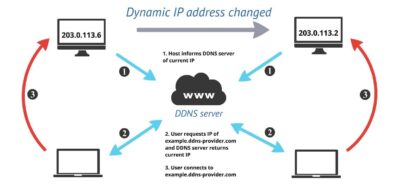
Table of Contents
- 1 What is an IP address and why is it so important?
- 2 Differences between public, private, dedicated and shared IP
- 3 What is a static IP address: how it works, its uses, and key details
- 4 What is a dynamic IP address: how it works and why it's the default option
- 5 Static IP vs Dynamic IP: Key Differences and When Each Is Suitable
- 6 How to tell if your IP is static or dynamic (public and local)
- 7 How to switch between static and dynamic IP: real options
- 8 Advantages and disadvantages: Is it better to have a static IP or a dynamic IP?