- SteamOS is a Linux distribution from Valve focused on gaming, with a console-like Game Mode and a full Desktop Mode.
- Windows game compatibility is based on Proton, which allows running a large part of the Steam catalog.
- Arch-based SteamOS 3 stands out on laptops and Steam Decks for its performance, stability, and power management.
- There are still limitations with some anti-cheat, DRM, and specific hardware, so Windows is still necessary in certain cases.
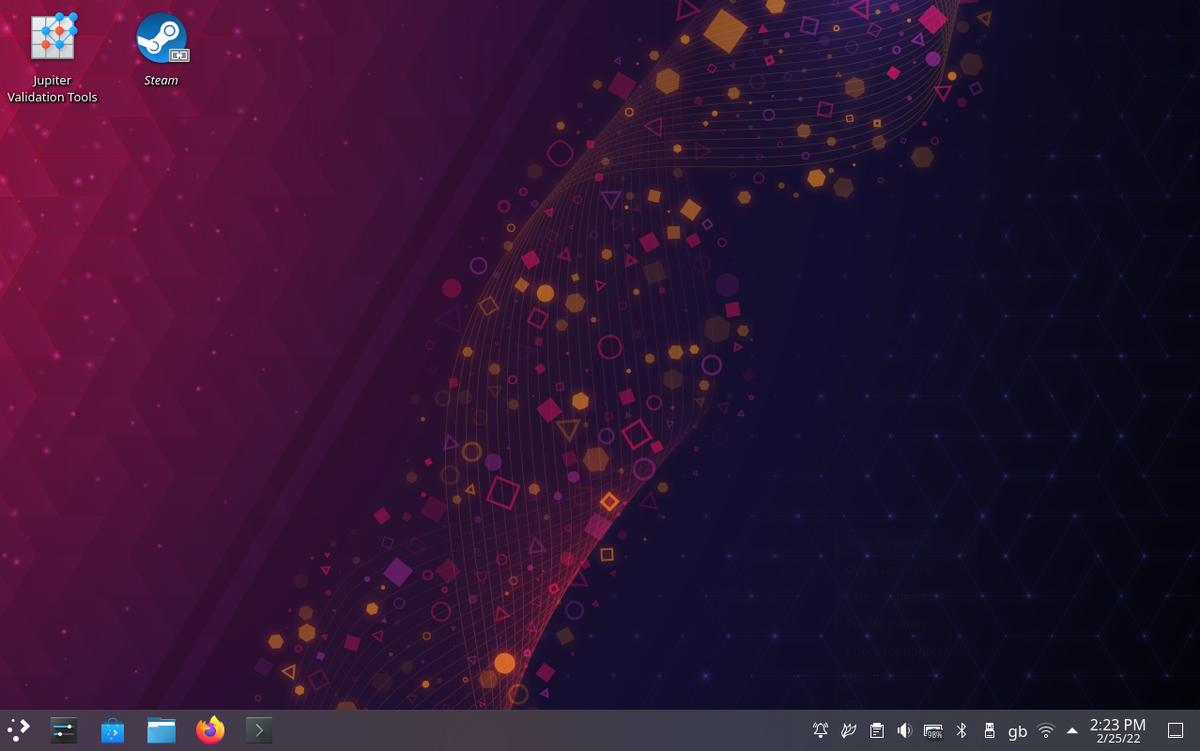
If you've just entered the world of SteamOS and Linux because you received a Steam Deck as a gift or you're simply curious to try something different from Windows, it's normal to feel a little lost. The word "terminal" can be intimidating, tutorials sometimes seem to be written in another language, and anyone would be intimidated the first few times they see commands on the screen.
The good news is that, although SteamOS is based on Linux, it's designed so you can play games without any hassle , just like on a console, but with all the power and flexibility of a PC. Throughout this article, you'll find everything you need to know: what exactly SteamOS is, how it has evolved, how it performs compared to Windows, which devices you can install it on, and its actual limitations so you won't encounter any surprises.
What is SteamOS and why has it generated so much discussion?
SteamOS is a Linux distribution developed by Valve , the company behind Steam and franchises like Half-Life, Dota, and Counter-Strike. It was created with the idea of transforming any compatible PC into a kind of "living room console" centered around Steam, while maintaining the essence of a complete desktop operating system.
In its early stages, SteamOS was based on Debian 7 and Debian 8 , with a console-like interface built around Steam's Big Picture mode. Later, with the arrival of the Steam Deck, Valve made a significant shift, refocusing the project on a much more modern, modular, and easily updatable Arch Linux base .
Valve's philosophy with SteamOS is clear: to offer an environment where the game is the center of the system , optimizing graphics drivers, kernel, and audio and video tools to make the experience as smooth as possible, whether in a living room connected to the TV, on a portable console, or on a desktop computer.
Furthermore, it's an open and free platform : you can install more software, modify parts of the system, or even replace entire components because it leverages the open-source nature of Linux. Valve doesn't envision it as a replacement for a classic desktop system for everyone, but rather as a very serious option for gaming and, if you want, tinkering.
A bit of history: from Steam Machines to the Steam Deck
The concept of SteamOS first appeared publicly in September 2013 , when Gabe Newell, CEO and co-founder of Valve, used a LinuxCon conference to make his position clear: “Linux and open source are the future of video games.” From then on, Valve announced a series of initiatives to bring Steam into the living room, connecting PCs and televisions more seamlessly.
On September 20, 2013, the company published a statement on its website titled “The Steam Universe Expands in 2014,” previewing three major announcements related to the living room experience. The first was revealed on September 23: SteamOS, presented as the best possible environment to deliver value to users by building the system directly and explicitly around Steam.
From the outset, it has been emphasized that users will be able to alter or replace any part of the software , that the system will be free, and that everything is designed to offer an open gaming platform, without artificial restrictions or deliberately sought-after exclusivity. In fact, in November 2013, Valve made it clear that it would not create exclusive games for SteamOS and recommended that other studios not do so either.
During LinuxCon 2013 in Edinburgh, Linus Torvalds went so far as to consider SteamOS the best model of standardization within the Linux ecosystem, proof that the technical community viewed this approach of gaming to Linux favorably. In parallel, manufacturers like Nvidia announced collaborations with Valve, for example with the Nvidia GameWorks suite, which integrates technologies such as PhysX, OptiX, and VisualFX to improve graphics support.
In December 2013, the first downloadable beta version of SteamOS was released, with Valve explicitly recommending that only users with some experience using Linux install it. The "living room PC" era had just begun, but the real game-changer would come years later with handheld consoles.
From SteamOS 1 and 2 to SteamOS 3: Debian vs Arch and the Steam Deck era
The first versions, SteamOS 1.0 and 2.0, were built on Debian as the base distribution . The goal was to achieve a relatively stable system, with regular updates and a customization layer based on Steam's Big Picture mode, primarily aimed at Steam Machines and living room PCs.
In the summer of 2015, SteamOS 2.0 arrived, based on Debian 8.1 “Jessie” and with the Linux 4.1 kernel. This version incorporates official SteamOS-specific repositories, improved support for open-source graphics drivers, and a reasonable “rolling release” approach, allowing for component updates without a complete system reinstallation.
This ecosystem is completed with devices such as Alienware's Steam Machines , the Steam Controller, and the Steam Link. Pre-orders for these products began in mid-October 2015, and the official launch of the Steam Machines took place on November 10th of that same year. However, the project failed to achieve significant commercial success compared to consoles like the Xbox and PlayStation.
The big leap forward came in July 2021, when Valve unveiled the Steam Deck . This portable PC console ran a very different version of SteamOS, now on the 3.xy branch based on Arch Linux instead of Debian. This change was driven by the need for a more modular and responsive system, with continuous updates and components like Mesa, the kernel, and the firmware always up-to-date.
SteamOS 3 also incorporates the KDE Plasma 5 desktop environment , which can be used in the Deck's "Desktop Mode" to install applications, emulators, productivity tools, and virtually anything you might want on a desktop PC, while maintaining "Game Mode" as the main face geared towards the console-like experience.
SteamOS technical architecture and key components
Under the hood, SteamOS 3 uses a very clear partitioning scheme that separates the operating system from user space. This is combined with an atomic update model similar to that of immutable distributions : new versions arrive in signed images, are applied all at once, and if a problem arises, it's possible to revert to a previous version fairly safely.
This approach, combined with the Arch platform and its rapid package cadence , allows SteamOS to maintain up-to-date versions of the kernel, Mesa (the open-source graphics stack), and hardware firmware. This is particularly important for AMD APUs (especially RDNA2 and RDNA3), where each release can bring improvements in performance, latency, or power consumption.
On the graphics side, the main focus is on Vulkan as the API , along with layers like DXVK and VKD3D-Proton, which handle translating DirectX 9/10/11/12 calls to Vulkan. By relying on the open-source radv driver (within Mesa), the typical Windows "complexity" of proprietary libraries and drivers is reduced, the environment is simplified, and shader compilation times are better controlled.
SteamOS also integrates modern technologies like PipeWire for audio and video , replacing older solutions and offering better compatibility with various multimedia devices and applications, something that is noticeable both when playing games and when playing content or capturing gameplay.
The kernel is customized and fine-tuned to reduce latency and improve responsiveness in games. Specific patches and tweaks are added to optimize controller input, power management, and process handling for a better gaming experience, while maintaining the stability needed for a system that people will turn on repeatedly, just like a console.
Proton: the key to playing Windows games on Linux
One of the major traditional obstacles for Linux gaming has been the lack of native games compared to Windows. Initially, the approach was to port a few titles and use Wine to run Windows programs, and over time, fixes and improvements have appeared in Wine . However, while powerful, Wine isn't specifically designed for video games and often causes problems.
This is where Proton comes in, the compatibility layer that Valve developed based on Wine but focused exclusively on gaming . Proton integrates DXVK, VKD3D-Proton, FAudio, and other components that allow Windows binaries to run on Linux by translating DirectX to Vulkan and handling audio, input, and synchronization in a way optimized for gaming.
For the average user, Proton is practically seamless in the Steam client : you install a Windows game from SteamOS and, if it's compatible, it simply runs. In some cases, it can be useful to force a specific version of Proton from the game's properties to squeeze out performance gains or resolve bugs with certain titles.
Compatibility is constantly changing, but as of today, a large portion of the PC game catalog works reasonably well on SteamOS thanks to Proton. There are limitations with some kernel-level anti-cheat systems or very intrusive DRM, which require changes from developers, but more barriers are being removed every month.
SteamOS also integrates the "Deck Verified" program , which labels games as Verified, Playable, or Not Compatible based on their performance, controls, and readability on the Steam Deck. While these labels are designed for the Steam Deck, they are also helpful if you use SteamOS on other devices with similar hardware.
What does SteamOS include beyond the Steam client itself?
SteamOS isn't just "Linux with Steam on top," but a fairly complete ecosystem designed so you can turn on your device and start playing without having to tweak too many things. Among its most notable features are several key components.
On one hand there is Game Mode , which acts as the main interface and is very reminiscent of a console: large menus, controller navigation, quick access to the library, the store and the settings per game, all designed for a television screen or the integrated screen of a portable device.
In the background, the system offers Desktop Mode with KDE Plasma , accessible from the Deck and other devices, where you can install office applications, browsers, emulators, third-party clients, and everything else a modern Linux desktop would allow. This makes SteamOS much more than just a simple "console layer."
The system comes with updated graphics drivers , specially tuned for AMD GPUs and, to a lesser extent, for Nvidia and Intel. The goal is to minimize compatibility issues and take advantage of the latest performance improvements available in Mesa and proprietary drivers where needed.
Over-the-air (OTA) updates allow the system to be kept up-to-date automatically and relatively safely, correcting errors, improving stability, optimizing performance, and patching vulnerabilities without the user having to monitor each individual package.
Finally, the integration of Mesa as a graphics library offers open-source implementations of APIs such as OpenGL and Vulkan, which is especially important for the Steam Deck and other modern APUs, since the quality of this graphics stack largely determines the gaming experience.
Where and how can SteamOS be installed?
In its early versions, SteamOS was distributed as a relatively generic image that anyone could install on a PC as long as it met certain minimum requirements: a 64-bit processor, at least 4 GB of RAM, and around 200 GB of disk space.
With SteamOS 3.x, the situation has changed. Valve has focused its main efforts on the Steam Deck as a target hardware device and, more recently, has also worked in collaboration with other manufacturers like Lenovo to provide official support for specific devices such as the Legion Go.
The official SteamOS 3 image is designed for the Deck and, in some cases, for specific models, and can be downloaded for free from the Steam downloads section . More generic images or community tools exist for installing SteamOS on other PCs, mini PCs, HTPCs, or laptops, but Valve does not guarantee perfect functionality in those cases.
The beta version of SteamOS has shown some compatibility with handheld consoles like the ASUS ROG Ally, ROG Ally X, and other devices with AMD APUs similar to those in the Deck. In many cases, the experience is good, but it depends heavily on the availability of suitable drivers for Wi-Fi, Bluetooth, display, audio, and other components.
Another option is to use older versions of SteamOS designed for desktop PCs, although in that scenario the problem is the lack of updates: you can install the system, but you run the risk of getting stuck with outdated drivers, kernel and software, which in the medium term is not ideal for a gaming environment.
Does it make sense to use SteamOS instead of Windows for gaming?
If we're talking about pure and simple catalogs, it's still true that Windows is king in PC gaming: almost all major releases are initially designed for Windows, graphics card drivers usually arrive earlier and better optimized, and it's the environment that most developers target by default.
Many analysts and users believe that Windows still generally offers the best raw performance on high-end hardware, especially with powerful GPUs and technologies like NVIDIA's DLSS, which are not yet as finely integrated into all titles and configurations in Linux.
That said, the landscape has changed dramatically since the early days of SteamOS 1. Older comparisons between SteamOS 1 and Windows 8.1 showed fairly even performance, with a slight edge for Windows in several games. Since then, we've had SteamOS 2, the arrival of Proton, the evolution of AMD's open-source drivers, and the leap to SteamOS 3 based on Arch.
In current practice, especially on portable devices, SteamOS offers a very competitive experience , with games performing the same or better than on Windows in many cases, especially if the engine makes good use of Vulkan or benefits from the efficient translation of DXVK and VKD3D-Proton.
The "Linux vs. Windows for gaming" debate continues to generate much discussion, but the realistic approach would be this: if you rely on professional software or very specific games that only run smoothly on Windows, the sensible thing to do is stick with Windows (or combine it with a dual boot). If your priority is Steam games, a Deck-like device, and a console-like experience, SteamOS has earned its place.
Performance, stability and battery life in SteamOS
In terms of FPS and smoothness, on equivalent hardware SteamOS usually matches or surpasses Windows in many titles that use Vulkan or DirectX translated via DXVK/VKD3D-Proton, especially when the CPU is the main bottleneck and having fewer background processes is appreciated.
SteamOS's performance overlay makes it easy to see how FPS caps , variable refresh rates, and scaling directly impact power consumption and frame time stability. In many demanding games, the "sweet spot" is around 40-45 FPS with a manageable TDP, where the experience remains smooth but battery life doesn't suffer.
Regarding input latency, Game Mode offers a very clean signal path for controllers, keyboard, mouse, and gyroscope , with less interference from overlays and third-party software than a Windows system cluttered with manufacturer utilities, toolbars, and the like. This contributes to a very responsive feel in shooters and competitive games.
Stability also benefits from the virtually immutable system model for the user and atomic updates with rollback capability . It's not infallible, but it greatly reduces the risk of a simple system update suddenly crashing a previously working game.
Where SteamOS truly shines is on laptops and Deck-type consoles thanks to its finely tuned power management . It allows you to set up game profiles with FPS limits, TDP control, screen refresh rate adjustment, use of scaling technologies like FSR, and fine-tuning of brightness, resulting in longer gaming sessions on limited battery life.
Real limitations and anti-cheat compatibility
Not everything is perfect, and it's wise to be aware of any potential drawbacks of SteamOS before using it as your primary gaming system. One of the main issues is its compatibility with certain aggressive anti-cheat and DRM systems that are integrated at the kernel level or require Windows services.
Today, many games that use Easy Anti-Cheat or BattlEye can run on SteamOS as long as the studio has enabled and correctly configured Linux/Proton support. However, some titles remain tied to solutions that, to this day, are only truly implemented on Windows.
Another point of contention is some very intrusive secondary launchers , which add extra layers on top of the main game, with their own DRM and background service requirements. In these cases, Proton usually releases specific patches to refine the experience, but it doesn't always achieve the same polished "click and play" feel as on Windows.
There are also potential compatibility issues with very specific hardware : high-end steering wheels, certain HOTAS, specific VR devices, or capture cards that only have well-maintained drivers on Windows may require time and effort to be properly integrated into a Linux environment.
Furthermore, although Nvidia has greatly improved its support on Linux , the experience is usually more seamless with AMD APUs and GPUs thanks to the open driver and the way it integrates with Mesa and the rest of the graphics stack that SteamOS takes full advantage of.
Finally, while SteamOS allows access to the KDE desktop and the installation of applications from other stores, or even the use of tools like Heroic Games Launcher or Lutris, the ecosystem is clearly Steam-centric . Playing Epic Games titles, the Xbox app, or similar games requires additional steps and, sometimes, some technical knowledge.
When does it make sense to choose SteamOS and recommended alternatives
If you only have a desktop PC and don't want to waste time tinkering, using Windows for gaming is probably still the most practical option , especially if you combine games from various stores, use very specific peripherals, or need professional applications that only exist on that system.
If you're a Steam Deck user or have a similar x86 handheld console, SteamOS is by far the best integrated option : an interface designed for small screens, game profiles, good thermal control, easy updates, and a huge catalog thanks to Proton.
On a home theater PC (HTPC) connected to the TV, SteamOS also makes a lot of sense as a "console mode" for the couch . It boots directly into Game Mode, recognizes controllers, and offers an experience very close to that of a traditional console, but with the flexibility to install emulators, advanced media players, and more software in Desktop Mode.
If you want a SteamOS-like experience on your PC without leaving a more generic environment, you can install another Linux distribution like Ubuntu, Fedora, openSUSE, or Arch, add the GPU drivers and the Steam client, and also rely on Proton to run Windows games or alternatives like playing on Linux with Bazzite.
There's even an alternative like SteamFork , a SteamOS-based distribution that aims to improve support for unofficial hardware by expanding compatibility and adding specific tweaks. It might be interesting if you want something very similar to SteamOS but for machines that Valve doesn't directly support.
In any case, before diving in headfirst, it's worth checking the specific status of your favorite games on Proton and seeing if any depend on a particularly problematic anti-cheat or launcher. Checking communities, forums, and the public Proton changelog is a big help in avoiding disappointment.
With all that said, SteamOS has established itself as a very serious Linux-based gaming platform , capable of delivering a console-like experience on PC hardware without sacrificing Steam's massive catalog or the ability to tinker whenever you want. It's not going to dethrone Windows anytime soon, but for handhelds, living room PCs, and users who prioritize Steam integration, it's an incredibly attractive option today.
