- Windows 11 25H2 reaches Release Preview (Build 26200.5074) as an enablement package.
- Focus on security and administration: goodbye to PowerShell 2.0 and WMIC; control to remove pre-installed apps.
- Available via Windows Update in search mode and for enterprises with WUfB/WSUS; ISOs coming soon.
- Shares base with 24H2, discrete changes and restarted support cycle for eligible editions.
Microsoft has moved Windows 11 25H2 to the Release Preview channel, the final step before general release, and is targeting a more incremental update that prioritizes stability . The company confirms that it will be an incremental release that will be activated with a quick restart, without requiring a full reinstallation.
This version is released as an enablement package (eKB) and shares the same service base as 24H2. In practice, the features are already in the system and are only enabled with a small update, reducing installation time and impact on the user.
Key Features of Preview
Build 26200.5074 doesn't aim for significant visual changes; its objective is to consolidate technical and maintenance improvements. As it's an eKB (eBay Note), simply installing the package and restarting will activate what's already pre-installed on systems with 24H2.
A key point is the restart of the support cycle for the affected editions: Enterprise and Education will now have 36 months, while Pro will maintain 24 months. For compatible systems, this translates to two additional years of monthly security patches.
Most of the updates have been rolled out gradually over the past year, so the differences with Windows 11 24H2 are minimal. This helps to reduce risks during a period marked by the end of Windows 10 support in late 2025.
Microsoft's strategy reinforces an incremental service model , with fewer surprises and more predictable deployments for both home users and corporate environments.
Availability, download and installation
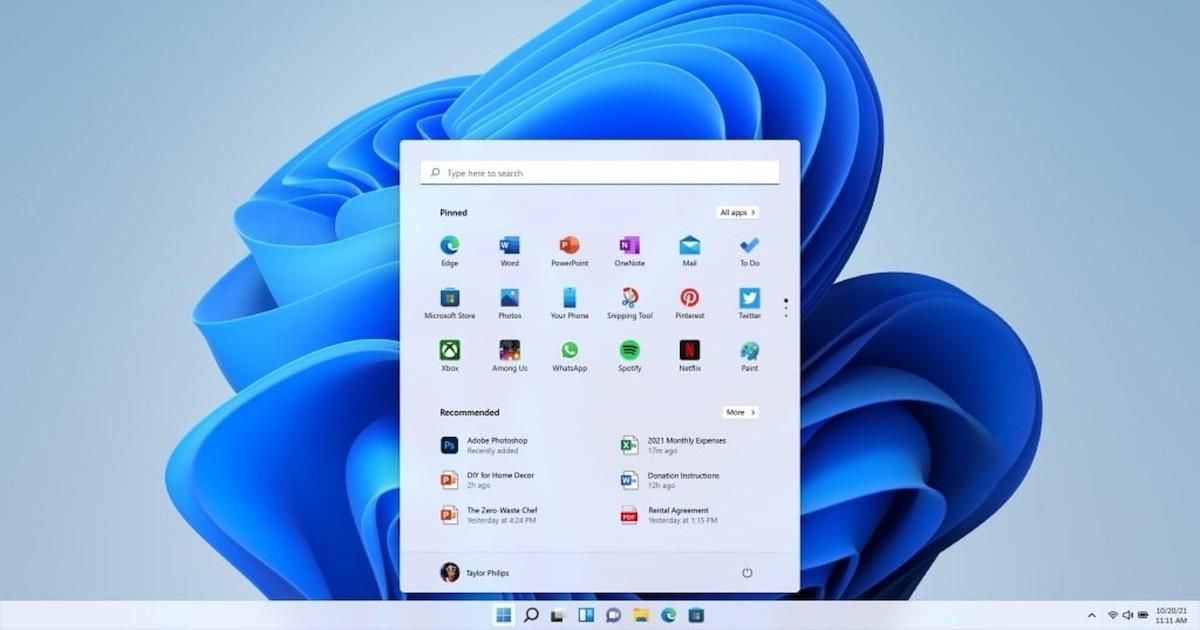
The preview is available in the Release Preview Channel for Windows Insiders. To try it, go to Settings > Windows Update, tap "Check for updates" (search mode), and when the notification for version 25H2 appears, choose "Download and install."
For businesses, the build can be validated through Windows Update for Business (WUfB) and Windows Server Update Services (WSUS). Microsoft has also indicated that it will soon publish ISO images on the Windows Insider website for clean installations or use in virtual machines.
After installing Build 26200.5074, the device remains in Release Preview and will continue to receive cumulative updates through the standard service channel. This is a near-final release experience, expected later this year.
Those who prefer to conduct tests using offline methods can opt for ISO when it becomes available; commercial customers can also rely on their usual deployment and support processes.
- Opens Settings > Windows Update.
- Press «Search for updates» and check the 25H2 banner.
- Choose "Download and install» and restarts when requested.
Security and administration changes

25H2 removes legacy components such as PowerShell 2.0 and the WMI command line ( WMIC ), reducing the attack surface and aligning with modern tools such as PowerShell 7 and current management APIs.
In Enterprise and Education environments, administrators can uninstall pre-installed apps from the Microsoft Store using group policies or MDM (CSP), a frequent request to lighten computers and comply with regulatory frameworks in the EU.
Microsoft has also applied small under-the-hood performance tweaks —scheduler and kernel optimizations— along with subtle refinements to the Start menu and taskbar, with smoother animations and drag-and-drop functionality.
For organizations, validation can be managed with WUfB or WSUS, and if any issues arise during testing, it is possible to open cases through Microsoft's enterprise support following the usual channels.
Minor improvements to the experience
Recent builds include two keyboard shortcuts designed for PCs without a numeric keypad: Win + – for hyphen and Win + Shift + – for em dash, much more accessible than the usual Alt combinations.
Minor improvements are also evident, such as a faster connection between Android devices , enhancements to the Click to Do function, updated battery icons, and the option to pin apps directly to the sharing interface.
The package fits with an update that prioritizes stability, security, and control for IT, with visible but moderate new features for the general user and a simplified delivery thanks to the enablement package.
