- A decoder translates encoded signals into information understandable by the user or devices.
- There are many types of decoders: electronic, TV, streaming, and 7-segment displays.
- Choosing the right decoder ensures maximum compatibility, quality, and access to new digital technologies.
You've probably come across the term "decoder" or "decoder" before , whether when buying a television, discussing communication systems, or having a new TV installed at home. But what exactly is a decoder? What is it used for, and how has it become such a fundamental component in both everyday technology and cutting-edge electronics? In this article, I'll break down everything about decoders, from the basic electronics and technical aspects to their practical applications and the most modern types available on the market today.
I invite you to delve into a comprehensive, clear, and accessible guide to the world of set-top boxes. Here you'll discover how they work, what they're used for , the differences between the various models, their role in the digital age, and how to prepare for the latest technological changes (such as the switch-off of digital terrestrial television in Spain). You'll also find answers to frequently asked questions and receive maintenance and purchasing advice. If you want to stay up-to-date and avoid getting lost in technical jargon, keep reading: this is the information you truly need.
What is a decoder?
A decoder is an electronic device that transforms coded signals (usually in binary or digital format) into signals understandable by other devices or the end user. Its key function is to interpret an input code and translate it into useful output information, whether to activate circuits (in electronics), enable the viewing of television channels, or facilitate communication between devices. To learn more about how these devices are integrated into different systems, you can consult the article on Xbox One features and models that also use decoders in their operation.
Essentially, when we receive a signal (for example, from television, digital data, or information on communication networks), it is often in a format that the receiving equipment cannot understand as is. The decoder intervenes in this process , "translating" the signal and transforming it so that it makes sense: thus, a television can display images and sounds, a seven-segment display can correctly represent numbers, or a computer system can process binary data.
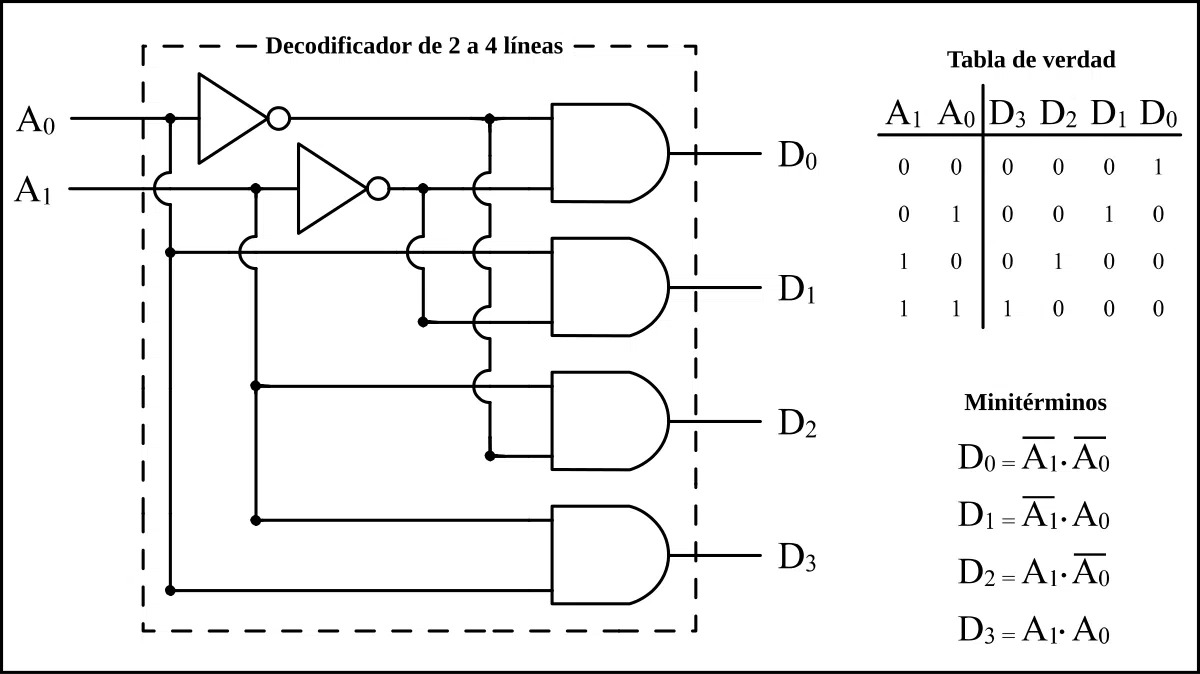
From an electronic standpoint, a digital decoder accepts a coded input (for example, in binary) and activates a single output from among several possible outputs, depending on the specific value it receives. If you have 3 input bits, for example, you could activate 8 different outputs depending on the value (from 000 to 111).
How do decoders work?
The operation of a decoder, whether digital, for TV, or for any other application, is based on interpreting input codes to select or activate a specific output . Let's look at it simply:
In digital electronics, we typically work with binary signals (zeros and ones). For example, a 2-to-4 decoder (2 inputs -> 4 outputs) receives two bits at its input and, depending on the value (00, 01, 10, 11), activates a single output out of the four possible ones. If we apply the binary code "10" to the input, only that output will be activated (the others remain off). Thus, each combination of bits corresponds to a specific output.
This principle extends to more complex decoders. If you have N input bits, you can address 2^ N distinct outputs . For example:
- with 3 bit: 8 outputs (23)
- with 4 bit: 16 outputs (24)
- with 10 bit: 1024 outputs (210)
In the context of television and home entertainment, the set-top box receives the antenna signal (whether digital terrestrial, cable, satellite, or internet) and transforms it into images and sound that the television can display. It can also decompress, filter, or translate complex signals, as is the case with modern streaming systems. For more information on similar devices, you can visit our dedicated section.
In communication systems, the decoder identifies bit sequences and transforms them so that end devices can understand the message, enabling seamless communication between different devices.
Main types of decoders

The term "decoder" covers everything from very simple circuits to complex devices, depending on the context in which they are used. Here's a rundown of the main types you can find today:
1. Electronic (digital) decoders
Logic circuits are used in digital electronics and computer systems. Their function is to convert a coded signal (typically binary) into an identifiable output signal, for example, to select a memory cell, activate a control line, or display digits on a display. Classic examples include 2-to-4, 3-to-8, and 4-to-16 decoders.
They are used in computers, calculators, control systems, segment displays and many other technical applications.
2. Television decoders
Probably the best known to the general public. A TV decoder (set-top box) is a device that receives digital or analog television signals and converts them into images and sound that can be viewed on the television.
Today, most television is broadcast digitally (whether terrestrial, cable, satellite, or IPTV), so a set-top box is necessary if your television doesn't have one built-in. Set-top boxes allow you to expand the number of channels, improve picture and sound quality, record programs, and even access streaming platforms and interactive services.
3. Streaming decoders
These devices transform signals from online platforms (Netflix, Prime Video, HBO, etc.) and play them on your television or other devices. These set-top boxes are typically designed to be compatible with multiple applications and support various video and audio formats, making it easy to view on-demand or live content.
4. BCD to 7-segment decoders
These types of decoders convert binary-decimal (BCD) code into the electrical signals needed to activate the seven segments of a display and show the corresponding number. They are very common in calculators, digital watches, and any device that needs to represent numerical information visually and clearly.
5. Decoders in communication systems
In telephony, computing, and data transmission systems, decoders transform sequences of bits into signals that the user or machine can understand, enabling the efficient and secure transmission of information across diverse networks and channels.
Features and advantages of modern decoders
Set-top boxes have evolved enormously in recent years. While they once only allowed access to more channels or more memory, today they offer a range of functions that make them true multimedia hubs or key components in smart devices.
- Advanced Compatibility: They support different types of signals (terrestrial, cable, satellite, IPTV) and multiple video and audio formats (HD, 4K, HDR, etc.)
- Image and sound quality: They offer high resolutions, better colors and surround sound thanks to modern digital technology.
- Wide connectivity: They incorporate HDMI, USB, Ethernet, WiFi and other connections to adapt to all types of televisions and devices.
- Smart features: They can include electronic programming guides, parental controls, digital recording (DVR), access to streaming platforms, interactivity (voting, apps, etc.), voice control, and much more.
- Upgrade and customization: Many models update automatically to incorporate new features and improve performance, as well as allowing the installation of applications.
- Portability and flexibility: Access content from different devices (TV, smartphone, tablet, computer) and enjoy your favorite programs anywhere.
Practical applications and examples in everyday life
Set-top boxes are present in a multitude of devices and everyday situations, and not just in advanced technology:
- Home television: access to paid or free channels, high definition viewing, recording features, applications, parental control…
- Streaming entertainment: Watch movies, series, and sports on demand from any platform and device.
- Security systems: camera monitoring, access control and other automated systems in homes or businesses.
- Automotive: from electronic engine management to multimedia systems in vehicles.
- Data visualization: digital displays in household appliances, elevators, clocks, medical instruments and more.
- Communications: data transmission in computer networks, telephony, alarm systems and others.
Differences between encoder and decoder
There's often confusion between these two terms. Let's clarify:
- Encoder: It transforms “normal” or user-understandable information (e.g., a decimal number) into a binary or specific code used by machines.
- Decoder: It performs the reverse process: it receives a coded signal (e.g., binary) and translates it into understandable information (e.g., it activates a specific output or displays a number on the screen). To illustrate more details about how it works, you can visit the page dedicated to .
In electronics, it is often said that the encoder converts many inputs (decimal) into few outputs (binary), while the decoder transforms few inputs (binary) into many outputs (decimal, display, etc.).
How to connect and configure a TV decoder?
To install a decoder at home, the steps are generally straightforward, although it's always a good idea to check the instructions specific to your model:
- Location: Place the decoder near the TV, in a ventilated and stable place.
- Signal connection: Connect the antenna cable (terrestrial, satellite or cable) to the input of the decoder.
- Connecting to the TV: Use an HDMI cable if your TV is modern; if not, opt for SCART or composite video.
- Feeding: connect the decoder to the electrical outlet.
- Power on and setup: Turn on the device, select the input on your TV and follow the wizard to tune channels and update software if necessary.
The decoder and the latest changes in television: the case of the DTT blackout
In Spain, the switch-off of Digital Terrestrial Television (DTT) has required all channels to broadcast in high definition (HD) from February 14, 2024. What does this mean for users?
If your TV is older and doesn't support HD signals, you'll stop receiving HD-only channels after that date. The solution is to buy an HD-compatible set-top box , which will convert the modern signal so your older TV continues to work properly. If you have a newer Smart TV, the set-top box is probably already built-in, and you won't need to buy a separate one. To better understand the technological changes, you can also consult our section on [topic missing].
This change improves image and sound quality, as well as freeing up space in the electromagnetic spectrum for emerging technologies such as 5G mobile telephony and others.
Tips for choosing the best decoder
Before purchasing a set-top box, consider these aspects:
- Compatibility: Check that it supports the signal you receive (DTT, cable, satellite, IPTV...)
- Maximum resolution: If you have a 4K TV, look for a set-top box that supports that resolution.
- Available connections: Make sure it has the HDMI, USB, Ethernet, etc. ports needed for your devices.
- Extra features: Evaluate whether you require recording, parental controls, application access, screen mirroring, among others.
- Updates: Opt for models that can update their software to maintain compatibility and new features.
- Easy to use: Spanish menus, ergonomic controls, and excellent technical support will make your experience easier.
Troubleshooting common set-top box problems
Some common problems and their simple solutions:
- The controller does not respond: Check the batteries, aim straight ahead, and make sure there are no obstacles. If you're using a universal remote, check its programming.
- No image: Check the cable connections and make sure the TV is connected to the correct input. Restart the device if necessary.
- Signal problems: inspect the antenna or wiring, perform a retune, and check for software updates.
- There is no Internet conection: Check that the decoder is connected correctly and that your WiFi or Ethernet network is working properly.
Maintenance and care for a longer lifespan
To prolong the life of your decoder:
- Read the manufacturer's instructions and save them for future reference.
- Avoid exposing it to moisture or liquids.
- Wipe it with a dry cloth to remove dust and dirt.
- Do not cover the vents to avoid overheating.
- Place it on a stable surface and in a ventilated place.
- Leave access to the power outlet free to make it easier to unplug in case of emergency.
- Store the device in places with moderate temperatures and avoid humid environments.
- If you have a remote control, protect the batteries from high temperatures and remove them if you are not going to use the device for long periods.
Frequently Asked Questions about Set-Top Boxes
- Can I use a set-top box on any TV?
Yes, as long as it has compatible inputs (HDMI, SCART, RCA) and supports the received signal. For older devices, you may need adapters. - Do I need internet to use a set-top box?
It depends on the model: if it only supports DTT or satellite, no; but if you want to access online or streaming services, you do need an internet connection. - What happens if my decoder becomes obsolete?
Many models support software updates; if not, it's a good idea to replace it with a newer model that meets current standards. - What is the energy consumption?
Its consumption is usually low, between 5 and 15W, depending on the functions and age of the device.
Set-top boxes have gone from being little-known devices to becoming essential pieces in the modern home, allowing you to make the most of any signal, keep your equipment up-to-date, and access a variety of content. By understanding their features and proper care, you can optimize their use and enjoy a satisfying multimedia experience for a long time.


Table of Contents
- 1 What is a decoder?
- 2 How do decoders work?
- 3 Main types of decoders
- 4 Features and advantages of modern decoders
- 5 Practical applications and examples in everyday life
- 6 Differences between encoder and decoder
- 7 How to connect and configure a TV decoder?
- 8 The decoder and the latest changes in television: the case of the DTT blackout
- 9 Tips for choosing the best decoder
- 10 Troubleshooting common set-top box problems
- 11 Maintenance and care for a longer lifespan
- 12 Frequently Asked Questions about Set-Top Boxes