- Prioritize authorized resellers with secure payments and clear policies to obtain genuine Windows 11 Pro keys.
- Check compatibility (TPM 2.0, UEFI/Secure Boot), download the official ISO and activate it with your 25-character key.
- Choose the right license (OEM, Retail, Volume or Refurbished) and consider support, warranty and verified reviews.

I'll explain, in clear and straightforward language, how to acquire a genuine Windows 11 Pro license , where to buy it safely, and how to install and activate it correctly. You'll also see how it differs from the Home edition, what requirements your PC must meet, and how to save money legally without falling for dubious offers.
Why Windows 11 Pro is worth it and how much it officially costs
For professionals and demanding users alike, Windows 11 Pro integrates security and productivity tools that make a real difference: BitLocker for encrypting your data , Remote Desktop, Group Policy management, domain joining, and support for Azure Active Directory, among others. All of this is complemented by a modern, fluid interface designed for improved workflow.
As for the price, the Pro edition costs €259,00 in digital format on the official Microsoft store. This is the market benchmark, although there are ways to save money completely legally and safely by using authorized distributors who sell original keys at more competitive prices.
Choosing a genuine license isn't just a matter of principle: it guarantees updates via Windows Update , system stability, and compliance with the terms of use. This prevents activation problems, system crashes, or failures caused by using invalid keys or altered versions.
That added reliability translates into real savings in the medium and long term : a stable system that updates itself and doesn't let you down when you need it most is worth its weight in gold.
Where to buy a secure key and how to identify reliable stores
The simplest and fastest way is to go to certified European distributors that sell genuine software, offer digital delivery, and provide support in Spanish. Specialized firms like Mr Key Shop stand out for their experience (over 18 years) and for offering licenses for Windows 11, Microsoft Office, antivirus software, professional software, and operating systems with a satisfaction or money-back guarantee.
In these stores, the entire process is online: you buy in minutes and receive the key and instructions by email . Because it's digital delivery, there are no physical shipments, the environmental impact is less, and you get your license almost instantly.
A good indicator of trustworthiness is finding traceable and secure payment options. You'll see options like PayPal (with payment in 3 installments) , Stripe for cards, Klarna, Apple Pay, Google Pay, or Amazon Pay. In addition, Trusted Shops' guarantee coverage of up to €2.500 is a bonus that confirms the merchant's reliability.
Another plus is its robust catalog: from Windows 11 and Office 2024 to Windows Server, Autodesk licenses (including AutoCAD 2026), antivirus, VPN, and professional utilities. Typically, each purchase includes step-by-step guides for downloading, installing, and activating software—essential if you're not very experienced.
License types: OEM, Retail, Volume and Legal Refurbished
Before buying, it's important to understand the different types of licenses. OEM licenses are tied to a single computer and are generally not transferable. If you plan to keep that PC for years, they might be more cost-effective.
Retail licenses , on the other hand, allow transfer to another computer (always one at a time). They are more flexible, although they tend to be more expensive. For those who frequently upgrade their hardware or manage multiple computers, this portability is very useful.
There are also volume licenses , designed for organizations. Be careful, because the secondary market sometimes sees questionable resales. That's why it's vital that the store clearly details the origin and terms of use of the keys it sells.
And there's an interesting option: the legal refurbished license , obtained through Authorized Refurbishment Programs (MAR). It's a perpetual license, perfectly valid for a refurbished computer, with genuine activation and full updates without fees. This type of key is ideal when you're looking to equip a refurbished PC with a full guarantee.
In the European Union, reselling software is permitted if the requirements of Directive 2009/24/EC are met . That said, ensure the seller is transparent about the license type and its origin, so that activation and use are clearly compliant with the law.
How to recognize a store that won't let you down
There are several simple criteria that will save you from unpleasant surprises. First, demand legal transparency : they should specify whether the code is OEM, Retail, volume, or refurbished, and what each option entails. If they don't explain it, be suspicious.
Second, value verified reviews . Review platforms with real verification (and not anonymous screenshots) are a very good sign. The more reliable and detailed reviews, the better.
Third, you need support that actually responds. A working email address and a phone line that speaks Spanish can be a lifesaver. Some stores even offer additional technical assistance, such as system reinstallation with file backup, SSD upgrades , and internal system cleaning. Some stores publish their phone number (for example, 915996504) and a contact form for getting your questions answered without obligation.
Fourth, a clear refund policy . If the key doesn't activate or there's a problem, you need a transparent and quick procedure to resolve it. This, combined with secure payment methods and an HTTPS domain, gives you a complete picture of reliability.
Windows 11 Pro requirements and how to check compatibility
Windows 11 Pro requires relatively recent hardware, with a particular focus on security. Key requirements include TPM 2.0 (or equivalents such as Intel PTT or AMD fTPM) and UEFI firmware with Secure Boot enabled. This ensures verified boot times and system protection.
The official minimums include: 64-bit CPU at 1 GHz with 2 cores , 4 GB of RAM, 64 GB of storage, DirectX 12 compatible graphics card with WDDM 2.0 driver, HD (720p) display larger than 9 inches with 8 bits per channel, and an internet connection for setup and updates.
To verify your computer, Microsoft offers the PC Integrity Check tool , which tells you in seconds whether you meet the requirements. If you fail the test, there are unofficial methods to bypass some restrictions, but these are not recommended for stability and security reasons.
If you still have doubts, many reputable stores offer free advice: they help you assess compatibility, data migration, and the specifics of business networks, so that the jump to Windows 11 Pro is as smooth as possible.
Download Windows 11 Pro: Official ISO or Upgrade Assistant
You have two main options. One is to download the official ISO image from the Microsoft website to perform a clean installation using a bootable USB drive (you can create it with the Media Creation Tool or Rufus). This is ideal for new computers or if you want to start from scratch.
The other option is to upgrade from an activated Windows 10 Pro using the Windows 11 Setup Assistant. The process is guided, keeps your files and apps, and if your Windows 10 license is valid, you won't have to pay for the upgrade within that same edition.
To create the bootable media, you connect the USB drive, enter the BIOS/UEFI, and set it as the primary boot device . From there, the installer guides you through the process: language selection, partitioning, file copying, and the initial reboots until you reach the desktop.
If you prefer official direct links, the Microsoft download section centralizes everything you need to download Windows 11, including media creation tools and installation guides . It's the safest source to avoid ISOs from dubious sources.
Step-by-step installation on a new or formatted PC
Turn on your computer with the USB drive connected and enter the BIOS/UEFI using the appropriate key (F2, F12, or Delete are common). Check two key points: that Secure Boot is enabled and that the primary boot device is your USB drive or DVD containing the ISO image.
Save the changes (usually with F10) and restart. The Windows 11 Pro installer will load automatically, and you can choose between a quick or custom installation. If you're performing a clean install, the custom option allows you to manage partitions for a clean format.
During the initial setup, the system will copy files, apply updates, and restart several times. It's normal for this to take a while, so let it finish without forcing shutdowns. Finally, you'll complete the basic setup (region, keyboard, network) and be prompted for your Microsoft account.
If you're in a professional environment, you can join the device to your organization later, or if you prefer, set up a local user first and complete the corporate integration later with your security policies.
Activate Windows 11 Pro with a product key
During installation, Windows may ask for your product key . If you already have it, enter it and it will be validated to associate the license with your computer. If not, choose the "I don't have a product key" option and continue; you'll be able to activate it later without any problems.
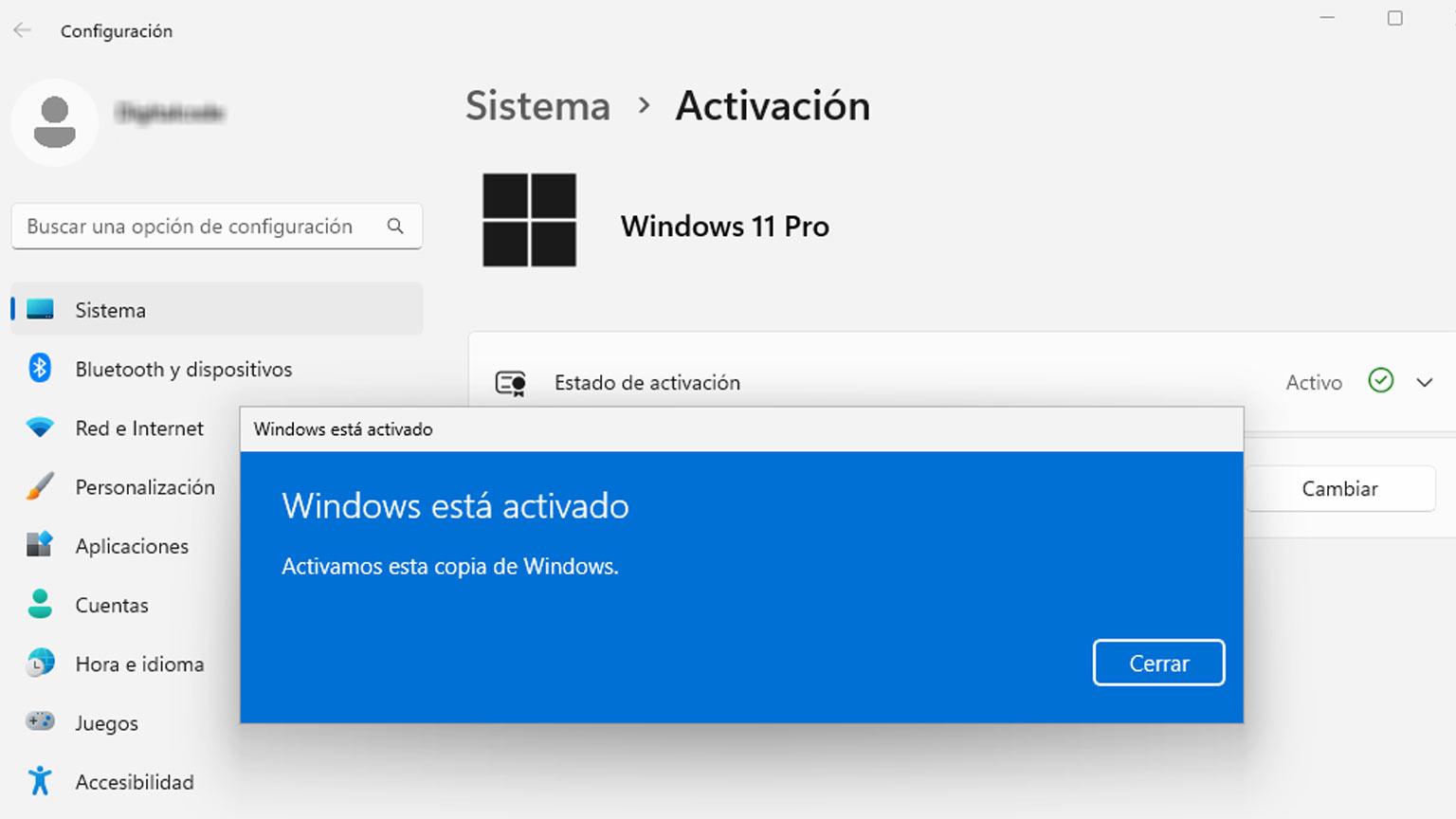
To activate later, go to Settings (Win + I) > System > Activation . Under "Activation status," tap "Change product key" and paste your 25-character code. After a few moments, you'll see the message "Windows is activated," and it will be linked to your account.
Activation is not a minor procedure: it unlocks customizations, ensures access to official updates , and certifies that your system complies with the law, which is essential especially in auditable professional environments.
If you get an error, confirm that there's no confusion between editions (Home vs. Pro), check your internet connection, and contact the seller's support. Reputable stores usually offer activation and replacement assistance if the key has genuine issues.
Upgrade from Windows 11 Home to Pro without reinstalling
If your computer comes with Windows 11 Home, you can upgrade to Pro without formatting or losing data. It's not a free upgrade: you need to purchase a valid Windows 11 Pro product key . The process, however, is very simple.
Go to Start > Settings > System > Activation and tap Change product key . Enter the new Pro code, confirm, and wait for the system to complete the conversion. Sometimes it will ask you to restart; when you restart, you'll see the Pro edition activated.
Before proceeding, it's advisable to create a backup just in case. Although the procedure preserves applications, files, and settings, it's better to be safe than sorry.
This method saves time and hassle because it doesn't require a clean install or reinstallation of your programs. In minutes, you'll have all the Pro features ready to use.
Windows 11 Home vs Pro: Differences that matter
Both editions are stable and smooth for everyday use, but Pro adds what many professionals need: BitLocker for disk encryption, Remote Desktop (RDP), Group Policy management, domain joining and Azure AD , plus advanced security features.
For productivity, Windows 11 brings improvements such as Snap Layouts to organize windows, Focus mode to reduce distractions, virtual desktops, and a more natural integration with Microsoft Teams, something especially useful in hybrid work.
If you work in IT or development, Pro adds Hyper-V for virtualization and remote management capabilities with tools like Windows Autopilot and Microsoft Endpoint Manager. It's the edition designed to grow with you and your business.
The Home edition, meanwhile, more than adequately covers home and personal use. It's a great base for browsing, entertainment, and light office tasks, but if you want policy control, robust encryption, and scalable management , the Pro edition is the better choice.
What do serious digital licenses include and how are they delivered?
Typically, after payment, you'll receive an email with the activation key , installation instructions, and official download links. In most cases, delivery is very fast (sometimes in less than 2 hours ), although depending on the time of day, it can take up to 24 hours.
The package usually includes a license valid for a single device , a unique 25-character key, the right to security and feature updates for the lifetime of the product, and basic technical support (from the vendor and/or Microsoft).
Some stores also offer free support if you have installation or activation problems, and additional on-demand assistance to reinstall the system, copy your personal files, or upgrade storage to an SSD with system setup.
Another practical tip: many licenses work perfectly with clean installations downloaded from the official Microsoft website . Avoid ISO images from unknown sources to prevent interference with an activation that should be immediate.
How to save money without risking legality
We start from the official price of €259,00, but there are legal offers on the market from authorized distributors and specialized e-commerce sites that adjust prices thanks to economies of scale, distribution agreements and licenses intended for specific environments (such as OEM or refurbished).
The key is to separate the wheat from the chaff. Be wary of ridiculously low prices on dubious marketplaces, keys that deactivate after a few days, or sellers who don't clarify the type of license. If there's no transparency, support, or return policy, what seems cheap can end up being very expensive.
Instead, opt for stores with verified reviews , secure payment methods, a money-back guarantee, and the European trust seal. This combination allows you to pay less than at the Microsoft Store without compromising legality or peace of mind.
If you want to stay up-to-date on the latest news, the Microsoft Store in Spain lets you subscribe to newsletters with offers and new releases. It's a great way to snag official discounts or learn about important product changes.
Quick tips before buying, installing and activating
First, verify your hardware: check TPM 2.0 and Secure Boot in UEFI. Second, plan ahead: back up and write down your software licenses in case you need to reinstall from scratch. Third, always download from official sources to avoid modified ISOs.
Fourth, if you're upgrading from Windows 10 Pro, make sure it's activated with a valid product key so the installation wizard doesn't give you any trouble. Fifth, keep your Windows 11 Pro product key safe and link the activation to your Microsoft account to make future reinstalls easier.
And sixth, if you buy from a specialist store, read the fine print : type of license, delivery times, included support, returns and additional coverage (for example, guarantees such as Trusted Shops or similar).
This will give you a smooth purchase and installation process, allowing you to take advantage of Windows 11 Pro from day one, with the assurance that everything is legal and secure.
Anyone looking to upgrade to Windows 11 Pro without any hassle needs two things: a genuine license and a clear plan for installing, activating, and maintaining the system. With authorized resellers (secure payments via PayPal, Stripe, Klarna, Apple Pay, Google Pay, or Amazon Pay), digital delivery via email , support in Spanish, and warranties recognized in Europe, it's possible to save money compared to the official price while still having the peace of mind of owning authentic software. If you also meet the requirements (TPM 2.0, UEFI with Secure Boot), download the ISO from Microsoft, and follow the activation steps, you'll enjoy BitLocker, RDP, GPO, Azure AD integration, and all the productivity enhancements of Windows 11 Pro without any surprises.