- A modern, well-configured mini PC offers enough power for professional 2D graphic design with applications such as Photoshop, Illustrator, or CorelDRAW.
- Choosing the right CPU, GPU (integrated or dedicated), RAM, and NVMe SSD is key to ensuring smooth performance, multitasking, and longevity of your computer.
- Mini PCs stand out for their small size, low power consumption, low noise, and good value for money compared to traditional laptops and towers.
- Depending on the type of creative work (2D only, light video or 3D), it is advisable to scale up from configurations with integrated graphics to models with dedicated GPUs.
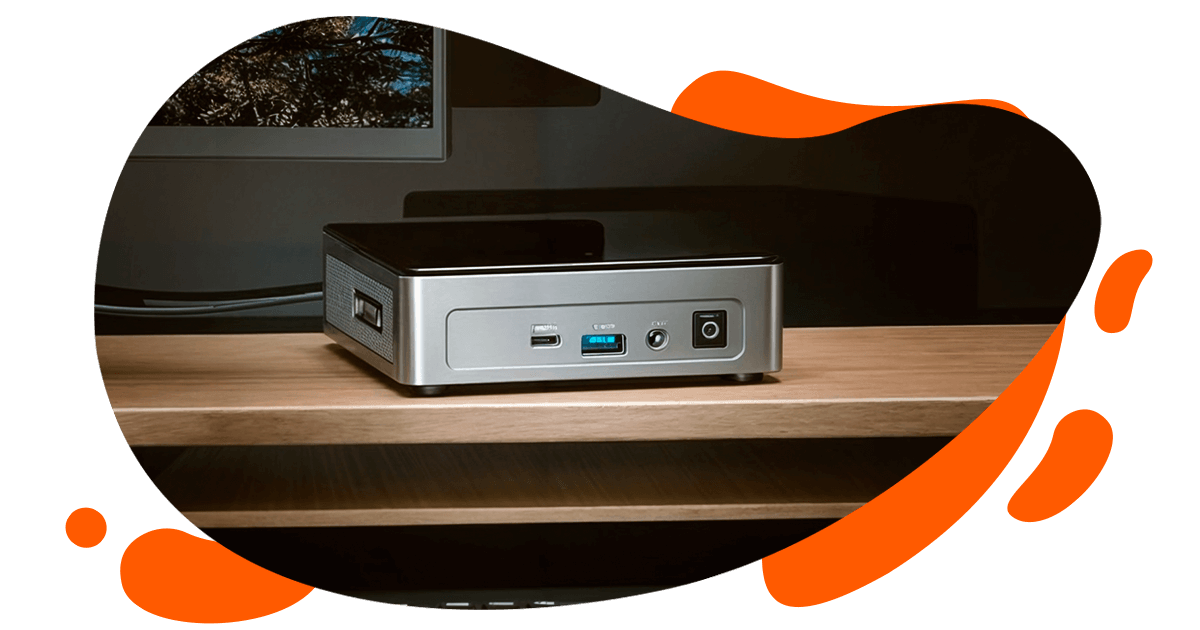
If you work in graphic design and are considering upgrading your computer, you're probably wondering if a mini PC is powerful enough to handle long days running Photoshop, Illustrator, InDesign, CorelDRAW, and similar programs. The idea of going from a traditional laptop or desktop to a tiny box that fits in the palm of your hand can be daunting, especially if your livelihood depends on the computer not failing due to errors that shorten its lifespan.
The reality is that today's mini PCs have made a huge leap in power and performance , to the point that they are now a very serious alternative to traditional desktop computers, even for creative professionals. However, not just any mini PC will do: you have to choose the right processor, graphics card, memory, storage, and cooling system , and also consider practical aspects such as noise, power consumption, and available ports.
Is a mini PC really suitable for professional graphic design?
Graphic design tasks demand considerable computing power , both due to the size of the files and the resource consumption of applications such as Adobe Creative Cloud (Photoshop, Illustrator, InDesign), CorelDRAW, and web layout tools. Traditionally, designers have relied on desktop workstations and high-end laptops, but the emergence of mini PCs has significantly changed the landscape.
A modern mini PC can effortlessly handle demanding 2D workflows : high-resolution image editing, complex vector illustration, editorial design, social media content creation, and even some light video editing if the hardware is up to the task. For many professionals who don't work with heavy 3D or 4K video with advanced color correction, a good mini PC can be more than sufficient for years.
Furthermore, the latest models come equipped with Intel Core i7/i9, AMD Ryzen 7/9, or Apple M processors , along with next-generation integrated graphics (Intel Iris Xe, AMD Radeon 780M/890M) or, in some cases, dedicated GPUs like the Nvidia RTX 40xx series. In other words, we're no longer talking about "office gadgets," but compact machines capable of competing with serious desktop computers.
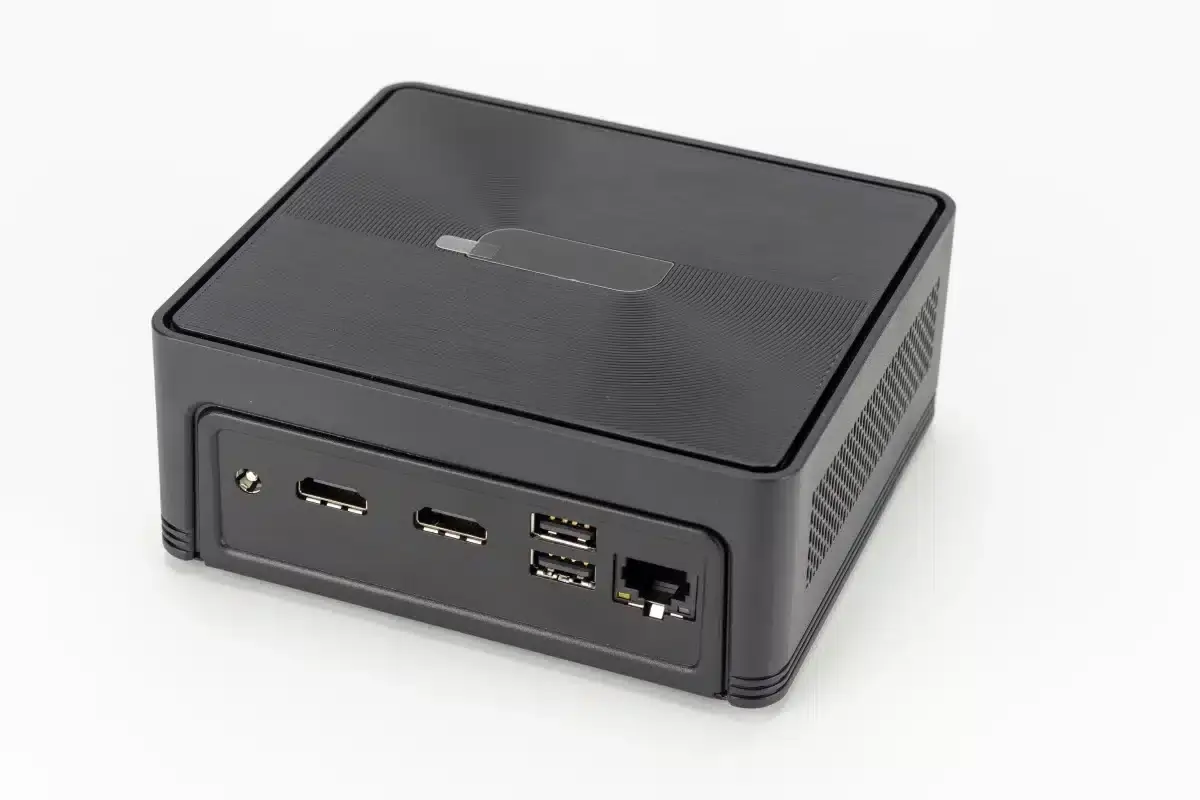
If you're coming from Surface Book laptops, Ultrabooks, or older models, you'll notice a significant performance jump when you switch to a well-configured mini PC. Users who work 8-12 hours a day on design projects report that, with modern CPUs, 16-32 GB of RAM, and NVMe SSDs, the device feels smooth even with multiple applications open, several browsers, plugins, fonts, and large files loaded simultaneously.
Advantages of using a mini PC for graphic design
Mini PCs have several strengths that make them especially attractive to design professionals , beyond simply being small. Let's break down the benefits that are most noticeable in everyday use.
1. Small size and better use of space
A mini PC takes up a fraction of the space of a conventional tower . You can place it behind your monitor, under the screen, on a VESA mount, or in a corner of your desk and forget it's even there. This frees up space for graphics tablets, notebooks, printed samples, or simply for a more clutter-free workspace.
It's proven that an organized workspace helps you concentrate better and be more creative . Without a large tower at your feet or on your desk, it's easier to manage cables, set up peripherals, and customize your workspace to your liking. For small studios, bedrooms, shared apartments, or coworking spaces, this space saving is invaluable.
2. Portability and flexibility to work wherever you want
A mini PC is much easier to transport than it seems : you put it in a backpack or bag, take it to another office, home, or a coworking space, and as long as you have a monitor, keyboard, mouse, and power outlet, you're working in minutes. It doesn't weigh or take up as much space as a large laptop, and in return, it offers performance very close to that of a desktop computer.
For freelance designers who juggle home, studio, and client offices , or who travel occasionally, this flexibility is invaluable. You connect the mini PC via HDMI or DisplayPort to any screen, plug in your peripherals, and pick up right where you left off, without having to lug around a high-end laptop all day.
3. Energy efficiency and reduced environmental impact
Another major advantage of mini PCs is their low power consumption . They typically use processors and graphics cards optimized to deliver good performance with a low TDP, resulting in lower electricity bills—a particularly attractive benefit if you're self-employed and have your computer running for 8-10 hours a day.
Lower energy consumption also means less heat generated and, in the long run, a reduced environmental impact . If you're concerned about the energy footprint of your studio or business, a mini PC with modern hardware can help you lower energy costs without sacrificing power for your creative applications.
4. Silent operation
Modern mini PCs are designed to be very quiet . Between the low TDP of the components and the optimized cooling systems (more efficient fans, vapor chambers, well-sized heatsinks), the noise at idle is usually practically inaudible and, even under load, remains very low.
For those who spend many hours retouching photos, illustrating, or doing layout in quiet environments , this silence is a huge advantage. You don't have that constant whir of the tower or the typical laptop fan kicking in when you open a lot of files, which helps maintain concentration.
5. Very competitive quality-price ratio
With the same performance, a mini PC is usually cheaper than a high-end laptop and, in many cases, even cheaper than building a compact desktop computer from similar brand parts. You pay for the power and integration, without the added cost of a screen or battery.
If you compare the price of top-of-the-range desktop workstations with certain mini PCs with i9/Ryzen 9 CPUs and 32-64 GB of RAM , you'll see that the mini PC can offer very serious performance at a more affordable cost, ideal for small studios, freelance professionals, or companies that want to equip several designers.
What to look for before buying a mini PC for graphic design
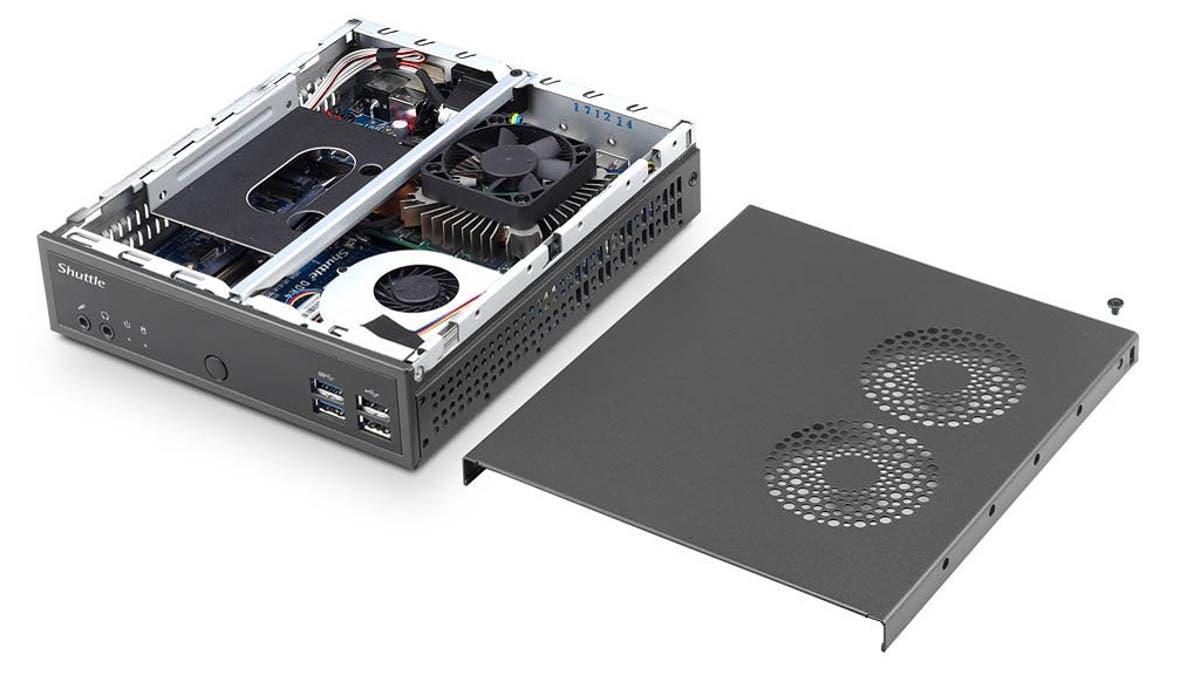
Before you rush out and buy the first mini PC you see on sale, it's worth taking a moment to carefully review the technical specifications . Not everyone needs the same thing: designing logos and flyers is not the same as editing 4K video or doing 3D modeling with Blender.
In the realm of professional 2D design, the key points to consider are the processor, graphics card (integrated or dedicated depending on the intended use), RAM, storage type, operating system, connectivity, support for high-resolution monitors, noise level, and cooling system. It's also important to choose brands that offer good driver and firmware support.
1. Processor (CPU)
The CPU is the heart of the mini PC and greatly influences the system's performance . Avoiding bottlenecks is key to maintaining a stable workflow. For professional graphic design, it's recommended to opt for modern mid-to-high-end processors: Intel Core i7 or i9, AMD Ryzen 7 or 9, or Apple M chips in the case of the Mac Mini. In the Windows ecosystem, models like the Intel Core i9-13900HK, i7-12700, or the AMD Ryzen 9 6800H / R9-8945HS offer more than enough performance for Photoshop, Illustrator, InDesign, or CorelDRAW.
If you're coming from 8th generation laptop CPUs or similar (like an i7-8650U) , the jump to a current i7/i9 or Ryzen 7/9 is very noticeable in file opening speed, exports, filters, and multitasking. For use focused on 2D design, it's not essential to go for the most extreme option like a Ryzen 9 9950X or Intel Core i9-14900K, but it's a good idea to look at the "H" series or equivalent of high-performance laptops or high-TDP mobile CPUs integrated into advanced mini PCs.
2. Graphics card (GPU)
In 2D graphic design, the GPU is not as important as in video or 3D editing , but it is still relevant for interface fluidity, handling large canvases, canvas zoom and rotation, as well as some GPU-accelerated features in Photoshop or Illustrator.
For most designers who don't work with video or 3D, a modern integrated graphics card is usually sufficient . Solutions like the Intel Iris Xe or the integrated AMD Radeon 780M/890M offer very respectable performance, allow for easy multi-monitor setups, and can even handle light or older games during downtime.
If you also do video editing with Premiere, DaVinci Resolve, or similar software, or work with 3D regularly , then it's definitely worth looking for a mini PC with a dedicated GPU: for example, an Nvidia RTX 3060/4060/4070 or equivalent AMD Radeon RX cards. GPU acceleration can drastically reduce export and rendering times, freeing up the CPU for other tasks.
3.RAM memory
RAM determines how well you can work with large files and multiple applications simultaneously without the system lagging. For professional graphic design, 16 GB is currently the minimum reasonable amount, and 32 GB is a very comfortable amount for those who use several Adobe programs at once, a browser with many tabs, communication applications, etc.
If you frequently work on large projects (catalogs, high-resolution posters, large resource libraries) , it's worth opting for 32 GB of RAM from the start, or at least choosing a mini PC that allows for future expansion from 16 to 32 GB or even 64 GB. It's also advisable to consider the RAM speed (for example, DDR5-5200 or higher) to avoid bottlenecks.
4. Storage: NVMe SSD is a must.
The type of storage determines the speed at which the system boots, opens programs, and loads files . Today, for a professional design workflow, NVMe SSDs are ideal , as they are much faster than SATA SSDs and, of course, vastly superior to traditional mechanical hard drives.
A well-balanced setup for graphic design typically includes a 1TB NVMe SSD for the operating system, programs, and ongoing projects, supplemented if needed by a second SSD or other external storage for archives and resource libraries (stock photos, fonts, templates, etc.). Some mini PCs allow you to install two SSDs and, occasionally, add a secondary HDD; this provides room for expansion without always relying on external drives.
5. Operating system and software compatibility
In graphic design, almost everyone uses Windows or macOS , with Linux being a less common but valid option for certain workflows. When choosing a mini PC, Windows is the most common choice, especially if you work with Adobe Creative Cloud, CorelDRAW, or compatible web layout tools.
macOS remains very popular in design studios and agencies , and the Mac Mini with the M chip offers spectacular performance within the Apple ecosystem. However, if you already have licenses, established workflows, and user habits based on Windows, a powerful Windows mini PC will make more sense. In any case, it's advisable to ensure that the hardware (especially GPUs) is well-supported by official drivers to avoid any surprises.
6. Connectivity and ports
For a designer, the available ports are not a minor issue . You'll need to connect one or more monitors, graphics tablets, external hard drives, card readers, printers, USB devices… and ideally, you shouldn't have to constantly rely on hubs and adapters.
Check that the mini PC includes at least several USB-A and USB-C ports, modern video outputs (HDMI 2.0/2.1, DisplayPort, or USB-C with DisplayPort Alt Mode), an Ethernet port, audio output, and, if possible, Thunderbolt 4 or USB4 to take full advantage of external NVMe drives and advanced docking stations. Wi-Fi 6 or 6E and recent Bluetooth versions are also highly recommended to ensure a stable and fast connection.
7. Support for high-resolution monitors
More and more designers are working with 4K monitors or even dual-screen setups . Before buying, make sure the mini PC can smoothly handle the resolution and refresh rate you need; many modern models support 4K at 60Hz on two or three screens simultaneously.
If you design for print, branding, or UI/UX , a high-resolution screen with good color reproduction is almost essential, and your mini PC needs to be up to the task to handle it all smoothly. Some devices even support 8K or complex multi-monitor setups, although for 2D design, going that far isn't usually necessary.
8. Cooling and noise level
The cooling system is critical in such a small chassis . A poorly cooled mini PC can experience throttling and performance drops during long work sessions, as well as generating more noise than desired.
Look for models with well-designed cooling solutions : quiet fans, quality heatsinks, vapor chambers, or fanless systems for low-power configurations. Generally, mini PCs with higher TDP CPUs will need more ventilation, but most current solutions maintain a good balance between temperature and noise, even in very hot weather.
9. Design, format and aesthetics
Although it might seem secondary, the design of the mini PC also matters . There are understated and professional models, others with gaming touches, lighting, different colors… If you're going to have it on display in your studio, it's normal to want something that fits your space and your style.
Besides the appearance, consider the ease of internal access for upgrading RAM or SSD , the position of the front and rear ports, and whether the computer supports VESA mounting so you can attach it directly behind your monitor. The more comfortable it is to work with, the fewer headaches you'll have in the long run; and remember to protect yourself from static electricity when touching internal components ( how to eliminate static electricity from your PC ).
Mini PC versus traditional tower and laptop: examples and comparisons
To put all this into perspective, it's helpful to compare it with real-world examples and common purchasing options . Many designers who were coming from laptops like the Microsoft Surface Book 2 (8th generation i7 CPU, 16 GB of RAM, mid-range dedicated GPU) have made the leap to mini PCs looking for more power and, above all, greater long-term reliability.
A system with processors like the AMD Ryzen 9 6800H, R9-8945HS, or Intel Core i9-13900HK , paired with 32-64 GB of RAM and a fast NVMe SSD, offers ample performance for several years. For someone who doesn't work with video or 3D, this configuration can easily last 5-6 years under intensive professional use without feeling underpowered.
If we compare a well-equipped mini PC with a classic tower PC with a dedicated GPU like a GeForce RTX 4060/4070 , the tower will still win in terms of expandability and, perhaps, maximum raw power, but the mini PC offers a very attractive balance between size, power consumption, noise, and cost. Compared to a high-end laptop, the mini PC usually wins in thermal stability, internal expandability, and price-to-performance ratio.
Featured mini PC models geared towards design and creative work
Within the current ecosystem, there are several mini PCs that are particularly interesting for graphic designers and creatives , with configurations that cover everything from users who only do 2D design to those who need some video or 3D capabilities. As a guide, here are some machine profiles that fit very well in a design studio.
1. High-performance mini PC with dedicated GPU
These systems are designed for those who combine graphic design with video editing, light animation, or some 3D work . A typical example would be a mini PC with an Intel Core i9-13900HK processor or similar, accompanied by an Nvidia GeForce RTX 4060 or 4070, up to 64 GB of DDR5 RAM, and several NVMe SSD slots.
This type of configuration allows you to work with 4K projects, moderately complex 3D scenes , and intensive multitasking without experiencing bottlenecks in exports or rendering. In return, they are somewhat more expensive and consume more energy than solutions with only integrated graphics, but they remain quite compact and quiet for the power they offer.
2. Mini PC with powerful CPU and advanced integrated graphics
Here we find systems with processors like the AMD Ryzen AI 9 HX 370 with integrated Radeon 890M GPU , or the Intel Core i9 with Intel Iris Xe. They are a very well-rounded option for designers who focus on 2D work, with occasional forays into light video or simple motion graphics.
With up to 64-128 GB of RAM and several terabytes of NVMe SSD storage , this type of mini PC offers excellent performance in Photoshop, Illustrator, Figma, XD, branding tools, layout, and web design, without the high price or power consumption of models with dedicated GPUs. It's a kind of "sweet spot" for many creatives.
3. Powerful but budget-conscious mini PC
If your work is mainly 2D graphic design, you don't play games, you don't make heavy video and you want to adjust the investment , there are mini PCs with mid-to-high-end processors (for example, Ryzen 7 or latest generation Intel Core i5/i7), 16-32 GB of RAM and 512 GB-1 TB NVMe SSD that can be great.
This type of computer is designed for small agencies, studios that need multiple workstations, or freelancers just starting out who want a reliable machine without breaking the bank. As long as the integrated graphics are modern, the performance with design software will be more than impressive.
Which mini PC should you choose based on your type of creative work?
If you don't want to get lost among processor names, GPUs, and acronyms, a simple way to choose is to think by use cases . For pure graphic design (branding, posters, social media, publishing, 2D UI/UX), a mini PC with a good CPU, modern integrated graphics, 32 GB of RAM, and a fast SSD is sufficient.
If you also create video regularly, even if it's not your primary focus , then it starts to make sense to upgrade to a setup with a dedicated GPU like an Nvidia RTX and consider 32-64 GB of RAM as a base. However, if your daily work consists of relatively light projects, you can stick with 16 GB as long as you have the option to upgrade.
In all cases, it's advisable to choose brands with solid driver support, BIOS/firmware updates, and spare parts , and avoid less reputable, no-name solutions. Brands specializing in mini PCs and some major manufacturers with compact lines offer reliable support websites, which is appreciated in the long run when it comes to updates or resolving minor issues.
Ultimately, the key is balancing your actual needs with some future-proofing : a well-chosen mini PC can easily last you 5-6 years, provided you don't drastically change your workflow (for example, switching from 2D to 3D and video-intensive design). Consider your current workflow, ensure you have a power cushion above the minimum requirements, and prioritize reliability and cooling over impressive marketing figures.
Choosing a mini PC for graphic design is, nowadays, a very sensible decision for many professionals : you gain space, reduce power consumption, limit noise, and can enjoy performance on par with a good desktop computer, provided you choose your CPU, GPU, RAM, and storage wisely. With the options available on the market, it's perfectly possible to build a compact system that can withstand intense creative sessions, smoothly handle your usual programs, and remain a reliable tool for years to come.
