- PCI was the classic parallel expansion bus, limited in bandwidth and now obsolete compared to current needs.
- PCI Express uses point-to-point serial links with scalable lanes (x1, x4, x8, x16) that multiply performance.
- Successive generations of PCIe have doubled the bandwidth per lane while maintaining high compatibility.
- Today, PCIe is the foundation for GPUs, NVMe SSDs, fast networking, and professional cards, while PCI has been relegated to older equipment.
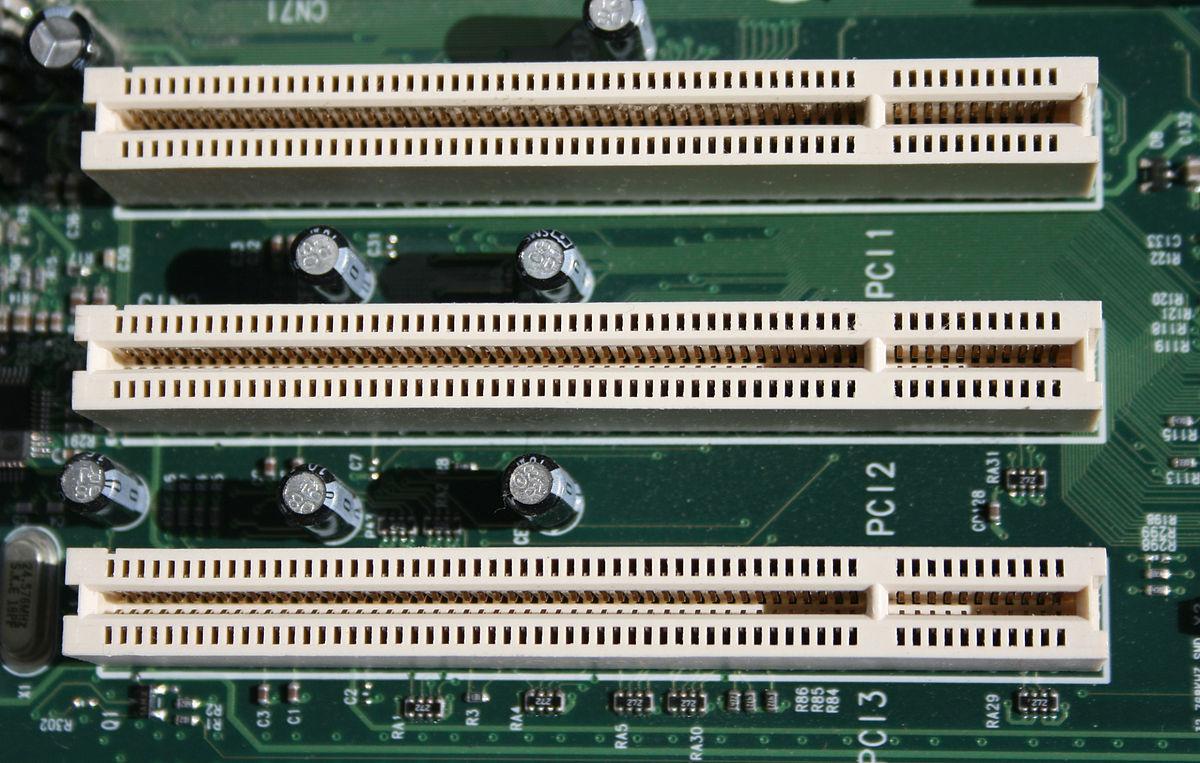
If you've ever opened your computer tower and seen a collection of long and short slots on the motherboard , you've probably wondered what each one looks like. With names like PCI, PCI-X, and PCI Express (PCIe) , it's easy to get confused, especially if you want to know which card you can plug into each slot without damaging anything.
In this article, we'll take a thorough look at what PCI and PCIe are, how they work, the different versions available, and their differences . We'll also examine their historical evolution, the role of PCI-X, the types of cards used in each slot, how PCIe lanes are allocated, and the implications for everyday applications like installing a GPU, a fast network card, or an NVMe SSD.
What is PCI: the classic expansion standard
PCI (Peripheral Component Interconnect) was for many years the standard expansion bus for desktop PCs. Developed by Intel in the early 90s, it became a general-purpose bus for all types of cards : sound, network, video, SCSI controllers, etc.
This PCI bus operated with a parallel and shared architecture : all connected devices shared the same bus and the available bandwidth. This meant that the more devices you connected, the more bandwidth they had to share , and the greater the risk of bottlenecks.
PCI cards came in 32-bit and 64-bit versions , combined with frequencies of 33 or 66 MHz. In its most typical configuration, 32-bit at 33 MHz, the bus offered a theoretical maximum transfer rate of 133 MB/s , a speed that at the time was more than decent for sound, 10/100 networking, or 2D video.
One of the great advantages of PCI at the time was its Plug and Play support : the system itself handled resource allocation (IRQs, memory addresses, etc.) without you having to move jumpers or bridges like in the old ISA standard. This greatly simplified hardware installation for the average user.
On many older motherboards you will still see several long, light-colored slots: those are the conventional PCI slots , which continue to work as long as the chipset and operating system support them, although today they are completely superseded by PCI Express.
What is PCI-X and why do you hardly ever see it in a home PC?
Halfway between classic PCI and PCI Express came PCI-X (PCI Extended) , an evolution designed primarily for professional environments and servers , where much more bandwidth was needed for network cards, storage, and RAID controllers.
PCI-X remained a shared parallel bus , physically compatible with 64-bit PCI cards, but it clearly increased operating frequencies: many PCI-X cards operated at 66, 100, 133 MHz and with PCI-X 2.0 it reached 533 MHz , achieving bandwidths of around 1,06 GB/s in a single slot.
Physically, 64-bit PCI-X slots are very similar to 64-bit PCI slots, measuring approximately 130 mm in length , and therefore occupy a considerable amount of space on the motherboard. This family was primarily designed for servers and workstations , and today it has practically disappeared in favor of PCI Express.
What is PCI Express and why has it replaced PCI?
With the arrival of increasingly faster processors, graphics cards, hard drives, and networks, the PCI bus clearly fell short. A more flexible and scalable interface was needed, and thus PCI Express (PCIe) was born , which is the standard that dominates current motherboards, both desktop and laptop, as well as servers.
Unlike PCI and PCI-X, PCI Express does not use a shared parallel bus. Instead, it adopts a point-to-point serial architecture : each device has a dedicated connection to a PCIe switch or directly to the CPU/chipset, without sharing bandwidth with the rest.
When you turn on your PC, the PCIe system performs a device enumeration process : it detects what's connected, negotiates the number of lanes each link will use, and builds a kind of internal traffic map. The good news is that, although the electronics are different, the detection and configuration protocol is compatible with PCI , so operating systems didn't have to reinvent the wheel.
Each PCIe lane consists of two differential pairs of lines , one for sending and one for receiving data, and operates in full-duplex mode: it can transmit in both directions simultaneously. The speed per lane depends on the PCIe generation (1.0, 2.0, 3.0, 4.0, 5.0, 6.0…), and each generation typically doubles the bandwidth compared to the previous one.
PCI Express Generations and Bandwidth
One of the great advantages of PCIe is that it has evolved without changing the slot design philosophy, maintaining backward and forward compatibility in most cases. However, the effective speed is always determined by the slowest version involved (slot or card).
As a guideline, for each lane (x1) these approximate bandwidths are handled per generation (data per direction):
- PCIe 1.0: about 250 MB/s per lane.
- PCIe 2.0: around 500 MB/s per lane.
- PCIe 3.0: around 1 GB/s per lane.
- PCIe 4.0: about 2 GB/s per lane.
- PCIe 5.0: about 4 GB/s per lane (3,938 GB/s effective).
- PCIe 6.0 (under development and initial implementations): even faster, using advanced coding techniques to continue scaling.
If you multiply these values by the number of lanes, you'll understand why a PCIe x16 connector can move massive amounts of data. For example, even in older generations:
A simple 32-bit PCI bus running at 33 MHz resulted in speeds of around 133 MB/s for all devices combined. In contrast, a single modern PCIe lane in versions 4.0 or 5.0 exceeds that figure several times over, and an x16 link can reach several GB/s per direction.
PCIe slots: x1, x4, x8 and x16
In practice, when you look at a motherboard you see PCIe slots of different lengths. These lengths correspond to the maximum number of lanes they can physically offer:
- PCIe x1: the shortest.
- PCIe x4: a little longer.
- PCIe x8: intermediate.
- PCIe x16: the longest and most common for graphics cards.
Each slot type can offer from 1 to 16 effective lanes , but it's important to distinguish between two concepts: the mechanical length of the slot and the actual electrical connection . A slot shaped like x16 might only be wired as x8 or x4, which reduces bandwidth even though it physically allows the insertion of x16 cards.
PCIe x1 slot
The PCIe x1 slot is the smallest and uses a single lane. It is typically used for cards that don't require much bandwidth : sound cards, network adapters, USB port expansions, mid-range capture cards, etc.
With the current generations of PCIe (4.0 and 5.0), even a single x1 lane offers more than enough performance for Gigabit networking, professional audio, or much of the auxiliary storage, making these slots very useful.
PCIe x4 slot
The x4 slot is a sort of middle ground. It offers four lanes, making it perfect for very high-speed network cards, RAID controllers, NVMe adapters, or powerful capture cards . Many NAS storage configurations or M.2 expansions utilize precisely x4 bandwidth.
In fact, modern NVMe SSDs, even though they are mounted in M.2 sockets, internally use PCIe x4 , which is the de facto standard for achieving very high read and write transfers.
PCIe x8 slot
PCIe x8 slots are becoming increasingly common, especially on mid-to-high-end motherboards and in professional applications. With eight available lanes, they are ideal for mid-range graphics cards, multi-slot NVMe adapters, 40GbE network cards, or complex storage configurations.
Some budget GPUs are designed to operate electrically at x8 even though they fit into x16 slots, and other motherboards use mechanical x16 slots wired as x8 when you mount more than one graphics card.
PCIe x16 slot
The star of the show is the PCIe x16 slot . It's the longest and is primarily intended for dedicated graphics cards , although it's also used for server-grade network and storage cards.
On many motherboards, the top x16 slot is directly connected to the CPU with 16 full lanes , while the lower slots, although the same length, may be wired as x8 or x4 due to limitations in available lanes.
This is key if you want to install multiple GPUs or high-performance graphics cards : you must check the motherboard specifications to see how many lanes each slot offers depending on the installed combination. Consumer platforms (Ryzen, Intel Core) typically have between 16 and 24 PCIe lanes directly to the CPU , while higher-end processors like Threadripper Pro or server processors (EPYC, Xeon) offer 64 lanes or more , allowing multiple GPUs at true x16 speeds.
Data topology: parallel vs serial
The difference in philosophy between PCI/PCI-X and PCI Express can be summarized as shared parallel versus point-to-point serial . In PCI and PCI-X, all devices connect to the same bus, and data is sent in parallel over multiple lines simultaneously. This worked well at low frequencies, but as speeds increased, interference and synchronization problems arose.
With PCI Express, instead of a single shared bus, a network of dedicated links is used . Each device has its own link to the switch or CPU, consisting of one or more lanes. The result is a much more efficient, scalable system that is less prone to interference , allowing for increased frequencies and bandwidth without the physical limitations of parallel buses.
Physical slot sizes and compatibility
On older motherboards, it was common to find several 32-bit PCI slots (about 85 mm long ) and sometimes one 64-bit or PCI-X slot (around 130 mm). These take up a considerable amount of space and all share the same bus.
Modern motherboards predominantly use PCIe x1, x4, x8, and x16 slots . A practical advantage of PCI Express is that a shorter card can be installed in a longer slot (for example, an x1 card in an x4 or x16 slot) as long as the slot is open or the design allows it. The card will operate with the number of lanes for which it was designed.
What you can't do is the reverse: an x16 card won't physically fit in an x1 slot. You also can't mix PCI and PCIe: they're not slot-compatible , even though there are specific adapters for certain very specific cases.
Performance: Why PCIe has made PCI obsolete
If we compare pure performance figures, PCI clearly lagged behind. A 32-bit PCI bus at 33 MHz was limited to 133 MB/s for all devices combined, while a single modern PCIe lane can handle hundreds of MB/s or several GB/s depending on the generation.
Even an early-generation PCIe x1 connection could handle Gigabit networking, multi-channel audio, and basic storage without breaking a sweat. At the other end of the spectrum, a well-utilized PCIe x16 connector can move several GB/s per direction , essential for high-performance graphics cards, AI accelerators, or mass storage controllers.
In addition to raw bandwidth, PCI Express introduces improvements such as traffic prioritization, real-time transfers, better error detection and packet forwarding algorithms , and the ability to give each device a dedicated channel, preventing multiple devices from having to fight for the same bus.
PCIe and graphics cards: Goodbye AGP, hello multi-GPU
Before PCIe became widespread, powerful graphics cards used AGP (Accelerated Graphics Port) slots . PCI Express made AGP unnecessary: a PCIe x16 slot offers significantly more bandwidth than AGP 8x and can also deliver up to 75W of power to the GPU directly from the motherboard.
With the right hardware, a motherboard with two PCIe x16 slots can handle two graphics cards simultaneously. Manufacturers like Nvidia and AMD have developed their own technologies (SLI, CrossFire, etc.) to allow two GPUs to work in coordination, sharing the rendering load between them. In some professional and high-end gaming systems, multiple GPUs have even been used in parallel for computing, AI, or 3D rendering tasks.
In this context, PCI and AGP have been completely superseded. Modern graphics cards are almost exclusively PCI Express , and the interface is so well-established that it remains the foundation for AI accelerators and purpose-built cards in servers.
Other uses of PCIe slots
PCIe isn't just about GPUs. Expansion slots remain very useful for adding features or expanding a computer's performance, especially when the motherboard has limited ports or when professional capabilities are required.
Common uses of PCIe today include:
- Expand storage with cards that add multiple NVMe SSDs.
- Update network connectivity with 2,5G, 10G or higher Ethernet adapters, or advanced WiFi cards.
- Add additional ports USB, Thunderbolt, SATA or eSATA using specific cards.
- Integrate professional audio interfaces for high-quality music production or sound editing.
- Mount dedicated RAID controllers for advanced storage servers or NAS.
- Install GPU accelerators, FPGAs, or dedicated cards for AI, machine learning, and scientific workloads.
Because each slot has its own dedicated link, the performance of a PCIe card does not degrade as much when adding more cards , unlike what happened with the classic PCI bus.
Errors and reliability in PCI Express
In professional and server systems, PCIe reliability is key. The standard defines different types of errors and how to handle them:
- Correctable errorsThey are handled by the PCIe hardware itself, do not affect long-term data integrity, and are usually transparent to the user.
- Non-fatal, uncorrectable errorsThese errors cause data loss or information loss at the device level, but the PCIe interface itself remains stable. They are typically managed with device-specific software.
- Fatal, uncorrectable errorsThey compromise the reliability of the PCIe interface. They usually force Restart the component or the entire link to recover the system.
In manufacturer-supplied equipment, in the event of a serious PCIe error, it is usually recommended to use diagnostic tools such as proprietary utilities (for example, SupportAssist applications) that can run quick and comprehensive tests, update drivers, and optimize the system to reduce problems.
PCI and PCIe compatibility
Although PCI and PCI Express are distinct standards, PCIe was designed at the software level to leverage the same programming model . This means that many operating systems and drivers could be adapted without major changes, and both standards have been able to coexist for years on hybrid motherboards that offered both PCI and PCIe slots.
However, compatibility isn't physical: you can't put a PCI card into a PCIe slot or vice versa . Specific adapters have been manufactured for particular uses, but this isn't a general or recommended solution unless you know exactly what you're doing.
Over time, and given that PCIe offers significantly greater speed, flexibility, and compatibility with modern operating systems, PCI cards have become increasingly marginalized in the market. It's becoming rare to see PCI slots on new motherboards, and manufacturers have focused all their efforts on PCI Express.
Why PCIe is the interface of the present and future
The combination of bandwidth, scalability, and compatibility has made PCI Express the backbone of expansion in PCs, workstations, and servers . It's equally suitable for installing a simple sound card as it is for installing multiple AI GPUs or NVMe storage racks.
Advances in software (games, 4K and 8K video editing, virtual reality, AI, big data) have continuously driven the need for faster transfer speeds . Successive versions of PCIe (4.x, 5.x, and the 6.x currently in development) are closing the gap between what the processor demands and what the expansion subsystem can supply.
Today, even though many functions that previously required a separate card are now integrated directly into the motherboard (audio, network, sometimes Wi-Fi), PCIe slots remain essential for advanced configurations . If you want to build a PC that won't become outdated in the short term, it's a good idea to keep an eye on how many PCIe slots the motherboard offers, how many lanes the CPU has, and how those lanes are allocated to the GPU, SSD, and any other cards you plan to add.
PCI was a key standard that defined an era, but it's PCI Express that now carries the bulk of performance in modern PCs. Understanding how its slots, lanes, and versions work is one of the best ways to avoid bottlenecks and get the most out of your system.

Table of Contents
- 1 What is PCI: the classic expansion standard
- 2 What is PCI-X and why do you hardly ever see it in a home PC?
- 3 What is PCI Express and why has it replaced PCI?
- 4 PCI Express Generations and Bandwidth
- 5 PCIe slots: x1, x4, x8 and x16
- 6 Data topology: parallel vs serial
- 7 Physical slot sizes and compatibility
- 8 Performance: Why PCIe has made PCI obsolete
- 9 PCIe and graphics cards: Goodbye AGP, hello multi-GPU
- 10 Other uses of PCIe slots
- 11 Errors and reliability in PCI Express
- 12 PCI and PCIe compatibility
- 13 Why PCIe is the interface of the present and future