- Wi-Fi 7 combines 2,4, 5 and 6 GHz bands, channels up to 320 MHz and 4K-QAM modulation to improve speed, latency and efficiency.
- Outdoor models such as the U7-Outdoor and Reyee RAP72PRO-OD offer IP65 design, high-gain antennas, MLO, and professional cloud management.
- Coverage figures and maximum number of customers are theoretical: the environment, interference and actual use determine the effective performance.
- Good planning, centralized controllers, and expert support are key to deploying stable and scalable outdoor Wi-Fi 7 networks.
If you're thinking about upgrading your outdoor wireless network, outdoor Wi-Fi 7 access points have become one of the most powerful options for terraces, patios, gardens, parking lots, company common areas, or public spaces. This new generation significantly improves speed, stability, and the ability to handle many connected devices simultaneously—a key factor in environments where we increasingly use mobile phones, tablets, IP cameras, and IoT devices.
Beyond the typical home router, an all-weather Wi-Fi 7 access point offers protection against rain, dust, and temperature fluctuations, as well as professional management and security options. In the following lines, we'll take a detailed look at what Wi-Fi 7 offers, how models like the U7-Outdoor or the Reyee RAP72PRO-OD work, their actual limitations, and what you should consider before setting up an outdoor network to ensure it functions flawlessly and doesn't drop when you need it most.
What exactly is Wi-Fi 7 and why does it matter outdoors?
Wi-Fi 7 technology , also known as IEEE 802.11be EHT (Extremely High Throughput), is the direct evolution of Wi-Fi 6 and Wi-Fi 6E. Its main objective is not only to increase maximum speed, but also to improve efficiency when many devices are connected and minimize latency, dropouts, or congestion, which are very common in busy open spaces.
One of the major improvements is that Wi-Fi 7 operates simultaneously on all three frequency bands : 2,4 GHz, 5 GHz, and 6 GHz. This allows for better use of the available spectrum, separating traffic, prioritizing critical devices, and alleviating the congestion that often occurs, especially in the 2,4 GHz band, where many neighboring networks and older devices coexist.
Another key feature is the increased channel bandwidth. With Wi-Fi 7, it's possible to use channels up to 320 MHz in the 6 GHz band , which, combined with advanced modulation techniques, significantly increases the theoretical transmission capacity. However, this 320 MHz bandwidth is only available in 6 GHz, and in many countries, neither the 6 GHz band nor this channel size may be fully unrestricted by regulations, so it's essential to always check the restrictions in each region.
Compared to previous generations, the combination of a 320 MHz bandwidth, techniques such as Multi-RU, OFDMA, MU-MIMO, and 4096-QAM (4K-QAM) modulation means that, on paper, Wi-Fi 7 can offer up to 4,8 times the speed of Wi-Fi 6 and about 13 times the speed of Wi-Fi 5. Although these maximum figures are theoretical, in well-configured real-world scenarios, a significant leap in both speed and network responsiveness is noticeable.
However, to fully utilize these improvements, a modern access point isn't enough: client devices must also be compatible with Wi-Fi 7 and its advanced features, such as Multi-Link Operation (MLO), 320 MHz channels, 4K-QAM modulation, Multi-RUs, OFDMA, and MU-MIMO. Connecting a mobile phone or laptop that only supports Wi-Fi 5 or Wi-Fi 6 will work perfectly, but it won't take full advantage of the latest standard's capabilities.
Theoretical speeds vs. real-world performance on Wi-Fi 7
When you read the specifications of an access point and see figures like "up to 5000 Mbps" or "4,8 times faster," it's easy to get carried away. However, it's important to distinguish between maximum physical speeds and actual throughput . The maximum speeds listed are based on the IEEE 802.11 standard and measure the data rate at the link layer, not the actual download speed you'll see in a speed test.
For example, in devices operating on the 6 GHz band with 320 MHz channels, theory suggests that very high bandwidth values can be achieved, but this bandwidth isn't always permitted in every country . In some markets, the 6 GHz band may be restricted or only narrower channels may be allowed, just as with the 160 MHz limit in the 5 GHz band. These are regulatory decisions that directly affect what the device can legally use.
Furthermore, even if the extended channel is available, actual performance depends on multiple external factors : the internet service provider (contracted bandwidth), the quality of the cabling or the use of a Wi-Fi signal amplifier , network saturation, the distance between the client and the access point, the presence of obstacles (walls, glass, vegetation, metal structures), interference, and the capabilities of the connected devices themselves.
In outdoor environments, obstacles are not so much interior walls as elements such as trees, pergolas, building facades, or vehicles , which also degrade the signal. User density, simultaneous traffic volume, and the physical location of each client (its angle and distance from the antenna) clearly influence the quality and stability of the connection.
For this reason, even if an outdoor Wi-Fi 7 access point boasts thousands of Mbps in its specifications, specific coverage or speeds cannot be guaranteed in all cases . These figures are indicative and were obtained under laboratory conditions, with controlled interference and clients in an ideal position. In real-world use, the results are almost always lower.
Features of outdoor Wi-Fi 7 access points
Within the range of professional outdoor solutions, we find models like the U7-Outdoor and the Reyee RAP72PRO-OD , designed to work outdoors and manage a large number of connections simultaneously. Although each manufacturer has its own specific features, they share many common characteristics that are worth reviewing in detail.
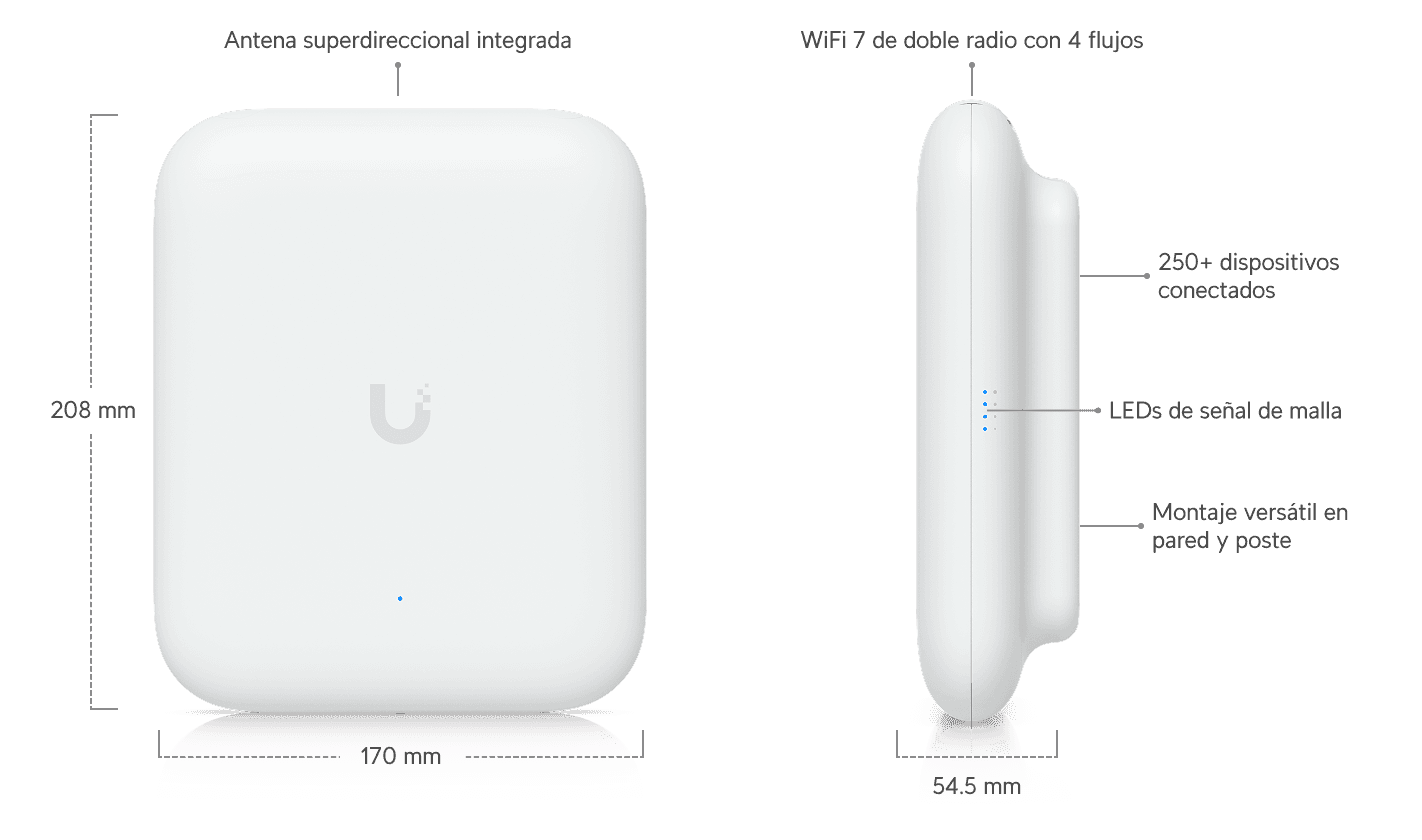
A prime example is the Wi-Fi 7 U7-Outdoor access point , designed for all weather conditions. It features four spatial streams, an integrated high-efficiency directional antenna, and versatile mounting options for poles, walls, or other outdoor structures. This device can support up to 100 simultaneous connections, making it ideal for company courtyards, restaurant patios, or common areas with moderate traffic.
It's important to note that many of these devices, such as the U7-Outdoor, don't include a PoE adapter as standard . They are typically powered by PoE (Power over Ethernet) or PoE+, and you'll need to ensure your switch or injector is compatible and provides sufficient power. The required standard is usually indicated in the specifications; high-performance Wi-Fi 7 models typically use 802.3at or higher.
The technical specifications also usually include the "reference" or commercial model number, in this case U7-Outdoor , which makes it easier to locate compatible documentation, firmware, and accessories. When purchasing, it's advisable to check both the reference and the region it's intended for, as there may be variations depending on each country's radio frequency regulations.
Reyee RAP72PRO-OD: Professional outdoor Wi-Fi 7
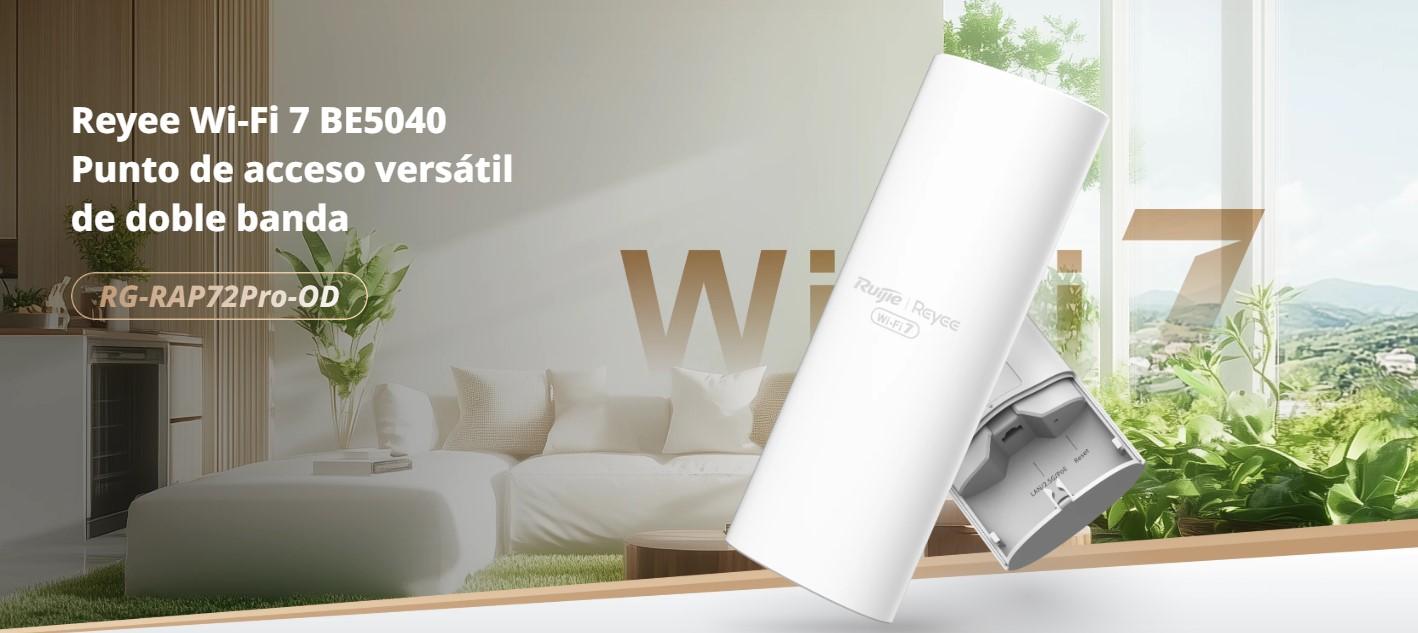
Within the professional outdoor range, the Reyee RAP72PRO-OD is a Wi-Fi 7 access point particularly interesting for demanding deployments in businesses, communities, or facilities with high user traffic. It is designed to operate outdoors without sacrificing advanced hardware or convenient centralized management.
The first thing that catches your eye is its compact design with IP65 protection , meaning the device is sealed against dust and protected from water jets. This is essential if you plan to install it on facades, masts, or in areas exposed to rain and dirt. An IP65 rating is usually sufficient for most outdoor installations where the equipment isn't submerged but is exposed to changing weather conditions.
In terms of compatibility, the RAP72PRO-OD supports the IEEE 802.11a/b/g/n/ac/ax/be standards . In other words, it can communicate with virtually all common Wi-Fi generations, from older devices (a, b, g, n) to Wi-Fi 5 (ac), Wi-Fi 6/6E (ax), and Wi-Fi 7 (be). This approach ensures a smooth transition in mixed networks where newer devices coexist with older ones.
At the radio level, it operates with simultaneous dual-band operation. On the 2,4 GHz band, it uses a 2x2 MIMO configuration that can reach up to 688 Mbps under ideal conditions. On the 5 GHz band, it uses 3x3 MIMO, with a theoretical capacity of approximately 4323 Mbps. Combining both bands, the aggregate throughput is around 5040 Mbps, figures that place this access point in the category of very high-capacity solutions.
One of the standout features of the RAP72PRO-OD is Multi-Link Operation (MLO). Thanks to this technology, the device can use both bands simultaneously for the same client , improving stability, balancing the load, and reducing latency when the network is congested. To take advantage of MLO, the client must also support this feature, something we'll increasingly see in high-end laptops and smartphones.
This access point also integrates 4K-QAM modulation , which increases the amount of data transmitted per radio symbol, and technologies such as MRU (Multi-RU) and Puncturing. In practice, these features help to maximize the use of available spectrum even in noisy environments, allowing the equipment to utilize portions of the channel unaffected by interference and adapt resource allocation to actual demand.
Another interesting feature is WIO (Wi-Fi Intelligent Optimization), a smart optimization function that adjusts wireless network parameters based on the environment: channels, power levels, band selection, etc. This is especially useful outdoors, where conditions can change depending on the time of day, the number of users, or the appearance of new nearby networks.
Hardware, ports and antennas on the RAP72PRO-OD
In terms of physical components, the Reyee RAP72PRO-OD incorporates high-gain internal antennas , with approximate values of 3,62 dBi at 2,4 GHz and 6,28 dBi at 5 GHz. Although you can't see the antennas externally, they are designed to provide wide and optimized outdoor coverage, with radiation patterns designed to efficiently cover open areas.
In terms of wired connectivity, it features a multi-gigabit Ethernet Base-T port compatible with 10/100/1000/2500 Mbps and PoE+ power according to the 802.3at standard. Having a port capable of up to 2,5 GbE is crucial when the access point is capable of transmitting several gigabits aggregated over Wi-Fi; otherwise, the bottleneck would be in the wired link to the main switch or router.
This model supports the creation of up to 8 different SSIDs , which is very useful for separating networks for guests, employees, IoT devices, or specific services. Each SSID can be associated with a different VLAN via 802.1Q, allowing traffic segmentation to improve security and manage different access priorities or policies for each user group.
To enhance the user experience on the move, the RAP72PRO-OD incorporates L2 and L3 roaming capabilities . This allows customers to move between different access points within the same network without experiencing noticeable connection interruptions, which is essential in large facilities such as campuses, industrial buildings, hotels, or sports venues.
Configuration and administration can be performed via a local web interface or through the Ruijie Cloud platform , which facilitates both initial setup and maintenance, firmware updates or daily monitoring of network status, even remotely.
Centralized management: Omada Mesh, roaming and captive portal
In professional outdoor networking solutions, it's common to find ecosystems like Omada, which allow you to manage multiple access points from a central controller . Features such as Omada Mesh, Seamless Roaming, cloud access, and captive portals depend precisely on using these controllers, whether on dedicated hardware, local software, or cloud services.
Omada Mesh enables a mesh network between compatible access points , allowing some devices to connect to the others via Wi-Fi instead of running cables to each one. This simplifies complex installations or setups in spaces where wiring is difficult, although whenever possible, it's recommended that at least the main node connect via Ethernet to maximize stability and performance.
Seamless Roaming allows users to switch between access points with virtually no interruptions , which is especially useful when moving around a large area with a laptop or mobile device connected to the network. To fully utilize these features, all access points in the environment must be compatible and properly configured with the same controller.
Cloud access makes it easy for administrators to log into the management panel from anywhere , check network status, see which devices are connected, apply configuration changes, or deploy updates. This is especially useful for businesses with multiple locations or distributed customers that don't want to travel every time something needs adjusting.
The captive portal, on the other hand, is a widely used tool in hospitality, coworking spaces, and public areas. It allows users, upon connecting to Wi-Fi, to be redirected to a welcome or authentication page where they accept terms of service, register, or enter a code. In many ecosystems, these mesh, roaming, cloud, and portal functions depend entirely on having an Omada controller configured.
If you want to know which specific models can be integrated into an Omada Mesh, there are usually official lists of products compatible with Omada Mesh , which detail each access point and link to the controller user guides, explaining the configuration modes and firmware requirements.
Coverage, capacity, and actual connection limits
The coverage claimed by a manufacturer is usually based on laboratory tests under highly controlled conditions . It's measured in open spaces or idealized environments, so the maximum distance or covered area is always just a guideline. In real-world installations, the environment dictates the outcome: structures, vegetation, interference, and even the mounting height significantly affect the results.
Even outdoors, elements such as concrete walls, metal, special glass, or landscaped walls can significantly attenuate the signal. Therefore, an outdoor Wi-Fi 7 access point can easily cover a large area in open terrain, but will have a more modest range if placed in a yard surrounded by tall buildings or with many obstacles in the line of sight.
The maximum client capacity that is usually advertised (for example, up to 100 devices on the U7-Outdoor) is also a theoretical value. The actual number of users who can have a good experience depends not only on the number of simultaneous connections, but also on what they are doing: it's not the same to have 80 mobile devices just checking email or messages as it is to have 30 users streaming high-resolution video at the same time.
In addition, the effective capacity is usually less than the maximum number of clients indicated . Each device generates control traffic, retries, band changes, etc., and the inherent contention of the wireless medium means that, beyond a certain point, adding more connected devices worsens the experience for everyone.
In practice, for high-density outdoor networks, the usual approach is to combine several strategically placed Wi-Fi 7 access points , adjust the transmission power, enable band steering, and, if the ecosystem allows, activate load balancing functions between radios and nodes, so that no equipment becomes saturated while others are underutilized.
Typical usage environments and professional deployments
Outdoor Wi-Fi 7 access points make sense anywhere stable and fast connectivity is needed outdoors . This could include residential spaces (villas, housing developments with communal areas, large gardens) as well as business and professional environments where the network becomes a critical tool.
In IT service companies, for example, it's common to design solutions that integrate this equipment into business parks, educational campuses, logistics warehouses, or loading and unloading zones. An IT support provider based in a nearby municipality, such as an IT maintenance company in Madrid with offices in Torrejón de Ardoz , typically travels throughout the Community of Madrid to install, configure, and maintain this type of wireless infrastructure.
In the hospitality sector, outdoor Wi-Fi 7 access points are ideal for bar and restaurant terraces, hotels with courtyards, or rooftops . Being able to offer good coverage and bandwidth in these areas has become a valuable asset, both for customers who simply want to browse the internet and for those working remotely while enjoying a coffee.
It's also common in office buildings and residential complexes to install access points in common areas such as courtyards, rooftops, parking lots, or communal swimming pools. In these locations, the potential for access control systems, IoT sensors, and guest connections makes choosing a robust, high-capacity outdoor access point essential.
In all these situations, having a partner specializing in computer repair, maintenance, and IT support helps ensure a coherent network design, optimized configuration, and prompt incident support. It's not just about "installing an access point" and calling it a day; it's about integrating it correctly into the existing network infrastructure.
Overall, outdoor Wi-Fi 7 access points like the U7-Outdoor or the Reyee RAP72PRO-OD enable the deployment of powerful, scalable, and future-proof wireless networks , but it is vital to keep in mind the real limitations, the particularities of each environment, and the need for clients to be compatible in order to enjoy all the benefits of the latest standard.
