- The MAC address uniquely identifies each network card in your device.
- Its hexadecimal format allows you to distinguish between manufacturers and models, making network management easier.
- It is key to security and access filtering, although it can be altered using spoofing techniques.

Have you ever wondered exactly what a MAC address is and why it appears in so many network configurations? Often, when checking the devices connected to your Wi-Fi or configuring a router, you've come across strange numbers and technical terms like IP address or MAC address. Don't worry if all this sounds like gibberish: here we clearly and simply explain everything you need to know about MAC addresses, their purpose, their format, the different types that exist, and how to find them on your devices.
Let's delve into the world of connectivity by identifying the fundamental role MAC addresses play in your computers, mobile phones, and any device that connects to a network, from security to privacy, along with practical tips and recommendations for protecting your information. After reading this article, you'll have a complete and straightforward understanding of the topic—perfect for finally stopping looking at those numbers as if they were alien messages!
What exactly is a MAC address?
The MAC ( Media Access Control ) address is a unique identifier that manufacturers assign to the network cards of any device capable of connecting to a local network, whether via Wi-Fi, Ethernet, or even Bluetooth. Think of it as the "ID" of each network interface, because you'll never find two that are exactly alike, at least in theory. This address serves to precisely differentiate each device within a network and is essential for data communication to function correctly.
MAC addresses consist of 48 or 64 bits expressed in hexadecimal format, typically grouped into blocks of two digits separated by colons or hyphens (for example: 00:1A:2B:3C:4D:5E). The most common format is 48 bits (MAC-48), although some modern devices, especially those adapted for IPv6 and newer technologies, can use the 64-bit format (EUI-64). In systems requiring a larger number of unique identifiers, resources such as information technology are often consulted to understand how this structure varies.
How is a MAC address structured?
A 48-bit MAC address is divided into six blocks of two hexadecimal characters each . The first three blocks (24 bits) identify the manufacturer, much like a serial number for the brand that produced the network card: this is called the OUI (Organizationally Unique Identifier) . The next three blocks are unique to each device within that manufacturer. This allows you to know not only who owns the device, but also its exact model and unit within the production line.
- Example: 00:1E:C2:9E:28:6B – where 00:1E:C2 indicates the manufacturer (e.g., Apple).
In EUI-64 (64-bit) addresses , the system is similar, although it uses eight blocks of two characters, thus increasing the number of unique devices that can be identified . For a deeper understanding, you can consult the classification of information systems and how these systems use different identifiers.
What is the MAC address really for?
The MAC address isn't just there "just in case." Its main function is communication within a local network . It operates at the data link layer of the OSI model (the famous layer 2), which means it ensures that data reaches the correct device within a network by communicating directly with the network interface card of the destination device. That's why, every time you connect your mobile phone, laptop, printer, or television to your Wi-Fi, they all send their MAC address to the router.
This identifier is essential for many network administration and security tasks . For example, you can configure access filters on your router, allowing only certain devices ( MAC filtering ), monitor who is connected, or even assign priorities or limit bandwidth based on MAC address . Furthermore, it's crucial for detecting intruders or unauthorized devices on the network. To learn how to manage these filters, it can be helpful to understand how to edit the hosts file on your devices to control which domain names are resolved or blocked on your network.
Difference between MAC address and IP address
The MAC address and IP address are not the same and serve very different purposes. The MAC address is permanent and hardcoded into the hardware ; it should never change (although we'll see later that this can be modified in certain situations). The IP address , on the other hand, is a logical identifier that can change depending on the network and the time. While the MAC address allows for the identification of devices on a local network, the IP address enables communication between different networks , allowing data routing across the internet. To understand how different information systems manage this data, it's helpful to have a thorough understanding of these concepts.
- The MAC is unique, physical, and acts only on the local network (it does not travel across the network beyond the router).
- The IP address is logical and can be dynamic (DHCP) or fixed, and allows data to reach your device from anywhere in the world.
Types of MAC addresses
There are several types of MAC addresses depending on their function in the network:
- Unicast: Uniquely identifies a single device within the network.
- broadcast: It is used to send data to all devices from the network at the same time. In 48-bit format, this would be FF:FF:FF:FF:FF:FF.
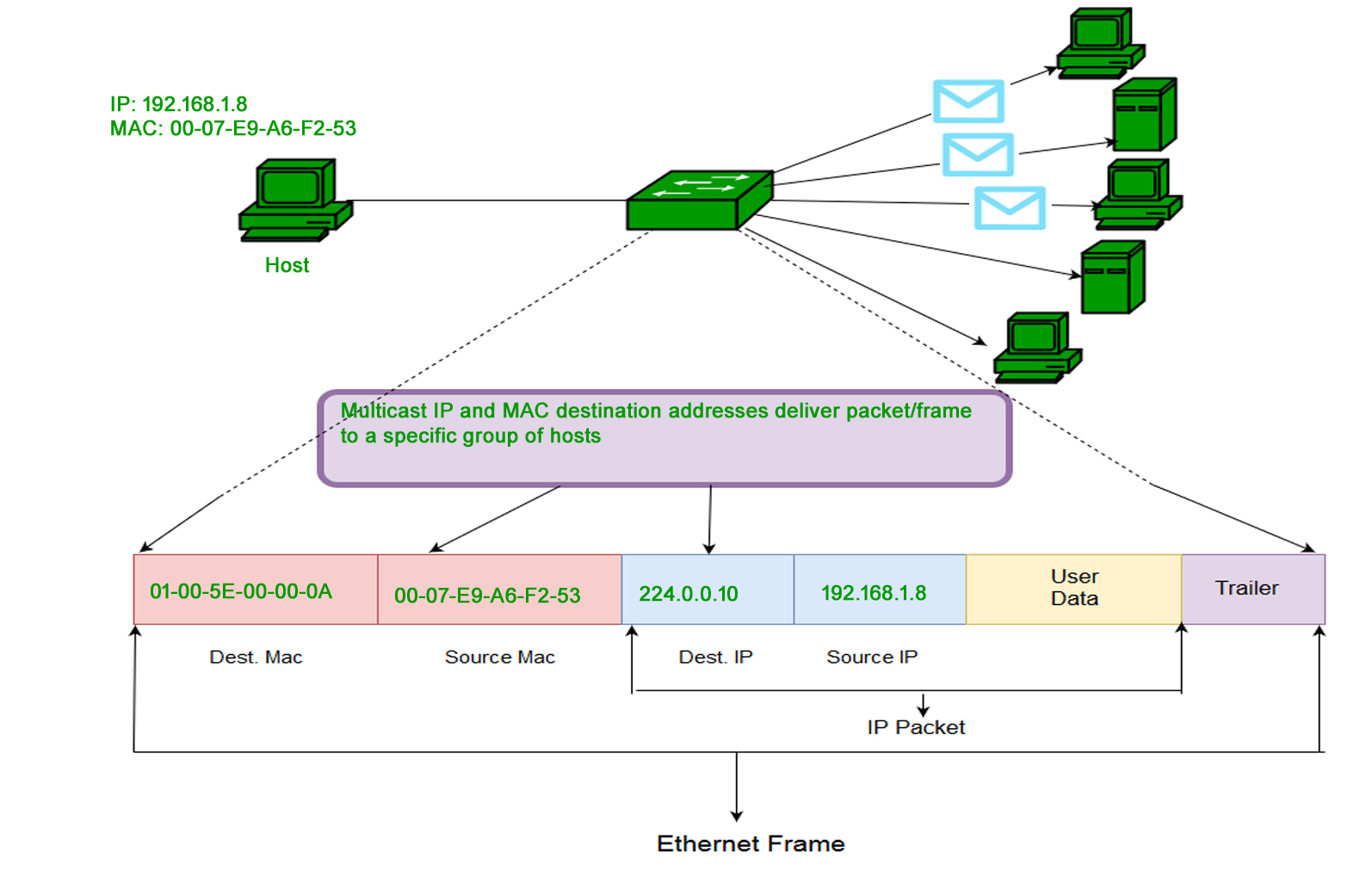
- Multicast: Allows you to send information only to a specific group of devices, very useful in multimedia applications and conferences.
This addressing system enables one-to-one, one-to-all, and one-to-many communications , depending on the needs of each network.
Key features of the MAC address
- Uniqueness: There should be no two devices in the world with the same MAC address..
- Fixed length: 48 bits (6 bytes) It is the standard, although 64-bit variants exist.
- Manufacturer Identification: The first 24 bits They reveal which company created the network card.
- Immutability: In theory, the MAC address doesn't change during the device's useful life, although there are exceptions. If you'd like to learn more about how to manage these changes, we recommend visiting our section on .
- Non-routable: It's only relevant within the local network. Routers don't broadcast the MAC address outside the LAN; that's what the IP address is for.
- Hexadecimal format: The use of hexadecimal digits makes them easier to view and use in computer systems.
How can you find out what your device's MAC address is?
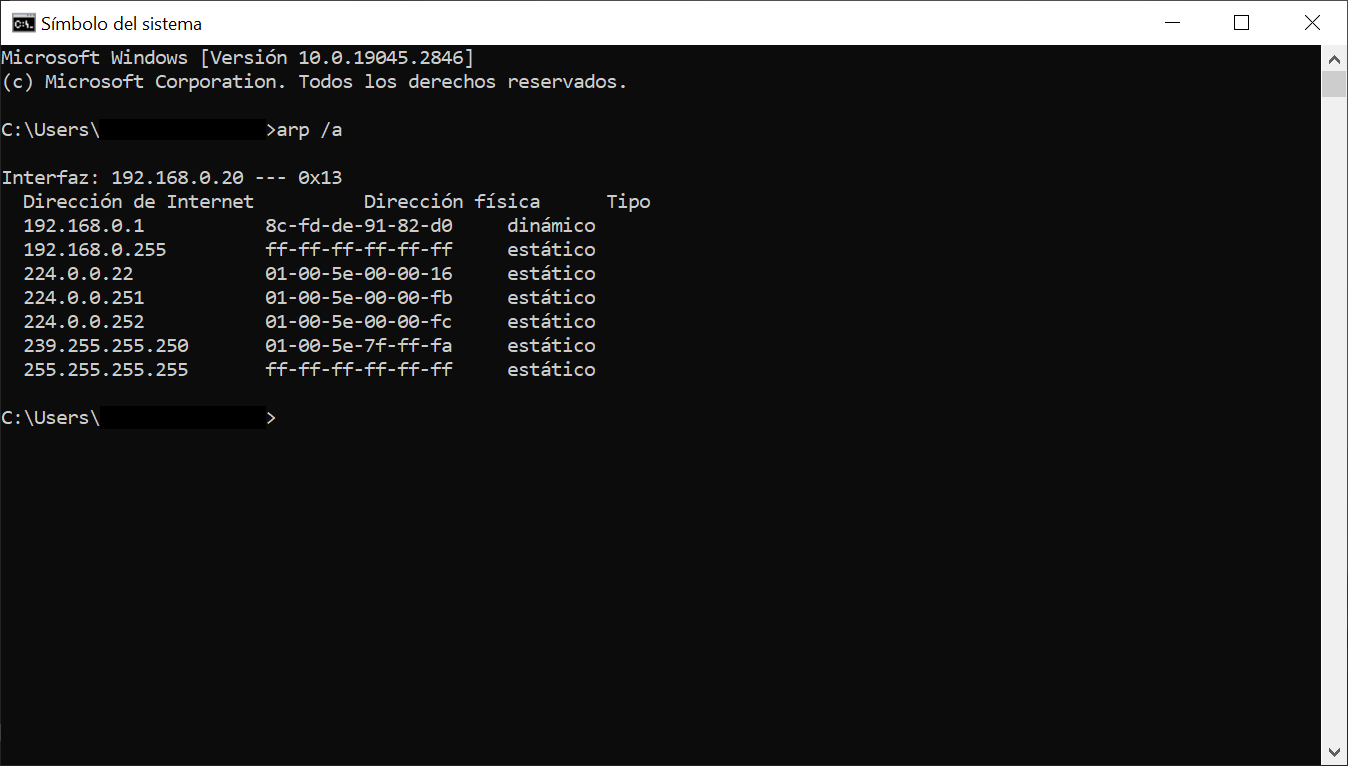
Finding the MAC address is very easy and varies depending on the operating system. Here are the steps for the most common systems:
Windows
- Press Windows key + R to open 'Run'.
- Write cmd and press Enter to open the command console.
- In the window, enter ipconfig / all and hit Enter.
- Look for the “Physical Address” line; that’s your MAC address.
MacOS
- Open the System preferences.
- Go to Red and select your active connection.
- Click on Advanced and enter the tab Hardware to se her.
Linux
- Open a terminal.
- Write ifconfig o ip-link.
- Look for the line that contains "ether"; your MAC address will appear there.
Android
- Sign in Configuration.
- Go to About of the phone and then to Status.
- There you will see the Wi-Fi MAC address (although in recent models this is random for privacy).
iOS
- Opens Settings and go to General.
- Sign in Information and scroll down to “Wi-Fi Address.”
Can a MAC address be changed?
In principle, the MAC address is hardcoded into the hardware and shouldn't be modifiable . However, modern operating systems allow you to temporarily change it using MAC spoofing techniques . This can be useful for network testing, protecting privacy, or in emergencies if your original MAC address has been blocked on a network.
Change the MAC in Windows
- Accesses Device administrator.
- En Network adapters, right click on your adapter and go to Properties.
- In the Advanced, look for the option Network address or similar.
- Enter the new address in hexadecimal format without separators.
On macOS and Linux
- Open Terminal and run specific commands like sudo ifconfig en0 ether 00:11:22:33:44:55 (modify the interface and address as appropriate).
- On Linux, you can use ifconfig o ip-link to make the change temporarily.
On Android or iOS devices, manual modification is more complex and, in many cases, is only possible after rooting or jailbreaking the system, with the risks that this entails. Since Android 10 and recent iOS versions, the MAC address is automatically randomized for each new Wi-Fi network you connect to, thus helping to protect your privacy.
MAC Address and Network Security
MAC address filtering is a fundamental tool for strengthening local network security. For example, you can restrict access to only those devices whose MAC addresses you have authorized, making it much harder for intruders. But be aware: MAC-based security is not foolproof , since, as we've seen, MAC addresses can be spoofed. An experienced attacker can "clone" the MAC address of an authorized device and infiltrate the network. So, while MAC filtering is useful as an additional layer of security, it should never be the sole defense.
Furthermore, it's important to remember that MAC addresses can be used to monitor and track devices , even creating behavioral profiles based on connection patterns. Therefore, it's advisable to disable Wi-Fi when not in use or enable MAC address randomization on mobile devices whenever possible.
Privacy and risks of exposing your MAC address
Displaying your MAC address openly can put you at risk of tracking and identity theft on public Wi-Fi networks. Cybercriminals can use software to clone your MAC address, access restricted resources, or even intercept your communications if they manage to hack the network. To learn more about improving your security, we recommend exploring ICT and keeping your devices updated.
To protect yourself, follow these basic tips:
- Turn off Wi-Fi when not needed to prevent your MAC from being visible to all nearby networks.
- Use secure and trusted networks; be cautious on public networks.
- Always enable the random MAC feature whenever possible, especially on modern mobile phones.
- If you're a network administrator, remember that MAC filtering should be accompanied by other security measures, such as strong passwords and WPA2/WPA3 encryption.

Examples of practical use and formats of MAC addresses
MAC addresses can be found on all devices connected to a network: computers, mobile phones, printers, smart speakers, even connected cars or smart home appliances. Each of your network cards will have a different MAC address, so a single device can have several (for example, one for Wi-Fi and another for Ethernet). To better understand how these devices manage their identifiers, it may be helpful to review different types of information systems.
- 48-bit format: 00:1A:2B:3C:4D:5E
- 64-bit format: 00:1A:2B:3C:4D:5E:6F:7G
- Broadcast (48 bits): FF:FF:FF:FF:FF:FF
- Multicast (48 bits): 01:00:5E:12:34:56
This system facilitates efficient and secure communication within the local network, but remember that MAC will never replace IP as a mechanism for sending data outside your home or business network.
A thorough understanding of how MAC addresses work helps you better understand how our devices identify and communicate, why privacy or tracking issues may arise, and how you can improve the management and security of your network, both at home and at work. Additionally, understanding these concepts will make it easier to resolve connectivity issues, control who accesses your Wi-Fi, and protect your devices from prying eyes.

Table of Contents
- 1 What exactly is a MAC address?
- 2 How is a MAC address structured?
- 3 What is the MAC address really for?
- 4 Difference between MAC address and IP address
- 5 Types of MAC addresses
- 6 Key features of the MAC address
- 7 How can you find out what your device's MAC address is?
- 8 Can a MAC address be changed?
- 9 MAC Address and Network Security
- 10 Privacy and risks of exposing your MAC address
- 11 Examples of practical use and formats of MAC addresses