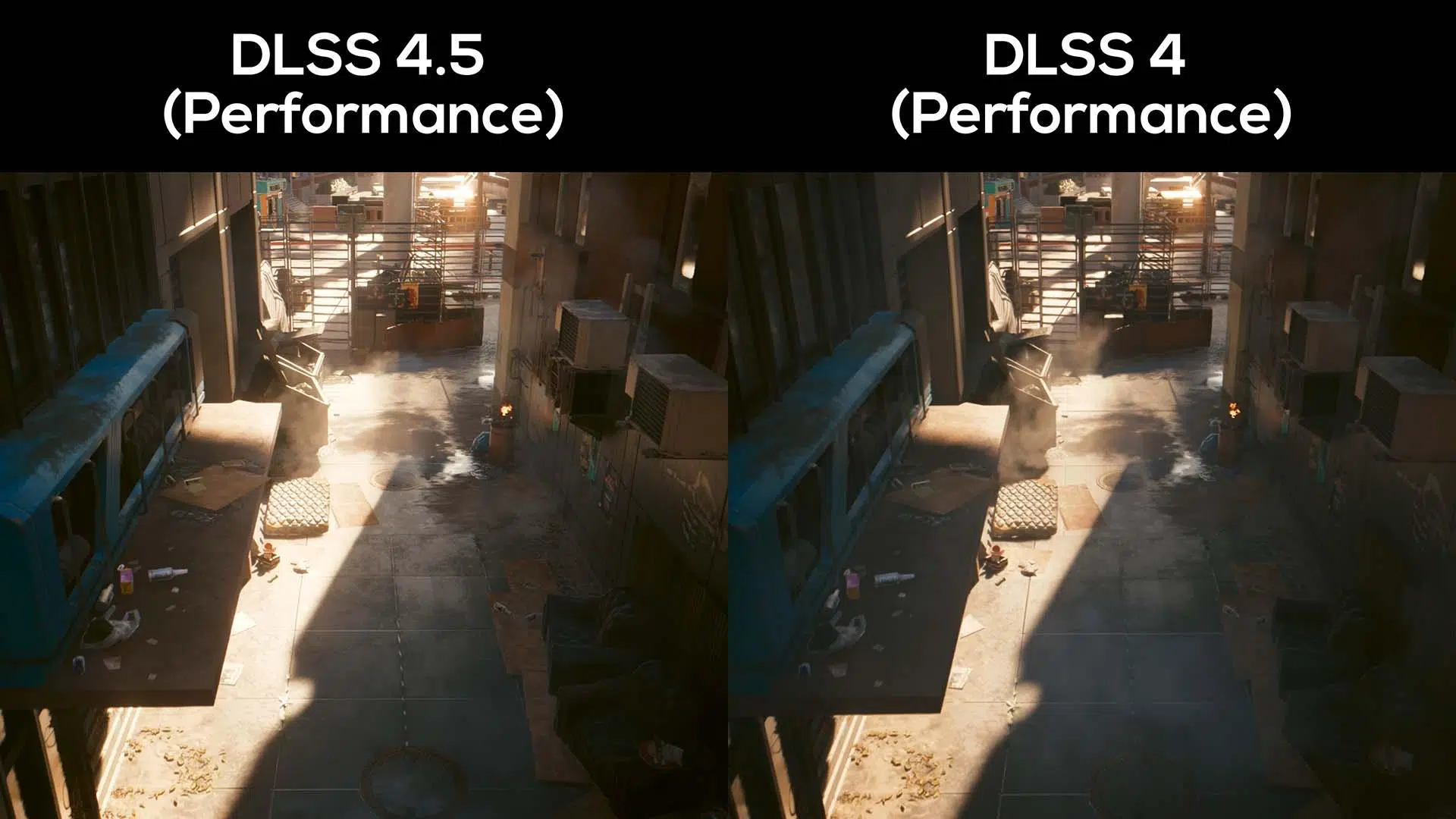
- DLSS 4.5 introduces a second-generation transformer that significantly improves image quality, especially in Performance and Ultra Performance modes.
- On RTX 40 and 50, the FPS loss when switching from DLSS 4 to 4.5 is usually moderate (4–7%), while on RTX 20 and 30 it can exceed 12–15%.
- Dynamic multi-frame generation allows up to x6 invented frames on RTX 50, targeting 4K and 240 Hz with full Path Tracing.
- DLSS 4.5 is highly recommended on RTX 40/50, but on RTX 20/30 it is often worthwhile to continue using DLSS 4 to avoid significant performance drops.
If there's one word that sums up what NVIDIA is doing with its latest graphics technologies, it's Artificial IntelligenceAt CES 2026, the company largely shifted its focus from new consumer hardware to a stronger emphasis on software, specifically its image reconstruction techniques. Whether you like them or not, AI upscaling is here to stay and is now a core part of how we play on PC, especially if you're aiming for high-end gaming. 4K, high refresh rates and ray tracing.
Within this movement, the brand new GeForce RTX 50 have become the public face of DLSS-4.5The latest iteration of the famous Deep Learning Super Sampling, replacing DLSS 4. It's not just for the 50 series: there are also improvements affecting older GPUs, although not all the new features are distributed equally. NVIDIA's promise with DLSS 4.5 is ambitious: games with Full 4K path tracing at up to 240 Hz, relying on more complex AI models and new frame generation features.
What is DLSS and how did we get to DLSS 4.5?
DLSS was born with the first GeForceRTX with a very specific mission: to allow players to enjoy higher FPS without sacrificing image quality and, incidentally, to make real-time ray tracing viable. The idea was simple on paper: render at lower resolution and rebuild using AI the final image to simulate a higher quality native output.
The early versions weren't exactly perfect; the original DLSS offered a blurrier image than native rendering, although you gained performance. With DLSS-2 Things changed completely: upscaling started to look as good as, or better than, native resolution in many cases, and since then NVIDIA has continued to refine algorithms, AI models, and quality modes.
DLSS 4 represented another major leap forward by combining Super Resolution, frame generation and ray reconstructionWith this, the GPU no longer had to handle drawing all the frames; some were generated by AI to boost smoothness, maintaining a very high level of detail without performance suffering. This approach directly tackled the classic impossible triangle between top graphics, smoothness, and latency.
DLSS 4.5 is not just a minor parameter update. NVIDIA presents it as a in-depth review of the heart of technology, especially on two fronts: super resolution and multiframe generation. The ray reconstruction block remains as it was in DLSS 4, but the rest has undergone a significant redesign with the aim of increasing image quality without destroying FPS… at least on the most modern GPUs.
Key new features of DLSS 4.5 compared to DLSS 4
The first major pillar of DLSS 4.5 is the new Super Resolution based on a second-generation TransformerUntil now, DLSS 4 used an already highly refined AI model, but in this version NVIDIA has greatly expanded the training: more data, more problematic cases, more computing power, and smarter pixel sampling to target precisely where these systems tend to suffer the most.
In practice, this transformer is more complex and computationally demanding, but this is where the new architectures come into play. The RTX 40 and 50 series can take advantage of the FP8 precision in Tensor CoresThis doubles inference performance and offsets the extra cost of the model. NVIDIA promises a more accurate reconstruction, even in very complex scenes, with a modest performance penalty on recent graphics cards.
Visually, DLSS 4.5 aims to Improve sharpness, antialiasing, and temporal stabilityMuch work has been done to reduce ghosting (those blurry trails behind moving objects), stabilize edges, and minimize artifacts in complex elements like water, fine vegetation, and particle effects. Demos and comparisons show smoother contours and less noise in shadows, especially in games using Unreal Engine 5 and ray tracing.
The second pillar is dynamic multi-frame generationDLSS 4 was already capable of creating up to three artificial frames for every real frame drawn by the GPU, making very demanding games feel surprisingly smooth. DLSS 4.5 takes this idea a step further: now compatible cards can generate up to four, five, or even more. six frames invented for each one renderedallowing frame rates of 190 to 240 FPS in compatible titles.
What's interesting is that this system is dynamic and adapts to the monitor refresh rateThe technology aims to maximize FPS without compromising the panel's responsiveness, crucial if you want to get the most out of 240Hz or higher monitors with full 4K Path Tracing. Essentially, it's about pushing the concept of smoothness to the extreme without sacrificing elite image quality.
Real impact on image: quality, ghosting, and artifacts
Beyond the theory, what really matters is how all of this looks in actual games. In titles like Black MythWukongNVIDIA compares DLSS 4 to DLSS 4.5 Super Resolution to illustrate the differences. According to the company, the improvement is noticeable in all modes, but especially significant in the profiles. Performance and Ultra Performancewhere the image starts from fewer real pixels and the reconstruction work is more aggressive.
The company claims that DLSS 4.5's Performance mode can be comparable to or even better than native resolution In terms of perceived quality, something that sounded like science fiction a couple of years ago. Ultra Performance mode, which historically was almost a "last resort" to squeeze out extra FPS at the cost of degrading the image, is now a truly usable option for playing in 4K while maintaining good sharpness.
In complicated scenes, like those in The Elder Scrolls IV: Oblivion RemasteredThe old DLSS 4 model showed noticeable ghosting in fast-moving objects or in areas with a lot of information that was difficult to interpolate. With DLSS 4.5 Super Resolution, these fast-moving objects remain cleaner and sharper, with a drastic reduction of traces and trailsIt's not perfect or miraculous, but it is a very visible reduction of the most criticized problems.
Other improvements noted by independent analyses relate to the treatment of waterThe improvements include reduced noise in shadows and greater stability of distant vegetation, which flickers less when the camera moves. The AI is more adept at identifying temporal patterns, so subtle elements no longer "dance" as much from frame to frame, something that was quite bothersome in previous versions.
It's not all good news. Some testers point out that, in certain games, vegetation at long distances now looks... slightly blurriersacrificing definition for stability. Furthermore, ray-traced reflections, which rely heavily on the game's own denoiser, remain a weak point: DLSS 4.5 doesn't manage to correct all the flaws in this area, and therefore you won't always notice a dramatic improvement in complex reflections.
Performance: DLSS 4 vs DLSS 4.5 on RTX 20, 30, 40 and 50
The big controversy surrounding DLSS 4.5 stems not so much from image quality as from the price-performance ratiowhich is not the same for all graphs. Media such as Hardware Unboxed y Computer Database They have published detailed comparisons, and the pattern is quite clear: The more modern the GPU, the less the FPS loss when moving from DLSS 4 to DLSS 4.5.
The picture changes considerably when we look at the RTX 20 (Turing) and RTX 30 (Ampere)These generations don't take advantage of FP8 acceleration, so the new AI model has an extra cost that's much more noticeable in practice. Tests with cards like RTX 3090 and RTX 2080 Ti show a average loss close to 12%with occasional drops of 15-16% in some titles, something that is no longer so easy to ignore if you're running low on FPS.
In extreme scenarios, such as the test of Rainbow Six Siege X In unboxed hardware tests at 1440p with DLSS in Quality mode, even more striking drops have been seen. An RTX 5070 and an RTX 4070 Super, for example, go from around 235-227 FPS with DLSS 4 to about 194-186 FPS with DLSS 4.5The RTX 3090 and 2080 Ti suffer even more, dropping from 211 to 148 FPS and from 141 to 91 FPS respectively, which represents reductions of around 42-54%, although it should be noted that this case is particularly aggressive.
In other games, such as Marvel Rivals o AvatarThe behavior is more moderate: in RTX 40/50 the loss is around 9-10%, while in RTX 30 it is around 18-20% and in RTX 20 it can reach 22%. Again, the pattern is the same: The older the GPU, the higher the bill. by using the new super resolution model.
ComputerBase's measurements are somewhat more forgiving, especially at 4K resolution. With cards like the RTX 5070 Ti and RTX 4080 Super, the difference between DLSS 4 and 4.5 in Quality is usually around 4% and 7%, with the highest value they cite in Kingdom Come: Deliverance 2In the RTX 3090 and 2080 Ti, however, the average is around 12%, with highs of 16%, in line with what has been reported by other media.
User experiences and real-world use in games
Beyond benchmark charts, it's worth looking at what players say when testing DLSS 4.5 on their own systems. A clear example is that of a user with a RTX 4070 Ti Super 16GB, playing at 4K resolution and with overclocking, which tested DLSS 4 and 4.5 in First Berserker: Khazan with the graphics at maximum.
With DLSS 4 and DLAA activated (the antialiasing mode that renders at native resolution and uses AI only to smooth edges and improve quality), this player was getting between 70 and 90 FPS. When switching to DLSS 4.5 while keeping DLAA and the rest of the parameters, the FPS plummeted to around 48-53, a very noticeable drop that raised the question: is the combination of DLSS 4.5 with DLAA poorly designed, or is the new version optimized for other modes?
After reading documentation and testing different profiles, the user himself concludes that DLSS 4.5 is not really designed to be used with DLAAbut with modes like Performance or Ultra Performance. By switching from the DLAA preset to a quality setting (DLSS on Quality, upscaling from a lower resolution), it recovered virtually all the lost FPS and even gained a few extra frames, maintaining image quality very similar to native/DLAA.
In practice, this leads to a fairly logical recommendation: if you want to get the most out of DLSS 4.5 and you don't have a very high-end GPU like a RTX 5090Perhaps the most sensible thing to do is to forget about using it with DLAA and opt for an upscaling mode (Quality, Balanced or Performance), which is where the new AI model shines brightest and justifies the extra cost.
These types of experiences align with the benchmark results: DLSS 4.5 is more punishing in scenarios where you were already pushing the limits. or where the game puts heavy strain on the GPU even at native resolution. In cooperative or competitive titles where a slight visual downgrade isn't a problem, switching to a Performance preset with DLSS 4.5 can be an excellent option; in demanding single-player adventures, the choice is more nuanced.
DLSS 4.5 Compatibility, Configuration and Availability
NVIDIA has emphasized that DLSS 4.5 is not arriving alongside a new generation of graphics cards, but as a software update which takes advantage of the current ecosystem. All new features are integrated into the GeForce RTX 50These are the ones that get the most out of the new version, but many of the functions can also be forced on previous generation GPUs through the NVIDIA App.
At the time of its launch, the company indicated that there were already more than 250 games compatible with DLSS 4.0and that many of the big releases of 2026, such as Resident Evil Requiem o PragmaticThey will also incorporate support for the latest versions of DLSS. The option to activate the new Super Resolution in DLSS 4.5 is already available in over 400 titles within the official application, provided your GPU supports it.
However, there are important nuances: the dynamic frame generation x6The feature that allows you to reach the aforementioned 240Hz with Path Tracing in 4K is exclusive to the RTX 50 series and will be rolled out gradually throughout the spring. In other words, you'll be able to benefit from the best Super Resolution on the RTX 20/30/40 series, but the more aggressive multi-frame generation mode is reserved for the new generation.
One interesting detail is that NVIDIA gives the user a very fine control over the AI model to use. From the app itself, you can choose between the first-generation and second-generation transformer, allowing you to prioritize performance or quality depending on the game and your GPU. This flexibility is especially useful for those with an RTX 20 or 30 series who want to avoid the worst cases of FPS drops.
At the memory level, analyses indicate that the consumption of VRAM is virtually identical The biggest change between DLSS 4 and DLSS 4.5 is in the load on the Tensor Cores and the model's inference time. If your usual limitation is VRAM, don't expect miracles in this regard with the new version.
NVIDIA, its ecosystem, and the role of DLSS 4.5
To better understand why NVIDIA is pushing DLSS 4.5 so hard, it's helpful to look at the context. The company has been working for years on a market share close to 90% In the dedicated GPU segment, they are far ahead of AMD, despite the popularity of the Radeon RX 9000 series. Even though the RTX 50 series hasn't sold as well as expected and the RTX 40 series has been criticized for its price, their advantage in software and ecosystem remains enormous.
The major turning point came with the first RTX 20 of 2018where Tensor Cores and real-time ray tracing debuted with acceptable performance. This paved the way for DLSS and the entire family of AI-based technologies with which NVIDIA has built a competitive barrier that is difficult for its rivals to overcome. Meanwhile, AMD has focused its efforts on powerful AI hardware, but without managing to close the gap in terms of integrated gaming solutions.
DLSS 4.5 fits into this strategy as a another step in refining its AI stackIt's not a revolution on the level of the leap from DLSS 1 to DLSS 2, but it is a fine-tuning that improves precisely the points that received the most criticism: ghosting, temporal stability, image quality in aggressive modes, and the viability of Ultra Performance for 4K.
At the same time, NVIDIA complements these improvements with other pieces of the ecosystem, such as the new displays. G-SYNC Pulsar Designed for esports, these are 27-inch monitors with 1440p resolution and a 360Hz refresh rate, boasting motion clarity that the brand equates to over 1000Hz thanks to VRR and G-Sync Ambient Adaptive, which adjusts brightness and color based on ambient light. The goal is clear: to offer the ultimate display for competitive gaming that perfectly complements frame generation and upscaling technologies.
Alongside this, the company has also showcased other developments such as its improved AI game assistantNew LTX-2 4K video generation capabilities and native clients for platforms like Linux and Fire TV reinforce the idea that the war is no longer just about raw FPS, but about the entire software environment surrounding the player.
Looking at this whole package, DLSS 4.5 is shaping up to be another key piece in NVIDIA's overall commitment to artificial intelligence in games. For those who have a RTX 40 or 50The combination of improved visual quality and a moderate performance impact makes it a very appealing upgrade. For users of RTX 20 and 30However, the general recommendation is to assess each case individually and, in many titles, to stick with DLSS 4, which offers a more agreeable balance between FPS and quality.
All of this leaves a curious scenario: a technology that clearly improves the image, makes the most aggressive upscaling modes more playable, and reinforces NVIDIA's advantage in AI, but at the same time requires the player to decide to what extent they are willing to sacrifice performance depending on their graphics card generation and the type of game that he has in his hands.
Table of Contents
- What is DLSS and how did we get to DLSS 4.5?
- Key new features of DLSS 4.5 compared to DLSS 4
- Real impact on image: quality, ghosting, and artifacts
- Performance: DLSS 4 vs DLSS 4.5 on RTX 20, 30, 40 and 50
- User experiences and real-world use in games
- DLSS 4.5 Compatibility, Configuration and Availability
- NVIDIA, its ecosystem, and the role of DLSS 4.5