- Most RAID system disasters are aggravated by hasty actions in the first few minutes after the failure.
- Each RAID level manages data and parity differently, which determines the actual risk and the recovery strategy.
- The professional intervention combines disk cloning, virtual array reconstruction, and advanced logical analysis techniques.
- A RAID does not replace backups: prevention and an orderly response are key to saving data.
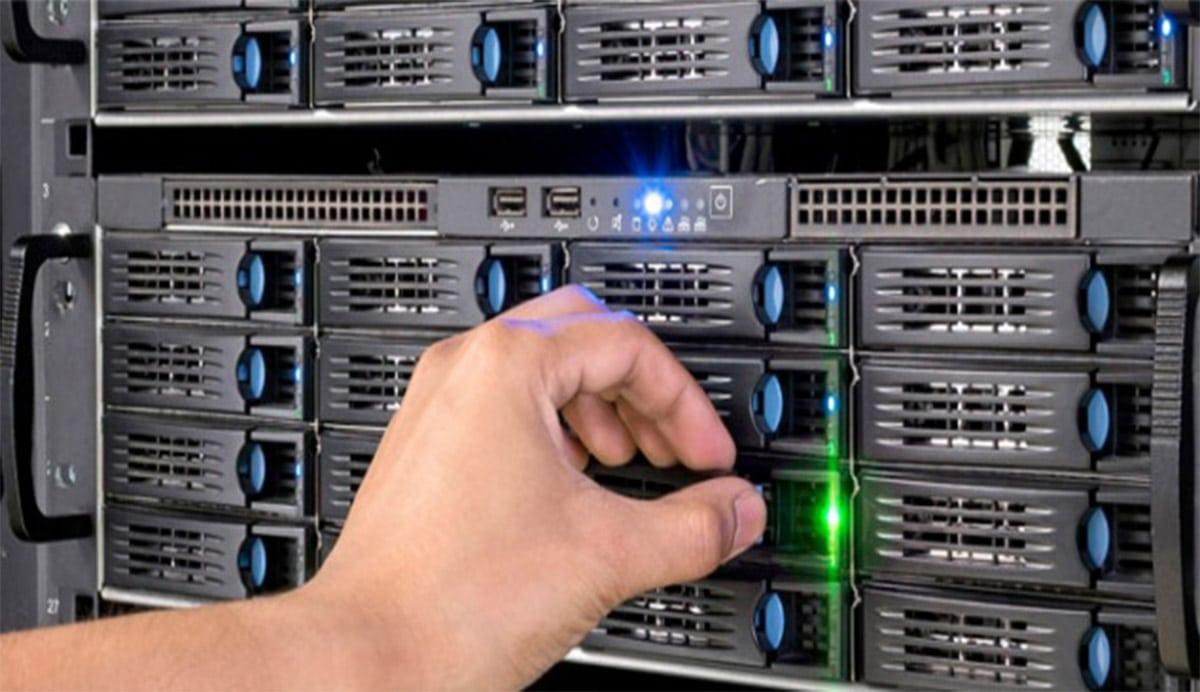
When a RAID system fails, the first few minutes are critical. In that call “golden hour” after the ruling Most human errors that turn a recoverable problem into an irreversible disaster occur in these situations. Blindly swapping disks, constant restarts, or attempting to rebuild without knowing what's wrong are usually the fastest path to total data loss.
Why is RAID recovery so delicate?
In many critical incidents, the loss of information is not caused by the initial hardware failure, but by subsequent hardware failures. hasty actions during the first hourThat period is key: a disk changes position, an initialization is started by mistake, a rebuild is forced, or the system is booted from an incomplete backup on the same storage array, and what was once a complex but manageable problem becomes an almost impossible puzzle.
The most common risk situations include swap discs in the wrong order (in RAID 0, 1, 5, 6, 10, etc.), replacing the controller with another model without cloning or documenting the configuration, forcing disks "online" without analyzing the actual state, initializing the wrong volumes, or launching rebuilds that are left unfinished and further corrupt the internal structure of the array.
Also especially dangerous are backup restores directly onto the damaged systemVMware Storage vMotion-type storage migrations with an unstable array, and any operation that writes new RAID configuration metadata to disks with potentially recoverable information.
A RAID array is the foundation of most physical servers, NAS devices, and SANs, and it's not always clear from the outset that the problem originates from the array itself. Therefore, when in doubt, the wisest course of action is... stop all writing to the disksDocument what happened in as much detail as possible and seek advice from data recovery specialists before touching anything else.
Typical human errors and basic good practices
When a RAID enters a degraded state, one or more disks fail, or the NAS won't boot, the instinctive reaction is usually to keep trying things "until something works." This approach almost always ends up worsening the problem because Every action leaves a trace on the disks. and can overwrite parities, metadata, or still intact user data.
Among the most frequent errors that complicate recovery are actions such as Configure a new RAID using the same controller and the same disksTrying to insert the disks into a different drive bay to "see if it recognizes them" or changing the physical order of the trays is another tactic. In a high percentage of cases, these actions rewrite the original configuration, destroy the parity strips, and drastically reduce the chances of success.
Another common bad practice is not recording anything that happens. In a complex breakdown scenario, this is vital. record all events chronologically: power outages, system messagesDisk changes, rebuild attempts, firmware updates, etc. This information then helps specialized technicians piece together the puzzle.
It is equally important to document and preserve the exact position of each disk in the arrayChanging drive bays "by eye" or throwing away supposedly dead drives is reckless: if you later need to rebuild the RAID in a lab, knowing which drive was in which slot and having all the original drives (even the replaced ones) can make all the difference.
As a general rule, in the event of a RAID failure, the following procedure should be followed: Stop the computer, do not reconfigure anything, keep all disks labeledGather as much information as possible about the incident and, if the data is important, contact a professional recovery service before continuing to experiment.
How professionals approach RAID system recovery
Companies specializing in RAID data recovery work with highly structured procedures because Every technical decision must minimize the risk of additional damageIn a typical case with multiple disks and terabytes of data at stake, any improvised step can be costly.
A very illustrative real-world example is that of a RAID array with twelve disks and approximately 12 TB of data. The backup had not been managed correctly, so the only viable solution was to resort to a Professional RAID data recovery companyThe case was urgent; operations needed to resume as soon as possible, and the array had already entered a critical state after two disks failed during a reconfiguration.
In such scenarios, specialists usually begin by clone all disks that are still responding and always work on copies, not the originals. At the same time, they try to repair, as far as possible, the physically damaged units, either through laboratory intervention (clean chambers, head replacement, donor electronics, etc.) or with advanced partial read techniques.
In the case of the 12 TB, the biggest problem was that the RAID reconfiguration had been initiated before the second failureThe controller had already partially recalculated the new parities. The relative advantage was that the second disk failed in the early stages of the process, so much of the old logical structure remained reconstructible.
After recovering one of the damaged disks and creating a complete copy, the challenge was manually reconstruct the logical structure of the arrayDisk order, block size, parity distribution, possible mid-process changes… This work, which can take several days of analysis, allowed us to recover around 90% of the data, which, given the circumstances, is considered a high success rate in RAID recovery.
Professional services: what they usually offer and how they work
Companies specializing in RAID data recovery typically offer fast diagnosis with no upfront costespecially when it comes to critical servers or NAS devices in production. In some cases, they commit to assessing the problem within a few hours, sending a feasibility report and a fixed-price quote, and applying a "no-recovery, no-fee" policy.
A typical service begins when the customer requests a Free quote to recover your RAIDIn this initial phase, information is gathered about the type of array (RAID 0, 1, 5, 6, 10, JBOD, etc.), the number of disks, the file system (for example ext4, Btrfs, XFS, HFS+, NTFS…), the hardware involved (Synology NAS, QNAP, brand servers, SAN arrays…) and a detailed description of the symptoms and actions taken so far.
Once the study is accepted, the company usually manages a Free collection of the equipment or discs, indicating precise packaging instructions: use antistatic or padded wrapping, place the device in a rigid box with shock-absorbing material, prevent the discs from moving during transport and label well with the application number.
Once in the laboratory, the technicians perform a physical and logical diagnosis of each diskThey create bit-by-bit images whenever possible, assess the condition of the sectors, and decide how to virtually reconstruct the RAID. Only then is a final quote presented with the estimated percentage of recoverable data and indicative work timelines.
If the client approves, the actual recovery process begins. After stabilizing the drives and setting up the RAID in a controlled environment, the specialists generate a list of accessible files. Up to that point, the customer has usually not paid anything yet.Only if the listing is satisfactory is the data copied to a new medium (an external disk, a replacement NAS, etc.) and sent back to the customer, almost always with shipping included.
Fundamentals: how a RAID works on the inside
A RAID system is, simply put, a a set of physical disks that are presented to the operating system as a single logical unitThe key lies in how the data is distributed and, eventually, the parity between the disks to gain performance, capacity or fault tolerance, or a combination of all of these.
RAID technology allows distribute the information in bands or blocks These data are written in parallel across multiple disks, which speeds up access by combining transfers. Additionally, redundant data (parity) is stored at certain levels to recalculate the information on a failed disk without service interruption, provided the failure limits specified in the array design are not exceeded.
Another important advantage is the possibility of hot disc swapping In many systems, a faulty disk can be physically removed and replaced without shutting down the server or storage array, allowing the controller to reconstruct the lost data on the new disk in the background while the system continues to operate.
There is no single "perfect RAID level" for all scenarios. Each level prioritizes a different balance between performance, safety and usable capacityThat's why it's so important to understand what type of RAID is set up before attempting any repair or recovery operation.
When something goes wrong, the RAID itself can usually reconstruct the data if the planned fault tolerance is met. However, when several physical, logical, or human problems occur in succession, the array can lose coherence and become unable to recover on its own, requiring expert intervention.
Common RAID levels and their characteristics
Each RAID level manages the data partitioning and parity between disksThis translates into very clear differences in behavior in the event of failures. Understanding these differences helps to assess the actual risk of a breakdown and the likelihood of a successful recovery.
RAID 0, known for its high performance, distributes data in stripes across at least two disks without storing any redundant information. This means that The loss of a single disc implies the loss of the entire volumebecause parts of each file are scattered across all drives. Its main advantage is speed, but from a data security standpoint, it is very fragile.
RAID 1, or mirroring, maintains identical copies of the information on two disksIf one fails, the other continues operating seamlessly. It's simple, reliable, and offers good read speeds, although it sacrifices usable capacity, as the available space is equivalent to that of a single disk in the pair. In recovery, having at least one of the disks intact usually makes things much easier.
There are also levels like RAID 3 and RAID 4, less widespread today, which combine data disks with a disk dedicated to store parityIn RAID 3, access to the data disks is simultaneous and the parity disk becomes a potential bottleneck, while in RAID 4, more independent access to each data disk is allowed, improving performance under certain workloads.
RAID 5 is probably the most widely used in server and NAS environments. It distributes data in stripes across multiple disks. intersperses parity blocks distributed among all unitswithout dedicating a disk exclusively to that function. This organization allows for tolerating a disk failure and reconstructing its information on a new replacement drive, provided that a second failure does not occur during the reconstruction.
RAID 6 takes security a step further. store two parity blocks for each data setThis allows it to withstand the simultaneous failure of up to two disks without data loss. It requires more disk capacity for parity and more computing power, but in return offers a much greater margin of error in the event of chained failures, a highly valued feature in large arrays.
In addition to these "classic" levels, there are combinations such as RAID 10 (mirroring + striping), RAID 50 or 60, and linear or JBOD configurations, where The disks are simply concatenated to form one large volumewithout real redundancy. In none of these cases does RAID replace a well-designed backup system.
Typical RAID system failures and when recovery becomes complicated
RAID systems have a reputation for robustness, and rightly so, but they are not immune to problems. In practice, issues arise. physical, logical, and human failureswhich often become mixed together and lead to delicate situations from the point of view of recovery.
From a logical standpoint, one of the most serious obstacles is the loss or corruption of parity bandsWhen the metadata that indicates how data is distributed and the parity between disks degrades, the RAID can no longer regenerate the information on its own and external intervention is required to locate and rebuild those stripes manually or semi-automatically.
Regarding hardware, statistics indicate that a small percentage of disks in any given infrastructure may physically fail each year, around 2-3%. In an array with many disks, this means that the chances of at least one failing are not negligible. Mechanical failures, voltage spikes, faulty firmware, extreme temperatures, or poor quality components These are common causes of physical incidents.
The problems worsen when a second failure occurs during a rebuild, especially in RAID 5 or configurations with many disks. If, while the system is regenerating data from a failed disk, another disk starts experiencing serious errors, the array can go from degraded to completely inaccessible. When more than the expected tolerance of discs failsThe internal logic of RAID is no longer sufficient, and advanced recovery techniques must be used.
Human error completes the mix: delaying the replacement of a hard drive that was already giving warnings, ignoring controller alarms, Improperly shut down systems during repeated power outages, install incorrect driversForcing continuous restarts or applying maintenance procedures without recent backups are practices that greatly increase the risk of data loss.
Use of specialized software: a practical example with R-Studio
When the RAID is no longer accessible through the original controller, one of the technical options is virtually reconstruct the array with specialized softwareTools like R-Studio allow you to detect RAIDs that are still consistent as if they were normal volumes, and in more serious cases, to set up virtual RAIDs from disks or disk images.
The working principle consists of creating a virtual RAID based on physical disks or their image copiesThis is done by manually entering parameters such as the number of disks, block size, starting offset, RAID type (0, 1, 4, 5, 6, 10, JBOD, ZFS RAIDZ, RAIDZ2, etc.), and disk order. Once the software detects a valid file system, this virtual RAID is presented as a navigable volume from which files can be listed and recovered.
For example, for a simple RAID 5 array of three disks with 64 KB blocks and "asynchronous left" parity order, it would suffice to select the three discs in the correct orderSpecify the block size, set the appropriate offset, and let the tool identify the partition. From there, you can open the volume, examine the folders, preview files (especially large ones), and verify that the structure has been mounted correctly.
In more complex configurations, such as a RAID 5 with 4KB blocks and a custom parity pattern, it is necessary manually define a block order tableThis involves entering, row by row, which disk contains each data block or parity value, validating that the sequence is consistent. The software alerts you when it detects inconsistencies in this table so that they can be corrected before applying the changes.
One important precaution is that these virtual RAIDs are purely logical objects within the softwareThey don't write anything to the original disks from which they were created. This allows experimentation with different parameter combinations until the one that correctly rebuilds the file system is found without risk of worsening the damage.
In cases where a physical disk is missing, some tools allow you to replace it with a "missing disk" or an empty block of space, simulating the behavior of a degraded RAID. Even so, for file recovery to be reliable, all parameters must be correct; a single incorrect block size or a miscalculated offset can corrupt the extracted files, hence the importance of technical expertise.
RAID types and their behavior in the face of data loss
Beyond the classic levels, today's RAID systems support a wide variety of hybrid and linear configurationsEach one presents different challenges when it comes to recovering information after a critical failure.
In a RAID 0 (pure striping) array, data is fragmented into small groups that are written sequentially to all disks in the array. The total capacity is the sum of all the drives, but There is no redundancy of any kindIf one of the disks fails, the entire volume becomes unusable, and the only recovery option involves advanced techniques that attempt to reconstruct what can be salvaged from the surviving disks.
RAID 1 always maintains identical copies of all data on each disk of the mirrorThis simplicity is a great asset in recovery processes, because if one of the disks remains intact, its data can be accessed directly as if it were an independent disk, or its contents can be copied to a new drive and the mirror remade later.
In RAID levels like RAID 4 and RAID 5, where parity is distributed differently, the usable capacity is usually the sum of all the disks minus the capacity equivalent to one of them. need to mathematically reconstruct the data on a disk from parity This is what complicates recovery when failures occur in succession and more disks are lost than the design allows.
Linear or JBOD (Just a Bunch Of Disks) configurations group several disks of the same or different sizes to form a single, larger logical unit without distributing data in parallel. They offer no significant performance improvements or redundancy. If any disk fails, access to the entire volume is lost.In these cases, recovery involves working on each disk and manually reconstructing the content from the segments that have not been affected.
All these scenarios highlight that, however advanced the storage technologies may be, External and verified backups remain essential.RAID reduces or eliminates downtime in the event of certain failures, but it does not protect against accidental deletions, logical corruption, malware attacks, or configuration errors that destroy information at the file system level.
Key tips to minimize risks and protect your data
The first recommendation, however obvious it may seem, is maintain a regular backup policy that doesn't depend on the RAID itself. This includes servers, workstations, smartphones, NAS systems, and any other device where valuable data is stored. Only in this way, in the event of a serious failure, can service be restored without relying on the success of a forensic recovery.
If an incident still occurs and there is no usable backup, the most prudent course of action is avoid any attempt at "homemade" repairs Without a clear understanding of the steps and their consequences, before running file system repair tools, initiating automatic rebuilds, or changing drive bays, it's advisable to consult with data recovery specialists and explain the situation to them in detail.
It is also essential heed the early signs of failureDisks that start showing reallocated sectors, controllers that generate alerts, system logs with I/O warnings, storage arrays that mark an array as degraded… Ignoring these symptoms out of laziness or fear of stopping the service is usually the prelude to a much more serious and costly failure.
Finally, when the value of the data is high, it is worthwhile to have identified beforehand a trusted data recovery providerWhen the time comes, having direct contact shortens reaction times, allows for receiving precise instructions from the very beginning, and increases the chances of saving as much information as possible.
The experience accumulated in countless cases demonstrates that the combination of a suitable RAID design, reliable backups, a calm response to failure, and specialist support when needed is what truly makes the difference between a controlled scare and a catastrophic data loss.
Table of Contents
- Why is RAID recovery so delicate?
- Typical human errors and basic good practices
- How professionals approach RAID system recovery
- Professional services: what they usually offer and how they work
- Fundamentals: how a RAID works on the inside
- Common RAID levels and their characteristics
- Typical RAID system failures and when recovery becomes complicated
- Use of specialized software: a practical example with R-Studio
- RAID types and their behavior in the face of data loss
- Key tips to minimize risks and protect your data